Tasmota: RGBW bulb does not display a white slider in WebUI
PROBLEM DESCRIPTION
I have an RGBW bulb configured per this template. Everything is working great, all the colors from the RGB slider map to the bulb 100%.
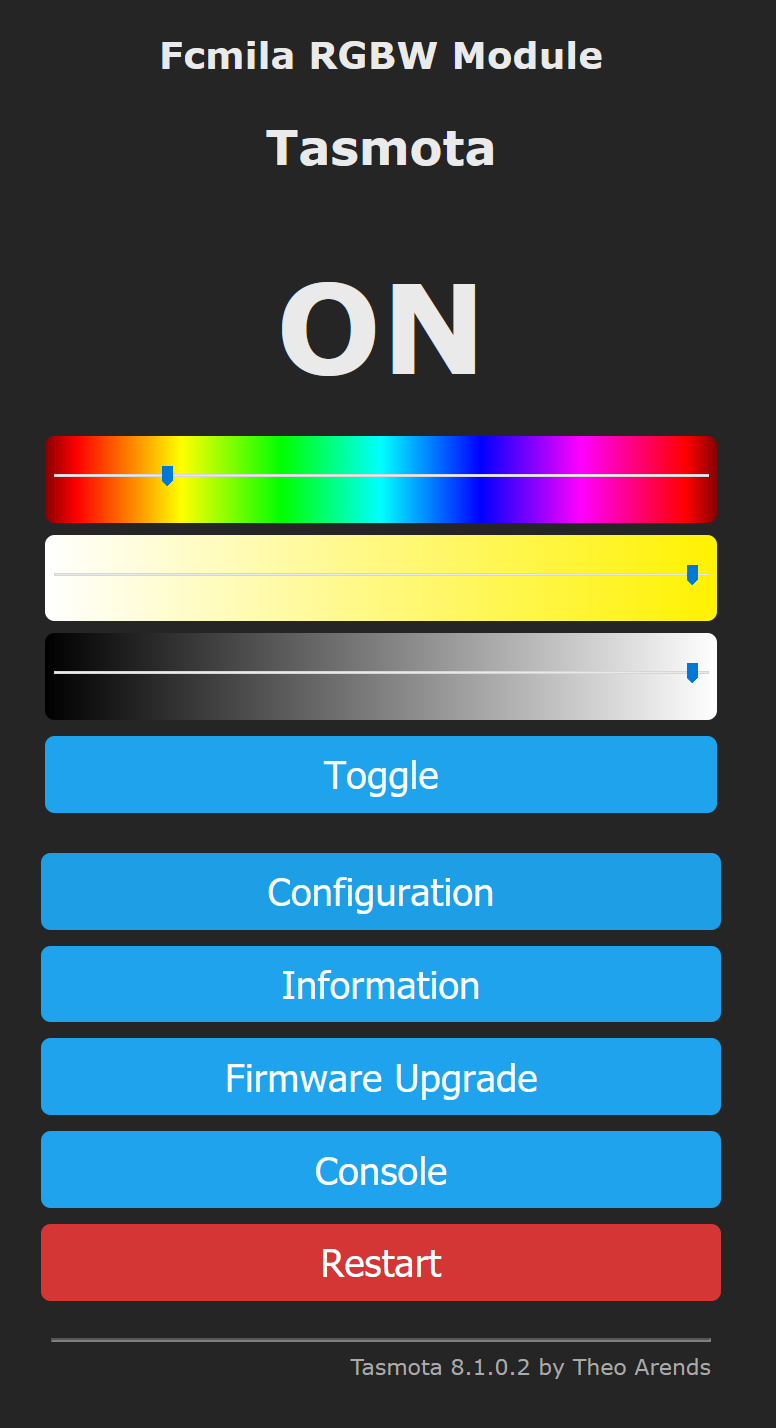
However there is no "white" slider, nor a way to engage the white LEDs in the UI. The screen shot of the UI below shows that there is no way to directly change the white LED.
I can set the white value via a command:
curl -s http://192.168.5.115/cm?cmnd=COLOR1+00000044
I know the bulb is configured correctly, and does have a W component. I just can't interact with it via the WebUI.
REQUESTED INFORMATION
_Make sure your have performed every step and checked the applicable boxes before submitting your issue. Thank you!_
- [x] Read the Contributing Guide and Policy and the Code of Conduct
- [x] Searched the problem in issues
- [x] Searched the problem in the docs
- [x] Searched the problem in the forum
- [x] Searched the problem in the chat
- [x] Device used (e.g., Sonoff Basic): Aoycocr Q0 750lm
- [ ] Tasmota binary firmware version number used: 8.1.0.2 and 8.2.0
- [x] Pre-compiled
- [ ] Self-compiled
- [ ] IDE / Compiler used: _____
- [x] Flashing tools used: tuya-convert
- [ ] Provide the output of command:
Backlog Template; Module; GPIO 255:
  Configuration output here:

05:57:38 RSL: stat/tasmota_28F24C/RESULT = {"NAME":"AoycocrA19","GPIO":[0,0,0,0,0,39,0,0,38,41,37,40,0],"FLAG":0,"BASE":18}
05:57:38 RSL: stat/tasmota_28F24C/RESULT = {"Module":{"0":"AoycocrA19"}}
05:57:39 RSL: stat/tasmota_28F24C/RESULT = {"GPIO0":{"0":"None"},"GPIO1":{"0":"None"},"GPIO2":{"0":"None"},"GPIO3":{"0":"None"},"GPIO4":{"0":"None"},"GPIO5":{"39":"PWM3"},"GPIO9":{"0":"None"},"GPIO10":{"0":"None"},"GPIO12":{"38":"PWM2"},"GPIO13":{"41":"PWM5"},"GPIO14":{"37":"PWM1"},"GPIO15":{"40":"PWM4"},"GPIO16":{"0":"None"}}
- [x] If using rules, provide the output of this command:
Backlog Rule1; Rule2; Rule3:
  Rules output here:

No rules
- [x] Provide the output of this command:
Status 0:
  STATUS 0 output here:
05:58:46 RSL: stat/tasmota_28F24C/STATUS = {"Status":{"Module":0,"FriendlyName":["Tasmota"],"Topic":"tasmota_28F24C","ButtonTopic":"0","Power":1,"PowerOnState":3,"LedState":1,"LedMask":"FFFF","SaveData":1,"SaveState":1,"SwitchTopic":"0","SwitchMode":[0,0,0,0,0,0,0,0],"ButtonRetain":0,"SwitchRetain":0,"SensorRetain":0,"PowerRetain":0}}
05:58:46 RSL: stat/tasmota_28F24C/STATUS1 = {"StatusPRM":{"Baudrate":115200,"SerialConfig":"8N1","GroupTopic":"tasmotas","OtaUrl":"http://thehackbox.org/tasmota/release/tasmota.bin","RestartReason":"Software/System restart","Uptime":"0T00:16:14","StartupUTC":"2020-04-01T04:42:32","Sleep":50,"CfgHolder":4617,"BootCount":15,"BCResetTime":"2020-04-01T03:04:44","SaveCount":186,"SaveAddress":"FA000"}}
05:58:46 RSL: stat/tasmota_28F24C/STATUS2 = {"StatusFWR":{"Version":"8.2.0(lite)","BuildDateTime":"2020-03-20T14:46:54","Boot":31,"Core":"STAGE","SDK":"2.2.2-dev(38a443e)","Hardware":"ESP8266EX","CR":"346/699"}}
05:58:46 RSL: stat/tasmota_28F24C/STATUS3 = {"StatusLOG":{"SerialLog":2,"WebLog":2,"MqttLog":0,"SysLog":0,"LogHost":"","LogPort":514,"SSId":["Malware.exe",""],"TelePeriod":300,"Resolution":"558180C0","SetOption":["00008009","2805C8000100060000005A00000000000000","00000000","00000000"]}}
05:58:46 RSL: stat/tasmota_28F24C/STATUS4 = {"StatusMEM":{"ProgramSize":466,"Free":536,"Heap":28,"ProgramFlashSize":1024,"FlashSize":1024,"FlashChipId":"144068","FlashMode":3,"Features":["00000809","8F082383","041083A0","00000006","010001C0","00000000","00000004"],"Drivers":"1,2,3,4,9,10,16,20,21,37","Sensors":"3"}}
05:58:46 RSL: stat/tasmota_28F24C/STATUS5 = {"StatusNET":{"Hostname":"tasmota_28F24C-4684","IPAddress":"192.168.5.115","Gateway":"192.168.5.1","Subnetmask":"255.255.255.0","DNSServer":"65.182.224.40","Mac":"BC:DD:C2:28:F2:4C","Webserver":2,"WifiConfig":4,"WifiPower":17.0}}
05:58:46 RSL: stat/tasmota_28F24C/STATUS6 = {"StatusMQT":{"MqttHost":"","MqttPort":1883,"MqttClientMask":"DVES_%06X","MqttClient":"DVES_28F24C","MqttUser":"DVES_USER","MqttCount":0,"MAX_PACKET_SIZE":1200,"KEEPALIVE":30}}
05:58:46 RSL: stat/tasmota_28F24C/STATUS7 = {"StatusTIM":{"UTC":"2020-04-01T04:58:46","Local":"2020-04-01T05:58:46","StartDST":"2020-03-29T02:00:00","EndDST":"2020-10-25T03:00:00","Timezone":"+01:00","Sunrise":"06:26","Sunset":"19:21"}}
05:58:46 RSL: stat/tasmota_28F24C/STATUS10 = {"StatusSNS":{"Time":"2020-04-01T05:58:46"}}
05:58:46 RSL: stat/tasmota_28F24C/STATUS11 = {"StatusSTS":{"Time":"2020-04-01T05:58:46","Uptime":"0T00:16:14","UptimeSec":974,"Vcc":3.442,"Heap":28,"SleepMode":"Dynamic","Sleep":10,"LoadAvg":104,"MqttCount":0,"POWER":"ON","Dimmer":27,"Color":"0000004400","HSBColor":"0,0,0","White":27,"CT":153,"Channel":[0,0,0,27,0],"Scheme":0,"Fade":"OFF","Speed":1,"LedTable":"ON","Wifi":{"AP":1,"SSId":"Malware.exe","BSSId":"E4:8D:8C:AB:0E:B2","Channel":1,"RSSI":94,"Signal":-53,"LinkCount":1,"Downtime":"0T00:00:06"}}}
- [x] Provide the output of the Console log output when you experience your issue; if applicable:
_(Please use_weblog 4_for more debug information)_
  Console output here:

N/A as it appears to be a UI bug
TO REPRODUCE
Configure a bulb via the provided template, observe the UI does not provide a way to interact with the white channel
EXPECTED BEHAVIOUR
A white channel to appear in the UI which would allow me to change that channel
SCREENSHOTS
_If applicable, add screenshots to help explain your problem._
ADDITIONAL CONTEXT
_Add any other context about the problem here._
I'm assuming there should be a way to interact with the white LED, but perhaps my expectation is wrong?
This may be slighly related to #6075. Maybe it's a feature request to add a white slider?
(Please, remember to close the issue when the problem has been addressed)
 scottchiefbaker
All 5 comments
I see the same thing with RGBW bulbs (PWM1-4 configured).
white 100 turns on the W channel, and so does color 000000ff, but the web UI itself doesn't present any way of turning on the white light the way it does for RGBCCT bulbs (PWM1-5 configured).
 leifclaesson
on 1 Apr 2020
leifclaesson
on 1 Apr 2020
Try https://tasmota.github.io/docs/Lights/#white-blend-mode
and
https://tasmota.github.io/docs/Lights/#4-channels-rgbw-lights
 Jason2866
on 1 Apr 2020
Jason2866
on 1 Apr 2020
Or better https://tasmota.github.io/docs/Lights/#rgb-and-white-split
 arendst
on 1 Apr 2020
arendst
on 1 Apr 2020
It's amazing just how capable this small piece of software is! Thanks, guys.
leifclaesson
on 1 Apr 2020
I too have this issue and have learned that it's by design. Not really sure why they didn't include a way for you to turn the white LED on in the web ui, but that's the way it is. You can turn the white led on by sending the white command with a value between 1 and 100. I would caution others to be careful with the white split mode, as you can overheat and brick your bulb if you have all 4 channels turned on at the same time.
EDIT: You can set the Virtual CT mode and this will give you a white slider that actually will move you between CW and WW. This lets you turn on the white led (in my case slider all the way to the right because I have a warm white bulb). It's not ideal as I believe it mixes the RGB and White LEDS if the slider is in the middle and thus could overheat the bulb. I know the power is lower on the channels when mixed, but it's still a concern. The other issue is that the cool white side uses the RGB LEDs which are much less bright so transitioning from CW to WW is a bit jarring. You can calibrate your white channel to match the lower output of the RGB LEDs but then the bulb is just too dim.
Honestly the best solution would be a toggle button that just lets you turn the white led on or add a white slider that's tied to the brightness like in HA. Hopefully it'll get added in the future.
 tduffy83
on 15 Sep 2020
tduffy83
on 15 Sep 2020
Related issues
 garret
·
3Comments
garret
·
3Comments
 esp32x
·
3Comments
esp32x
·
3Comments
 TylerDurden23
·
3Comments
TylerDurden23
·
3Comments
 wirelesssolution
·
3Comments
wirelesssolution
·
3Comments
 Vujagig
·
3Comments
Vujagig
·
3Comments
Most helpful comment
Or better https://tasmota.github.io/docs/Lights/#rgb-and-white-split