Tasmota: Zigbee IKEA Tradfri - module restarts after ZigbeeRead command
PROBLEM DESCRIPTION
Module restarts when I'm trying to get status from IKEA Tradfri switch
REQUESTED INFORMATION
_Make sure your have performed every step and checked the applicable boxes before submitting your issue. Thank you!_
- [x] Read the Contributing Guide and Policy and the Code of Conduct
- [x] Searched the problem in issues
- [x] Searched the problem in the wiki
- [ ] Searched the problem in the forum
- [ ] Searched the problem in the chat
- [x] Device used (e.g., Sonoff Basic): NodeMCU + CC2530
- [x] Tasmota binary firmware version number used: 7.0.0.5
- [ ] Pre-compiled
- [x] Self-compiled
- [x] IDE / Compiler used: VSCode
- [x] Flashing tools used: esptool
- [x] Provide the output of command:
Backlog Template; Module; GPIO 255:
21:23:53 MQT: stat/sonoff-z2t/RESULT = {"NAME":"Zigbee","GPIO":[0,0,0,0,0,0,0,0,0,166,0,165,0],"FLAG":0,"BASE":18}
21:23:53 MQT: stat/sonoff-z2t/RESULT = {"Module":{"18":"Generic"}}
21:23:53 MQT: stat/sonoff-z2t/RESULT = {"GPIO0":{"0":"None"},"GPIO1":{"165":"Zigbee Tx"},"GPIO2":{"0":"None"},"GPIO3":{"166":"Zigbee Rx"},"GPIO4":{"0":"None"},"GPIO5":{"0":"None"},"GPIO9":{"0":"None"},"GPIO10":{"0":"None"},"GPIO12":{"0":"None"},"GPIO13":{"0":"None"},"GPIO14":{"0":"None"},"GPIO15":{"0":"None"},"GPIO16":{"0":"None"}}
- [ ] If using rules, provide the output of this command:
Backlog Rule1; Rule2; Rule3:
Rules output here:
- [x] Provide the output of this command:
Status 0:
21:24:43 MQT: stat/sonoff-z2t/STATUS = {"Status":{"Module":18,"FriendlyName":["Sonoff"],"Topic":"sonoff-z2t","ButtonTopic":"0","Power":0,"PowerOnState":3,"LedState":1,"LedMask":"FFFF","SaveData":1,"SaveState":1,"SwitchTopic":"0","SwitchMode":[0,0,0,0,0,0,0,0],"ButtonRetain":0,"SwitchRetain":0,"SensorRetain":0,"PowerRetain":0}}
21:24:43 MQT: stat/sonoff-z2t/STATUS1 = {"StatusPRM":{"Baudrate":115200,"GroupTopic":"sonoffs","OtaUrl":"http://thehackbox.org/tasmota/release/sonoff.bin","RestartReason":"Exception","Uptime":"0T00:05:27","StartupUTC":"2019-12-11T20:19:16","Sleep":50,"CfgHolder":4617,"BootCount":69,"SaveCount":93,"SaveAddress":"FB000"}}
21:24:43 MQT: stat/sonoff-z2t/STATUS2 = {"StatusFWR":{"Version":"7.0.0.5(tasmota)","BuildDateTime":"2019-11-18T23:32:35","Boot":31,"Core":"2_6_1","SDK":"2.2.2-dev(bb83b9b)","Hardware":"ESP8266EX"}}
21:24:43 MQT: stat/sonoff-z2t/STATUS3 = {"StatusLOG":{"SerialLog":2,"WebLog":2,"MqttLog":0,"SysLog":0,"LogHost":"","LogPort":514,"SSId":["SnakeRM_24",""],"TelePeriod":300,"Resolution":"558180C0","SetOption":["00008009","2805C8000100060000005AFF000000000000","00000000","00000000"]}}
21:24:43 MQT: stat/sonoff-z2t/STATUS4 = {"StatusMEM":{"ProgramSize":588,"Free":412,"Heap":21,"ProgramFlashSize":1024,"FlashSize":4096,"FlashChipId":"164068","FlashMode":3,"Features":["00000809","8FDAE397","047683A1","22B617CD","01001BC0","00007881"],"Drivers":"1,2,3,4,5,6,7,8,9,10,12,16,18,19,20,21,22,23,24,26,29","Sensors":"1,2,3,4,5,6,7,8,9,10,14,15,17,18,20,22,26,34"}}
21:24:43 MQT: stat/sonoff-z2t/STATUS5 = {"StatusNET":{"Hostname":"sonoff-z2t-4154","IPAddress":"192.168.1.52","Gateway":"192.168.1.1","Subnetmask":"255.255.255.0","DNSServer":"1.1.1.1","Mac":"80:7D:3A:3E:B0:3A","Webserver":2,"WifiConfig":4}}
21:24:43 MQT: stat/sonoff-z2t/STATUS6 = {"StatusMQT":{"MqttHost":"192.168.1.10","MqttPort":1883,"MqttClientMask":"DVES_%06X","MqttClient":"DVES_3EB03A","MqttUser":"snakuzzo","MqttCount":1,"MAX_PACKET_SIZE":1000,"KEEPALIVE":30}}
21:24:43 MQT: stat/sonoff-z2t/STATUS7 = {"StatusTIM":{"UTC":"Wed Dec 11 20:24:43 2019","Local":"Wed Dec 11 21:24:43 2019","StartDST":"Sun Mar 31 02:00:00 2019","EndDST":"Sun Oct 27 03:00:00 2019","Timezone":"+01:00","Sunrise":"08:33","Sunset":"16:53"}}
21:24:43 MQT: stat/sonoff-z2t/STATUS10 = {"StatusSNS":{"Time":"2019-12-11T21:24:43"}}
21:24:43 MQT: stat/sonoff-z2t/STATUS11 = {"StatusSTS":{"Time":"2019-12-11T21:24:43","Uptime":"0T00:05:27","UptimeSec":327,"Heap":21,"SleepMode":"Dynamic","Sleep":50,"LoadAvg":19,"MqttCount":1,"Wifi":{"AP":1,"SSId":"SnakeRM_24","BSSId":"10:13:31:BC:5D:59","Channel":11,"RSSI":50,"LinkCount":1,"Downtime":"0T00:00:06"}}}
- [x] Provide the output of the Console log output when you experience your issue; if applicable:
_(Please use_weblog 4_for more debug information)_
00:00:00 CFG: Loaded from flash at FB, Count 93
00:00:00 Project tasmota Sonoff Version 7.0.0.5(tasmota)-2_6_1
00:00:00 WIF: Connecting to AP1 SnakeRM_24 in mode 11N as sonoff-z2t-4154...
00:00:08 WIF: Connected
00:00:08 HTP: Web server active on sonoff-z2t-4154 with IP address 192.168.1.52
21:32:01 MQT: Attempting connection...
21:32:01 MQT: Connected
21:32:01 MQT: tele/sonoff-z2t/LWT = Online (retained)
21:32:01 MQT: cmnd/sonoff-z2t/POWER =
21:32:01 MQT: tele/sonoff-z2t/INFO1 = {"Module":"Generic","Version":"7.0.0.5(tasmota)","FallbackTopic":"cmnd/DVES_3EB03A_fb/","GroupTopic":"cmnd/sonoffs/"}
21:32:01 MQT: tele/sonoff-z2t/INFO2 = {"WebServerMode":"Admin","Hostname":"sonoff-z2t-4154","IPAddress":"192.168.1.52"}
21:32:01 MQT: tele/sonoff-z2t/INFO3 = {"RestartReason":"Fatal exception:28 flag:2 (EXCEPTION) epc1:0x40248d10 epc2:0x00000000 epc3:0x00000000 excvaddr:0x00000002 depc:0x00000000"}
21:32:03 MQT: tele/sonoff-z2t/RESULT = {"ZigbeeState":{"Status":1,"Message":"CC2530 booted","RestartReason":"Watchdog","MajorRel":2,"MinorRel":6}}
21:32:04 MQT: tele/sonoff-z2t/RESULT = {"ZigbeeState":{"Status":50,"MajorRel":2,"MinorRel":6,"MaintRel":3,"Revision":20190608}}
21:32:04 MQT: tele/sonoff-z2t/RESULT = {"ZigbeeState":{"Status":3,"Message":"Configured, starting coordinator"}}
21:32:05 MQT: tele/sonoff-z2t/RESULT = {"ZigbeeState":{"Status":51,"IEEEAddr":"00124B00094A6F1B","ShortAddr":"0x0000","DeviceType":7,"DeviceState":9,"NumAssocDevices":6,"AssocDevicesList":["0x2E8F","0xF77F","0xF34F","0x3AA7","0xFC5A","0x3775"]}}
21:32:05 MQT: tele/sonoff-z2t/STATE = {"Time":"2019-12-11T21:32:05","Uptime":"0T00:00:15","UptimeSec":15,"Heap":24,"SleepMode":"Dynamic","Sleep":50,"LoadAvg":19,"MqttCount":1,"Wifi":{"AP":1,"SSId":"SnakeRM_24","BSSId":"10:13:31:BC:5D:59","Channel":11,"RSSI":50,"LinkCount":1,"Downtime":"0T00:00:09"}}
21:32:05 MQT: tele/sonoff-z2t/RESULT = {"ZigbeeState":{"Status":0,"Message":"Started"}}
21:32:05 ZIG: Zigbee started
TO REPRODUCE
Following wiki I'm trying to get the state of my device. Reading zigbeestatus3 output I'm trying this command...
21:28:36 CMD: ZigbeeStatus3
21:28:36 MQT: stat/sonoff-z2t/RESULT = {"ZigbeeStatus-99":[{"Device":"0xFC5A","IEEEAddr":"0000000000000000","Endpoints":{}},{"Device":"0x3775","IEEEAddr":"0000000000000000","ModelId":"TRADFRI control outlet","Manufacturer":"IKEA of Sweden","Endpoints":{"0x01":{"ProfileId":"0x0104","ClustersIn":["0x0000","0x0003","0x0004","0x0005","0x0006","0x0008","0x1000","0xFC7C"],"ClustersOut":["0x0005","0x0019","0x0020","0x1000"]},"0xF2":{"ProfileId":"0xA1E0","ClustersIn":["0x0021"],"ClustersOut":["0x0021"]}}}]}
...
ZigbeeRead { "device":"0x3775", "endpoint":"0x01", "cluster":"0x0004", "read":"0x0000" }
...but when i send the command on Tasmota console I had no response and the module restarts with an exception
EXPECTED BEHAVIOUR
I'd like to get the state (ON/OFF) of my IKEA switch
SCREENSHOTS
_If applicable, add screenshots to help explain your problem._
ADDITIONAL CONTEXT
_Add any other context about the problem here._
(Please, remember to close the issue when the problem has been addressed)
 snakuzzo
All 46 comments
I will investigate. Can you please try with latest 7.1.2.4, and copy details from the crash. This version gives much more details.
 s-hadinger
on 11 Dec 2019
s-hadinger
on 11 Dec 2019
Ok...I'll try ASAP.
Just a question...the commands I described are ok ?
snakuzzo
on 11 Dec 2019
Cluster '4' is actually groups. If you're looking for on/off you should use cluster 6.
ZigbeeRead { "device":"0x3775", "endpoint":"0x01", "cluster":"0x0006", "read":"0x0000" }
or shorter version:
ZigbeeRead {"device":"0x3775","endpoint":1,"cluster":4,"read":0}
It doesn't explain the crash though
s-hadinger
on 11 Dec 2019
Tried
ZigbeeRead {"device":"0x3775","endpoint":1,"cluster":6,"read":0}
...but it crashes...
I will upgrade and retry
snakuzzo
on 11 Dec 2019
Updgraded to 7.1.2.4...same issue...
00:00:00 CFG: Loaded from flash at F9, Count 100
00:00:00 SNS: Hardware Serial
00:00:00 Project tasmota Sonoff Version 7.1.2.4(tasmota)-2_6_1
00:00:00 WIF: Connecting to AP1 SnakeRM_24 in mode 11N as sonoff-z2t-4154...
00:00:05 WIF: Connected
00:00:05 HTP: Web server active on sonoff-z2t-4154 with IP address 192.168.1.52
22:44:36 MQT: Attempting connection...
22:44:36 MQT: Connected
22:44:36 MQT: tele/sonoff-z2t/LWT = Online (retained)
22:44:36 MQT: cmnd/sonoff-z2t/POWER =
22:44:36 MQT: tele/sonoff-z2t/INFO1 = {"Module":"Generic","Version":"7.1.2.4(tasmota)","FallbackTopic":"cmnd/DVES_3EB03A_fb/","GroupTopic":"cmnd/sonoffs/"}
22:44:36 MQT: tele/sonoff-z2t/INFO2 = {"WebServerMode":"Admin","Hostname":"sonoff-z2t-4154","IPAddress":"192.168.1.52"}
22:44:36 MQT: tele/sonoff-z2t/INFO3 = {"RestartReason":{"Exception":28,"Reason":"Exception","EPC":["402464f5","00000000","00000000"],"EXCVADDR":"00000002","DEPC":"00000000","CallChain":["40243748","4021ff9c","40249ae8","40247928","4027ccb5","4027da7f","4027926b","4027926b","4027da2c","402791f4","40279210","40202da4","402253b1","4020daed","40222336","40242633","40219cb4","401016cb","40222450","40222390","4022ad71","40230361","40242dfc","40242499","40210ee4","40231fe4","40242dfc","402016e8","4024630e","402016e8","401000e1"]}}
22:44:40 MQT: tele/sonoff-z2t/STATE = {"Time":"2019-12-11T22:44:40","Uptime":"0T00:00:12","UptimeSec":12,"Heap":25,"SleepMode":"Dynamic","Sleep":50,"LoadAvg":19,"MqttCount":1,"Wifi":{"AP":1,"SSId":"SnakeRM_24","BSSId":"10:13:31:BC:5D:59","Channel":11,"RSSI":52,"Signal":-74,"LinkCount":1,"Downtime":"0T00:00:06"}}
22:44:45 ZIG: timeout, goto label 99
22:44:45 MQT: tele/sonoff-z2t/RESULT = {"ZigbeeState":{"Status":99,"Message":"Abort"}}
22:44:45 ZIG: Abort
22:44:45 ZIG: Stopping (99)
I also tried with weblog 4 but when I run the command nothing is showed in console and it restarts
snakuzzo
on 11 Dec 2019
Can you please upload and share somewhere the firmware.map file? It's in the source directory where you compiled Tasmota.
s-hadinger
on 11 Dec 2019
Here it is...
snakuzzo
on 11 Dec 2019
Fixed in #7203
Thanks for reporting the bug.
s-hadinger
on 12 Dec 2019
It works! :)
Thank you!
snakuzzo
on 12 Dec 2019
@s-hadinger just a question...
In my scenario when I turn on/off the IKEA switch I expect to automatically receive the new state published on MQTT broker....and...I expect to receive that automatically with a fixed period (eg. 30s, 1m).
Is this a Work in Progress or I have to manage all by automations on my hub (homeassistant) ?
snakuzzo
on 12 Dec 2019
I don't know this IKEA device. Is it just a switch? If so it should send or broadcast a message when you press the switch. Try setting weblog 3 and press the switch to see what Zigbee message is received.
s-hadinger
on 12 Dec 2019
This is thd IKEA control outlet
https://www.zigbee2mqtt.io/devices/E1603_E1702.html
snakuzzo
on 12 Dec 2019
And this is the log on Tasmota when I send command to Power toggle
23:38:19 CMD: weblog 3
23:38:19 MQT: stat/sonoff-z2t/RESULT = {"WebLog":3}
23:38:20 CFG: Saved to flash at F9, Count 109, Bytes 4096
23:38:35 SRC: MQTT
23:38:35 CMD: Group 0, Index 1, Command "ZIGBEESEND", Data "{ "device":"0x3775", "endpoint":"0x01", "send":{"Power":"Toggle"} }"
23:38:35 ZigbeeSend: command_template = 0006!xx
23:38:35 SendZCLCommand_P: zcl_cmd = 0006!02
23:38:35 ZigbeeSend: command_final    = 0006!02
23:38:35 ZigbeeCmd_actual: ZigbeeZCLSend {"device":"0x3775","endpoint":1,"send":"0006!02"}
23:38:35 ZigbeeSend: dstAddr 0x3775, cluster 0x0006, endpoint 0x01, cmd 0x02, data
23:38:35 ZIG: ZigbeeZNPSent 240175370101060001301E03110102
23:38:35 MQT: stat/sonoff-z2t/RESULT = {"ZigbeeSend":"Done"}
23:38:35 ZIG: ZigbeeZNPReceived 640100
23:38:36 ZIG: ZigbeeZNPReceived 45C4753700
23:38:36 ZIG: ZigbeeZNPReceived 4480000101
In the code, I always disable the DisableDefaultReponse flag meaning that the device does not send response to a command.
With my OSRAM plug, when you change this parameter, the device acknowledges the command but does not send the status of the plug. You need to explicitly send a ZigbeeRead to get the state of the plug. I don't know if your device does the same.
If you want to try, change in file xdrv_23_zigbee_9_impl.ino line 425, from:
ZigbeeZCLSend(dstAddr, cluster, endpoint, cmd, clusterSpecific, buf.getBuffer(), buf.len());
to
ZigbeeZCLSend(dstAddr, cluster, endpoint, cmd, clusterSpecific, buf.getBuffer(), buf.len(), false);
Full example:
ZigbeeSend { "device":"0x69CF", "endpoint":"0x03", "send":{"Power":"Toggle"} }
20:51:00 CMD: ZigbeeSend { "device":"0x69CF", "endpoint":"0x03", "send":{"Power":"Toggle"} }
20:51:00 RSL: RESULT = {"ZigbeeSend":"Done"}
20:51:01 RSL: RESULT = {"ZigbeeZCLReceived":{"groupid":0,"clusterid":6,"srcaddr":"0x69CF","srcendpoint":3,"dstendpoint":1,"wasbroadcast":0,"LinkQuality":7,"securityuse":0,"seqnumber":0,"timestamp":1355456,"fc":"0x18","manuf":"0x0000","transact":1,"cmdid":"0x0B","payload":"0200"}}
20:51:01 ZigbeeZCLRawReceived: {"ZigbeeReceived":{"0x69CF":{}}}
20:51:01 RSL: SENSOR = {"ZigbeeReceived":{"0x69CF":{"LinkQuality":7}}}
As you can see, the status of the switch is not send. Then ZigbeeRead works:
ZigbeeRead { "device":"0x69CF", "endpoint":3, "cluster":6, "read":0 }
20:52:17 CMD: ZigbeeRead { "device":"0x69CF", "endpoint":3, "cluster":6, "read":0 }
20:52:17 RSL: RESULT = {"ZigbeeRead":"Done"}
20:52:17 RSL: RESULT = {"ZigbeeZCLReceived":{"groupid":0,"clusterid":6,"srcaddr":"0x69CF","srcendpoint":3,"dstendpoint":1,"wasbroadcast":0,"LinkQuality":10,"securityuse":0,"seqnumber":0,"timestamp":1594789,"fc":"0x18","manuf":"0x0000","transact":1,"cmdid":"0x01","payload":"0000001001"}}
20:52:17 ZigbeeZCLRawReceived: {"ZigbeeReceived":{"0x69CF":{"0006/0000":true}}}
20:52:17 RSL: SENSOR = {"ZigbeeReceived":{"0x69CF":{"Power":true,"LinkQuality":10}}}
I've tested,
it sends ZigbeeRead, but I have no info about Power...it shows just LinkQuality
23:40:38 CMD: ZigbeeSend { "device":"0x3775", "endpoint":"0x01", "send":{"Power":"Toggle"} }
23:40:38 ZigbeeCmd_actual: ZigbeeZCLSend {"device":"0x3775","endpoint":1,"send":"0006!02"}
23:40:38 MQT: stat/sonoff-z2t/RESULT = {"ZigbeeSend":"Done"}
23:40:39 MQT: tele/sonoff-z2t/RESULT = {"ZigbeeZCLReceived":{"groupid":0,"clusterid":6,"srcaddr":"0x3775","srcendpoint":1,"dstendpoint":1,"wasbroadcast":0,"LinkQuality":92,"securityuse":0,"seqnumber":0,"timestamp":505660,"fc":"0x08","manuf":"0x0000","transact":1,"cmdid":"0x0B","payload":"0200"}}
23:40:39 ZigbeeZCLRawReceived: {"ZigbeeReceived":{"0x3775":{}}}
23:40:39 MQT: tele/sonoff-z2t/SENSOR = {"ZigbeeReceived":{"0x3775":{"LinkQuality":92}}}
but if I send ZigbeeRead command it sends Power status in payload
23:42:37 CMD:  ZigbeeRead {"device":"0x3775","endpoint":1,"cluster":6,"read":0}
23:42:38 MQT: stat/sonoff-z2t/RESULT = {"ZigbeeRead":"Done"}
23:42:38 MQT: tele/sonoff-z2t/RESULT = {"ZigbeeZCLReceived":{"groupid":0,"clusterid":6,"srcaddr":"0x3775","srcendpoint":1,"dstendpoint":1,"wasbroadcast":0,"LinkQuality":92,"securityuse":0,"seqnumber":0,"timestamp":877772,"fc":"0x18","manuf":"0x0000","transact":1,"cmdid":"0x01","payload":"0000001001"}}
23:42:38 ZigbeeZCLRawReceived: {"ZigbeeReceived":{"0x3775":{"0006/0000":true}}}
23:42:38 MQT: tele/sonoff-z2t/SENSOR = {"ZigbeeReceived":{"0x3775":{"Power":true,"LinkQuality":92}}}
the ZigbeeZCLRawReceived after Power Toggle has no input about cluster...I think that's the problem.
snakuzzo
on 13 Dec 2019
Yes, but that's part of the Zigbee protocol. You need to send a ZigbeeRead if you want the device to report its state.
s-hadinger
on 14 Dec 2019
So...I have to send manually ZigbeeRead command...right?
No way to implement this in Tasmota fw?
snakuzzo
on 14 Dec 2019
Let me think about it and try one or two things. It may not be very hard to add, I need to check if I need to wait before sending the ZigbeeRead command or if I can fire it right away.
s-hadinger
on 14 Dec 2019
Btw I just reduced the logging level of Z2T to make it more readable.
s-hadinger
on 14 Dec 2019
Ok thank you.
I'll wait for your check :)
snakuzzo
on 14 Dec 2019
I did some test, and what I feared happened. When you send a change to a device, it may take typically 1 second to reach the target level.
Ex (Philips Zigbee bulb):
First setting brightness to 254
ZigbeeSend { "device":"0x3D82", "endpoint":"0x0B", "send":{"Dimmer":254} }
Then setting brightness to 1, and doing 2 reads at 200ms interval (default backlog pause):
Backlog ZigbeeSend { "device":"0x3D82", "endpoint":"0x0B", "send":{"Dimmer":1} }; ZigbeeRead { "device":"0x3D82", "endpoint":11, "cluster":8, "read":0 }; ZigbeeRead { "device":"0x3D82", "endpoint":11, "cluster":8, "read":0 }
11:57:05 MQT: stat/tasmota/Zigbee_home/RESULT = {"ZigbeeSend":"Done"}
11:57:05 MQT: stat/tasmota/Zigbee_home/RESULT = {"ZigbeeRead":"Done"}
11:57:05 MQT: stat/tasmota/Zigbee_home/RESULT = {"ZigbeeRead":"Done"}
11:57:05 MQT: tele/tasmota/Zigbee_home/SENSOR = {"ZigbeeReceived":{"0x3D82":{"CurrentLevel":196,"LinkQuality":23}}}
11:57:06 MQT: tele/tasmota/Zigbee_home/SENSOR = {"ZigbeeReceived":{"0x3D82":{"CurrentLevel":145,"LinkQuality":23}}}
As you can see the CurrentLevel reported is the realtime one, not the target. So I'm not sure it makes sense to probe the device just after the command.
s-hadinger
on 15 Dec 2019
I understand but...
to solve my situation, yesterday I tried zigbee2mqtt (using espeasy + cc2530) with same IKEA Tradfri and when I turn on/off it sends the power state after some ms as I expect
snakuzzo
on 15 Dec 2019
Yes, it means that I need to add a per-device timer to wait between 100ms and 1s before querying the status. Just some more work... On it.
s-hadinger
on 15 Dec 2019
@snakuzzo Done! in PR #7226
Please try as soon as Theo merges.
Good suggestion, per device timer also allows me to improve the presence detector.
s-hadinger
on 15 Dec 2019
I'll try ASAP. Just to improve...do you think it is possible to generate a "device topic" like zigbee2mqtt than the actual "unique topic"? It should be great so I don't need to parse every time the JSON payload to understand referred device
snakuzzo
on 15 Dec 2019
The Tasmota community decided that the same topic was used for all sensors and the key in the json identifies the device. You'll have to have a very good reason to change this ;)
s-hadinger
on 15 Dec 2019
I understand, but consider that using for example homeassistant or other personal hubs is not so simple to manage devices ?
Maybe my reason is a "very good" reason to change :)
snakuzzo
on 16 Dec 2019
Just to explain the situation...
Look at my configuration on Home Assistant for a single binary_sensor:
- platform: mqtt
  name: "porta_ingresso"
  state_topic: "tele/sonoff-z2t/SENSOR"
  availability_topic: "tele/sonoff-z2t/LWT"
  payload_available: "Online"
  payload_not_available: "Offline"
  value_template: >
    {% if '0x8987' in value_json.ZigbeeReceived %}
      {% if value_json.ZigbeeReceived['0x8987'].Power is defined %}
        {{ value_json.ZigbeeReceived['0x8987'].Power }}
      {% endif %}
    {% else %}
        {{ false if states('binary_sensor.porta_ingresso') == "off" else true }}
    {% endif %}
  payload_on: true
  payload_off: false
  device_class: "door"
or a sensor...
- platform: mqtt
  name: "porta_ingresso_battery"
  state_topic: "tele/sonoff-z2t/SENSOR"
  availability_topic: "tele/sonoff-z2t/LWT"
  payload_available: "Online"
  payload_not_available: "Offline"
  value_template: >
    {% if '0x8987' in value_json.ZigbeeReceived %}
      {% if value_json.ZigbeeReceived['0x8987'].Battery is defined %}
        {{ value_json.ZigbeeReceived['0x8987'].Battery }}
      {% endif %}
    {% else %}
      {{ states('sensor.porta_ingresso_battery') }}
    {% endif %}
  device_class: "battery"
No problem for me to create these entities, but for end users it may be too complicated.
If you generate a unique topic for single device (eg. tele/<topic>/<short-addr>/SENSOR)
everything would be easier
snakuzzo
on 2 Feb 2020
i agree with snakuzzo.
For Home Assistant users, its a real hassle to make it work.
I made some node-red 'translations' to get seperate mqtt topics for each device automatically, but this is way to complicated for standard users...
 wimpie007
on 9 Feb 2020
wimpie007
on 9 Feb 2020
also, with 8.1.0.5(tasmota), tasmota crashes again when using ZigbeeRead command.
No output.... just 'reload'.
00:00:00 Project tasmota tasmota_zigbee Version 8.1.0.5(tasmota)-2_6_1
11:55:24 MQT: tasmota_zigbee/tele/INFO3 = {"RestartReason":{"Exception":28,"Reason":"Exception","EPC":["4021cfed","00000000","00000000"],"EXCVADDR":"00000000","DEPC":"00000000","CallChain":["4023e640","4023c568","40271fe9","4026db23","4026db23","40271714","40271f8c","4026dad8","4026daec","40202b66","4026dac0","4022867e","4026dac0","40221f34","4020c569","4021e9b2","4023e640","40236af8","402166c8","401011e7","40100f5c","40000000","4023694c","4022ff04","4021eac8","4021ea08","402265a1","4022b2d9","402383d4","40237a3d","4021038c"]}}
wimpie007
on 9 Feb 2020
i agree with snakuzzo.
For Home Assistant users, its a real hassle to make it work.
I made some node-red 'translations' to get seperate mqtt topics for each device automatically, but this is way to complicated for standard users...
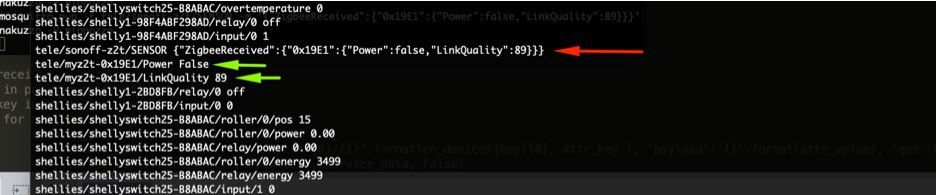
I made a python script and an automation (demultiplexer) to have single unique topics...
This is the result. Tasmota topic (red) and my topics (green)
snakuzzo
on 9 Feb 2020
I also solved using value templates without automations or scripts. If you prefer I can explain later both solutions
snakuzzo
on 9 Feb 2020
would be great to see the value template solution also. Thanks in advance!
Its crazy that everyone must 'invent the wheel' to get it working in HA...
wimpie007
on 9 Feb 2020
Ok...now I'm not at home. Later I can post some examples
snakuzzo
on 9 Feb 2020
I have some Aqara Door & Window sensor...
For "value template" method I made a package with binary_sensor and sensor entities...
binary_sensor:

# STATE

- platform: mqtt
  name: "porta_ingresso"
  state_topic: "tele/sonoff-z2t/SENSOR"
  availability_topic: "tele/sonoff-z2t/LWT"
  payload_available: "Online"
  payload_not_available: "Offline"
  value_template: >
    {% if '0x8987' in value_json.ZigbeeReceived and 'Power' in value_json.ZigbeeReceived['0x8987'] %}
      {{ value_json.ZigbeeReceived['0x8987'].Power }}
    {% else %}
        {{ false if states('binary_sensor.porta_ingresso') == "off" else true }}
    {% endif %}
  payload_on: true
  payload_off: false
  device_class: "door"

sensor:

# LINKQUALITY

- platform: mqtt
name: "porta_ingresso_linkquality"
state_topic: "tele/sonoff-z2t/SENSOR"
availability_topic: "tele/sonoff-z2t/LWT"
payload_available: "Online"
payload_not_available: "Offline"
value_template: >
  {% if '0x8987' in value_json.ZigbeeReceived and 'LinkQuality' in value_json.ZigbeeReceived['0x8987'] %}
    {{ value_json.ZigbeeReceived['0x8987'].LinkQuality }}
  {% else %}
    {{ states('sensor.porta_ingresso_linkquality') }}
  {% endif %}
device_class: "signal_strength"

# BATTERY

- platform: mqtt
  name: "porta_ingresso_battery"
  state_topic: "tele/sonoff-z2t/SENSOR"
  availability_topic: "tele/sonoff-z2t/LWT"
  payload_available: "Online"
  payload_not_available: "Offline"
  value_template: >
    {% if '0x8987' in value_json.ZigbeeReceived and 'Battery' in value_json.ZigbeeReceived['0x8987'] %}
      {{ value_json.ZigbeeReceived['0x8987'].Battery }}
    {% else %}
      {{ states('sensor.porta_ingresso_battery') }}
    {% endif %}
  device_class: "battery"
And here the other solution based on "demultiplexer". In my case I made an automation...
automation
automation:
- alias: 'zigbee2tasmota demultiplexer'
  trigger:
  - platform: mqtt
    topic: 'tele/sonoff-z2t/SENSOR'
  action:
  - service: python_script.z2t_demux
    data_template:
      short_addr: "{{ (trigger.payload_json.ZigbeeReceived.keys() | list)[0] | string }}"
      attributes: "{{ trigger.payload_json.ZigbeeReceived[(trigger.payload_json.ZigbeeReceived.keys() | list)[0] | string] | string }}"
python script
en_devices = {
    '0x8987':['porta_ingresso','true'],
    '0x19E1':['finestra_soggiorno_01','true'],
    '0x5707':['finestra_cameretta','true'],
    '0xE065':['finestra_bagno','true'],
    '0x644D':['finestra_camera_01','true'],
    }

en_attributes = {
    'Power',
    'LinkQuality',
    'Battery'
    }

short_addr = data.get('short_addr')
attr_json = data.get('attributes')
attr_array = attr_json.strip('}{').split(', ')

logger.warning(attr_array)


if data is not None:
    if short_addr in en_devices.keys():
        for attr in attr_array:
            data = attr.split()
            key = data[0].replace("\'", "").replace(":", "")
            value = data[1].replace("\'", "").replace(":", "")
            logger.warning(value)
            service_data = {'topic':'tele/myz2t-{0}/{1}'.format(en_devices[short_addr][0], key ), 'payload':'{}'.format(value), 'qos':0, 'retain':'{}'.format(en_devices[short_addr][1])}
            hass.services.call('mqtt', 'publish', service_data, False)
    else:
        logger.warning('Device {} not enabled'.format(short_addr))
else:
    logger.error('Something goes wrong!')
On python script you can choose to enable just device and attributes you want editing first two variables en_devices and en_attributes
IMPORTANT!!! I used this solution because I didn't want to use AppDaemon or node-red or others, and with home assistant python scripts there are not all necessary libraries (like json library for example)
snakuzzo
on 9 Feb 2020
however the best solution would be to have the individual topics directly on the Tasmota side
snakuzzo
on 9 Feb 2020
Would triggering a rule to publish to a unique topic work?
Command|Description
-- | --
\
For example:
MQT: tele/zigbee/SENSOR = {"ZBReceived":{"0x39BD":{"Name":"Vibration_sensor","PresentValue":0,"AqaraCube":"shake","LinkQuality":152}}}
ON ZbReceived#Vibration_sensor#AqaraCube=shake DO Publish cmnd/myHATopic/Power 2 ENDON
 meingraham
on 9 Feb 2020
meingraham
on 9 Feb 2020
Interesting...I have to try
snakuzzo
on 9 Feb 2020
@wimpie007 The way Z2T reports sensor data is consistent with the rest of Tasmota. I'm willing to consider alternatives if it makes your life easier, but I need to understand what exactly is needed (with examples).
What is your ZbRead command? I don't know of any crash with ZbRead since PR #7651
s-hadinger
on 9 Feb 2020
@s-hadinger look at my screenshot posted today
https://github.com/arendst/Tasmota/issues/7187#issuecomment-583834121
snakuzzo
on 9 Feb 2020
@s-hadinger
my device crashes when sending for example:
ZigbeeRead {"Device":"0xD059"}
snakuzzo describes it nicely. In home-assistant, we need a topic for every device. We're making our own solutions now:)
wimpie007
on 9 Feb 2020
@snakuzzo You screenshot shows one topic per sensor measure, not per device. Users generally want on the contrary that multiple measures are grouped within a single message (ex: temperature, pressure and humidity in a single MQTT message - which is the case currently).
@wimpie007 ZigbeeRead {"Device":"0xD059"} is incorrect because it's missing a lot of parameters. Please refer to the documentation. It does not crash my side, please try with the latest development version.
s-hadinger
on 10 Feb 2020
@snakuzzo You screenshot shows one topic per sensor measure, not per device. Users generally want on the contrary that multiple measures are grouped within a single message (ex: temperature, pressure and humidity in a single MQTT message - which is the case currently).
That is just an example.it would be great also one topic with all measures grouped in a single message, but I think is important to have "ONE different topic per device"
snakuzzo
on 10 Feb 2020
@s-hadinger i just recompiled with the latest dev, and zigbeeread doesnt crash any more!!
8.1.0.6 =ok. previous 8.1.0.5 was crashing.
BTW, CC2530 lost flash contents after OTA upgrading. repairing was not necessary: just had to run ZigbeePermitJoin. (devices still knew keys) Known issue?
wimpie007
on 10 Feb 2020
Related issues
 kckepz
·
3Comments
kckepz
·
3Comments
 JoergZ2
·
3Comments
JoergZ2
·
3Comments
 esp32x
·
3Comments
esp32x
·
3Comments
 jensuffhaus
·
3Comments
jensuffhaus
·
3Comments
 garret
·
3Comments
garret
·
3Comments