GUIDE
This BUG issue template is meant to REPORT Tasmota software BUGS ONLY>
Please DO NOT OPEN AN ISSUE:
- If your Tasmota version is not the latest from the development branch, please update your device before submitting your issue. Your problem might already be solved. The latest precompiled binaries of Tasmota can be downloaded from http://thehackbox.org/tasmota/
- If you have a issue when flashing was done via Tuya Convert
- If your issue is a flashing issue, please address it to the Tasmota Support Chat
- If your issue is compilation problem, please address it to the Tasmota Support Chat
- If your issue has been addressed before (i.e., duplicated issue), please ask in the original issue
- If your issue is a Wi-Fi problem or MQTT problem, please try the steps provided in the FAQ and troubleshooting wiki articles
Please take a few minutes to complete the requested information below. Our ability to provide assistance is greatly hampered without it. The details requested potentially affect which options to pursue. The small amount of time you spend completing the template will also help the volunteers providing the assistance to you to reduce the time required to help you.
BUG DESCRIPTION
_A clear and concise description of what the bug is._
Using IF ELSE works in console but it don't work properly in the rules.
I have a Wemos D1 Mini used to light a walk-in light. The light open before sunrise, after a IR motion detection only if the door is closed (to avoid to wake up the person staying in the bed)... But after Sunrise, it light at the door opening.
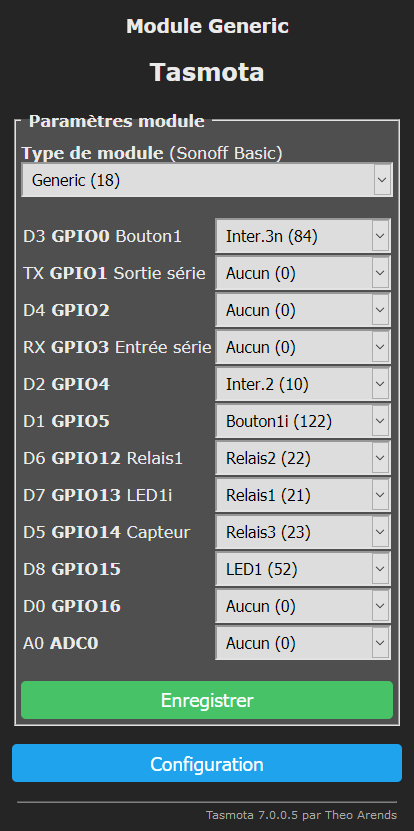
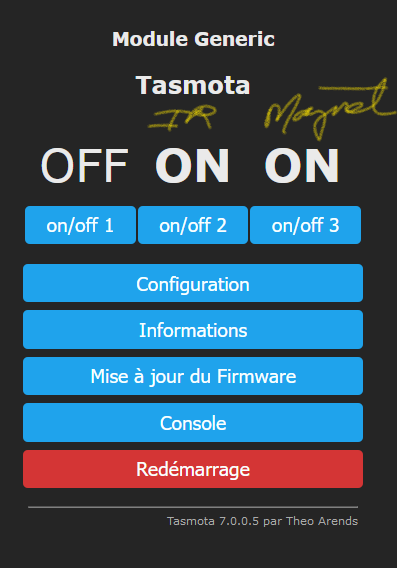
IO:
1- touch switch (button)
2- magnet switch (door open or closed)
3- IR Motion Sensor
To initialize switches...
Rule1 on power2#boot do power2 0 endon on power3#boot do power3 1 endon
on power2#state=1 do backlog var1 1; RuleTimer1 1 endon
on power2#state=0 do backlog var1 0 endon
on power3#state=1 do backlog var2 1;RuleTimer1 1 endon
on power3#state=0 do backlog var2 0; IF((Time - Sunset)<0 OR Time>Sunrise) power1 1 ELSE power1 0 ENDIF endon
on Rules#Timer=1 do backlog var3 = var1 * var2; IF(var3==1 AND ((Time - Sunset)>0 OR Time<Sunrise)) power1 1; RuleTimer2 30 ELSE power1 0 endon
on Rules#Timer=2 do backlog power1 0 endon
If the Var1 and Var2 are initialized at 1 and I enter in the console:
var3 = var1 * var2; IF(var3==1 AND ((Time - Sunset)>0 OR Time
REQUESTED INFORMATION
_Make sure your have performed every step and checked the applicable boxes before submitting your issue. Thank you!_
FAILURE TO COMPLETE THE REQUESTED INFORMATION WILL RESULT IN YOUR ISSUE BEING CLOSED
- [x ] Read the Contributing Guide and Policy and the Code of Conduct
- [ x] Searched the problem in issues
- [x ] Searched the problem in the wiki
- [x ] Searched the problem in the forum
- [x ] Searched the problem in the chat
- [x ] Device used (e.g., ): _____Wemos D1 mini
- [ x] Tasmota binary firmware version number used: _____7.0.0.5
Version Core/SDK | 2_6_1/2.2.2-dev(bb83b9b)
- [ ] Pre-compiled
- [ x] Self-compiled
- [x ] IDE / Compiler used: _____VS Code Plateform IO
- [ x] Flashing tools used: _____
[x ] Provide the output of command:
Backlog Template; Module; GPIO:Configuration output here: 1- touch switch (button) 2- magnet switch (door open or closed) 3- IR Motion Sensor[ ] If using rules, provide the output of this command:
Backlog Rule1; Rule2; Rule3:Rules output here: Rule2 on power2#state=1 do backlog var1 1; RuleTimer1 1 endon on power2#state=0 do backlog var1 0 endon on power3#state=1 do backlog var2 1;RuleTimer1 1 endon on power3#state=0 do backlog var2 0; IF((Time - Sunset)<0 OR Time>Sunrise) power1 1 ELSE power1 0 ENDIF endon on Rules#Timer=1 do backlog var3 = var1 * var2; IF(var3==1 AND ((Time - Sunset)>0 OR Time<Sunrise)) power1 1; RuleTimer2 30 ELSE power1 0 endon on Rules#Timer=2 do backlog power1 0 endon[ ] Provide the output of this command:
Status 0:STATUS 0 output here: 13:19:27 RSL: stat/tasmota/STATUS = {"Status":{"Module":18,"FriendlyName":["Tasmota","Tasmota2","Tasmota3"],"Topic":"tasmota","ButtonTopic":"0","Power":6,"PowerOnState":3,"LedState":1,"LedMask":"FFFF","SaveData":1,"SaveState":0,"SwitchTopic":"","SwitchMode":[0,0,0,0,0,0,0,0],"ButtonRetain":0,"SwitchRetain":0,"SensorRetain":0,"PowerRetain":0}}[ ] Provide the output of the Console log output when you experience your issue; if applicable:
_(Please use_weblog 4_for more debug information)_Console output here: 11:22:11 RSL: stat/tasmota/RESULT = {"Var2":"0"} 11:22:11 RSL: stat/tasmota/RESULT = {"If":"Done"} 11:22:15 RSL: stat/tasmota/RESULT = {"POWER3":"ON"} 11:22:15 RSL: stat/tasmota/POWER3 = ON 11:22:15 RUL: POWER3#STATE=1 performs "backlog var2 1;RuleTimer1 1" 11:22:16 RSL: stat/tasmota/RESULT = {"Var2":"1"} 11:22:16 RSL: stat/tasmota/RESULT = {"T1":1,"T2":0,"T3":0,"T4":0,"T5":0,"T6":0,"T7":0,"T8":0} 11:22:17 RUL: RULES#TIMER=1 performs "backlog var3 = var1 * var2; IF(var3==1 AND ((Time - Sunset)>0 OR Time<Sunrise)) power1 1; RuleTimer2 30 ELSE power1 0" 11:22:17 RSL: stat/tasmota/RESULT = {"Var3":"0.000"} 11:22:18 RSL: stat/tasmota/RESULT = {"If":"Done"} 11:22:18 RSL: stat/tasmota/RESULT = {"T1":0,"T2":30,"T3":0,"T4":0,"T5":0,"T6":0,"T7":0,"T8":0} 11:22:24 RSL: stat/tasmota/RESULT = {"POWER2":"ON"} 11:22:24 RSL: stat/tasmota/POWER2 = ON 11:22:24 RUL: POWER2#STATE=1 performs "backlog var1 1; RuleTimer1 1" 11:22:24 RSL: stat/tasmota/RESULT = {"Var1":"1"} 11:22:24 RSL: stat/tasmota/RESULT = {"T1":0,"T2":23,"T3":0,"T4":0,"T5":0,"T6":0,"T7":0,"T8":0} 11:22:26 RUL: RULES#TIMER=1 performs "backlog var3 = var1 * var2; IF(var3==1 AND ((Time - Sunset)>0 OR Time<Sunrise)) power1 1; RuleTimer2 30 ELSE power1 0" 11:22:26 RSL: stat/tasmota/RESULT = {"Var3":"1.000"} 11:22:27 RSL: stat/tasmota/RESULT = {"If":"Done"} 11:22:27 RSL: stat/tasmota/RESULT = {"T1":0,"T2":30,"T3":0,"T4":0,"T5":0,"T6":0,"T7":0,"T8":0}
TO REPRODUCE
_Steps to reproduce the behavior:_
Follow the text over
EXPECTED BEHAVIOUR
_A clear and concise description of what you expected to happen._
Follow the text over
SCREENSHOTS
_If applicable, add screenshots to help explain your problem._
ADDITIONAL CONTEXT
_Add any other context about the problem here._
(Please, remember to close the issue when the problem has been addressed)
Status 0
Template
Module
GPIO
The actual output from the rules commandsThat's all missing
In any case - the issue is with your configuration and your incorrect rules logic/syntax.
Please use Discord for these kinds of questions.
 frablaser
All 23 comments
Lots of information but critical information requested by the issue template is missing. You have mentioned only input IO but yet your rules are using output commands (power) and triggers.
Please close this issue and address this to the Tasmota Support Discord Chat. The chat is a better and more dynamic channel for helping you. Github issues are best used for Tasmota _software feature requests and bug reporting_. Troubleshooting and setup assistance is more effective using an interactive forum.
Please check the Contributing Guideline and Policy and the Support Guide.
Thanks.
Support Information
See Wiki for more information.
See Chat for more user experience.
See Community for forum.
See Code of Conduct
 meingraham
on 22 Nov 2019
meingraham
on 22 Nov 2019
template is missing
I did it on the two screenshots but, I don't know why git don't show them... 🙄
frablaser
on 22 Nov 2019
Status 0
Template
Module
GPIO
The actual output from the rules commands
That's all missing
In any case - the issue is with your configuration and your incorrect rules logic/syntax.
Please use Discord for these kinds of questions.
meingraham
on 22 Nov 2019
Mr. Ingraham,
The template is here:
Template GPIO
Module is Wemos D1 Mini Generic 18 (in the text description but could be any ESP 8266 the )
Regards
frablaser
on 22 Nov 2019
Ok... then I give up... After two days of loosing my time on it. I let it go. Rules are not ready to work in the way I need it... I will use the HA automation, just to bad, Tasmota isn't enough mature yet.
I tried to help for debugging the development , but there is no way to talk...
Then thanks again!
frablaser
on 22 Nov 2019
Tasmota isn't enough mature yet.
:joy: :joy: :joy: :joy: :joy: :joy: :joy: :joy: :joy: :joy: :joy: :joy: :joy: :joy: :joy: :joy: :joy: :joy: :joy: :joy: :joy:
meingraham
on 22 Nov 2019
For the rules... 😂
frablaser
on 22 Nov 2019
@frablaser
For the rules...
:joy: :joy: :joy: :joy: :joy: :joy: :joy: :joy: :joy: :joy: :joy: :joy: :joy: :joy: :joy: :joy: :joy: :joy: :joy: :joy: :joy:
At the minimum, you're missing an endif. I'll let you start there.
meingraham
on 22 Nov 2019
Yes... at the end of the on Rules#Timer=1 but even that, I tested it directly in the console (with the ENDIF at the end as well), and it worked like a charm, but inner the rule, it doesn't trigger the power1 1 and start the second Timer... even if the IF conditions is false... 🙄
frablaser
on 22 Nov 2019
It seems that the rule timers do a thread where the IF doesn't fit...
frablaser
on 22 Nov 2019
If your Tasmota version is not the latest from the development branch, please update your device before submitting your issue.
Are you?
I'm fairly certain that IF inside a Backlog is not supported.
If I were you, I would send a strongly worded letter and ask for a full refund! Tasmota is unacceptable.
meingraham
on 22 Nov 2019
Thanks again for your answer Mr Ingraham,
My version date less than a week I think...
Version du programme | 7.0.0.5(tasmota)
Date & Heure de build | 2019-11-21T09:55:59
Version Core/SDK | 2_6_1/2.2.2-dev(bb83b9b)
frablaser
on 22 Nov 2019
This is the reason Status 0 is requested.
Alter you rule to separate Backlog and IF - i.e., repeat the trigger.
meingraham
on 22 Nov 2019
I removed all the Backlog instructions...
on power2#state=1 do var1 1;RuleTimer1 1 endon
on power2#state=0 do var1 0 endon
on power3#state=1 do var2 1;RuleTimer1 1 endon
on power3#state=0 do var2 0; IF((Time - Sunset)<0 OR Time>Sunrise) power1 1 ELSE power1 0 ENDIF endon
on Rules#Timer=1 do var3 = var1 * var2; IF(var3==1 AND ((Time - Sunset)>0 OR Time<Sunrise)) power1 1; RuleTimer2 30 ENDIF; IF(var3!=1) power1 0 ENDIF endon
on Rules#Timer=2 do power1 0 endon
But it result of... now my var2 include the IF... that's a spliting fault. It don't handle the semicolon
RSL: stat/tasmota/RESULT = {"Var2":"0; IF((Time - Sunset)<0 OR Time>"}
15:01:45 RUL: POWER3#STATE=0 performs "var2 0; IF((Time - Sunset)<0 OR Time>Sunrise) power1 1 ELSE power1 0 ENDIF"
15:01:45 RSL: stat/tasmota/RESULT = {"Var2":"0; IF((Time - Sunset)<0 OR Time>"}
15:01:46 RSL: tele/tasmota/STATE = {"Time":"2019-11-22T15:01:46","Uptime":"0T21:40:06","UptimeSec":78006,"Heap":27,"SleepMode":"Dynamic","Sleep":50,"LoadAvg":19,"MqttCount":0,"POWER1":"OFF","POWER2":"ON","POWER3":"OFF","Wifi":{"AP":1,"SSId":"WaxHome_2G","BSSId":"50:D4:F7:37:AB:CB","Channel":2,"RSSI":100,"LinkCount":1,"Downtime":"0T00:00:06"}}
15:01:46 RSL: tele/tasmota/SENSOR = {"Time":"2019-11-22T15:01:46","Switch2":"ON","Switch3":"ON"}
15:02:21 CMD: var2
15:02:21 RSL: stat/tasmota/RESULT = {"Var2":"0; IF((Time - Sunset)<0 OR Time>"}
frablaser
on 22 Nov 2019
If I put that IF in the console... It works! Yhea!
15:13:56 CMD: IF((Time - Sunset)<0 OR (Time>Sunrise AND Time
15:13:56 RSL: stat/tasmota/RESULT = {"POWER1":"ON"}
15:13:56 RSL: stat/tasmota/POWER1 = ON
frablaser
on 22 Nov 2019
i.e., repeat the trigger.
You did not.
on power3#state=0 do backlog var2 0; IF((Time - Sunset)<0 OR Time>Sunrise) power1 1 ELSE power1 0 ENDIF endon
becomes
on power3#state=0 do var2 0 endon
on power3#state=0 do IF((Time - Sunset)<0 OR Time>Sunrise) power1 1 ELSE power1 0 ENDIF endon
and
on Rules#Timer=1 do backlog var3 = var1 * var2; IF(var3==1 AND ((Time - Sunset)>0 OR Time<Sunrise)) power1 1; RuleTimer2 30 ELSE power1 0 endon
becomes
on Rules#Timer=1 do var3 = var1 * var2 endon
on Rules#Timer=1 do IF(var3==1 AND ((Time - Sunset)>0 OR Time<Sunrise)) power1 1; RuleTimer2 30 ELSE power1 0 endon
Thanks Mr Ingraham for your answer,
I did'nt know that it was possible to track the same trigger many times...
But I'm bumping into another problem... 🙄 Now I reached the limit of a rule string length I think... ?!
If I try to insert it in a whole line as :
on power2#state=1 do var1 1
on power2#state=1 do RuleTimer1 1 endon
on power2#state=0 do var1 0 endon
on power3#state=1 do var2 1
on power3#state=1 do RuleTimer1 1 endon
on power3#state=0 do var2 0
on power3#state=0 do IF((Time - Sunset)<0 OR (Time>Sunrise AND Time
on Rules#Timer=1 do IF(var3==1 AND ((Time - Sunset)>0 OR Time
It don't insert anything... Then I tried to using the append rule instruction as (+) like:
Rule2 on power2#boot do power2 0 endon on power3#boot do power3 1 endon
Rule2 + on power2#state=1 do var1 1
Rule2 + on power2#state=1 do RuleTimer1 1 endon
Rule2 + on power2#state=0 do var1 0 endon
Rule2 + on power3#state=1 do var2 1
Rule2 + on power3#state=1 do RuleTimer1 1 endon
Rule2 + on power3#state=0 do var2 0
Rule2 + on power3#state=0 do IF((Time - Sunset)<0 OR (Time>Sunrise AND Time
Rule2 + on Rules#Timer=1 do IF(var3==1 AND ((Time - Sunset)>0 OR Time
It works until the third last line...
My question would be, can I insert Rule Timers into an other rule(x) entry? And could it be triggered by an other rule?
frablaser
on 22 Nov 2019
I corrected my endon missing at the end in my previous splitting...
Ok I tried to split it into two rules (2-3) to fit on the maximum string length of rules as:
Rule2 on power2#state=1 do var1 1 endon on power2#state=1 do RuleTimer1 1 endon on power2#state=0 do var1 0 endon on power3#state=1 do var2 1 endon on power3#state=1 do RuleTimer1 1 endon on power3#state=0 do var2 0 endon on power3#state=0 do IF((Time - Sunset)<0 OR (Time>Sunrise AND Time<Sunset)) power1 1 ELSE power1 0 ENDIF endon on Rules#Timer=1 do var3 = var1 * var2 endon
Rule3 on Rules#Timer=1 do IF(var3==1 AND ((Time - Sunset)>0 OR Time<Sunrise)) power1 1; RuleTimer2 30 ENDIF; IF(var3!=1) power1 0 ENDIF endon on Rules#Timer=2 do power1 0 endon
But I got the answer... Rules#Timer called from rule2 are not triggered in rule3... then I face again in a deep black hole!
Can I ask for a refund??
frablaser
on 22 Nov 2019
This replicates your logic. It shouldn't matter which rule set a particular rule is in (e.g., RuleTimer2)
- Clears everything.
- The rules.
- Enable rules sets.
Backlog Rule1 ""; Rule2 ""; Rule3 ""; Rule1 0; Rule2 0; Rule3 0

Rule1
  on power2#boot do power2 0 endon
  on power3#boot do power3 1 endon
  on power2#state do var1 %value% endon
  on power2#state=1 do RuleTimer1 1 endon
  on power3#state do var2 %value% endon
  on power3#state=1 do RuleTimer1 1 endon
  on power3#state=0 do IF((Time-Sunset)<0 OR (Time>Sunrise AND Time<Sunset)) power1 1 ELSE power1 0 ENDIF endon

Rule2
  on Rules#Timer=1 do IF (var1==0 OR var2==0) power1 0 ELSEIF ((Time-Sunset)>0 OR Time<Sunrise)) power1 1; RuleTimer2 30 ENDIF endon
  on Rules#Timer=2 do power1 0 endon

Backlog Rule1 1; Rule2 1
UPDATE!!!
I put my Rule3 at ON and now it works!!!!
Thanks Mr Ingraham for your help. It's very appreciated.
And the good thing, no refund is needed! 😂😂😂
frablaser
on 22 Nov 2019
A donation would do
 arendst
on 22 Nov 2019
arendst
on 22 Nov 2019
It is what I did! 😉
frablaser
on 25 Nov 2019
Relating tags to names keeps being a challange but I think I digged it. 👍
arendst
on 25 Nov 2019
Related issues
 Joeyhza
·
3Comments
Joeyhza
·
3Comments
 Vujagig
·
3Comments
Vujagig
·
3Comments
 grizewald
·
3Comments
grizewald
·
3Comments
 ximonline
·
3Comments
ximonline
·
3Comments
 TylerDurden23
·
3Comments
TylerDurden23
·
3Comments
Most helpful comment
A donation would do