Tasmota: Sonoff RF bridge - portisch firmware documentation clarification
ISSUE DESCRIPTION - TROUBLESHOOTING
The wiki for the Sonoff RF bridge - portisch firmware documentation appears to be incomplete, and if not, it is confusing. Using google I end up in forums with the same questions.
Can the documentation be clarified to describe in what mode the RF bridge should be set during "normal daily operation" with portisch firmware ?
Is thisrfraw 1and/or,rfraw 177,rfraw 166,rfraw 169,rfraw AAB155, or nothing ?When following all the steps, you end up in the "raw sniffing procedure" which does not explain what to do with the data.
I was under the impression that the RF bridge with Portisch firmware cannot store "learned" devices, yet the documentation describes with "Learning of Commands with custom Firmware", can it be clarified that the "learned" codes needs to be programmatically handled/captured by any home automation software.
Documentation talks about "Interactive B1 to B0 tool" what is this tool used for ? Is this optional?
Preferably a consise list of steps on how to use it.
I can update it myself, but as I don't really understand how this firmware is supposed to work I cannot write a guide.
- [x] Read the Contributing Guide and Policy and the Code of Conduct
- [x] Searched the problem in issues (https://github.com/arendst/Sonoff-Tasmota/issues)
- [x] Searched the problem in the wiki (https://github.com/arendst/Sonoff-Tasmota/wiki/Troubleshooting)
- [x] Searched the problem in the forum (https://groups.google.com/d/forum/sonoffusers)
- [x] Searched the problem in the chat (https://discord.gg/Ks2Kzd4)
- [x] Device used (i.e. Sonoff Basic) : RF bridge
- [x] Tasmota binary firmware version number used : precompiled/latest
 bakman2
All 19 comments
For daily operation with no special needs dont use rfraw. This is the default setting.
If you use rfraw you have special needs that cant be easily answered or described.
For further information visit github site https://github.com/Portisch/RF-Bridge-EFM8BB1
Enhancement of wiki with more infos is highly welcome. Everyone can do!
See https://github.com/arendst/Sonoff-Tasmota/blob/development/CONTRIBUTING.md
 Jason2866
on 21 Apr 2019
Jason2866
on 21 Apr 2019
Still unclear.
Daily operation with the portisch firmware installed.
You have to do something else nothing happens.
bakman2
on 21 Apr 2019
If you have a sonoff bridge, you only need to flash Tasmota and then select sonoff bridge as module in module config and you can start receiving data from RF. The bridge supports some protocols and only in 433mhz. So, you need a compatible device to receive data.
Portish alternative firmware for the RF chip, adds support for more protocols.
Closing this issue as it has been answered.
Support Information (Guide)
See Wiki for more information.
See Chat for more user experience.
See Community for forum.
See Code of Conduct
 ascillato2
on 23 Apr 2019
ascillato2
on 23 Apr 2019
@ascillato2
Are you guys deliberately misunderstanding what i am stating?
“The portisch firmware adds support for more protocols”: but this requires interaction that is described in the wiki, which is not clear.
bakman2
on 23 Apr 2019
@bakman2 - Do you want to take a stab at the edits you would suggest to make this article clearer? As @Jason2866 mentioned, the wiki is an open platform for collaboration. If you'll take a first pass, I'm happy to read it as an RF Bridge novice (which I most definitely am) to provide feedback.
 meingraham
on 23 Apr 2019
meingraham
on 23 Apr 2019
@meingraham I would like to rewrite it, but as I am confused by the procedure I don't know where to start. Note that I have the portisch firmware installed, but without doing any steps, nothing will change. I have it currently in "raw sniffing" mode, but that only seems to last for ~2 hours and then i have to reload the bridge.
bakman2
on 23 Apr 2019
Let me recommend having some RF Bridge users help you get it operational by visiting the Discord chat. Once you get the bridge there, that "struggle" may provide you with what you need to "translate" what's currently written in the wiki into clearer or less ambiguous instructions based on what you learn through the process.
I'm afraid that's the extent of how I can help (other than reviewing your updates after the fact).
Regards.
Mike
meingraham
on 23 Apr 2019
@meingraham I would like to rewrite it, but as I am confused by the procedure I don't know where to start. Note that I have the portisch firmware installed, but without doing any steps, nothing will change. I have it currently in "raw sniffing" mode, but that only seems to last for ~2 hours and then i have to reload the bridge.
same situation here, documentation is poor, i can help to write it too, but first we need to understand how it works. I am able to capture the data useing rfraw 177, now how the heck do i retransmit the data?
 fgonza2
on 15 May 2019
fgonza2
on 15 May 2019
The Rfraw function isnt a part of the Tasmota firmware. Rfraw is processed in the EFM MCU
How it works and support for this part you find here https://github.com/Portisch/RF-Bridge-EFM8BB1
Jason2866
on 15 May 2019
@fgonza2 The Portisch firmware documentation has its own wiki (link @Jason2866 provided). See https://github.com/Portisch/RF-Bridge-EFM8BB1/wiki/0xB1 for information on the command.
meingraham
on 15 May 2019
@fgonza2 what I figured out is that you need to use rfraw 1 or rfraw 166 (this will enable the non-sonoff rf signals using portisch).
If you receive data in rfraw 1 mode, you are good to go.
If not, try rfraw 166, if you do not receive data, follow the advanced steps described in the wiki to capture the values from your device (using rfraw 177) and raise an issue with portisch (look at the closed issues for examples).
He/she is superhelpful with providing a custom EMF8BB1 firmware for your needs.
If you use 177 only, the bridge will stop working after ~3 hours and the signals are not usable.
bakman2
on 15 May 2019
I agree with this issue. It is not clear how to install portisch on top of an existing tasmota rf bridge. This documentation has everything and the kitchen sink whereas anybody who would even need the portisch upgrade would only need it after a relatively advanced requirement of having to RE an existing signal.
Of course it doesn't help that the portisch docs themselves don't actually tell you how to add it to a tasmota rf bridge.
So the docs should be separated and made more clear or at least bundle portisch in the sonoff firmware itself (maybe sonoff-rf-portisch.bin).
 smashah
on 8 Jul 2019
smashah
on 8 Jul 2019
regarding portisch code have a look in the repository /tools/fw_efm8bb1.
 arendst
on 8 Jul 2019
arendst
on 8 Jul 2019
Have you really looked in wiki?
https://github.com/arendst/Sonoff-Tasmota/wiki/Sonoff-RF-Bridge-433
Jason2866
on 9 Jul 2019
@smashah as I originally opened this topic, in the end I figured out what is going on.
The RF bridge has a separate chip for handling the RF signals (EFM8BB1 MCU). By default this chip understands signals from Sonoff devices. The chip can be programmed with a firmware as described in the wiki. The firmware can be found in the tasmota repository or in the portisch repository (broader support for different devices).
Once (properly) installed enter in the console: RfRaw 1. Reference. Now your RF bridge should be able to decode sonoff devices and many others. Learning/storing is not possible, codes received should be handled via other software. And make sure to use a rule to turn RfRaw 1 on during reboot.
The rest of the document details the steps when you have a device that is not decoded properly using the portisch firmware. In that case you should open a issue with portisch and provide the output of the script .
bakman2
on 13 Jul 2019
And make sure to use a rule to turn RfRaw 1 on during reboot.
@bakman2 can you please give an example of this rule?
 jpduhen
on 24 Jul 2019
jpduhen
on 24 Jul 2019
Rule1 ON System#Boot DO RfRaw 1 ENDON
Rule1 1
meingraham
on 24 Jul 2019
@meingraham Thanks!
Any chance you can help me with decoding my Auriol weather sensors?
I'm trying to read the data from an Auriol H23726a, which has a console with a LCD screen and 2 separate exterior sensors:
- rain-meter,
- windspeed/-direction & temp/humidity meter.
I like to get the sensor-data into HomeAssistant via Sonoff Bridge - >MQTT
As it seems the latest Portisch firmware (26-03-2019) for my Sonoff Bridge (Tasmota 6.6.0.0) should be albe to decode the RF signals. So I flashed the Sonoff and all seems to be OK.
When I enter the command
RfRaw 1
I get the following responses:
`
16:57:19 CMD: rfraw 1
16:57:19 MQT: stat/BRIDGE/RESULT = {"RfRaw":"ON"}
16:57:19 MQT: tele/BRIDGE/RESULT = {"RfRaw":{"Data":"AAA055"}}
16:57:23 MQT: tele/BRIDGE/RESULT = {"RfRaw":{"Data":"AAA6060EA46FB910A055"}}
16:57:52 MQT: tele/BRIDGE/RESULT = {"RfRaw":{"Data":"AAA6060AA16C0C000055"}}
16:58:25 MQT: tele/BRIDGE/RESULT = {"RfRaw":{"Data":"AAA6060AA4411814C055"}}
16:58:25 MQT: tele/BRIDGE/RESULT = {"RfRaw":{"Data":"AAA6060AA4411814C055"}}
16:58:25 MQT: tele/BRIDGE/RESULT = {"RfRaw":{"Data":"AAA6060AA4411814C055"}}
16:58:25 MQT: tele/BRIDGE/RESULT = {"RfRaw":{"Data":"AAA6060AA4411814C055"}}
16:58:25 MQT: tele/BRIDGE/RESULT = {"RfRaw":{"Data":"AAA6060AA4411814C055"}}
16:58:29 MQT: tele/BRIDGE/RESULT = {"RfRaw":{"Data":"AAA6060AA16C0C000055"}}
16:59:06 MQT: tele/BRIDGE/RESULT = {"RfRaw":{"Data":"AAA6060AA16C0C000055"}}
16:59:27 MQT: tele/BRIDGE/RESULT = {"RfRaw":{"Data":"AAA6060AA4680020A055"}}
16:59:43 MQT: tele/BRIDGE/RESULT = {"RfRaw":{"Data":"AAA6060AA16C0C000055"}}
17:00:20 MQT: tele/BRIDGE/RESULT = {"RfRaw":{"Data":"AAA6060AA16C0C000055"}}
`
Looking into the described rf-decode document,
I think the first 6 Hex characters are sort of ID, then I hope the next Hex numbers represent the values as described in the above linked document, but I'm totally stuck...
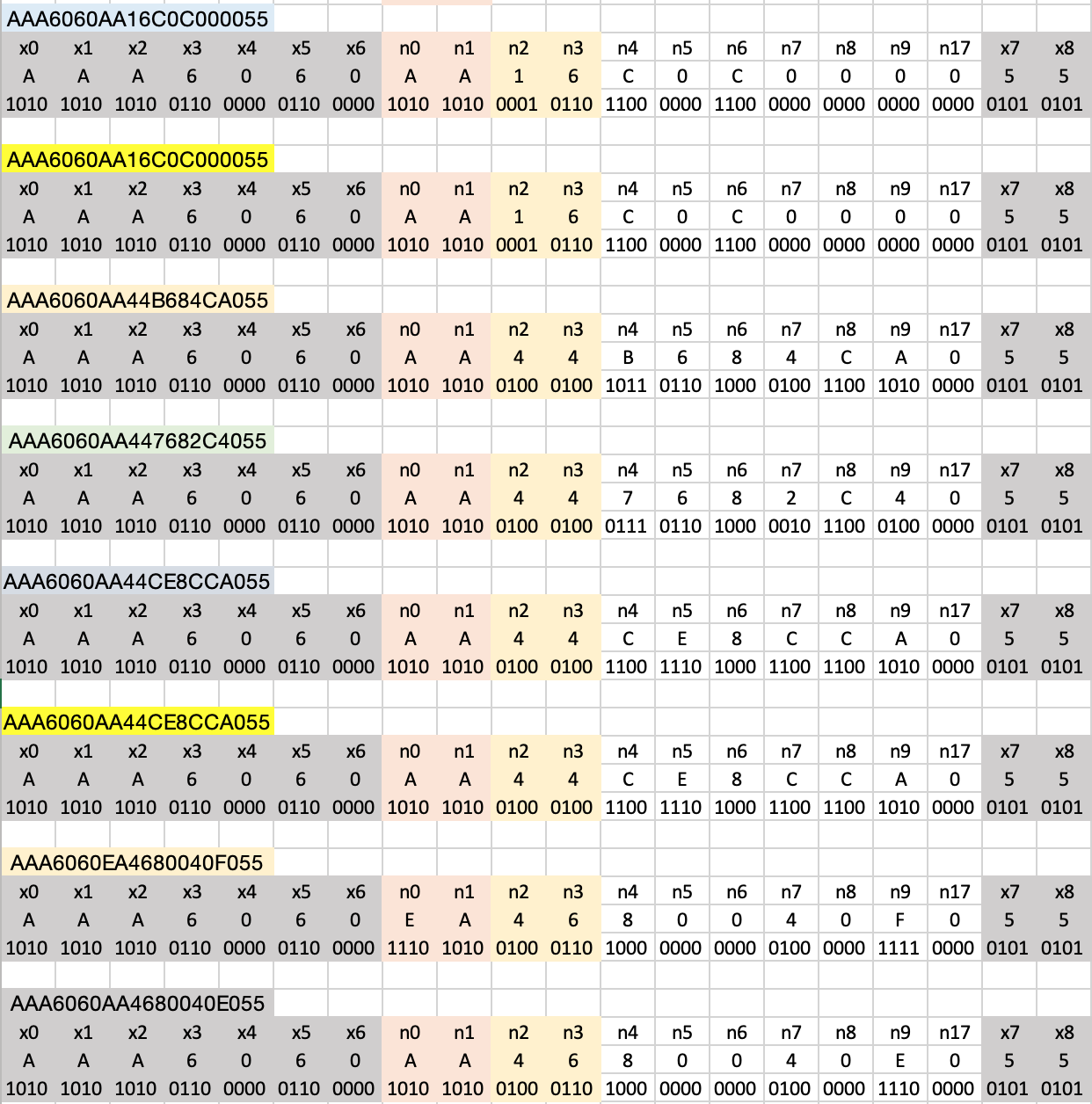
Any ideas? Much appreciated!
jpduhen
on 24 Jul 2019
Hi I don't understand one thing about RF codes.
I've flashed my RF Bridge (R2 V1) with tasmota 6.6.0(release-sonoff)-2_3_0 and after it with Portish HEX file from Keil 8051 v9.53 - Release.
Everything works properly I mean I can program 16 buttons in my tasmota panel and my devices work fine (I use my old devices 4 switches with one pilot).
But when I want to send them to my Domoticz I get random svalues. So why I can copy this key to my RF Bridge and send it from tasmota but I couldn't send it to Domoticz?
 slom1
on 17 Oct 2019
slom1
on 17 Oct 2019
Related issues
 wirelesssolution
·
3Comments
wirelesssolution
·
3Comments
 abzman
·
3Comments
abzman
·
3Comments
 Ndrinta
·
3Comments
Ndrinta
·
3Comments
 jensuffhaus
·
3Comments
jensuffhaus
·
3Comments
 TylerDurden23
·
3Comments
TylerDurden23
·
3Comments
Most helpful comment
Rule1 ON System#Boot DO RfRaw 1 ENDONRule1 1