Tasmota: Home Assistent displays devices after reboot as "off" when they are "on"
Describe the bug
When I start Home Assistant, the status of the sonoff devices get's not updated (not even after 5 minutes). I used this automation to trigger the update:
- alias: Tasmota - Powerstate
  trigger:
    platform: homeassistant
    event: start
  action:
    - service: mqtt.publish
      data:
        topic: "cmnd/sonoffs/state"
        payload: ""
- [x] _Searched the problem in issues and in the wiki_
- [x] _Hardware used_ : Sonoff S20
- [x] _Development/Compiler/Upload tools used_ : arduino
- [x] _If a pre-compiled release or development binary was used, which one?_ : sonoff.bin
- [x] _You have tried latest release or development binaries?_ : latest
- [x] _Provide the output of command_
status 0:
01:18:29 CMD: status 0
01:18:29 MQT: stat/ecklampe/STATUS = {"Status":{"Module":8,"FriendlyName":["Ecklampe Sonoff"],"Topic":"ecklampe","ButtonTopic":"0","Power":1,"PowerOnState":3,"LedState":0,"SaveData":1,"SaveState":1,"SwitchTopic":"0","SwitchMode":[0,0,0,0,0,0,0,0],"ButtonRetain":0,"SwitchRetain":0,"SensorRetain":0,"PowerRetain":0}}
01:18:29 MQT: stat/ecklampe/STATUS1 = {"StatusPRM":{"Baudrate":115200,"GroupTopic":"sonoffs","OtaUrl":"http://thehackbox.org/tasmota/release/sonoff.bin","RestartReason":"Software/System restart","Uptime":"2T22:52:02","StartupUTC":"2019-01-12T01:26:27","Sleep":50,"BootCount":30,"SaveCount":445,"SaveAddress":"F8000"}}
01:18:29 MQT: stat/ecklampe/STATUS2 = {"StatusFWR":{"Version":"6.4.1(sonoff)","BuildDateTime":"2018-12-24T14:41:00","Boot":6,"Core":"2_4_2","SDK":"2.2.1(cfd48f3)"}}
01:18:29 MQT: stat/ecklampe/STATUS3 = {"StatusLOG":{"SerialLog":2,"WebLog":2,"SysLog":0,"LogHost":"","LogPort":514,"SSId":["Sparta-IoT",""],"TelePeriod":300,"SetOption":["00008009","558180C0","00000000"]}}
01:18:29 MQT: stat/ecklampe/STATUS4 = {"StatusMEM":{"ProgramSize":521,"Free":480,"Heap":17,"ProgramFlashSize":1024,"FlashSize":1024,"FlashChipId":"14405E","FlashMode":3,"Features":["00000809","0FDAE794","000383A0","23B617CE","00003BC0"]}}
01:18:29 MQT: stat/ecklampe/STATUS5 = {"StatusNET":{"Hostname":"ecklampe-1399","IPAddress":"192.168.180.33","Gateway":"192.168.180.1","Subnetmask":"255.255.255.0","DNSServer":"192.168.180.1","Mac":"5C:CF:7F:79:A5:77","Webserver":2,"WifiConfig":5}}
01:18:29 MQT: stat/ecklampe/STATUS6 = {"StatusMQT":{"MqttHost":"192.168.180.31","MqttPort":1883,"MqttClientMask":"DVES_%06X","MqttClient":"DVES_79A577","MqttUser":"florian","MqttType":1,"MAX_PACKET_SIZE":1000,"KEEPALIVE":15}}
01:18:29 MQT: stat/ecklampe/STATUS7 = {"StatusTIM":{"UTC":"Tue Jan 15 00:18:29 2019","Local":"Tue Jan 15 01:18:29 2019","StartDST":"Sun Mar 31 02:00:00 2019","EndDST":"Sun Oct 27 03:00:00 2019","Timezone":"+01:00","Sunrise":"08:38","Sunset":"17:20"}}
01:18:29 MQT: stat/ecklampe/STATUS10 = {"StatusSNS":{"Time":"2019-01-15T01:18:29"}}
01:18:29 MQT: stat/ecklampe/STATUS11 = {"StatusSTS":{"Time":"2019-01-15T01:18:29","Uptime":"2T22:52:02","Vcc":3.442,"SleepMode":"Dynamic","Sleep":50,"LoadAvg":19,"POWER":"ON","Wifi":{"AP":1,"SSId":"Flos-IoT","BSSId":"44:4E:6D:4C:70:CC","Channel":1,"RSSI":100}}}
To Reproduce
- Add tasmota device to HA via:
switch:
  - platform: mqtt
    name: "Ecklampe"
    state_topic: "stat/ecklampe/POWER"
    command_topic: "cmnd/ecklampe/POWER"
    availability_topic: "tele/ecklampe/LWT"
    state_value_template: "{{value_json.POWER}}"
    qos: 1
    payload_on: "ON"
    payload_off: "OFF"
    payload_available: "Online"
    payload_not_available: "Offline"
    retain: false
- Reboot HA
- Device is displayed as "off" even when it's "on"
Expected behavior
Display device as on if it's on
Screenshots
Device is on:
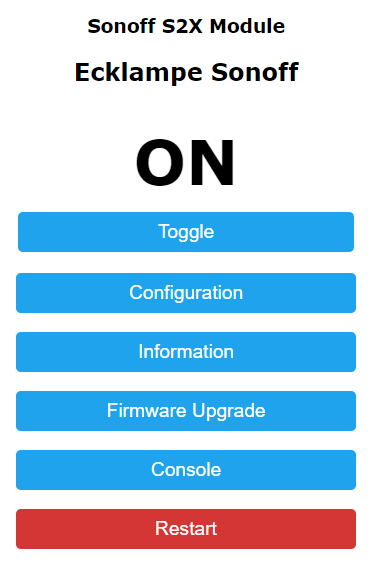
But displayed as off:

BTW: The commands are different here and here
topic: "cmnd/sonoffs/state" vs topic: "sonoffs/cmnd/state"
 TheZoker
All 16 comments
You are right. You need that automation and that automation is explained in the wiki.
Also the difference you saw in the wiki is correct. The fulltopic is different if you config HA manually or by automatic discovery.
Sorry, there is no issue. In the wiki is explained all this.
 ascillato
on 15 Jan 2019
ascillato
on 15 Jan 2019
@ascillato Thanks for the fast feedback. So I added my devices via the manual configuration and added the automation described above. Why does it not work then?
TheZoker
on 15 Jan 2019
You can not use both, manual and automatic config. You need to choose one. The fulltopic is different. So, if you choose manual, check that your fulltopic is the same.
 ascillato2
on 15 Jan 2019
ascillato2
on 15 Jan 2019
Closing this issue as it has been answered.
Support Information
See Wiki for more information.
See Chat for more user experience.
ascillato2
on 15 Jan 2019
I don't want to use both. I just want to use manual configuration. I just talked about the automatic config, because I thought the difference of the command would maybe be the issue for me. But since it's supposed that way, this is not the issue then. But what is the issue? Why does it not work?
TheZoker
on 15 Jan 2019
Check that your fulltopic is the same in Tasmota and in your home assistant.
topic: "cmnd/sonoffs/state" vs topic: "sonoffs/cmnd/state"
ascillato2
on 15 Jan 2019
Since I use the manual configuration, I need to use "cmnd/sonoffs/state" and that is exactly what I use in my automation:
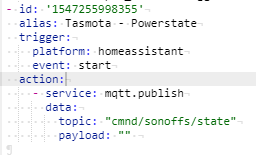
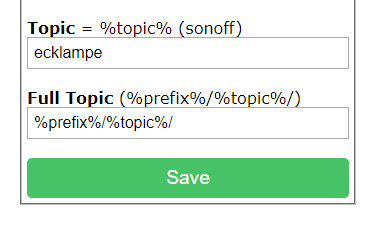
This should be correct, right?
TheZoker
on 15 Jan 2019
Currently it's %prefix%/%topic%/ (see screenshot above). Do I need to change that?
Sorry if these questions are obvious, but I'm completely new to tasmota and MQTT. Really appreciate the help!
TheZoker
on 15 Jan 2019
Write the command grouptopic in the console to check that your grouptopic is sonoffs
ascillato2
on 15 Jan 2019
Output:
02:21:55 CMD: grouptopic
02:21:55 MQT: stat/ecklampe/RESULT = {"GroupTopic":"sonoffs"}
Ah, ok. Your automation in home assistant is wrong for manual configuration. Let me rewrite it for you.
ascillato2
on 15 Jan 2019
- alias: Tasmota - Powerstate
  trigger:
    platform: homeassistant
    event: start
  action:
    - service: mqtt.publish
      data:
        topic: "cmnd/sonoffs/state"
        payload: ""
    - service: mqtt.publish
      data:
        topic: cmnd/sonoffs/POWER
    - service: mqtt.publish
      data:
        topic: cmnd/sonoffs/POWER2
    - service: mqtt.publish
      data:
        topic: cmnd/sonoffs/POWER3
You were right. We rearrange the wiki and that was taken out. Will correct the wiki. Thanks for reporting :+1:
ascillato2
on 15 Jan 2019
Seems to work :) Thank you very much for the quick help!
TheZoker
on 15 Jan 2019
Great! Thanks for your testings and patience.
ascillato
on 15 Jan 2019
Wiki Updated for Manual Configuration. Thanks :+1:
ascillato2
on 15 Jan 2019
Related issues
 wirelesssolution
·
3Comments
wirelesssolution
·
3Comments
 ximonline
·
3Comments
ximonline
·
3Comments
 garret
·
3Comments
garret
·
3Comments
 grizewald
·
3Comments
grizewald
·
3Comments
 esp32x
·
3Comments
esp32x
·
3Comments