Tasmota: Blinking Green LED after FLash S20
hi i have flashed 4 x S20 Plugs Flashing works to 100%
i used for 3 of them Atom.io and 1 of them flashed with NodeMCU-PyFlasher-3.0-x64
all shows the same resoult succefull flashed but after replug in, the green led still blinking
i think it is not correct. i have asket in some forums but dosnt get answer
what is the problem???
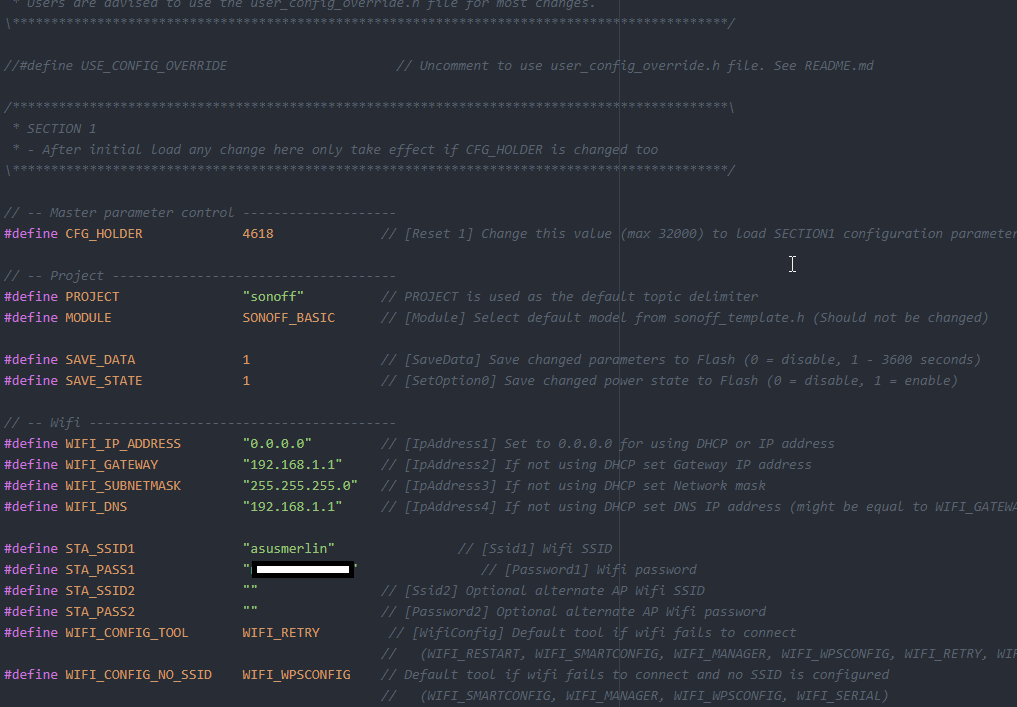
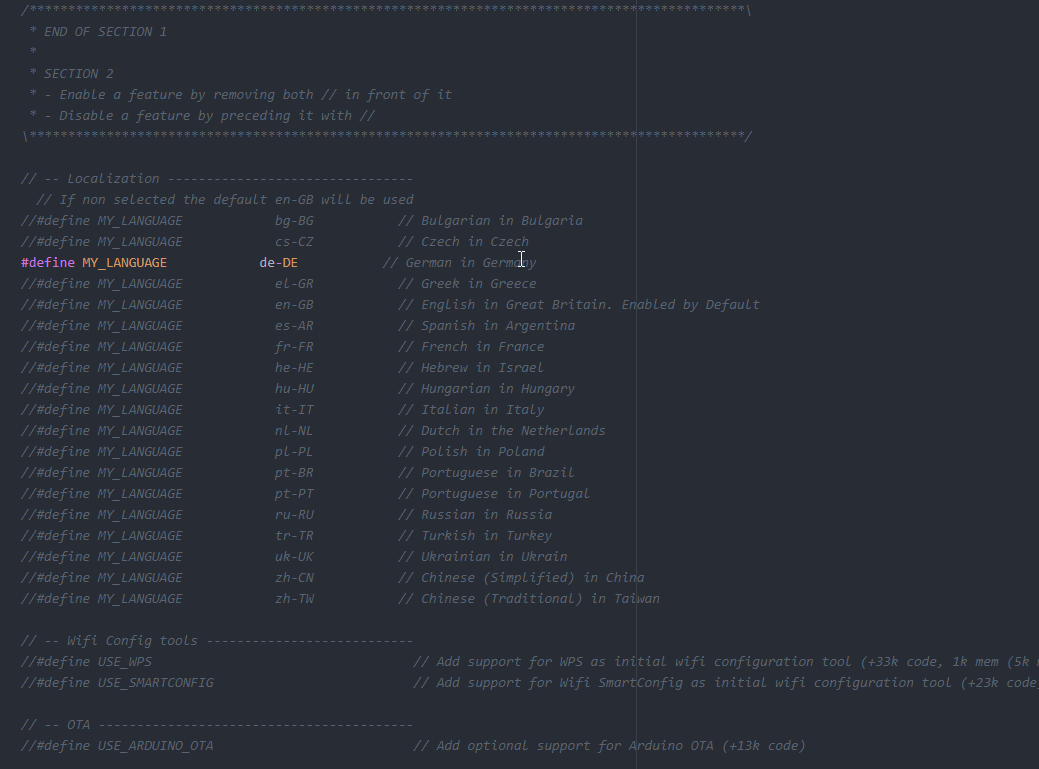
my user config settings
// -- Master parameter control --------------------
define CFG_HOLDER 4618 // [Reset 1] Change this value (max 32000) to load SECTION1 configuration parameters to flash
here i try 4618 and 4617
define STA_SSID1 "asussssn" // [Ssid1] Wifi SSID
define STA_PASS1 "mypw" // [Password1] Wifi password
define STA_SSID2 "" // [Ssid2] Optional alternate AP Wifi SSID
define STA_PASS2 "" // [Password2] Optional alternate AP Wifi password
define WIFI_CONFIG_TOOL WIFI_RETRY // [WifiConfig] Default tool if wifi fails to connect
// -- Localization --------------------------------
// If non selected the default en-GB will be used
//#define MY_LANGUAGE bg-BG // Bulgarian in Bulgaria
//#define MY_LANGUAGE cs-CZ // Czech in Czech
define MY_LANGUAGE de-DE // German in Germany
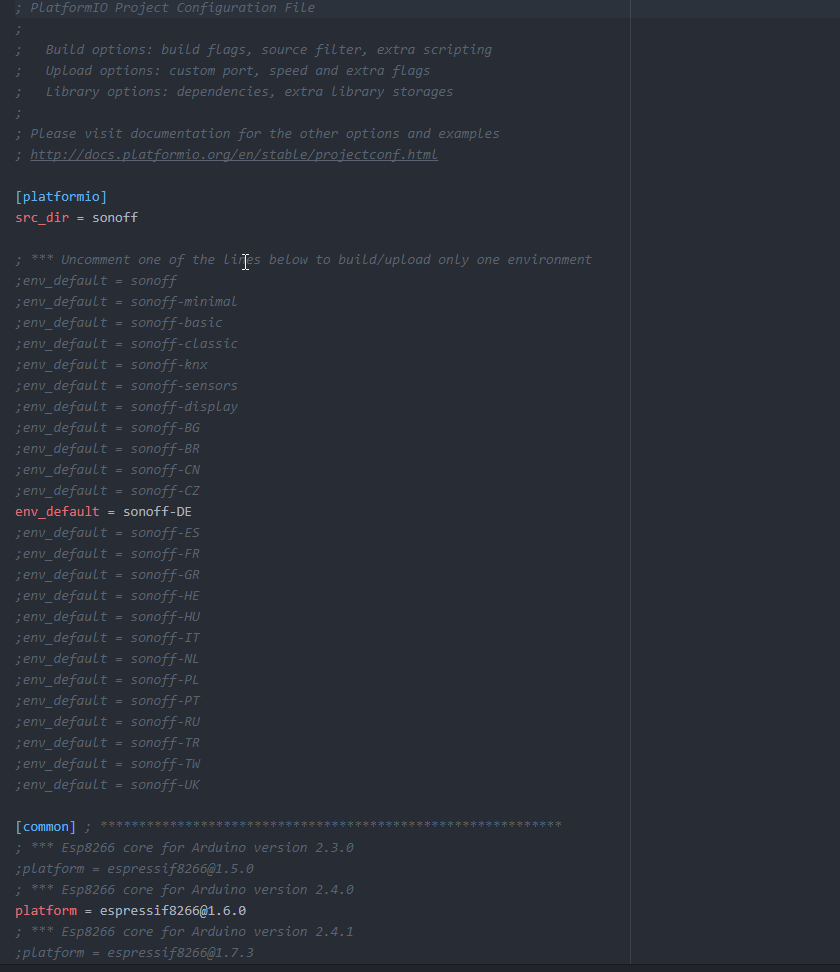
[platformio]
src_dir = sonoff
; * Uncomment one of the lines below to build/upload only one environment
env_default = sonoff-DE
[common] ; *******************
; Esp8266 core for Arduino version 2.3.0
platform = [email protected]
; Esp8266 core for Arduino version 2.4.0
;platform = [email protected]
; Esp8266 core for Arduino version 2.4.1
;platform = [email protected]
; Esp8266 core for Arduino version 2.4.2
;platform = [email protected]
; Esp8266 core for Arduino version latest beta
;platform = https://github.com/platformio/platform-espressif8266.git#feature/stage
; * Esp8266 core for Arduino current version (located in %USERPROFILE%.platformio\platforms\espressif8266)
;platform = espressif8266
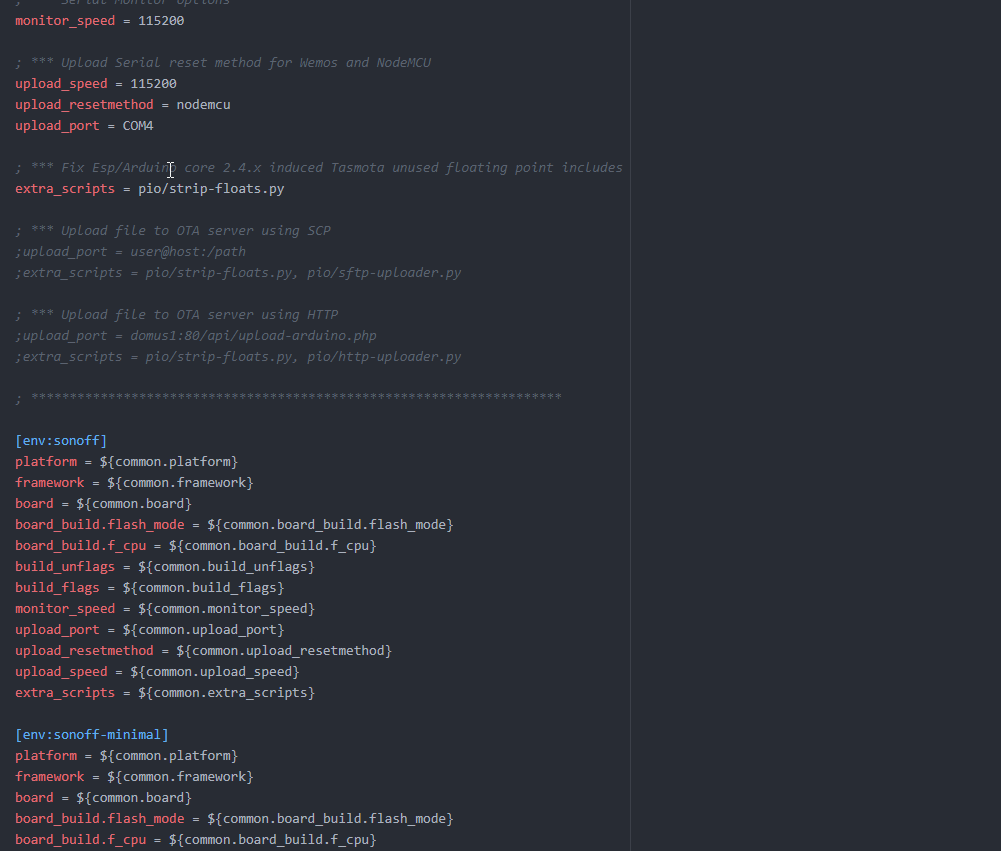
; * Upload Serial reset method for Wemos and NodeMCU
upload_speed = 115200
upload_resetmethod = nodemcu
upload_port = COM4
for all 4 power supplys the flash gave success
 badplay
All 18 comments
You will need to complete the template and include your status 0 output.
 andrethomas
on 26 Nov 2018
andrethomas
on 26 Nov 2018
Please, complete the troubleshooting template in order to enough have information to properly help you/
all shows the same resoult succefull flashed but after replug in, the green led still blinking
blinking means no wifi connected or no mqtt connected.
 ascillato
on 26 Nov 2018
ascillato
on 26 Nov 2018
how i can make the troubleshooting template ???
should i made screenshot from the settings ?
badplay
on 26 Nov 2018
When you have clicked in new issue, you had 3 options: BUG REPORT, TROUBLESHOOTING and FEATURE REQUEST. You have selected blank.
The troubleshooting template is:
IMPORTANT NOTICE
If you do not complete the template below it is likely that your issue will not be addressed. When providing information about your issue please be as extensive as possible so that it can be solved by as little as possible responses.
FAILURE TO COMPLETE THE REQUESTED INFORMATION WILL RESULT IN YOUR ISSUE BEING CLOSED
Make sure these boxes are checked [x] before submitting your issue - Thank you!
- [ ] Searched the problem in issues (https://github.com/arendst/Sonoff-Tasmota/issues)
- [ ] Searched the problem in the wiki (https://github.com/arendst/Sonoff-Tasmota/wiki/Troubleshooting)
- [ ] Searched the problem in the forum (https://groups.google.com/d/forum/sonoffusers)
- [ ] Searched the problem in the chat (https://discord.gg/Ks2Kzd4)
- [ ] Development/Compiler/Upload tools used :
- [ ] Hardware used :
- [ ] If a pre-compiled release or development binary was used, which one? :
- [ ] You have tried latest release or development binaries? :
- [ ] Provide the output of command
status 0:
STATUS 0 OUTPUT HERE
(Please, remember to close the issue when the problem has been addressed)
ascillato
on 26 Nov 2018
dont understand all but i try
Make sure these boxes are checked [x] before submitting your issue - Thank you!
done Searched the problem in issues (https://github.com/arendst/Sonoff-Tasmota/issues)
done Searched the problem in the wiki (https://github.com/arendst/Sonoff-Tasmota/wiki/Troubleshooting)
done Searched the problem in the forum (https://groups.google.com/d/forum/sonoffusers)
nope Searched the problem in the chat (https://discord.gg/Ks2Kzd4)
Development/Compiler/Upload tools used : atom.io with plattformio ide
Hardware used : https://nl.aliexpress.com/item/Free-shipping-1pcs-FT232RL-FTDI-USB-3-3V-5-5V-to-TTL-Serial-Adapter-Module-for/1902980198.html?spm=a2g0s.9042311.0.0.27424c4dFJbNBC
If a pre-compiled release or development binary was used, which one? : sonoff-de tested and own made Sonoff-Tasmota v6.3.0
You have tried latest release or development binaries? : yes
Provide the output of command status 0 : how i can made this :(
is there a way to put in screenshoots ???
`00:00:00 Projekt sonoff Sonoff (Topic sonoff, Fallback DVES_131EFE, GroupTopic sonoffs) Version 6.3.0-2_4_0
00:00:00 WIF: verbinden mit AP1 asusmerlin in Modus 11N wie sonoff-7934...
00:00:04 WIF: verbunden
00:00:04 DNS: initialisiert
00:00:04 HTP: Web-Server aktiv bei sonoff-7934.local mit IP-Adresse 192.168.1.5
00:00:04 MQT: Verbindungsversuch...
00:00:05 DNS: Suchanfrage abgeschlossen. MQTT-Services gefunden 0
21:19:00 RSL: stat/sonoff/RESULT = {"POWER":"ON"}
21:19:00 RSL: stat/sonoff/POWER = ON
21:19:01 RSL: stat/sonoff/RESULT = {"POWER":"OFF"}
21:19:01 RSL: stat/sonoff/POWER = OFF
21:19:02 RSL: stat/sonoff/RESULT = {"POWER":"ON"}
21:19:02 RSL: stat/sonoff/POWER = ON
21:19:04 MQT: Verbindungsversuch...
21:19:05 DNS: Suchanfrage abgeschlossen. MQTT-Services gefunden 0
21:19:16 MQT: Verbindungsversuch...
21:19:17 DNS: Suchanfrage abgeschlossen. MQTT-Services gefunden 0
21:19:28 MQT: Verbindungsversuch...
21:19:29 DNS: Suchanfrage abgeschlossen. MQTT-Services gefunden 0
21:19:39 MQT: Verbindungsversuch...
21:19:40 DNS: Suchanfrage abgeschlossen. MQTT-Services gefunden 0
21:19:51 MQT: Verbindungsversuch...
21:19:52 DNS: Suchanfrage abgeschlossen. MQTT-Services gefunden 0
21:19:52 CMD: status 0
21:19:52 RSL: stat/sonoff/STATUS = {"Status":{"Module":1,"FriendlyName":["Sonoff"],"Topic":"sonoff","ButtonTopic":"0","Power":1,"PowerOnState":3,"LedState":1,"SaveData":1,"SaveState":1,"SwitchTopic":"0","SwitchMode":[0,0,0,0,0,0,0,0],"ButtonRetain":0,"SwitchRetain":0,"SensorRetain":0,"PowerRetain":0}}
21:19:52 RSL: stat/sonoff/STATUS1 = {"StatusPRM":{"Baudrate":115200,"GroupTopic":"sonoffs","OtaUrl":"http://thehackbox.org/tasmota/release/sonoff.bin","RestartReason":"Power on","Uptime":"0T00:01:04","StartupUTC":"2018-11-26T20:18:48","Sleep":0,"BootCount":4,"SaveCount":10,"SaveAddress":"FA000"}}
21:19:52 RSL: stat/sonoff/STATUS2 = {"StatusFWR":{"Version":"6.3.0","BuildDateTime":"2018.11.26 20:01:42","Boot":31,"Core":"2_4_0","SDK":"2.1.0(deb1901)"}}
21:19:52 RSL: stat/sonoff/STATUS3 = {"StatusLOG":{"SerialLog":2,"WebLog":2,"SysLog":0,"LogHost":"","LogPort":514,"SSId":["asusmerlin",""],"TelePeriod":300,"SetOption":["00008009","55818000","00000000"]}}
21:19:52 RSL: stat/sonoff/STATUS4 = {"StatusMEM":{"ProgramSize":514,"Free":488,"Heap":18,"ProgramFlashSize":1024,"FlashSize":1024,"FlashMode":3,"Features":["00000407","0FDAE794","240183A0","23B617CE","00003BC0"]}}
21:19:52 RSL: stat/sonoff/STATUS5 = {"StatusNET":{"Hostname":"sonoff-7934","IPAddress":"192.168.1.5","Gateway":"192.168.1.1","Subnetmask":"255.255.255.0","DNSServer":"192.168.1.1","Mac":"EC:FA:BC:13:1E:FE","Webserver":2,"WifiConfig":4}}
21:19:52 RSL: stat/sonoff/STATUS6 = {"StatusMQT":{"MqttHost":"","MqttPort":1883,"MqttClientMask":"DVES_%06X","MqttClient":"DVES_131EFE","MqttUser":"DVES_USER","MqttType":1,"MAX_PACKET_SIZE":1000,"KEEPALIVE":15}}
21:19:52 RSL: stat/sonoff/STATUS7 = {"StatusTIM":{"UTC":"Mon Nov 26 20:19:52 2018","Local":"Mon Nov 26 21:19:52 2018","StartDST":"Sun Mar 25 02:00:00 2018","EndDST":"Sun Oct 28 03:00:00 2018","Timezone":1,"Sunrise":"08:15","Sunset":"16:59"}}
21:19:52 RSL: stat/sonoff/STATUS10 = {"StatusSNS":{"Time":"2018-11-26T21:19:52"}}
21:19:52 RSL: stat/sonoff/STATUS11 = {"StatusSTS":{"Time":"2018-11-26T21:19:52","Uptime":"0T00:01:04","Vcc":3.480,"POWER":"ON","Wifi":{"AP":1,"SSId":"asusmerlin","BSSId":"C4:04:15:3D:F5:D5","Channel":5,"RSSI":100}}}
21:20:03 MQT: Verbindungsversuch...
21:20:04 DNS: Suchanfrage abgeschlossen. MQTT-Services gefunden 0
21:20:15 MQT: Verbindungsversuch...
21:20:16 DNS: Suchanfrage abgeschlossen. MQTT-Services gefunden 0

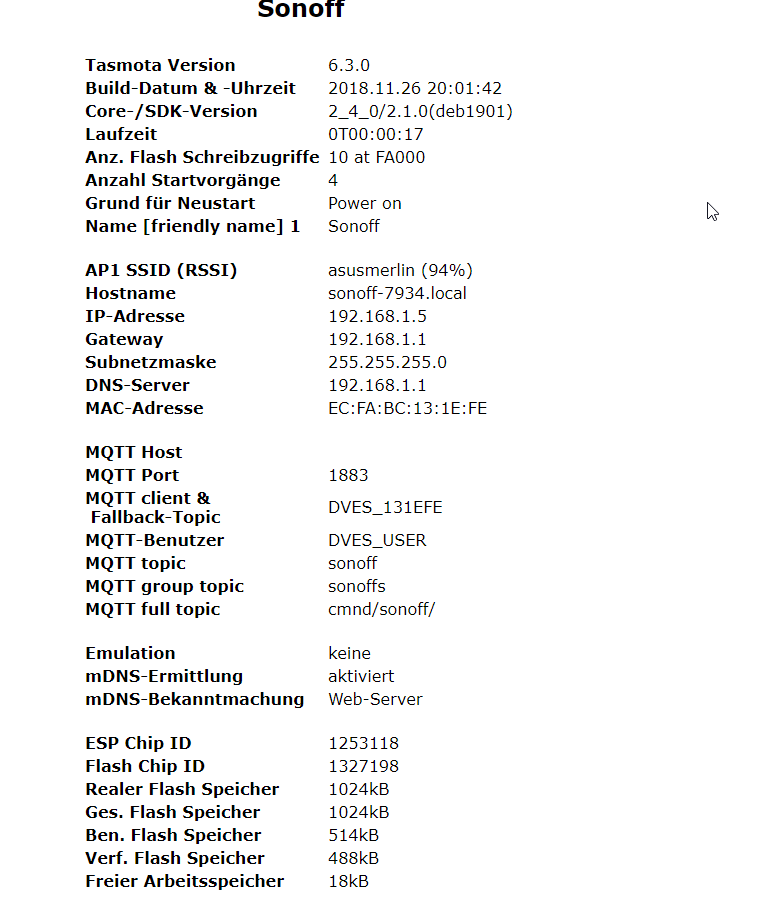
alsow i try with arduino version 2.3.0
`
badplay
on 26 Nov 2018
You are using a core that is it buggy and have wifi issues
Core":"2_4_0"
So, please,
Erase all flash with esptool.py as explained in the wiki (link: https://github.com/arendst/Sonoff-Tasmota/wiki/Troubleshooting#esptool-usage ) and flash also with esptool.py, the precompiled bins from the development branch (http://thehackbox.org/tasmota/)
Please use the tutorials in the wiki (https://github.com/arendst/Sonoff-Tasmota/wiki) and also the support chat (https://discord.gg/Ks2Kzd4)
Thanks
ascillato
on 26 Nov 2018
 ascillato2
on 26 Nov 2018
ascillato2
on 26 Nov 2018
hope i understand how i do this
and we cant use atom.io for do this? becorse i made a tutorial about it how to flash but if this not working i will delete it
badplay
on 26 Nov 2018
what is this core??? i mean from were from platformio? how i change it .
badplay
on 26 Nov 2018
I have already posted to you the links to the tutorials that works. All that is in the wiki.
You are having compilation issues, that is why, it is better to use the precompiled bins when you start with Tasmota. Just follow the steps in the links provided.
The core is the Arduino core that links the espressif SDK with the arduino libraries. 2.3.0 works fine. 2.4.0 and 2.4.1 have wifi issues. do not use.
From your provided information, we can see that you are using also 6.3.0 That version is more than 500 commits old. Lots of bugs were solved since then. That is why also was provided the link to the latest Tasmota (6.3.0.13)
If you use the platformio.ini file by default (as it is in the Tasmota repository) you will be using the right core.
_Please update to latest version and please try first the precompiled bins._
Default core selection in _platformio.ini_:
[common] ; ************************************************************
; *** Esp8266 core for Arduino version 2.3.0
platform = [email protected]
; *** Esp8266 core for Arduino version 2.4.0
;platform = [email protected]
; *** Esp8266 core for Arduino version 2.4.1
;platform = [email protected]
; *** Esp8266 core for Arduino version 2.4.2
;platform = [email protected]
; *** Esp8266 core for Arduino version Stable STAGE (2.5.0) Tasmota
;platform = https://github.com/Jason2866/platform-espressif8266.git#Tasmota
; *** Esp8266 core for Arduino version latest beta (STAGE) from https://github.com/esp8266/Arduino
;platform = https://github.com/platformio/platform-espressif8266.git#feature/stage
; *** Esp8266 core for Arduino current version (located in %USERPROFILE%\.platformio\platforms\espressif8266)
;platform = espressif8266
uff i have some trouble to understand :( i cant install the pip install pyserial :(
can someone assist me in the chat please
badplay
on 26 Nov 2018
i used this
https://github.com/arendst/Sonoff-Tasmota/releases
so why this is an old version ? :(
hm i have some trouble to understand english is not my nativ langues i have some trouble to install esptool and make the erase :(
badplay
on 26 Nov 2018
That was the last release but there are bugfixes since then... over 800 changes, so for stability, for now, use the open development one as provided.
andrethomas
on 26 Nov 2018
PS C:\esptool> python setup.py install
python : Die Benennung "python" wurde nicht als Name eines Cmdlet, einer Funktion, einer Skriptdatei oder eines
ausführbaren Programms erkannt. Überprüfen Sie die Schreibweise des Namens, oder ob der Pfad korrekt ist (sofern
enthalten), und wiederholen Sie den Vorgang.
In Zeile:1 Zeichen:1
- python setup.py install
~~
- CategoryInfo : ObjectNotFound: (python:String) [], CommandNotFoundException
- FullyQualifiedErrorId : CommandNotFoundException
badplay
on 26 Nov 2018
s20 flash erase
python 2.7 installation
open cmd
c:\python27\python.exe -m pip install esptool
then
c:\python27\python.exe -m pip install pyserial
now
for erase
bring the sonoff into flash mode
now do this but use the correct port for your flasher see it in manager
c:\python27\python.exe -m esptool --port COM4 erase_region 0x0F4000 0x008000
now
Optional Clear the complete flash with command
c:\python27\python.exe -m esptool --port COM4 erase_flash
now
Optional Load Tasmota into a device with command
c:\python27\python.exe -m esptool --port COM4 write_flash -fs 1MB -fm dout 0x0 sonoff.bin
badplay
on 26 Nov 2018
I tried 6.5 and 6.4, always got blink green light. What to do?
 dwengticorp
on 27 Mar 2019
dwengticorp
on 27 Mar 2019
A blinking led means no wifi configured or no mqtt configured.
If you need support, please use the Tasmota support chat. Thanks
ascillato
on 27 Mar 2019
Related issues
 grizewald
·
3Comments
grizewald
·
3Comments
 JoergZ2
·
3Comments
JoergZ2
·
3Comments
 j4k3
·
3Comments
j4k3
·
3Comments
 renne
·
3Comments
renne
·
3Comments
 Vujagig
·
3Comments
Vujagig
·
3Comments
Most helpful comment
A blinking led means no wifi configured or no mqtt configured.
If you need support, please use the Tasmota support chat. Thanks