Tasmota: [Question] Sonoff iFan02 - deactivate sound when fan speed changes
I couldn't find how to do this from Tasmota, if I use the remote, there is a button that allows to mute the fan so when speed changes, the only noise you hear is the "click" from the relay, instead of a really loud BEEP (one per level, and a long beep if you turn fan off).
The problem is that, if you configure it using the remote, if AC go off (power outage or whatever), you need to push the button again, so there is no way to get rid off the remote :(
Anyone knows how can this be achieved?
Thanks!
 aimartin
All 12 comments
Quick hardware solution:
Desolder the loudspeaker or buzzer
 Jason2866
on 8 Oct 2018
Jason2866
on 8 Oct 2018
LOL, I was wondering if there is a less destructive way to achieve this... xD
I looked at the pictures of the circuit board and I didn't see the buzzer, although I'm not an expert...
aimartin
on 8 Oct 2018
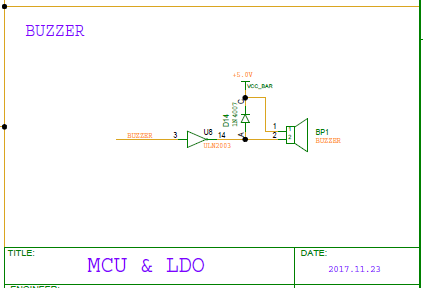
Edit: Sorry. This is just the schematics.
 arendst
on 8 Oct 2018
arendst
on 8 Oct 2018
I've checked the pictures, but now in a second look, I found it:
https://user-images.githubusercontent.com/26437169/41858543-230bc352-7868-11e8-8a81-9d2f10bdc7c2.jpg
I will try to remove it... without breaking it...
Thanks
Edited: Credit to the picture to the original thread for the iFan support: https://github.com/arendst/Sonoff-Tasmota/issues/2839
aimartin
on 8 Oct 2018
I found easy solution to at least make buzzer volume more acceptable was to but a blob of hot glue on top of the buzzer speaker hole. Buzzer still works but is not obnoxiously loud
 brettlg
on 3 Jan 2019
brettlg
on 3 Jan 2019
I just removed it with a bit of force and a pliers xD. Seems to still be working fine...
aimartin
on 4 Jan 2019
There is a button on the remote that comes with the unit that turns off the beep.
 josephhajduk
on 17 May 2019
josephhajduk
on 17 May 2019
Yes, but that setting is reset every time you disconnect and re-connect the iFan (for example, in a power outage), so is very annoying.
I ended up removing the speaker and it works as expected without the beep :)
aimartin
on 17 May 2019
Still though. We need a solution in the software settings to have this permanent upon power drop/reconnect, without removing the buzzer itself.
 mkormendy
on 13 Jul 2019
mkormendy
on 13 Jul 2019
I agree, I don't want to have to take my entire fan apart and back together to remove the buzzer, I guess I'll just tape my light switch until a software solution comes out
 ShayBox
on 20 Dec 2020
ShayBox
on 20 Dec 2020
I ended up opening up the module and removing the buzzer as well. It's completely unnecessary.
mkormendy
on 20 Dec 2020
I actually just figured out how to do this in software, not exactly a perfect solution but it works if you don't want to use the buzzer for alerts in things like homeassistant, you clone the ifan03 template and remap gpio10 (buzzer) to none, then apply that template to the module.
ShayBox
on 20 Dec 2020
Related issues
 Joeyhza
·
3Comments
Joeyhza
·
3Comments
 kckepz
·
3Comments
kckepz
·
3Comments
 luisfpinto
·
3Comments
luisfpinto
·
3Comments
 ximonline
·
3Comments
ximonline
·
3Comments
 Ndrinta
·
3Comments
Ndrinta
·
3Comments
Most helpful comment
Still though. We need a solution in the software settings to have this permanent upon power drop/reconnect, without removing the buzzer itself.