Tasmota: CE Smart Home Wifi Smart Dimmer Light Switch (TYWE1S) Model WF500D
Has anyone had success with:
CE Smart Home Wifi Smart Dimmer Light Switch (TYWE1S) Model WF500D
From the same series of this Wifi Plug which is already supported.
Purchased at Costco, a pack of two for $39.99 CDN
The manual can be found here
Product

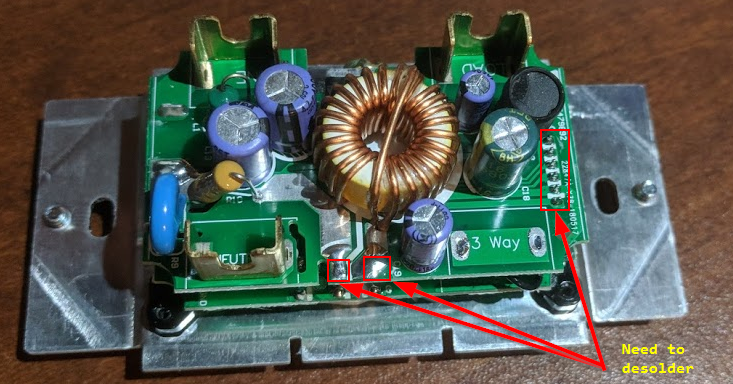
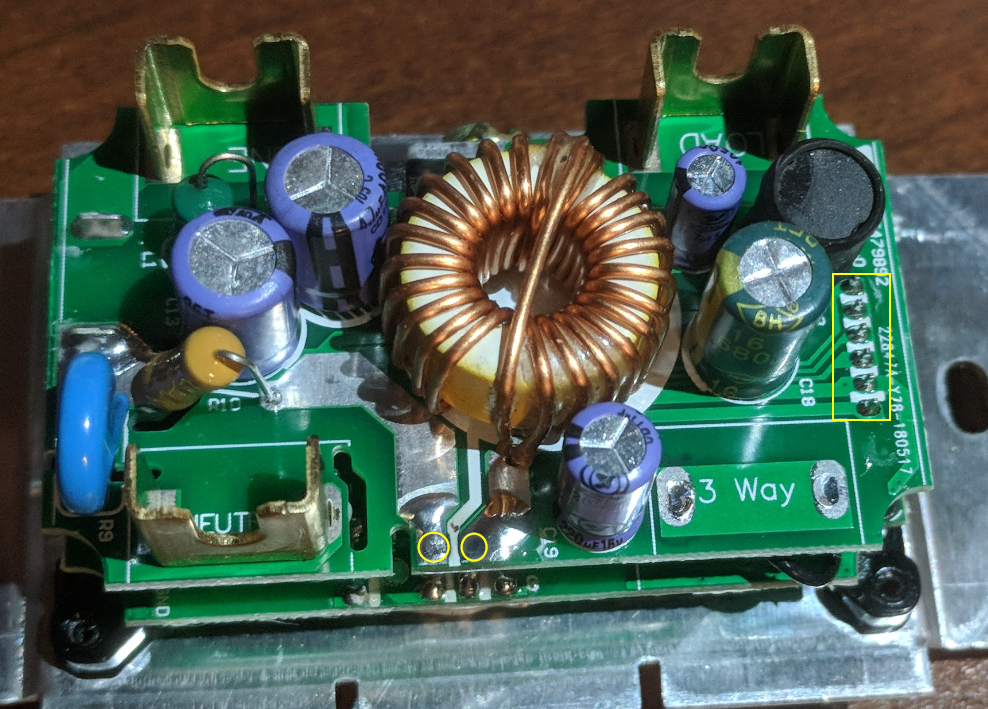
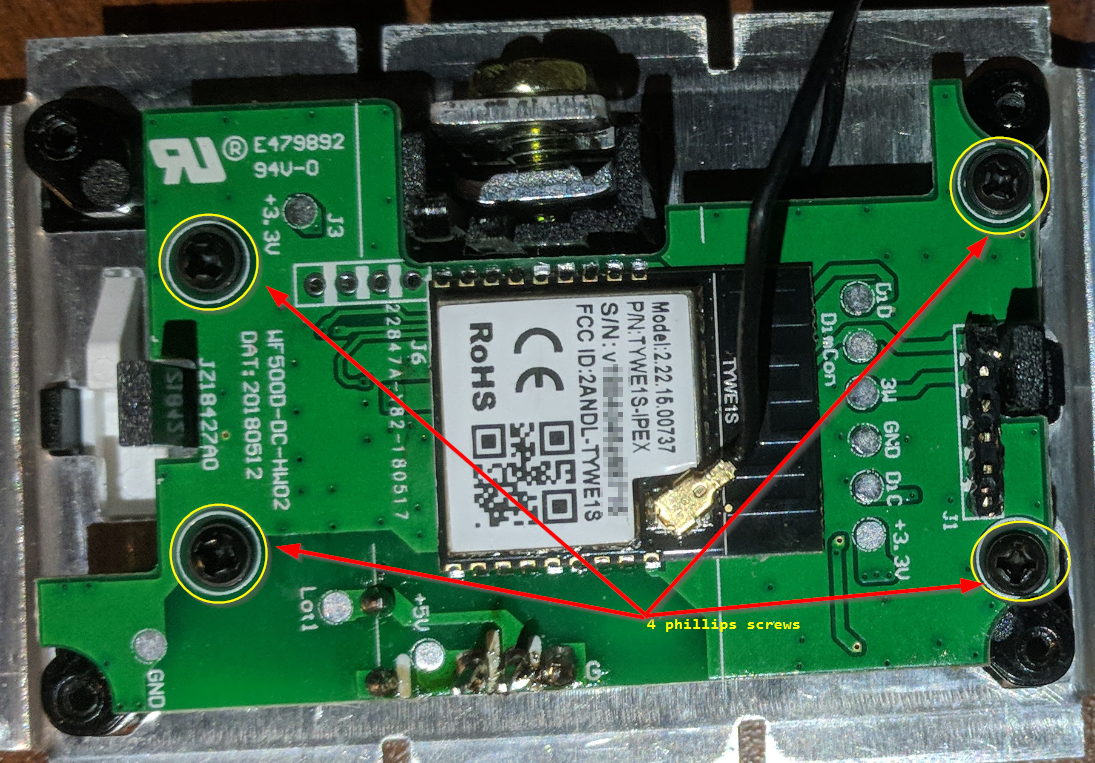
Here are some disassembly pics and notes.


They've made it particularly difficult to take it apart.
You need to de-solder or clip the connections.


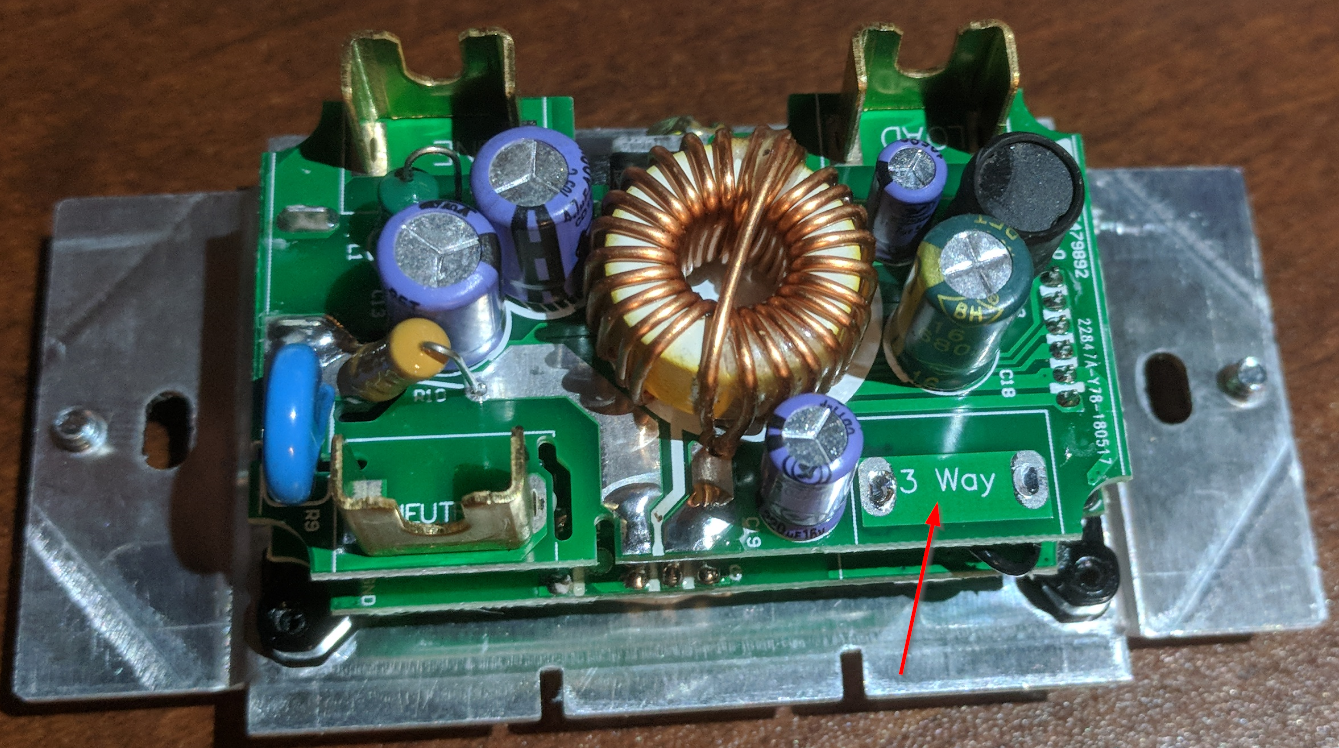
Looks like the same PCB will be used for the 3-way versions.
Thanks
BB
 badabing2005
All 34 comments
Hi,
Dimmers are not supported yet.
Please see #469 for further information.
Thanks.
 ascillato
on 7 Oct 2018
ascillato
on 7 Oct 2018
Closing this issue as it has been answered. Thank you for your valued inputs.
If you have further questions please do not hesitate to follow one of the provided support entry points listed below.
Support Information
See Wiki for more information.
See Community for forum.
See Chat for more user experience.
 andrethomas2
on 7 Oct 2018
andrethomas2
on 7 Oct 2018
It can probably be supported by switching UART port.
 qingz2004
on 26 Oct 2018
qingz2004
on 26 Oct 2018
It is supported.
Please see #469 for further information.
Here is the wiki.
Flash it the same way as the other ESP8266 product.
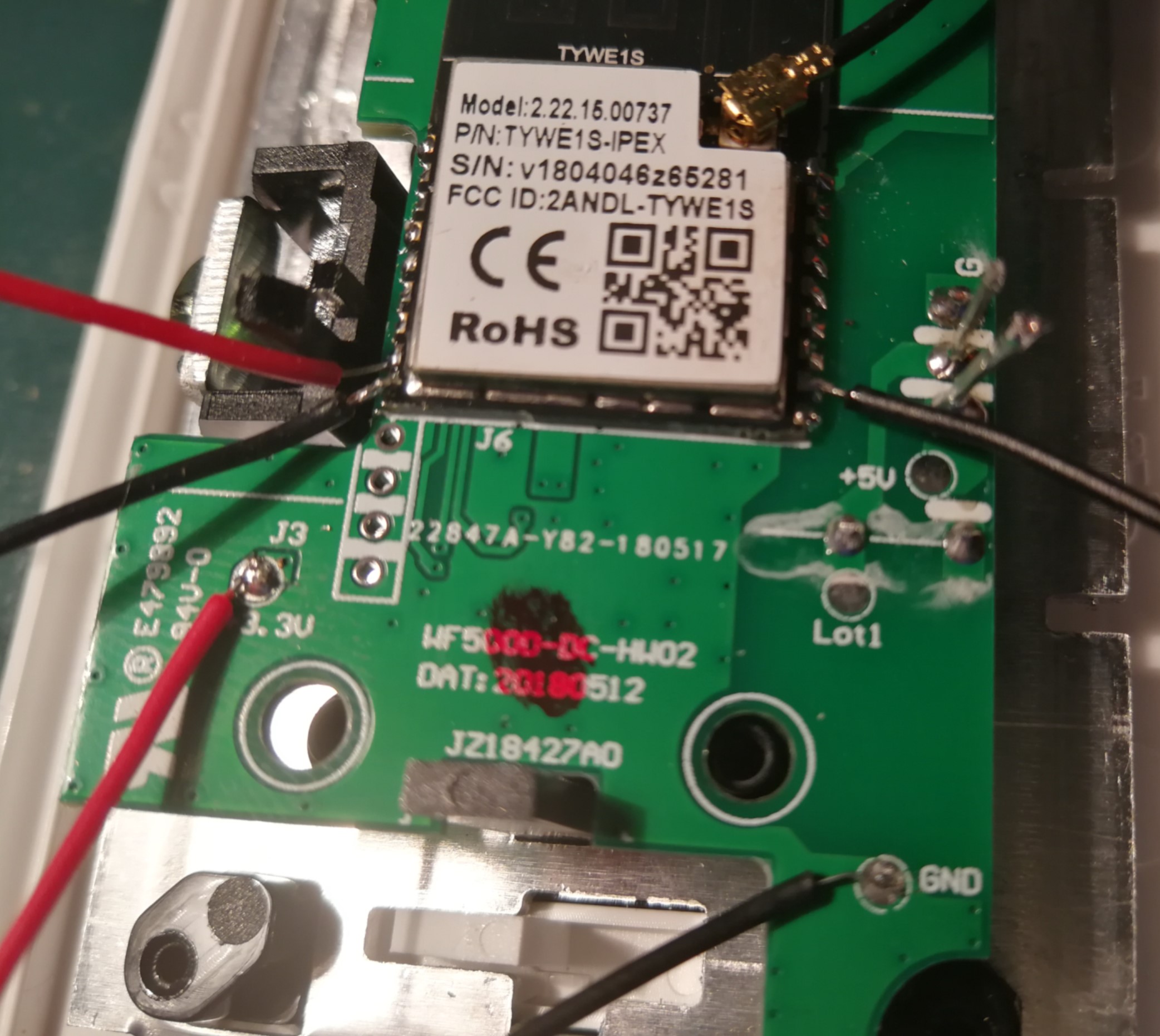
Setup

qingz2004
on 28 Oct 2018
Thank you @qingz2004
Just to be sure, the relay portion of the device does not need to be connected to flash
The black on the right is connected to U0RX
The black on the left if connected to GPIO 0
The red above it is connected to U0Tx
and the red at the bottom is the 3.3v (obviously)
Can I flash the latest sonoff.bin
Probably not as it is dated Sep 5th
Which build should I flash?
Can I set all the settings afterwards through serial or do I need special defines / settings in the source and build from that?
Thanks for the awesome work.
BB
badabing2005
on 28 Oct 2018
@badabing2005 The connection is right, plus I used the GND pad from bottom right corner for easy soldering.
You can not use the sonoff.bin from Sep 5th. The code (Tuya Software Serial) is just added in the development branch yesterday by @chaosmaster.
You may have to compile it from the development branch for now.
qingz2004
on 28 Oct 2018
Thanks @qingz2004
Ok Got the Development branch, built sonoff using VS Code (Platform IO IDE)
flashed firmware.bin using ESPEasy Flasher
Then in Termite
All I get is:
 ets Jan  8 2013,rst cause:2, boot mode:(3,0)

load 0x4010f000, len 1384, room 16
tail 8
chksum 0x2d
csum 0x2d
v3fff38f8
~ld
And I also don't see Direct Wifi for Sonoff.
I'm sure I'm doing something wrong, if you could kindly point out where, it would be nice.
Thanks
badabing2005
on 28 Oct 2018
Even flashing this, I get the same.
badabing2005
on 28 Oct 2018
I set my own WiFi in the user config.
qingz2004
on 28 Oct 2018
I must be doing something wrong.
Entered my wifi settings in sonoff\my_user_config.h
Rebuild
Flashed
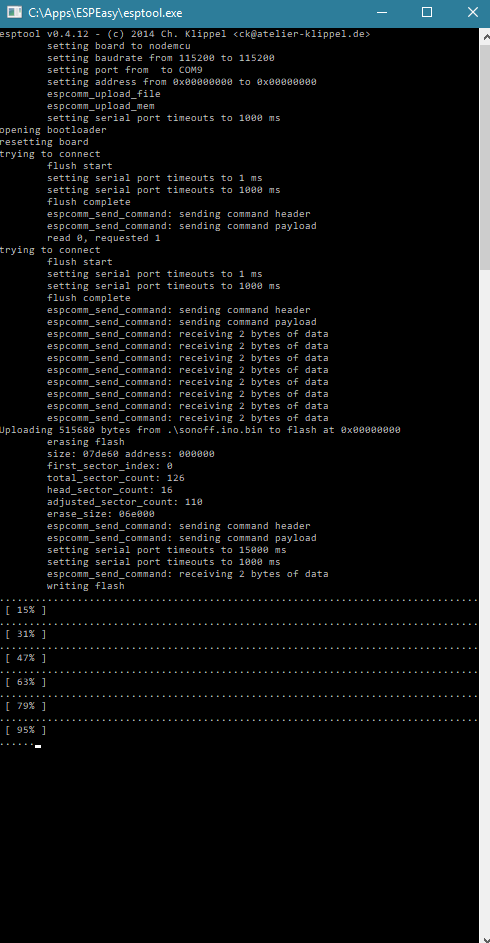
Still the same thing, It's not connecting to wifi and serial connection shows
constantly scrolling
 ets Jan  8 2013,rst cause:2, boot mode:(3,0)

load 0x4010f000, len 1384, room 16
tail 8
chksum 0x2d
csum 0x2d
v3fff3948
~ld

 ets Jan  8 2013,rst cause:2, boot mode:(3,0)

load 0x4010f000, len 1384, room 16
tail 8
chksum 0x2d
csum 0x2d
v3fff3948
~ld
:(
badabing2005
on 28 Oct 2018
I got the same with one of my dimmer.
Try with another one.
qingz2004
on 28 Oct 2018
So this one is considered paperweight?
I'll try with the other, but would hate to lose both.
Taking these apart is such a Pita, did you manage to desolder and detach the jumper pins?
For the Voltage regulator, it wasn't bad, but the 2mm jumper pins, I had to clip them (see pic above), now I'm waiting for the replacement jumpers to arrive.
Thanks for all your assistance.
BB
badabing2005
on 28 Oct 2018
Not sure if this would apply to us.
badabing2005
on 28 Oct 2018
So this one is considered paperweight?
You can still use it without WiFi. I can not connect to it with the stock firmware. So to me, it's not worse.
Can you connect to it with the CE app?
qingz2004
on 28 Oct 2018
Do I need to flash the original firmware?
Where do I find that?
badabing2005
on 28 Oct 2018
Use esptool to backup the stock firmware before flash.
qingz2004
on 28 Oct 2018
Thanks, I'll do that on the second unit :)
badabing2005
on 28 Oct 2018
I flashed three, two of them are good. I will debug the bad one later when I have time.
Have you tried with CE app before flash? Does it work?
qingz2004
on 28 Oct 2018
So this one is considered paperweight?
You can still use it without WiFi. I can not connect to it with the stock firmware. So to me, it's not worse.
Can you connect to it with the CE app?
Thanks,
I'll bend the jumper this time
I won't have a chance today, but I'll give it a shot tomorrow.
Thanks for your help, let me know if you manage to find out what's wrong with your other unit.
BB
badabing2005
on 28 Oct 2018
Just got back and couldn't wait,
I flashed the second Dimmer.
Strangely I got absolutely nothing on the serial after flashing.
I couldn't even get status.
Surprisingly, it connected to my wifi, and I was able to add more settings through webui
I chose Tuya Dimmer (54)
Do I need to set anything else?
I can get the console in webui, but serial connection I get nothing, are these at 115200 baud?
Any idea why I get nothing on serial? if there was anything wrong with my serial connection, I wouldn't have been able to flash.
What's next, just close the box and put in in wall?
I suppose update flashes can now all be done OTA, and I can desolder the serial pins?
How do I test this before connecting to mains?
I have green LED constantly flashing, but I see in the dimmer thread that you have that issue as well and working with Joel.
Thanks for all the hard work.
BB
badabing2005
on 29 Oct 2018
Check the wiki for settings.
qingz2004
on 29 Oct 2018
Thanks,
Done and settings updated.
Was that supposed to address the serial issue? if it was, it hasn't.
Good night.
BB
badabing2005
on 29 Oct 2018
I think it is expected with current code, not sure if it's a bug or supposed to be like that.
Since it uses U1TX/RX instead of U0TX/RX to communicate between ESP8266 and MCU, the serial console may also be re-directed to U1TX/RX.
qingz2004
on 29 Oct 2018
Ah ok, it's not only mine, you have the same issue.
Thanks
BB
badabing2005
on 29 Oct 2018
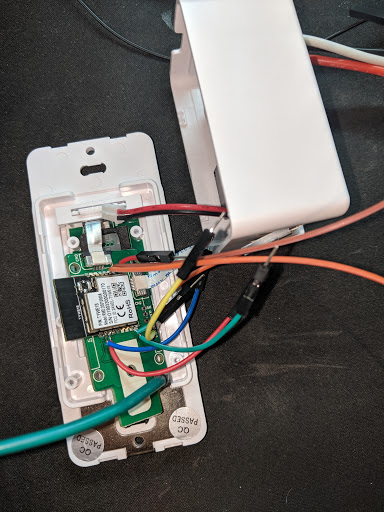
I have a Moes DS01 using this same chip (TYWE1S). It flashed successfully with the pre-compiled bin using ESPEasy (FlashESP8266), but I couldn't termite in to put in my SSID info. I tried connecting to U0TX/RX and U1TX/RX with no luck. It also didn't go into WIFICONFIG mode where it broadcasts an SSID to connect to. As a last hurrah, I tried putting it back together (connecting the ribbon cables) and connecting it to mains power. THAT WORKED! I was able then to connect to the device over WIFI to configure it. Looks like its all working now :-)
As you can see, I have a mess of wires going on here ;-)
 e2m32
on 22 Jun 2019
e2m32
on 22 Jun 2019
I bought one of the Moes Dimmers as well, but can not flash it.
I've connected UX0,TX0 and GPO0 to ground, but for some reason it isn't allowing flash. Is there any particular changes you made to this setup that are not posted here?
 arduino43
on 23 Jun 2019
arduino43
on 23 Jun 2019
Nevermind - I had UX0 connected to the wrong pin.
arduino43
on 23 Jun 2019
I have a Moes DS01 using this same chip (TYWE1S). It flashed successfully with the pre-compiled bin using ESPEasy (FlashESP8266), but I couldn't termite in to put in my SSID info. I tried connecting to U0TX/RX and U1TX/RX with no luck. It also didn't go into WIFICONFIG mode where it broadcasts an SSID to connect to. As a last hurrah, I tried putting it back together (connecting the ribbon cables) and connecting it to mains power. THAT WORKED! I was able then to connect to the device over WIFI to configure it. Looks like its all working now :-)
As you can see, I have a mess of wires going on here ;-)
I've got it running, but it doesnt respond using the Tuya Dimmer (54) template. Did you have any additional configuration? I've also set SetOption34 2 but it still does not work.
arduino43
on 23 Jun 2019
arduino43,
I have the same switch and set it up today. I don't know if you got it working, but try using the template found in the wiki.
You'll also need to reset SetOption34 to 3 again so the ESP can communicate with the MCU on the back.
 jmw6773
on 16 Aug 2019
jmw6773
on 16 Aug 2019
That worked, the flashing red LED was frustrating.
The LED is now solid white - Thanks!
arduino43
on 17 Aug 2019
arduino43,
I found that flashing digiblur's fork of Tasmota worked much better for this dimmer. Before when I sent a value to dim to, it would set that value and then change it's value to a lower level. Digiblur's fork fixed this.
jmw6773
on 19 Aug 2019
I flash mine with tuya-convert. Set the module like below, it works. I am still having problem to control it with "tasmota-connect" though.
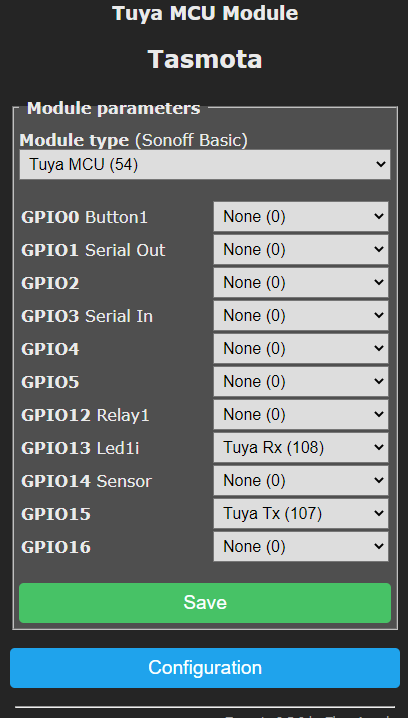
 wyxsmarthome
on 20 Oct 2020
wyxsmarthome
on 20 Oct 2020
@wyxsmarthome remember to enter command "SetOption19 1"
@jmw6773 , were you talking about the Model WF500D using the Digiblur's fork or the Moes Dimmer using Digiblur fork?
I tried using the template and infos on "blakadder ce_smart_home_CFW500D-3W", but neither are working ...
 papapep514
on 2 Nov 2020
papapep514
on 2 Nov 2020
@papapep514, I was recommending the Digiblur fork for the Moes Dimmer. However, I believe that Digiblur's changes were merged into the main Tasmota branch a few releases ago. I'm using the normal Tasmota release on my dimmer without issue now.
I don't have a WF500D to test with, sorry.
jmw6773
on 3 Nov 2020
Related issues
 he-so
·
3Comments
he-so
·
3Comments
 Vujagig
·
3Comments
Vujagig
·
3Comments
 smadds
·
3Comments
smadds
·
3Comments
 JoergZ2
·
3Comments
JoergZ2
·
3Comments
 wirelesssolution
·
3Comments
wirelesssolution
·
3Comments