Have you look for this feature in other issues and in the wiki? Yes
Is your feature request related to a problem? Please describe.
The Tasmota web server main page is nice for an insider but not so nice and dangerous for an ordinary user. With MQTT an the necessary infrastructure everything might be better but I'm running Tasmota devices only (right now).
Describe the solution you'd like
1. The Sonoff Pow module shows 7 lines of extra information to the user. (Not relevant for this issue but let me say it: Line 4 is of no value to the user and lines 5..7 of less value.) Why not showing 2 lines with the content of var1..5 and mem1..5? This would make a lot sense to users. E.g. with var1=Engine_; var2=running! you can read the message line Engine_running!. By use an event you set var2=stopped! and see the message line Engine_stopped!. Var3..5 are empty and therefore not recognized. Such a modification is not limited to Sonoff Pow module only!
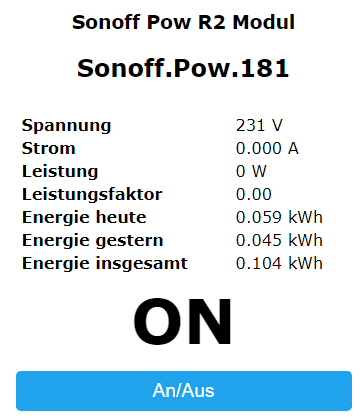
In addition by using a new SetOptionxx N you can control the appearance of the tiny user message interface:
- Command Payload Description
- SetOptionxx Show current interface type
- SetOptionxx 0 No user messages, only button "An/Aus" shown
- SetOptionxx 1 No user messages, all buttons shown (like today)
- SetOptionxx 2 User messages shown, only button "An/Aus" shown
- SetOptionxx 3 User messages shown, all buttons shown
Describe alternatives you've considered
- Instead of showing "vars" and "mems" a command similar to WebSend
UserSend [<text><var1..5><mem1..5>]maybe can do same, but might be more development because of a new command.
Additional context
- The SetOptionxx even makes sense without this additional user message lines. It can be used to switch on/off the appearance of each button at the main page. An ordinary user never needs "Informationen", "Firmware Update", "Konsole". He better should see button "Neustart" small and with light color (usage is exception only). Most sub-buttons of the button "Einstellungen" makes no sense to a user either except sub-buttons "Zeitplan / WLAN konfigurieren".
- If you switch all buttons to hidden, it might be a problem to make them visible again. By web command you can send the right "SetOptionxx N", but that is not conveniant. What about a click to a unvisible button? Ideas are welcome!
 Pewibe
All 8 comments
I doubt that you will find a lot of support for your idea. Take a look at the primary reason for Tasmota and you will see that the web server really isn't even on the list. While you can use the web server interface to control it, that UI is not designed for uninformed user's use.
If you want user friendly control for home automation, you should invest the time to figure out which home automation system works best for your needs. The wiki has links to many choices. Each one offers something.
Theo likes Domoticz. I tried it and found it didn't handle non metric units well and requires a fair amount of manual setup. But, it does automatically keep track of last seen time and has some graphing built in. I the tried OpenHAB. It is hard to get started and quite confusing, but with persistence I am finding it quite capable. I briefly looked at Home Assistant, but it seems really easy to misconfigure it and it didn't offer anything extra than OpenHAB. I also use NodeRED, but any UI would need to be provided by me, which is why I started looking for a Home Automation system that was more complete.
 Frogmore42
on 16 Sep 2018
Frogmore42
on 16 Sep 2018
I can recommend OpenHab too :-)
Not long ago there where a discussion initiated from Theo to cancel WebFrontend completly.
I needs many resources and it isnt as @Frogmore42 already said the focus of TASMOTA.
So maybe in future Web Frontend is gone...
 Jason2866
on 17 Sep 2018
Jason2866
on 17 Sep 2018
A modern fairytale: There was an egineer who constructed a remote controlled soapbox, a small platform with motor and brakes. Another said, what about a steering wheel? No he said, in general a good idea but I want to remove the brake and gas pedal anyway! grins
I believe the web interface of Tasmota is one of the success factors, because it tears down the barrier against IoT for beginners and non-engineering people. And why increasing local intelligence (Rules, timers, websend, etc.) when pointing every time towards management systems? I know that I have to use fpr long terms a automation system. The way to achieve it can be much easier if a lot works local in these small devices.
Pewibe
on 17 Sep 2018
I am somewhere in the middle between @Jason2866 and @Pewibe.
TL;DR version - one vote for a home automation hub (openHAB for me) and one vote for _not_ getting rid of the web interface.
If all one needs is a few items in one's home to be automated via an environmental sensor or a timed event, then one can probably get away with "stand alone" edge devices (e.g., Sonoff running TASMOTA). But to achieve even a rudimentary interaction of more than one item, one is, at the very least, looking at interacting with an MQTT broker or the likes. At that point, one might as well set that up on one's local network. And if one has gone that far, the a home automation hub is really not that much additional effort. Once the hub is in place, the flexibility it provides opens up a realm of automation possibilities. All this to say, I'm on the "gotta have a hub" side of the argument.
So, where I'm in the middle is that I also agree with @Pewibe that the TASMOTA web interface is a must (beyond just the "low level" configuration pages, e.g., AP setup). I avoid the serial interface for anything other than flashing the device. I have very little in terms of an electronics tool workbench - basically an old soldering iron and some solder. I avoid soldering on these IoT devices as much as humanly possible. Therefore, I have a solderless contraption that works with most devices, particularly Sonoffs. Without the web interface I'd have to have physical access to each device (sometimes not the easiest endeavor). I suppose I could use MQTT pub/sub for some of this (or even something like TasmoAdmin to handle some of this with a remote interface). But this is far more complicated and I don't believe it provides a means to perform every Console command available (or needed). So, once I get TASMOTA on the device, the web interface is really my "only" means to complete the "deeper" setup and to perform troubleshooting (via the Console log and Console commands).
Cheers!
Mike
P.S. I suspect there might be folks that will tell me I don't really know enough (i.e., I don't know what I'm talking about). Folks wouldn't be all to wrong, I suspect. There are probably 42 thousand other ways to do what I describe. And, if that is the case, I'm all ears because I'm always glad to learn how to do things the right way or an easier way.
 meingraham
on 17 Sep 2018
meingraham
on 17 Sep 2018
Maybe moving WebFrontend (GUI) outside Tasmota is a good idea? But only GUI not "WebAPI".
I can imagine that such GUI can be written purely static, only HTML, CSS, JS. You can then download such files to your computer, start _index.html_ and point/enter IP address of your device and have all those bells and whistles which allows you configure/interact device by website. It can even have different ways of communication (for more advanced users):
- WebAPI
- MQTT (using websockets served by mosquitto/emqtt and paho js library)
On mobile devices this static website could be served on github pages. The only problem could be initial configuration on mobile. But it can be done by:
- open webpage from "github pages"
- change to tasmota AP
- enter device IP
- do configuration
 benzino77
on 17 Sep 2018
benzino77
on 17 Sep 2018
Thanks everyone for sharing theirs ideas.
 ascillato2
on 17 Sep 2018
ascillato2
on 17 Sep 2018
What @ascillato2 is trying to say is, take your philosophical opining over to Discord ;-)
meingraham
on 17 Sep 2018
@meingraham thanks a lot. I couldn't say that better.
We are happy to discuss all this.
We have the Discord Chat and the Forum.
Github issues are for traking Tasmota software bugs.
Thanks
 ascillato
on 17 Sep 2018
ascillato
on 17 Sep 2018
Related issues
 renne
·
3Comments
renne
·
3Comments
 abzman
·
3Comments
abzman
·
3Comments
 luisfpinto
·
3Comments
luisfpinto
·
3Comments
 belidzs
·
3Comments
belidzs
·
3Comments
 he-so
·
3Comments
he-so
·
3Comments
Most helpful comment
I doubt that you will find a lot of support for your idea. Take a look at the primary reason for Tasmota and you will see that the web server really isn't even on the list. While you can use the web server interface to control it, that UI is not designed for uninformed user's use.
If you want user friendly control for home automation, you should invest the time to figure out which home automation system works best for your needs. The wiki has links to many choices. Each one offers something.
Theo likes Domoticz. I tried it and found it didn't handle non metric units well and requires a fair amount of manual setup. But, it does automatically keep track of last seen time and has some graphing built in. I the tried OpenHAB. It is hard to get started and quite confusing, but with persistence I am finding it quite capable. I briefly looked at Home Assistant, but it seems really easy to misconfigure it and it didn't offer anything extra than OpenHAB. I also use NodeRED, but any UI would need to be provided by me, which is why I started looking for a Home Automation system that was more complete.