Tasmota: SonOff Basic cannot connect to WiFi with sonoff.bin
On a newly flashed SonOff Basic WiFi connection fails with the following error message:
"connect failed as AP cannot be reached"
Of course AP works and SonOff is near AP. Tried erase_flash and reset 2 and reflashed. Works fine with minimal image.
- [x] Searched the problem in issues and in the wiki
- [x] Hardware used : Sonoff Basic
- [x] Provide the output of command
status 0:
00:00:14 RSL: stat/sonoff_F42AA1/STATUS = {"Status":{"Module":1,"FriendlyName":["Sonoff"],"Topic":"sonoff_F42AA1","ButtonTopic":"0","Power":1,"PowerOnState":3,"LedState":1,"SaveData":1,"SaveState":1,"ButtonRetain":0,"PowerRetain":0}}
00:00:14 RSL: stat/sonoff_F42AA1/STATUS1 = {"StatusPRM":{"Baudrate":115200,"GroupTopic":"sonoffs","OtaUrl":"http://sonoff.maddox.co.uk/tasmota/sonoff.bin","RestartReason":"Software/System restart","Uptime":"0T00:00:13","StartupUTC":"","Sleep":0,"BootCount":15,"SaveCount":32,"SaveAddress":"F5000"}}
00:00:14 RSL: stat/sonoff_F42AA1/STATUS2 = {"StatusFWR":{"Version":"6.1.1","BuildDateTime":"2018-07-14T15:57:03","Boot":31,"Core":"2_3_0","SDK":"1.5.3(aec24ac9)"}}
00:00:14 RSL: stat/sonoff_F42AA1/STATUS3 = {"StatusLOG":{"SerialLog":2,"WebLog":2,"SysLog":0,"LogHost":"","LogPort":514,"SSId":["MpeCorpIoT","Niar"],"TelePeriod":300,"SetOption":["00008009","55818000"]}}
00:00:14 RSL: stat/sonoff_F42AA1/STATUS4 = {"StatusMEM":{"ProgramSize":535,"Free":468,"Heap":24,"ProgramFlashSize":1024,"FlashSize":1024,"FlashMode":3,"Features":["00000809","0FDAE794","0C000000","23B6179E","00000000"]}}
00:00:14 RSL: stat/sonoff_F42AA1/STATUS5 = {"StatusNET":{"Hostname":"sonoff_F42AA1-2721","IPAddress":"0.0.0.0","Gateway":"192.168.1.1","Subnetmask":"255.255.255.0","DNSServer":"192.168.1.1","Mac":"5C:CF:7F:F4:2A:A1","Webserver":2,"WifiConfig":3}}
00:00:14 RSL: stat/sonoff_F42AA1/STATUS6 = {"StatusMQT":{"MqttHost":"openwrt","MqttPort":1883,"MqttClientMask":"DVES_%06X","MqttClient":"DVES_F42AA1","MqttUser":"DVES_USER","MqttType":1,"MAX_PACKET_SIZE":1000,"KEEPALIVE":15}}
00:00:14 RSL: stat/sonoff_F42AA1/STATUS7 = {"StatusTIM":{"UTC":"Thu Jan 01 00:00:14 1970","Local":"Thu Jan 01 00:00:14 1970","StartDST":"Thu Jan 01 00:00:00 1970","EndDST":"Thu Jan 01 00:00:00 1970","Timezone":1,"Sunrise":"07:43","Sunset":"16:03"}}
00:00:14 RSL: stat/sonoff_F42AA1/STATUS10 = {"StatusSNS":{"Time":"1970-01-01T00:00:14"}}
00:00:14 RSL: stat/sonoff_F42AA1/STATUS11 = {"StatusSTS":{"Time":"1970-01-01T00:00:14","Uptime":"0T00:00:13","Vcc":3.170,"POWER":"ON","Wifi":{"AP":1,"SSId":"MpeCorpIoT","RSSI":100,"APMac":"FF:FF:FF:FF:FF:FF"}}}
00:00:15 WIF: Connect failed as AP cannot be reached
To Reproduce
Flash sonoff.bin version 6.1.1 on a Sonoff Basic
Expected behavior
Wifi should connect
Additional context
WiFi works perfectly with older Tasmota versions and also with sonoff-classic (6.1.1) and sonoff-minimal (6.1.1)
 glogiotatidis
All 25 comments
Same issue for me. Sonoff Basic and RF say that it cannot reach the AP, or that the password is wrong. BTW, wificonfig 2 mode does not work neither.
It did try to reflash about 10 times the modules, without any success. Version 5.12.0 works well.
All other types of modules that I have work well with 6.1.1 (POW, POW R2, RF Bridge, Wemos). Only the Sonoff Basic and RF fail with « sonoff.bin ». « sonoff-classic.bin » works as expected.
 jcheger
on 21 Jul 2018
jcheger
on 21 Jul 2018
Same here.
Flashed 2 brand new RF with 5.10 and upgraded with 6.1.1 minimal. Minimal works fine. Then 6.1.1 normal. After that it is incommunicado.
Re-flashed one of these with 5.10. Upgraded to 5.14 minimal,then 5.14 normal, then 6.1.1 minimal, finally 6.1.1. No luck!
Tried to flash one with 6.1.1 directly but that bricked the device.
Serial out:
00:00:33 APP: Restarting
ets Jan 8 2013,rst cause:4, boot mode:(3,6)
wdt reset
load 0x4010f000, len 1384, room 16
tail 8
chksum 0x2d
csum 0x2d
v3fff3888
~ld
⸮
00:00:00 Project sonoff Sonoff (Topic sonoff, Fallback DVES_CDDEF2, GroupTopic sonoffs) Version 6.1.1-2_3_0
00:00:00 WIF: Connecting to AP1 AAA in mode 11N as sonoff-7922...
00:00:07 WIF: Connect failed as AP cannot be reached
00:00:07 WIF: Connecting to AP2 BBB in mode 11N as sonoff-7922...
00:00:14 WIF: Connect failed as AP cannot be reached
00:00:14 WIF: WPSConfig active for 3 minutes
00:00:33 APP: Restarting
 Siggemada
on 21 Jul 2018
Siggemada
on 21 Jul 2018
I have the same issue. Version 5.12 is working correctly. Version 5.13 and 5.14 have intermittent wifi connection. Version 6.1.1 wont connect at all.
 oriolism
on 22 Jul 2018
oriolism
on 22 Jul 2018
same issue, i think i just brick 2 of my sonoff basic by upgrading to 6.1.1. 6.1.1 minimal did work but the full upgrade bricked the device. I tried to do the "4 presses" and "hold longer than 40 seconds" to see if i can reset things but they didn't work.
I did the upgrade using OTA method
 chaoranxie
on 22 Jul 2018
chaoranxie
on 22 Jul 2018
After may tries with espcomm_sync, open and upload_mem failed, I finally managed to flash 5.14 on my presumed 6.1.1 bricked RF. So keep trying, it may wake up again.
Siggemada
on 22 Jul 2018
Hi Theo (@arendst),
I could reproduce this issue. Seems that the file _sonoff.bin_ is corrupted.
If I compile the last default version from source with Platform.io or Arduino and upload it by cable, It works!
But uploading directly from the sonoff.bin (OTA or esptool.py) it does not work.
Can you deploy a new release?
 ascillato
on 22 Jul 2018
ascillato
on 22 Jul 2018
I will...
 arendst
on 23 Jul 2018
arendst
on 23 Jul 2018
Just removed Travis builds containing byte alignment errors and uploaded new re-compiled binaries.
arendst
on 23 Jul 2018
Verified fixed. Thanks for the quick solution @arendst
glogiotatidis
on 23 Jul 2018
Question, how to fix Sonoff basic's that i flashed OTA with corrup 6.1.1 and now i cant connect to?
How can i flash the correct 6.1.1 to them OTA?
 magin1
on 23 Jul 2018
magin1
on 23 Jul 2018
Sorry, You need to flash by wire.
ascillato
on 23 Jul 2018
Thx, thats gonna suck. next time i will wait a whole before updating haha. This will take some time with all those Sonoff's i have:P
magin1
on 23 Jul 2018
Thx, thats gonna suck. next time i will wait a whole before updating haha. This will take some time with all those Sonoff's i have:P
I feel you on that. I had to dissemble a handful of lamps all of the house. I'll definitely be fully testing upgrades on my workbench lamp before pushing them out from now on. My bad for getting complacent and not doing that already :grin:
 knd775
on 23 Jul 2018
knd775
on 23 Jul 2018
Sometimes the Sonoff Basic must reboot once to get connected.
Anyway, it will connect on the second try. Much better, thank you.
jcheger
on 23 Jul 2018
I upgraded a TH with the old 6.1.1. It works. Should I reupgrade with new 6.1.1 binary?
Siggemada
on 24 Jul 2018
Does this also affect the source code (using it to compile with Atom) or only the straight bins?
 akpuggy
on 24 Jul 2018
akpuggy
on 24 Jul 2018
@Siggemada No need if is working for you
@akpuggy Source code ok, only the binaries had problems (travis issue)
ascillato
on 24 Jul 2018
I followed two tutorials for flashing. One was Dr Z and the faster one by Vicious Computers which uses ESPEasy Flasher to flash the sonoff.bin. I re-downloaded the file, flashed again and this is what I'm getting:
Another thing... when I use Dr. Z's method of flashing, I can get it to show on my wifi list. But when I "connect" to it, msn.com page pops up instead of the 192.168.4.1. Is this suppose to happen???
~
load 0x4010f000, len 1384, room 16
tail 8
chksum 0x2d
csum 0x2d
v3fff3b48
~ld
á
00:00:00 Project sonoff Sonoff (Topic sonoff, Fallback DVES_4B67BA, GroupTopic sonoffs) Version 6.1.1-2_3_0
00:00:00 WIF: Connecting to AP1 xxxxxxxxx in mode 11N as sonoff-1978...
00:00:07 WIF: Connect failed as AP cannot be reached
00:00:07 WIF: Connecting to AP1 xxxxxxxxx in mode 11N as sonoff-1978...
00:00:14 WIF: Connect failed as AP cannot be reached
00:00:14 WIF: WPSConfig active for 3 minutes
status 0
00:00:21 CMD: status 0
00:00:21 RSL: stat/sonoff/STATUS = {"Status":{"Module":1,"FriendlyName":["Sonoff"],"Topic":"sonoff","ButtonTopic":"0","Power":0,"PowerOnState":3,"LedState":1,"SaveData":1,"SaveState":1,"ButtonRetain":0,"PowerRetain":0}}
00:00:21 RSL: stat/sonoff/STATUS1 = {"StatusPRM":{"Baudrate":115200,"GroupTopic":"sonoffs","OtaUrl":"http://sonoff.maddox.co.uk/tasmota/sonoff.bin","RestartReason":"Software/System restart","Uptime":"0T00:00:17","StartupUTC":"","Sleep":0,"BootCount":12,"SaveCount":19,"SaveAddress":"F9000"}}
00:00:21 RSL: stat/sonoff/STATUS2 = {"StatusFWR":{"Version":"6.1.1","BuildDateTime":"2018-07-23T11:18:24","Boot":31,"Core":"2_3_0","SDK":"1.5.3(aec24ac9)"}}
00:00:21 RSL: stat/sonoff/STATUS3 = {"StatusLOG":{"SerialLog":2,"WebLog":2,"SysLog":0,"LogHost":"","LogPort":514,"SSId":["xxxxxxxxx",""],"TelePeriod":300,"SetOption":["00008009","55818000"]}}
00:00:21 RSL: stat/sonoff/STATUS4 = {"StatusMEM":{"ProgramSize":537,"Free":464,"Heap":22,"ProgramFlashSize":1024,"FlashSize":1024,"FlashMode":3,"Features":["00000809","0FDAE794","0C000000","23B6179E","00000000"]}}
00:00:21 RSL: stat/sonoff/STATUS5 = {"StatusNET":{"Hostname":"sonoff-1978","IPAddress":"0.0.0.0","Gateway":"192.168.2.254","Subnetmask":"255.255.255.0","DNSServer":"192.168.2.27","Mac":"DC:4F:22:4B:67:BA","Webserver":2,"WifiConfig":3}}
00:00:21 RSL: stat/sonoff/STATUS6 = {"StatusMQT":{"MqttHost":"","MqttPort":1883,"MqttClientMask":"DVES_%06X","MqttClient":"DVES_4B67BA","MqttUser":"DVES_USER","MqttType":1,"MAX_PACKET_SIZE":1000,"KEEPALIVE":15}}
00:00:21 RSL: stat/sonoff/STATUS7 = {"StatusTIM":{"UTC":"Thu Jan 01 00:00:21 1970","Local":"Thu Jan 01 00:00:21 1970","StartDST":"Thu Jan 01 00:00:00 1970","EndDST":"Thu Jan 01 00:00:00 1970","Timezone":1,"Sunrise":"07:43","Sunset":"16:03"}}
00:00:21 RSL: stat/sonoff/STATUS10 = {"StatusSNS":{"Time":"1970-01-01T00:00:21"}}
00:00:21 RSL: stat/sonoff/STATUS11 = {"StatusSTS":{"Time":"1970-01-01T00:00:21","Uptime":"0T00:00:17","Vcc":2.963,"POWER":"OFF","Wifi":{"AP":1,"SSId":"xxxxxxxxx","RSSI":100,"APMac":"FF:FF:FF:FF:FF:FF"}}}
~
It doesn't even show up on my wifi list...
 amore75
on 24 Jul 2018
amore75
on 24 Jul 2018
Hi,
@amore75
It doesn't even show up on my wifi list...
Seems that your firmware has a problem. Please try
- download again the firmware
- erase all flash with:
esptool.py --port COM5 erase_flash - flash again as DrZzs video.
- After flashing, try with your phone to connect to the WIFI that your sonoff make. After that, if not pop up the config webpage, go to your web explorer and type 192.168.4.1
The msn page you mention is not in Tasmota. That is your browser. In that case you need to type 192.168.4.1
ascillato
on 24 Jul 2018
Getting the same chksum error on two different devices even after erase_flash and with different versions of Tasmota.
````
20:46:16 MQT: MqttHost 192.168.1.31, MqttPort 1883, MqttClient DVES_%06X, MqttUser myusermqtt, MqttPassword mypassmqtt, Topic sonoff, FullTopic %prefix%/%topic%/
20:46:18 APP: Restarting
ets Jan 8 2013,rst cause:1, boot mode:(3,7)
load 0x4010f000, len 1384, room 16
tail 8
chksum 0x2d
csum 0x2d
v3fff3b48
~ld
á
00:00:00 Project sonoff Sonoff (Topic sonoff, Fallback DVES_3AC8C6, GroupTopic sonoffs) Version 6.1.1-2_3_0
00:00:00 WIF: Connecting to AP1 SFWifi in mode 11N as sonoff-2246...
00:00:11 WIF: Connected
00:00:11 DNS: Initialized
00:00:11 HTP: Web server active on sonoff-2246.local with IP address 192.168.1.154
00:00:12 MQT: Attempting connection...
00:00:13 MQT: Connected
00:00:13 MQT: tele/sonoff/LWT = Online (retained)
00:00:13 MQT: cmnd/sonoff/POWER =
00:00:13 MQT: tele/sonoff/INFO1 = {"Module":"Sonoff Basic","Version":"6.1.1","FallbackTopic":"DVES_3AC8C6","GroupTopic":"sonoffs"}
00:00:13 MQT: tele/sonoff/INFO2 = {"WebServerMode":"Admin","Hostname":"sonoff-2246","IPAddress":"192.168.1.154"}
00:00:13 MQT: tele/sonoff/INFO3 = {"RestartReason":"Software/System restart"}
00:00:14 MQT: stat/sonoff/RESULT = {"POWER":"OFF"}
00:00:14 MQT: stat/sonoff/POWER = OFF
20:46:41 MQT: tele/sonoff/STATE = {"Time":"2018-07-24T20:46:41","Uptime":"0T00:00:21","Vcc":3.004,"POWER":"OFF","Wifi":{"AP":1,"SSId":"SFWifi","RSSI":100,"APMac":"07:14:57:E2:9B:10"}}
20:47:00 MQT: stat/sonoff/RESULT = {"POWER":"ON"}
20:47:00 MQT: stat/sonoff/POWER = ON
20:47:00 MQT: stat/sonoff/RESULT = {"POWER":"OFF"}
20:47:00 MQT: stat/sonoff/POWER = OFF
20:47:19 APP: Restarting
ets Jan 8 2013,rst cause:1, boot mode:(3,7)
load 0x4010f000, len 1384, room 16
tail 8
chksum 0x2d
csum 0x2d
v3fff3b48
~ld
á
00:00:00 Project sonoff Sonoff (Topic sonoff, Fallback DVES_3AC8C6, GroupTopic sonoffs) Version 6.1.1-2_3_0
00:00:00 WIF: Connecting to AP1 SFWifi in mode 11N as sonoff-2246...
00:00:06 WIF: Connected
00:00:06 DNS: Initialized
00:00:06 HTP: Web server active on sonoff-2246.local with IP address 192.168.1.154
00:00:06 MQT: Attempting connection...
00:00:07 MQT: Connected
00:00:07 MQT: tele/sonoff/LWT = Online (retained)
00:00:07 MQT: cmnd/sonoff/POWER =
00:00:07 MQT: tele/sonoff/INFO1 = {"Module":"Sonoff Basic","Version":"6.1.1","FallbackTopic":"DVES_3AC8C6","GroupTopic":"sonoffs"}
00:00:07 MQT: tele/sonoff/INFO2 = {"WebServerMode":"Admin","Hostname":"sonoff-2246","IPAddress":"192.168.1.154"}
00:00:07 MQT: tele/sonoff/INFO3 = {"RestartReason":"Software/System restart"}
00:00:08 MQT: stat/sonoff/RESULT = {"POWER":"OFF"}
00:00:08 MQT: stat/sonoff/POWER = OFF
20:47:36 MQT: tele/sonoff/STATE = {"Time":"2018-07-24T20:47:36","Uptime":"0T00:00:15","Vcc":3.007,"POWER":"OFF","Wifi":{"AP":1,"SSId":"SFWifi","RSSI":100,"APMac":"07:14:57:E2:9B:10"}}
```
Maybe the problme is with ESPeasy bin flashing rahter than direct Arduino or Atom write?
akpuggy
on 24 Jul 2018
@ ascillato
Did as you instructed but no go... Still the same "incorrect password" error and doesn't show up on Fing or my router.
~
load 0x4010f000, len 1384, room 16
tail 8
chksum 0x2d
csum 0x2d
v60000608
~ld
ø
00:00:00 Project sonoff Sonoff (Topic sonoff, Fallback DVES_4B67BA, GroupTopic sonoffs) Version 6.1.1-2_3_0
00:00:00 WIF: Connecting to AP1 xxxxxxxxx in mode 11N as sonoff-1978...
00:00:07 WIF: Connect failed as AP cannot be reached
00:00:07 WIF: Connecting to AP1 xxxxxxxxx in mode 11N as sonoff-1978...
00:00:14 WIF: Connect failed as AP cannot be reached
00:00:14 WIF: WifiManager active for 3 minutes
00:00:15 HTP: Web server active on sonoff-1978 with IP address 192.168.4.1
status 0
00:01:17 CMD: status 0
00:01:17 RSL: stat/sonoff/STATUS = {"Status":{"Module":1,"FriendlyName":["Sonoff"],"Topic":"sonoff","ButtonTopic":"0","Power":0,"PowerOnState":3,"LedState":1,"SaveData":1,"SaveState":1,"ButtonRetain":0,"PowerRetain":0}}
00:01:17 RSL: stat/sonoff/STATUS1 = {"StatusPRM":{"Baudrate":115200,"GroupTopic":"sonoffs","OtaUrl":"http://sonoff.maddox.co.uk/tasmota/sonoff.bin","RestartReason":"Software/System restart","Uptime":"0T00:01:15","StartupUTC":"","Sleep":0,"BootCount":6,"SaveCount":9,"SaveAddress":"FB000"}}
00:01:17 RSL: stat/sonoff/STATUS2 = {"StatusFWR":{"Version":"6.1.1","BuildDateTime":"2018-07-24T22:01:03","Boot":31,"Core":"2_3_0","SDK":"1.5.3(aec24ac9)"}}
00:01:17 RSL: stat/sonoff/STATUS3 = {"StatusLOG":{"SerialLog":2,"WebLog":2,"SysLog":0,"LogHost":"","LogPort":514,"SSId":["xxxxxxxxx",""],"TelePeriod":300,"SetOption":["00008009","55818000"]}}
00:01:17 RSL: stat/sonoff/STATUS4 = {"StatusMEM":{"ProgramSize":537,"Free":464,"Heap":14,"ProgramFlashSize":1024,"FlashSize":1024,"FlashMode":3,"Features":["00000809","0FDAE794","00000000","23B6179E","00000000"]}}
00:01:17 RSL: stat/sonoff/STATUS5 = {"StatusNET":{"Hostname":"sonoff-1978","IPAddress":"0.0.0.0","Gateway":"192.168.2.254","Subnetmask":"255.255.255.0","DNSServer":"192.168.2.27","Mac":"DC:4F:22:4B:67:BA","Webserver":2,"WifiConfig":2}}
00:01:17 RSL: stat/sonoff/STATUS6 = {"StatusMQT":{"MqttHost":"","MqttPort":1883,"MqttClientMask":"DVES_%06X","MqttClient":"DVES_4B67BA","MqttUser":"DVES_USER","MqttType":1,"MAX_PACKET_SIZE":1000,"KEEPALIVE":15}}
00:01:17 RSL: stat/sonoff/STATUS7 = {"StatusTIM":{"UTC":"Thu Jan 01 00:01:17 1970","Local":"Thu Jan 01 00:01:17 1970","StartDST":"Thu Jan 01 00:00:00 1970","EndDST":"Thu Jan 01 00:00:00 1970","Timezone":1,"Sunrise":"07:43","Sunset":"16:03"}}
00:01:17 RSL: stat/sonoff/STATUS10 = {"StatusSNS":{"Time":"1970-01-01T00:01:17"}}
00:01:17 RSL: stat/sonoff/STATUS11 = {"StatusSTS":{"Time":"1970-01-01T00:01:17","Uptime":"0T00:01:15","Vcc":2.970,"POWER":"OFF","Wifi":{"AP":1,"SSId":"xxxxxxxxx","RSSI":100,"APMac":"FF:FF:FF:FF:FF:FF"}}}
~
amore75
on 25 Jul 2018
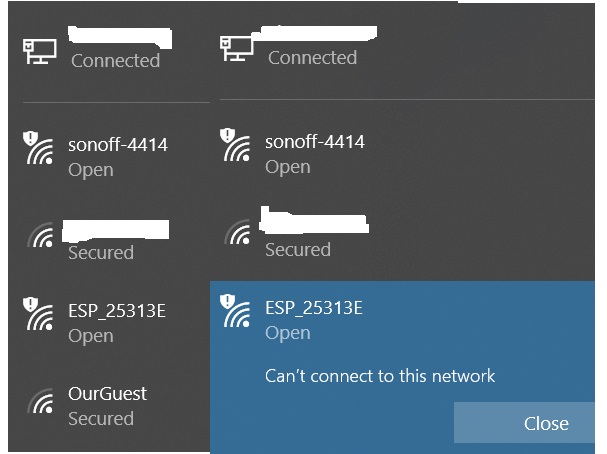
When the sonoff shows up on my wifi list, there's another AP that pops up and then disappears. ESP_25313E. When I try to connect to it, get msg saying I can't and then it disappears. I'm pretty sure this is another AP for the same sonoff b/c when I tested one of the other ones with ewelink, similar name showed on my router/fing along with the IP address and I was able to connect.
amore75
on 25 Jul 2018
The newly uploaded 6.1.1 works for me. Thanks!
Siggemada
on 25 Jul 2018
I got it to work. Flashed as ascillato directed. Totally changed the name of my SSID/PW, rebooted.
Flashed again using Dr. Zzzs newest method (uploaded 07/25/18). Copy/pasted SSID/PW in termite.
Thanks to everyone for all the suggestions and advice!
amore75
on 26 Jul 2018
Hello All,
Is it allowed to have special characters on the SSID and Password..?
Using version 6.2.1
Model: Sonoff Basic
Right Now, I am not able to see my SSID on my WIFI list, when I start the WIFI manager on the Sonoff.
regards
Mani
 shankarez87
on 7 Sep 2018
shankarez87
on 7 Sep 2018
Related issues
 j4k3
·
3Comments
j4k3
·
3Comments
 TylerDurden23
·
3Comments
TylerDurden23
·
3Comments
 he-so
·
3Comments
he-so
·
3Comments
 luisfpinto
·
3Comments
luisfpinto
·
3Comments
 esp32x
·
3Comments
esp32x
·
3Comments
Most helpful comment
I will...