Tasmota: WiFi won't connect with 6.1.0a
WiFi just does not connect with 6.1.0a firmware on Sonoff basic. If I connect console I see it saying it's trying to connect to 11N AP but then gives up. If I switch back to 5.14, all works just fine.
 Stuart-Richards
All 95 comments
I can't use my Wemos D1 Mini module with this tasmota version 6.1 because the connection turns very unstable. I don't have this trouble with the tasmota 5.14 version.
I configured the option Wifi_manager in the wifi config tool (User_config.h), I'm wondering if there are any issue?
I checked my router and my module connects just for few seconds but afterward i can't get acces to the webserver. I used the tool ESPflashtool to clean the module before the flashing process.
I read about the posibility to use the libraries of the 5.14 version to compile the 6.1 version but after try it i got some errors. Could somebody else confirm if they have this troubles? Thanks in advance (And sorry for my english)
Edit:
Seems to be that the user Subdancer found a solution. I copy paste the solution:
In the user_config.h, find the option CFG_Holder and change from #define CFG_HOLDER 4617 to #define CFG_HOLDER 4618. Result: it works flawlessly as it should. connects instant to the wifi, no more problems.
Credits to Subdancer, thanks for post the solution.
 Sealight10
on 7 Jul 2018
Sealight10
on 7 Jul 2018
stat/basic_woonkamer_bank/STATUS2 {"StatusFWR":{"Version":"6.1.0a","BuildDateTime":"2018-07-07T11:53:47","Boot":31,"Core":"2_4_1","SDK":"2.2.1(cfd48f3)"}}
OTA upgrade invoked by the browser or MQTT doesn't work: stat/basic_woonkamer_bank/UPGRADE Failed Update error: ERROR[6]: Stream Read Timeout
Then I just upload the file manually and after the upgrade the WiFi connection looks fine but for me the webserver doesn't work anymore for me...
When I do a downgrade back to 5.14.0 throught MQTT it doesn't retain the config...
 pascalsaul
on 7 Jul 2018
pascalsaul
on 7 Jul 2018
Try the prebuilt image (release) from path Master not development.
Maybe your selfcompiled version is buggy...
 Jason2866
on 7 Jul 2018
Jason2866
on 7 Jul 2018
Hi, i have the same problem with iTead sonoff basic.
PCB says "Sonoff Basic R2 V1.0 2017-10-11".
For me, the problem started with v5.14, I only use the precompiled DE-bin's. I have flashed also some of the "obisockets", a pow v2, some esp8266-01 and a node-mcu. All work fine with v5.14 and with the given wireless network (fritzbox, all dhcp leases cleared).
But with the iTead basic, the last working version is v5.13
v5.11.1 and v5.13: working
v5.14 and v6.1: not working
I flash them using a ftdi-usb with esptool 2.4.1 with the following commands:
py esptool.py --port COM11 erase_region 0x0F4000 0x008000
py esptool.py --port COM11 erase_flash
py esptool.py --port COM11 write_flash -fs 1MB -fm dout 0x0 sonoff.bin
I can reproduce the behavior with at least six devices.
I also tried to flash the minimal-bin and then OTA, but the OTA fails.
Serial output (v6.1; seriallog 4)
`
00:13:16 APP: starte neu
ets Jan 8 2013,rst cause:1, boot mode:(3,7)
load 0x4010f000, len 1384, room 16
tail 8
chksum 0x2d
csum 0x2d
v3fff38d8
~ld
ø
00:00:00 APP: Anzahl Startvorgänge 6
00:00:00 SRC: Restart
00:00:00 Projekt sonoff Sonoff (Topic sonoff, Fallback DVES_A34C9C, GroupTopic sonoffs) Version 6.1.0-2_3_0
00:00:00 CFG: in Flash gespeichert am F6, zählen 46, Bytes 3584
00:00:00 WIF: Prüfe Verbindung...
00:00:00 WIF: Verbindungsversuch...
00:00:00 WIF: Repariere Problem #2186
00:00:00 WIF: verbinden mit AP1 * in Modus 11N wie sonoff-3228...
00:00:01 WIF: Prüfe Verbindung...
00:00:01 WIF: Verbindungsversuch...
00:00:02 WIF: Prüfe Verbindung...
00:00:02 WIF: Verbindungsversuch...
00:00:03 WIF: Prüfe Verbindung...
00:00:03 WIF: Verbindungsversuch...
00:00:04 WIF: Prüfe Verbindung...
00:00:04 WIF: Verbindungsversuch...
00:00:05 WIF: Prüfe Verbindung...
00:00:05 WIF: Verbindungsversuch...
00:00:06 WIF: Prüfe Verbindung...
00:00:06 WIF: Verbindungsversuch...
00:00:07 WIF: Prüfe Verbindung...
00:00:07 WIF: Verbindungsversuch...
00:00:08 WIF: Prüfe Verbindung...
00:00:08 WIF: Verbindungsversuch...
00:00:09 WIF: Prüfe Verbindung...
00:00:09 WIF: Verbindungsversuch...
00:00:10 WIF: Prüfe Verbindung...
00:00:10 WIF: Verbindungsversuch...
00:00:11 WIF: Prüfe Verbindung...
00:00:11 WIF: Verbindungsversuch...
00:00:12 WIF: Prüfe Verbindung...
00:00:12 WIF: Verbindungsversuch...
00:00:13 WIF: Prüfe Verbindung...
00:00:13 WIF: Verbindung fehlgeschlagen, da AP nicht erreicht werden konnte
00:00:13 WIF: Repariere Problem #2186
00:00:14 WIF: verbinden mit AP1 * in Modus 11N wie sonoff-3228...
00:00:14 WIF: Prüfe Verbindung...
00:00:14 WIF: Verbindungsversuch...
00:00:15 WIF: Prüfe Verbindung...
`
sometimes it drops
00:01:36 WIF: Prüfe Verbindung...
00:01:36 WIF: Verbindung fehlgeschlagen, da das Passwort falsch ist
00:01:37 WIF: Prüfe Verbindung...
If i can provide any further information, please tell me
If it is usefull, i can provide a device within germany.
Greets Bastelfix
PS: Yeah, first action at github :)
 bastelfix
on 7 Jul 2018
bastelfix
on 7 Jul 2018
@bastelfix
Please post result of status 0. May you try not the german version for testing.
I have one NodeMcu which is working only until 5.13. But all my sonoffs do work with all versions including Sonoff Basic R2 V1.0 2017-10-11
Ich bin aus Deutschland...
Jason2866
on 7 Jul 2018
May you try with optioon for flashing speed
esptool.py --port COM11 erase_flash
esptool --port COM11 --baud 115200 write_flash -fs 1MB -fm dout 0x000000 firmware.bin
Jason2866
on 7 Jul 2018
00:01:10 CMD: status 0
00:01:10 SRC: Serial
00:01:10 RSL: empfangenes topic /status, Datengröße 1, Daten 0
00:01:10 RSL: Gruppe 0, Index 1, Befehl STATUS, Daten 0
00:01:10 RSL: stat/sonoff/STATUS = {"Status":{"Module":1,"FriendlyName":["Sonoff"],"Topic":"sonoff","ButtonTopic":"0","Power":1,"PowerOnState":3,"LedState":1,"SaveData":1,"SaveState":1,"ButtonRetain":0,"PowerRetain":0}}
00:01:10 RSL: stat/sonoff/STATUS1 = {"StatusPRM":{"Baudrate":115200,"GroupTopic":"sonoffs","OtaUrl":"http://sonoff.maddox.co.uk/tasmota/sonoff.bin","RestartReason":"Power on","Uptime":"0T00:01:09","StartupUTC":"","Sleep":0,"BootCount":11,"SaveCount":51,"SaveAddress":"F9000"}}
00:01:10 RSL: stat/sonoff/STATUS2 = {"StatusFWR":{"Version":"6.1.0","BuildDateTime":"2018.07.06 21:05:33","Boot":31,"Core":"2_3_0","SDK":"1.5.3(aec24ac9)"}}
00:01:10 RSL: stat/sonoff/STATUS3 = {"StatusLOG":{"SerialLog":4,"WebLog":2,"SysLog":0,"LogHost":"","LogPort":514,"SSId":["*",""],"TelePeriod":300,"SetOption":["00008009","55818000"]}}
00:01:10 RSL: stat/sonoff/STATUS4 = {"StatusMEM":{"ProgramSize":536,"Free":464,"Heap":24,"ProgramFlashSize":1024,"FlashSize":1024,"FlashMode":3,"Features":["00000407","0FDAE794","0C000000","23B6179E","00000000"]}}
00:01:10 RSL: stat/sonoff/STATUS5 = {"StatusNET":{"Hostname":"sonoff-3228","IPAddress":"0.0.0.0","Gateway":"192.168.2.254","Subnetmask":"255.255.255.0","DNSServer":"192.168.2.27","Mac":"68:C6:3A:A3:4C:9C","Webserver":2,"WifiConfig":5}}
00:01:10 RSL: stat/sonoff/STATUS6 = {"StatusMQT":{"MqttHost":"openhabianpi","MqttPort":1883,"MqttClientMask":"DVES_%06X","MqttClient":"DVES_A34C9C","MqttUser":"openhabian","MqttType":1,"MAX_PACKET_SIZE":1000,"KEEPALIVE":15}}
00:01:10 RSL: stat/sonoff/STATUS7 = {"StatusTIM":{"UTC":"Thu Jan 01 00:01:10 1970","Local":"Thu Jan 01 00:01:10 1970","StartDST":"Thu Jan 01 00:00:00 1970","EndDST":"Thu Jan 01 00:00:00 1970","Timezone":1,"Sunrise":"07:43","Sunset":"16:03"}}
00:01:10 RSL: stat/sonoff/STATUS10 = {"StatusSNS":{"Time":"1970-01-01T00:01:10"}}
00:01:10 RSL: stat/sonoff/STATUS11 = {"StatusSTS":{"Time":"1970-01-01T00:01:10","Uptime":"0T00:01:09","Vcc":3.016,"POWER":"ON","Wifi":{"AP":1,"SSId":"*","RSSI":100,"APMac":"FF:FF:FF:FF:FF:FF"}}}
bastelfix
on 7 Jul 2018
Flashed a S31, Dual R2, and Basic this morning with 6.1.0b built with core 2.3.0 in PlatformIO, no issues with WiFi connections so far.
 digiblur
on 7 Jul 2018
digiblur
on 7 Jul 2018
May you try with optioon for flashing speed
esptool.py --port COM11 erase_flash
esptool --port COM11 --baud 115200 write_flash -fs 1MB -fm dout 0x000000 firmware.bin
The --baud parameter didn't change anything
BUT
your advice to test with an english version was a key:
v5.13-DE: working
v5.14-DE: not working
v5.14: working
v6.1-DE: not working
v6.1: working
tested with two devices to avoid hardware-dependency
So maybe there is a bug from v5.13-DE to v5.14-DE that only shows up at the iTead sonoff basic?
Can you verify that with your device @Jason2866 ?
Did anyone else experienced this with the DE-bin?
Thanks so far,
Bastelfix
Berlin
bastelfix
on 7 Jul 2018
@bastelfix
Do you have changed wifi settings in user_config.h to your setup?
Jason2866
on 7 Jul 2018
no, i used precompiled release-bins
bastelfix
on 7 Jul 2018
Do you have read the wiki how establishing to wifi works?
https://github.com/arendst/Sonoff-Tasmota/wiki/Button-usage
Jason2866
on 7 Jul 2018
of course, but i configure the wifi via serial (ftdi-usb) with the backlog command:
Backlog SSID1 netssid; Password1 pw
00:00:12 CMD: Backlog SSID1 netssid; Password1 pw
00:00:12 RSL: stat/sonoff/RESULT = {"SSId1":"**"}
00:00:12 WIF: Connect failed with AP timeout
00:00:12 WIF: Connecting to AP1 StonedNet_n in mode 11N as sonoff-4402...
00:00:12 RSL: stat/sonoff/RESULT = {"Password1":"pw"}
00:00:14 APP: Restarting
then it tries to connect
00:00:00 Project sonoff Sonoff (Topic sonoff, Fallback DVES_86B132, GroupTopic sonoffs) Version 6.1.0-2_3_0
00:00:00 WIF: Connecting to AP1 * in mode 11N as sonoff-4402...
00:00:10 WIF: Connected
00:00:10 DNS: Initialized
00:00:10 HTP: Web server active on sonoff-4402.local with IP address 192.168.**
bastelfix
on 7 Jul 2018
I was having a similar issue with two Basics with the precompiled 6.1.0 release binary. Both had been on a locally built 5.13.1 with a custom user_config_override.h before the upgrade. After the upgrade to 6.1.0, one simply wouldn't connect to wifi and the other's wifi became unstable, losing connection frequently. The uptime kept increasing when it published status updates, so it was not rebooting.
After rolling both back to a locally built 5.13.1 w/2.4.1 things seem stable again.
 jjlawren
on 7 Jul 2018
jjlawren
on 7 Jul 2018
i've had similar problems. after updating to 6.1 (release version) my sonoff didn't connect to wifi anymore.
i used the webupdater. first flashed 6.1 minimal bin. the sonoff rebooted and connected to wifi no problem so far. then i flashed the 6.1 classic bin, after a reboot the sonoff didn't work anymore.
the serial terminal showed a lot of wifi connection tries but no success. it always ended with some strange symbols and started all over.
then i flashed the my old version back 5.10a. success. it was back alive connected to the wifi as it should.
then i compiled sonoff-classic snapshot from yesterday evening and flashed it via platformio.
it resulted in the same behaviour as written above. after the first boot it connected to the wifi but the webui was really slow and it always lost connection after clicking through the menu. it kinda hanged itself.
also when pushing the button on the sonoff the led went on and the relais clicked but after another push it didn't turn off. it kinda hanged itself and i heard the relais click like every minute.
after that try i compiled and flashed the same version again but changed the
#define CFG_HOLDER 4617
to
#define CFG_HOLDER 4618
result: it works flawlessly as it should. connects instant to the wifi, no more problems.
 subdancer
on 7 Jul 2018
subdancer
on 7 Jul 2018
@bastelfix
Compiled (vor dem Fussball) v.6.1.0a development (latest) and flashed it to my easy reachable sonoff... No problem. Will build de version after soccer Rus - Cro and flash it afterwards.
00:00:00 Project sonoff Fluter (Topic sonoff-13D92F, Fallback sonoff-13D92F, GroupTopic sonoffs) Version 6.1.0a-2_3_0
00:00:00 WIF: Connecting to AP1 Jason_Home_WLAN in mode 11N as sonoff-13D92F-6447...
20:55:48 WIF: Connected
20:55:48 HTP: Web server active on sonoff-13D92F-6447 with IP address 192.168.2.119
20:55:48 UPP: Multicast (re)joined
20:55:48 MQT: Attempting connection...
20:55:48 MQT: Connected
20:55:49 MQT: tele/sonoff-13D92F/LWT = Online (retained)
20:55:49 MQT: cmnd/sonoff-13D92F/POWER =
20:55:49 MQT: tele/sonoff-13D92F/INFO1 = {"Module":"Sonoff S2X","Version":"6.1.0a","FallbackTopic":"sonoff-13D92F","GroupTopic":"sonoffs"}
20:55:49 MQT: tele/sonoff-13D92F/INFO2 = {"WebServerMode":"Admin","Hostname":"sonoff-13D92F-6447","IPAddress":"192.168.2.119"}
20:55:49 MQT: tele/sonoff-13D92F/INFO3 = {"RestartReason":"Software/System restart"}
20:55:49 UPP: Multicast (re)joined
20:55:50 MQT: stat/sonoff-13D92F/RESULT = {"POWER":"OFF"}
20:55:50 MQT: stat/sonoff-13D92F/POWER = OFF
20:55:53 UPL: File Tasmota_dev_6.1.0a.bin ...
20:56:00 UPP: Multicast (re)joined
20:56:00 MQT: Attempting connection...
20:56:00 MQT: Connected
20:56:01 MQT: tele/sonoff-13D92F/LWT = Online (retained)
20:56:01 MQT: cmnd/sonoff-13D92F/POWER =
20:56:01 UPP: Multicast (re)joined
20:56:03 MQT: stat/sonoff-13D92F/RESULT = {"POWER":"ON"}
20:56:03 MQT: stat/sonoff-13D92F/POWER = ON
20:56:03 MQT: stat/sonoff-13D92F/RESULT = {"POWER":"OFF"}
20:56:03 MQT: stat/sonoff-13D92F/POWER = OFF
20:56:04 MQT: tele/sonoff-13D92F/STATE = {"Time":"2018-07-07T20:56:04","Uptime":"0T00:00:26","Vcc":3.126,"POWER":"OFF","Wifi":{"AP":1,"SSId":"Jason_Home_WLAN","RSSI":96,"APMac":"00:A0:57:2A:BD:19"}}
20:57:06 MQT: stat/sonoff-13D92F/RESULT = {"POWER":"ON"}
20:57:06 MQT: stat/sonoff-13D92F/POWER = ON
20:57:07 MQT: stat/sonoff-13D92F/RESULT = {"POWER":"OFF"}
20:57:07 MQT: stat/sonoff-13D92F/POWER = OFF
21:01:05 MQT: tele/sonoff-13D92F/STATE = {"Time":"2018-07-07T21:01:05","Uptime":"0T00:05:27","Vcc":3.126,"POWER":"OFF","Wifi":{"AP":1,"SSId":"Jason_Home_WLAN","RSSI":90,"APMac":"00:A0:57:2A:BD:19"}}
21:02:00 MQT: tele/sonoff-13D92F/UPTIME = {"Time":"2018-07-07T21:02:00","Uptime":"0T00:06:22"}
21:06:05 MQT: tele/sonoff-13D92F/STATE = {"Time":"2018-07-07T21:06:05","Uptime":"0T00:10:27","Vcc":3.126,"POWER":"OFF","Wifi":{"AP":1,"SSId":"Jason_Home_WLAN","RSSI":92,"APMac":"00:A0:57:2A:BD:19"}}
21:11:06 MQT: tele/sonoff-13D92F/STATE = {"Time":"2018-07-07T21:11:06","Uptime":"0T00:15:28","Vcc":3.127,"POWER":"OFF","Wifi":{"AP":1,"SSId":"Jason_Home_WLAN","RSSI":100,"APMac":"00:A0:57:2A:BD:19"}}
21:11:22 CMD: Status 0
21:11:22 MQT: stat/sonoff-13D92F/STATUS = {"Status":{"Module":8,"FriendlyName":["Fluter"],"Topic":"sonoff-13D92F","ButtonTopic":"0","Power":0,"PowerOnState":3,"LedState":1,"SaveData":1,"SaveState":1,"ButtonRetain":0,"PowerRetain":0}}
21:11:22 MQT: stat/sonoff-13D92F/STATUS1 = {"StatusPRM":{"Baudrate":115200,"GroupTopic":"sonoffs","OtaUrl":"http://192.168.2.20/tasmota/sonoff-minimal.bin","RestartReason":"Software/System restart","Uptime":"0T00:15:44","StartupUTC":"2018-07-07T18:55:38","Sleep":1,"BootCount":18,"SaveCount":209,"SaveAddress":"FB000"}}
21:11:22 MQT: stat/sonoff-13D92F/STATUS2 = {"StatusFWR":{"Version":"6.1.0a","BuildDateTime":"2018-07-07T20:01:00","Boot":6,"Core":"2_3_0","SDK":"1.5.3(aec24ac9)"}}
21:11:22 MQT: stat/sonoff-13D92F/STATUS3 = {"StatusLOG":{"SerialLog":0,"WebLog":2,"SysLog":0,"LogHost":"","LogPort":514,"SSId":["Jason_Home_WLAN",""],"TelePeriod":300,"SetOption":["00008009","55C18000"]}}
21:11:22 MQT: stat/sonoff-13D92F/STATUS4 = {"StatusMEM":{"ProgramSize":512,"Free":488,"Heap":16,"ProgramFlashSize":1024,"FlashSize":1024,"FlashMode":3,"Features":["00000809","0FAAA78C","0C000001","00080696","00000000"]}}
21:11:22 MQT: stat/sonoff-13D92F/STATUS5 = {"StatusNET":{"Hostname":"sonoff-13D92F-6447","IPAddress":"192.168.2.119","Gateway":"192.168.2.1","Subnetmask":"255.255.255.0","DNSServer":"192.168.2.1","Mac":"EC:FA:BC:13:D9:2F","Webserver":2,"WifiConfig":3}}
21:11:22 MQT: stat/sonoff-13D92F/STATUS6 = {"StatusMQT":{"MqttHost":"192.168.2.114","MqttPort":1883,"MqttClientMask":"sonoff-13D92F","MqttClient":"sonoff-13D92F","MqttUser":"openhabian","MqttType":1,"MAX_PACKET_SIZE":1000,"KEEPALIVE":15}}
21:11:22 MQT: stat/sonoff-13D92F/STATUS7 = {"StatusTIM":{"UTC":"Sat Jul 07 19:11:22 2018","Local":"Sat Jul 07 21:11:22 2018","StartDST":"Sun Mar 25 02:00:00 2018","EndDST":"Sun Oct 28 03:00:00 2018","Timezone":99,"Sunrise":"05:18","Sunset":"21:17"}}
21:11:22 MQT: stat/sonoff-13D92F/STATUS10 = {"StatusSNS":{"Time":"2018-07-07T21:11:22"}}
21:11:22 MQT: stat/sonoff-13D92F/STATUS11 = {"StatusSTS":{"Time":"2018-07-07T21:11:22","Uptime":"0T00:15:44","Vcc":3.126,"POWER":"OFF","Wifi":{"AP":1,"SSId":"Jason_Home_WLAN","RSSI":100,"APMac":"00:A0:57:2A:BD:19"}}}
Jason2866
on 7 Jul 2018
Maybe this
https://github.com/arendst/Sonoff-Tasmota/wiki/Upgrade#migration-path
Jason2866
on 7 Jul 2018
@arendst pls move up the Migration Information on the release page over the changelog and a fat !!!MUST READ!!!
Try this:
DE, EN, Minimal bins 6.1.[email protected] builded from latest dev branch @ f9ce86a6e8c037ee267566f58b4f647e072bae3c , nothing changed, just a clean rebuild with atom+platformio on a DE windows 10 x64
DOWNLOAD 6.1.0a.zip
 reloxx13
on 7 Jul 2018
reloxx13
on 7 Jul 2018
Info. De version 6.1.0a works too. Self compiled and @reloxx13 clean de build
Jason2866
on 7 Jul 2018
i remember we had problems with a german release in the past, maybe theos IDE or system does have a charset problem.
00:01:10 RSL: empfangenes topic /status, Datengröße 1, Daten 0
i dont have those charset errors with my builds.
reloxx13
on 7 Jul 2018
I also had that issue, even with fresh flashing. It turned out for me that I had to undef USE_ENERGY_SENSOR for my Sonoff Basics to work with master branch. My other Sonoff devices are not affected, only the Basics.
 rkojedzinszky
on 8 Jul 2018
rkojedzinszky
on 8 Jul 2018
also dont forget that wifi relevant change short mentioned here: https://github.com/arendst/Sonoff-Tasmota/issues/3101
if you build yourself and want to debug, revert the line in your local code, rebuild and check if your connection gets stable again.
WiFi.persistent(false); // Solve possible wifi init errors
reloxx13
on 8 Jul 2018
The binaries are provided automagically by Travis to the release. I thought Travis is a German company so it would be strange that the German translation seems to fail.
 arendst
on 8 Jul 2018
arendst
on 8 Jul 2018
Jason2866 commented 15 hours ago
Info. De version 6.1.0a works too.
The One from releases or a self-compiled one? Can you please provide a link? Then i can test with my devices.
What about the Migration Path? I thought it is only relevant if i'm upgrading from version <5 via OTA. But I flash them via serial, so this shouldnt be an issue?
At the moment i'm happy with the the english build, but it would be nice if anybody can reproduce this behaviour with DE-v5.14 or DE-v6.1 at the "Sonoff Basic R2 V1.0 2017-10-11"-Hardware so i can exclude an error made by me.
(Again, ) DE-5.14 is working fine on "obisocket", esp8266-01, pow v2 and nodeMCU for me, only the basics fail to connect to wifi.
Thanks for all the support to all of you and please execuse my dirty english :)
bastelfix
on 8 Jul 2018
I tried @reloxx13 and my de version, which works. reloxx13 has uploaded clean rebuild files 6 or 7 posts before
Migration path is not relevant if you erase the device and do a clean flash.
If you upgrade take a look how to migrate from v.5.14. You have to care!
Jason2866
on 8 Jul 2018
nice, working!
v5.13-DE: working
v5.14-DE: not working
v5.14: working
v6.1-DE: not working
v6.1-DE-reloxx13: working, connects faster (4s to 7s) than v6.1
v6.1: working, connection time 4s to 34s
all tested with two devices
If you upgrade take a look how to migrate from v.5.14. You have to care!
That should be sticky in a way as reloxx13 mentioned
bastelfix
on 8 Jul 2018
I'm having similar problems. I can flash 5.14.0b and everything works fine. When I upgrade to 6.1, however, it won't connect. On the serial monitor, I get:
00:00:00 Project sonoff Lamp (Topic Lamp, Fallback Lamp, GroupTopic Home) Version 6.1.0a-2_4_1
00:00:00 WIF: Connecting to AP1 The Dog House in mode 11N as Lamp-3447...
00:00:09 WIF: Connect failed as AP cannot be reached
00:00:09 WIF: Connecting to AP1 The Dog House in mode 11N as Lamp-3447...
00:00:18 WIF: Connect failed as AP cannot be reached
00:00:18 WIF: WPSConfig active for 3 minutes
00:00:41 APP: Restarting
ets Jan 8 2013,rst cause:1, boot mode:(3,7)
load 0x4010f000, len 1384, room 16
tail 8
chksum 0x2d
csum 0x2d
v614f7c32
~ld
[which repeats indefinitely ]
I tried via updating via the web interface, both via .bin file and the OTA link. I tried a clean install. I tried the regular and minimal builds. Still, nothing seems to work.
 ChipStewart1
on 9 Jul 2018
ChipStewart1
on 9 Jul 2018
@ChipStewart1 Try to use arduino 2.3.0! For me 2.4.x has never worked...
Jason2866
on 9 Jul 2018
2.3? I’m on 1.85, and 1.9 is a beta.
And it seems to be uploading okay – just not connecting to WiFi afterwards. And even the OTA isn’t working for me.
Thanks,
Chip Stewart
From: Jason2866 [mailto:[email protected]]
Sent: Monday, July 9, 2018 11:15 AM
To: arendst/Sonoff-Tasmota Sonoff-Tasmota@noreply.github.com
Cc: ChipStewart1 GitHub@StewartsPlace.com; Mention mention@noreply.github.com
Subject: Re: [arendst/Sonoff-Tasmota] WiFi won't connect with 6.1.0a (#3150)
@ChipStewart1 https://github.com/ChipStewart1 Try to use arduino 2.3.0! For me 2.4.x has never worked...
—
You are receiving this because you were mentioned.
Reply to this email directly, view it on GitHub https://github.com/arendst/Sonoff-Tasmota/issues/3150#issuecomment-403514405 , or mute the thread https://github.com/notifications/unsubscribe-auth/AP7uhsGtPrafy37C10D67ccy0BkIQYUvks5uE3NegaJpZM4VGMNn . https://github.com/notifications/beacon/AP7uhoF5i7Q1huSTkCl3R8iSTB60TGh_ks5uE3NegaJpZM4VGMNn.gif
ChipStewart1
on 9 Jul 2018
you are on 2.4.1, i dunno wher eyou get the numbers 1.85...
00:00:00 Project sonoff Lamp (Topic Lamp, Fallback Lamp, GroupTopic Home) Version 6.1.0a-2_4_1
platformio.ini
[common] ; ************************************************************
; *** Esp8266 core for Arduino version 2.3.0
platform = [email protected]
; *** Esp8266 core for Arduino version 2.4.0
;platform = [email protected]
; *** Esp8266 core for Arduino version 2.4.1
;platform = [email protected]
; *** Esp8266 core for Arduino version latest beta
;platform = https://github.com/platformio/platform-espressif8266.git#feature/stage
; *** Esp8266 core for Arduino current version
;platform = espressif8266
Confusing the compiler and library versions folks. In ArduinoIDE it's the board manager section where 2.30 or 2.41 is installed.
digiblur
on 9 Jul 2018
edit not @digiblur info is for @ChipStewart1 I dont know the actual Arduino Ide Version
I dont use it anymore since i "found" Platformio (Atom) and VSC.
It is so much easier to use even for me as non programmer.
Just follow the perfect tutorials in wiki from tasmota how to setup this IDEs.
Compiling is done so easy. No hassle with files to copy somewhere and so on.
Just download project from github extract to folder, "open folder" in VSC and hit button compile.
Platform changes are all in platformio.ini... (This file is preconfigured from @arendst )
Thats it
Jason2866
on 9 Jul 2018
@jason2866 definitely lots of confusion. I already use PlatformIO
digiblur
on 9 Jul 2018
@digiblur sorry my fault. Infos is for @ChipStewart1
Jason2866
on 9 Jul 2018
Hi,
I had the same issue. All sonoffs (S20, 433 MHz, 4CH Pro, SC, B1...) are working well with Stable Varsion 6.1.0 and german translation
...Except the sonoff Basic. It is possible to update to minimal version 6.1.0 via OTA, but Update to "normal" version isn't possible. Device was stuck.
That's how i was able to fix:
- Used Development Version 6.1.0a (Stable version 6.1.0 isn't working for me)
- Don't use german translation (if used, flashing via serial connections works, but no wifi connection is possible):
Commented out the following in user_config.h:
//#define MY_LANGUAGE de-DE // German in Germany - with this change I was able to update via serial connection
- OTA Update to minimal version and then back to "normal" version isn't possible at all
Regards
Helmar
 helmar74
on 10 Jul 2018
helmar74
on 10 Jul 2018
So, am I reading this right? Right now, there is no way to OTA a Sonoff Basic?
 apastuszak
on 10 Jul 2018
apastuszak
on 10 Jul 2018
@apastuszak No you're not reading it right. People seem to have problems with OTA. I don't, many others do not either. So.....
arendst
on 10 Jul 2018
It just failed on me on a Sonoff Basic. Need to disassemble and flash via serial.
apastuszak
on 10 Jul 2018
@apastuszak if possible pls provide output of status 0
arendst
on 10 Jul 2018
I can't connect to the device. Comes up in Wifi Manager, but attempts to connect to the AP fail. I held the button down for 40 seconds to reset the device to defaults, and same issue. 4 quick clicks to get it into wifi_manager and I an AP, but can't connect to it.
The last version I was successfully able to upgrade via wifi was 5.13.0
apastuszak
on 10 Jul 2018
OK. onto to the serial upload then.
arendst
on 10 Jul 2018
Just annoying since the basics are hot glued down into 3d printed boxes a friend made for me.
apastuszak
on 10 Jul 2018
Comes up in Wifi Manager, but attempts to connect to the AP fail. I held the button down for 40 seconds to reset the device to defaults, and same issue. 4 quick clicks to get it into wifi_manager and I an AP, but can't connect to it.
I had the same behavior with one of my two Basics. Console showed repeated wifi failed connection attempts (after I hooked to serial cable), and attempting to join to the Basic in AP mode would time out.
I had upgraded from a custom 5.13.1 build to the 6.1.0 release build binary. My build was prettty minimal but did have a custom timezone override. Could a sudden timezone change + something stored in RTC memory cause wifi connection issues because of a time-based dependency?
jjlawren
on 10 Jul 2018
Fyi:
Had the same problem, using timezone99...
helmar74
on 10 Jul 2018
I have a custom timezone. But when I went from 5.13 to 5.14 I did not have a custom timezone and still have to go serial.
That does seem to be something we have in common. May be worth investigating.
apastuszak
on 10 Jul 2018
Starting with 5.14 the timezone settings in user_config.h have changed. See releasenotes and compare user_config.h between both versions.
arendst
on 10 Jul 2018
Would that cause wifi upgrade issues?
apastuszak
on 10 Jul 2018
I don't think so but it explains peoples timezone issues.
arendst
on 10 Jul 2018
Strange. I’m working with two Sonoff Basics that I bought together. One, I was able to flash in 5.14, then reflash in 6.1.0a. I used the 40 second hold followed by the four quick taps as mentioned by apastuszak, and was able to access the network it set up and get to the web server interface, which I then used to set everything up. It’s working fine now.
The other one – not so much. I flash in 5.14 and everything works fine. I flash in 6.1 (I tried normal and minimal) and it can’t access the APs. I use the 40/4 method, and it says it set up the web server, but my phone isn’t showing the network. I tried WifiConfig 1, 2, and 3, but no luck.
Chip
Whoops! Forgot to add the serial monitor output:
00:00:00 Project Lamp Lamp (Topic Lamp, Fallback Lamp-ESP, GroupTopic Home) Version 6.1.0a-2_4_1
00:00:00 WIF: Connecting to AP1 The Dog House in mode 11N as Lamp-3447...
00:00:09 WIF: Connect failed as AP cannot be reached
00:00:09 WIF: Connecting to AP2 The Dog House Guest in mode 11N as Lamp-3447...
00:00:18 WIF: Connect failed as AP cannot be reached
00:00:18 WIF: SmartConfig active for 3 minutes
00:02:00 RSL: /Home/Lamp/UPTIME = {"Time":"1970-01-01T00:02:00","Uptime":"0T00:02:00"}
00:03:21 APP: Restarting
ets Jan 8 2013,rst cause:1, boot mode:(3,7)
load 0x4010f000, len 1384, room 16
tail 8
chksum 0x2d
csum 0x2d
v614f7c32
~ld
[And then it starts all over again]
From: Theo Arends [mailto:[email protected]]
Sent: Tuesday, July 10, 2018 9:51 AM
To: arendst/Sonoff-Tasmota Sonoff-Tasmota@noreply.github.com
Cc: ChipStewart1 GitHub@StewartsPlace.com; Mention mention@noreply.github.com
Subject: Re: [arendst/Sonoff-Tasmota] WiFi won't connect with 6.1.0a (#3150)
@apastuszak https://github.com/apastuszak if possible pls provide output of status 0
—
You are receiving this because you were mentioned.
Reply to this email directly, view it on GitHub https://github.com/arendst/Sonoff-Tasmota/issues/3150#issuecomment-403829491 , or mute the thread https://github.com/notifications/unsubscribe-auth/AP7uhuERBqpwr_Ep--en9s1-eBkb2g7Qks5uFLFdgaJpZM4VGMNn . https://github.com/notifications/beacon/AP7uhnEYdjeVHb3mhQPRfdvGioqdhcdnks5uFLFdgaJpZM4VGMNn.gif
ChipStewart1
on 12 Jul 2018
@arendst I put 5.1.4 back on my unit. But I have another one new in box with just Tasmota 5.1.4 on it. That one I can experiment with tonight.
I'm thinking there must be some kind of hardware tweak that Sonoff made and perhaps there is a rev 1 and perhaps a rev 1.1. How old is the Basic that you're testing with? I'd be willing to donate two Basics to your cause and have them drop shipped to your house directly from iTead if you PM me offline.
apastuszak
on 12 Jul 2018
My latest basic has writings: Sonoff TH_V1.1 2017-5-5
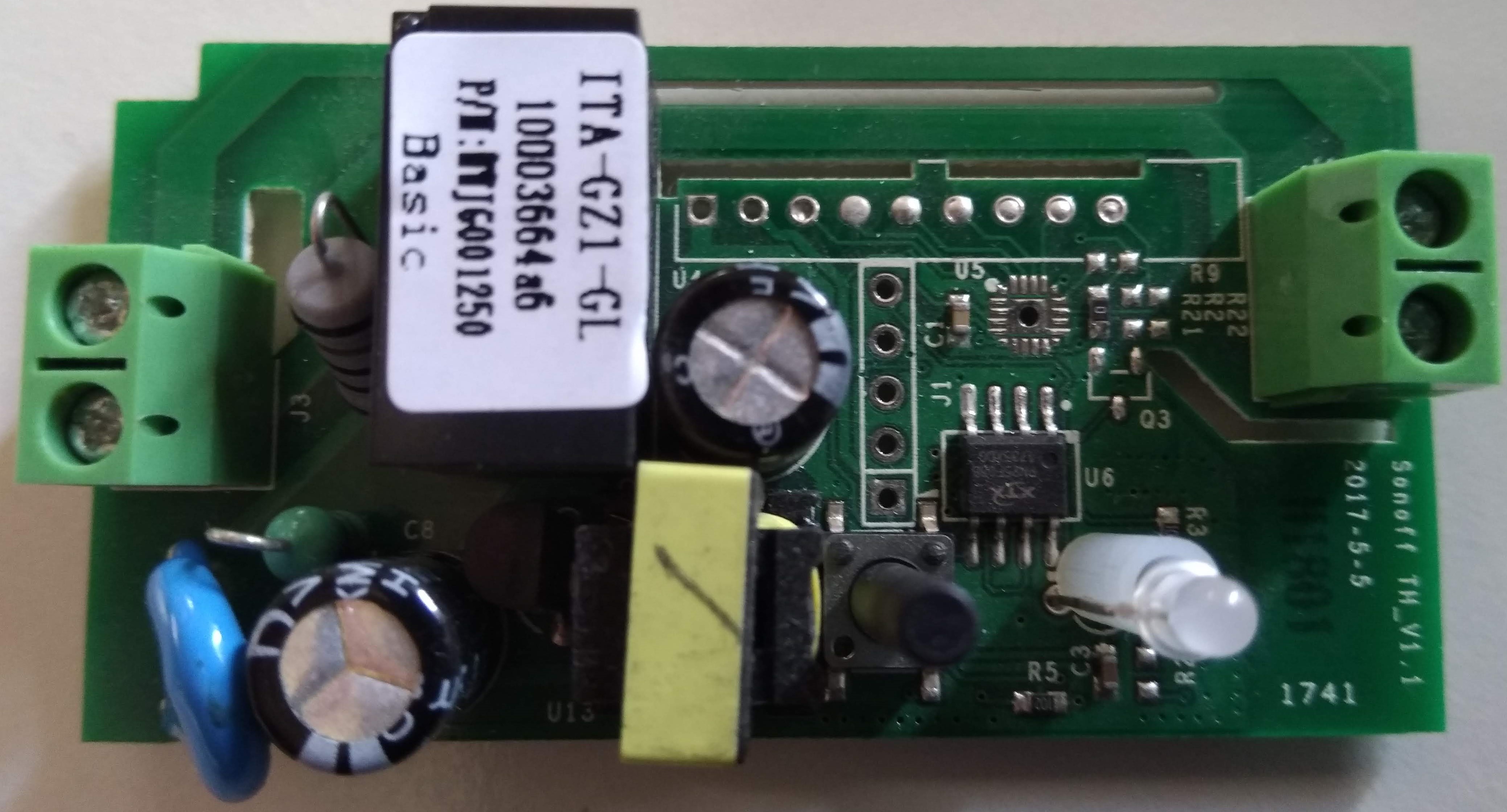
arendst
on 12 Jul 2018
Mine is a Sonoff Basic R2
v 1.0
10-11-2017
On Thu, Jul 12, 2018 at 9:14 AM Theo Arends notifications@github.com
wrote:
My latest basic has writings: Sonoff TH_V1.1 2017-5-5
—
You are receiving this because you were mentioned.
Reply to this email directly, view it on GitHub
https://github.com/arendst/Sonoff-Tasmota/issues/3150#issuecomment-404507636,
or mute the thread
https://github.com/notifications/unsubscribe-auth/ADPlXi-EFp19QikXB0XeG8SKa8GYWnRDks5uF0udgaJpZM4VGMNn
.
apastuszak
on 12 Jul 2018
Hmm...so food for thought, I have to do some additional testing here though. I got a few NodeMCUs in the other day with 4 meg flash chips. I tested them like I normally do and one wouldn't connect to the WiFi at all. I use a little test sketch the 2.3.0 core that just connects to WiFi so I can ping it and then I test a few GPIO in/out pins. I chunked it in the drawer as dud and maybe for a project that doesn't need WiFi one day. I even flashed Tasmota 6.x (don't remember which one at the time) that is on my other various Sonoff switches. No dice.
With this thread I decided to try something, I flashed ESPEasy on it and boom, she was alive with WiFi! So about 12 hours ago I fired up the latest development repo and compiled and flashed it. WiFi still alive! Nice! So I popped it in my breadboard and fired it up with a couple i2c sensors, the wifi was dead. I tried all sorts of things, popped it out of the breadboard, etc, reflashed, nothing. Still dead. I then flashed ESPEasy on it again while it was still sitting there on the table and boom, WiFi is alive again. Very strange!
I'm thinking something is faulty with this chip though as it did work a couple times with Tasmota, then just died when I put it int the breadboard. It's odd that ESPEasy has worked every time though. I think I'm going to try my little test sketch again and see if it is a core 2.30/2.4.1 thing maybe, try to narrow this down type deal. Hoping I can get it to break with ESPEasy so I can ultimately rule that this is just a faulty chip.
For the record though, I don't have WiFi issues with any of my S31s, Duals, Basics, Wemos D1 minis, etc running 6.x of Tasmota built with platformIo 2.3.0 core.
digiblur
on 12 Jul 2018
Comparing the two reveals major change in power supply design but that seems to be the only change. They still use the ESP8266
arendst
on 12 Jul 2018
@digiblur Sensors on a breadboard can cause different undefined troubles!
I had bad experiences with that. Device does not react (seems dead) laggy, Wifi problems!!
Now i only connect everything direct with short lines -> no problems
Jason2866
on 12 Jul 2018
A small update. I tried to upgrade an older Sonoff from 5.1.2 to 5.1.4 and
had all the exact same issues, except I could connect via WIFI_MANAGER. I
went to my router and created a new 2.4 Ghz only network and gave it a 16
character password that only container letter and numbers, and was able to
get a good wifi signal. I don't have any more time to tinker today.
Tonight I will try and upgrade a Sonoff Basic from 5.1.2 to 6.1.0 using my
new wifi network and see how it goes.
On Thu, Jul 12, 2018 at 10:35 AM Jason2866 notifications@github.com wrote:
@digiblur https://github.com/digiblur Sensors on a breadboard can cause
different undefined troubles!
I had bad experiences with that. Device does not react (seems dead) laggy,
Wifi problems!!
Now i only connect everything direct with short lines -> no problems—
You are receiving this because you were mentioned.
Reply to this email directly, view it on GitHub
https://github.com/arendst/Sonoff-Tasmota/issues/3150#issuecomment-404534144,
or mute the thread
https://github.com/notifications/unsubscribe-auth/ADPlXjOtLXh1GqAvAfYxJ9i6Rod5vVt_ks5uF16ngaJpZM4VGMNn
.
apastuszak
on 12 Jul 2018
@Jason2866 right, sensors can do odd things, but when they've been running fine on the same NodeMCU type and even some Wemos D1s for a couple weeks now I don't have any reason to question them.
digiblur
on 12 Jul 2018
The switch that gave me issues going from 5.12 to 5.14 that was corrected by a new 2.4 Ghz SSID with a password that was just letters and numbers was my guinea pig.
I flashed that with sonoff-minimal.bin from Github. It rebooted and now has a blinking green light. If I put it in WIFI_MANAGER, then I see the SSID, but my iPhone gives me an error and says it can't connect.
apastuszak
on 12 Jul 2018
Final update. Used ESPtool to erase the SOnoff Basic. Then I flashed 6.1 from Github and I can't get it to come up now. Fires up. I can put it in WIFI_MANAGER, but I can't connect to the AP it creates.
Is there anything useful I can do with it to help troubleshoot the issue?
apastuszak
on 12 Jul 2018
@arendst I found a Sonoff Basic TH_1.1. I'll try and take that to 6.1 via OTA and see what happens.
apastuszak
on 12 Jul 2018
@arendst The TH_1.1 Sonoff Basic upgraded to 6.1.0 OTA without any issues using the minimal+full method. I'm on my old wifi with the special character in it and it seems to be working fine.
apastuszak
on 12 Jul 2018
Well count my weird NodeMCU chip out, I can't seem to narrow it down. Definitely not a 2.30/2.41 issue or 5.x vs 6.x issue, so exclude my testing out the mix. I believe I've found the issue with my NodeMCU, updated from 5.14 to 6.01a via OTA without issue and then I saw it... bet this has an big deal with my flaky WiFi: "Vcc":2.836
Edit: hmm...went to another USB power source and I can see 3.1 on VCC now but the MAC is all FFs. APMac":"FF:FF:FF:FF:FF:FF"}} and of course no WiFi. Nevermind, I am guessing that's due to it being in Wifi Manager mode.
digiblur
on 13 Jul 2018
Hi all,
i don't know if this is any solution but i had a lot of WiFi issues with the BASIC (R2) models.
Never with the S20 or any other iTead type.
After a short time or from up the bginning i could'nt reach the config page or the main page.
On my router (Linksys WRT1900AC) on the browse page the BASIC was visible, strange thing.
Then i rembered that i had read a lot of sOnOff and Tasmota and i had something about
WIFI_SLEEP in my head.
I use:
- Arduion: 1.8.5
- Firmware: Sonoff-Tasmota-6.1.0 latest
- ARDUINO ESP8266 Release: v2.4.1
What i have found in support.ino
ifndef ARDUINO_ESP8266_RELEASE_2_4_1
// See https://github.com/arendst/Sonoff-Tasmota/issues/2559
WiFi.setSleepMode(WIFI_LIGHT_SLEEP); // Allow light sleep during idle times
endif
That i have changed to (added the two slashes before WiFi.setSleepMode):
ifndef ARDUINO_ESP8266_RELEASE_2_4_1
// See https://github.com/arendst/Sonoff-Tasmota/issues/2559
//WiFi.setSleepMode(WIFI_LIGHT_SLEEP); // Allow light sleep during idle times
endif
Now it works like charm. Had flashed right now 16 BASIC types with issues
and thay are all gone right now. All 16 working like never before.
It looks that the WiFi don't come back from the loop (sometimes or all the times)
or some dependencies are different or (and i will not say in-correct) but possible changed?
 mike2nl
on 14 Jul 2018
mike2nl
on 14 Jul 2018
My 6.1.0a connects to Wi-Fi fine. I flashed 6.1.0b using serial upload. I am taking advantage of the new USE_WPS not being defined to reduce the size of the image (I want to get to an image that I can have space to flash OTA). In any case, my 6.1.0b image won't connect to Wi-Fi. I'm using the same user_config_override.h that I have been using for 6.0.0c and 6.1.0a.
 meingraham
on 14 Jul 2018
meingraham
on 14 Jul 2018
@meingraham
What arduino core version do you use? 2.3.0 or a 2.4.x ?
If 2.4.x try 2.3.0.
Jason2866
on 14 Jul 2018
@Jason2866
Yes, I'm using 2.4.1.
I edited my platformio.ini to point to 2.3.0 and tried to compile 6.1.0b and my old "esptool" not found nemesis came back. I never was able to resolve that problem without a full reinstall of my development environment. I'm beginning to understand perhaps where that "esptool" error was coming from in that the linker can't find it in the 2.3.0 package path... but I don't know how to resolve that (either by updating the path or installing esptool in the proper 2.3.0 folder path). I thought esptool was used for uploading but apparently it is used to link the image as well.
Net-net... I'd like to test 6.1.0b with 2.3.0 just as a matter of confirming the Wi-Fi issue... and also so I can use the "no WPS" option. But, alas, until 6.1.0b is "stable" with 2.4.1 or I can get someone to give me guidance on resolving "esptool", I'm sticking with 6.1.0a.
Regards.
Mike
meingraham
on 15 Jul 2018
Ok, the Sonoff Basic R2 that refused to work, I got working! I recompiled using Arduino Core 2.4.1 and then used esptool to erase_flash and then flash my compiled image that was compiled with 2.4.1. WIFI_MANAGER came up. I connected and put in my wifi info. The Sonoff rebooted and immediately connected to my wifi without issues.
apastuszak
on 15 Jul 2018
@meingraham @apastuszak
Long time ago i had problems with mDNS -> laggy devices and slow wifi.
I dont need it, so i disabled it by default
Jason2866
on 15 Jul 2018
@meingraham
A full reinstall of the IDE isnt that big thing. Just do it like in the wiki described.
I did i that way, and got it running <1 hour.
Jason2866
on 15 Jul 2018
@Jason2866
Adding an hour to the task for a two minute flash... wrong side of the cost benefit curve. Perhaps I'll wait until 6.1.0b becomes a stable release. I don't flash enough items at any one time. I might go back and flash all of them at once (less than 10 altogether at this point) at that point.
Regards.
Mike
meingraham
on 15 Jul 2018
@meingraham
If you need it just one time, you are right with spending time...
@arendst released latest version in master. He reverted the wifi changes he made before.
So it should be stable.
Jason2866
on 15 Jul 2018
@meingraham I wouldn't even say it's an hour to do a new environment and sometimes we just have to do what needs to be done in the DIY world.
What all are you enabling and running on your firmware? I noticed with the WPS recent change mine has dropped to 439k.
digiblur
on 15 Jul 2018
@digiblur
I am a little gun shy with poking my IDE hornets' nest. I initially used the Arduino IDE and right out of the box (1st install & configure) it worked! I got spoiled! Then the Arduino IDE started getting finicky and any time I changed a parameter (i.e., a full re-compile) or rebooted, it would error out telling me it could not find Arduino.h. The only way I figured out to repair this was to uninstall, reboot, and reinstall. I can't tell you how many dozens of hours I spent trying to figure out why it was "unstable". THen the number of times I uninstalled, rebooted, re-installed, re-configured.
I gave up. Or, rather, I decided to go with Theo's recommendation, since I use VS Code for openHAB, and start using VS Code with the Platform IO IDE.
This took me a L O N G time to get it operational as I was getting an error regarding its inability to find "esptool". No amount of searching uncovered a similar behavior elsewhere on the interwebs. I posted on a couple of forums. The only suggestions I received was that I ought to use ATOM instead.
I had tried installing esptool and different attempted permutations. Then, I wiped EVERYTHING, rebooted, and started with a clean slate. This time I installed VSC, PlatformIO, esptool, and voila - success! Again, many, many, many dozens of hours to get to that point. But, VSC & PlatformIO was solidly stable.
Then comes 6.1.0b and the Wi-FI issues. @Jason2866 suggested going back to 2.3.0... and the minute I did, my "esptool" issue came back. I switched to my 6.1.0a with 2.4.1 and everything was immediately fine. So, if I could feel sure that I'd only spend a few minutes uninstalling, rebooting, and re-installing to get to a 6.1.0b with 2.3.0 environment, I'd probably do it. Because, I know we're hackers and we ought to expect to do a little work to get the rewards. BUT, my experience with setting up IDEs makes me feel very little confidence that it would be a simple installation "refresh" to get the IDE up and going. To repeat... gun shy.
That's why I'm waiting a bit hoping for TASMOTA to stabilize with 2.4.1. But, if not, I'm sure I'll eventually bite the bullet.
Cheers!
Mike
meingraham
on 16 Jul 2018
Hi,
That's why I'm waiting a bit hoping for TASMOTA to stabilize with 2.4.1.
The problem is not Tasmota, is in the Arduino Library for esp8266 core. So, Tasmota is stable for most people with the esp core version 2.3.0. For many people, the core 2.4.1 is not stable and also the sleep feature did not work in that version. We are waiting to a new release (I think 2.4.2) to see if that core solves previous bugs, but are not related to Tasmota.
To make more clear, think that Tasmota is like a program in your PC and the core library is your Operating System. If your OS hungs, there isn't much that your program can do to solve that. Is a problem in your OS.
So, you can change to use the core 2.3.0 or wait and change to the new core to be released (don't know when), but anyway, you will need to change the core libraries to try to solve your issue. Sorry.
Another thing you can try (if you want) is to use the portable version of arduino ide explained in: https://github.com/arendst/Sonoff-Tasmota/issues/2980#issuecomment-397110534 (no need to install anything)
 ascillato
on 16 Jul 2018
ascillato
on 16 Jul 2018
I have totally stopped using Arduino IDE. I now use Visual Studio Code + Platform I/O to compile. And I use esptool to flash.
apastuszak
on 16 Jul 2018
Hi, @apastuszak
I never used Visual Studio Code + Platform I/O. Can you give some help to @meingraham with that? Thanks :+1:
ascillato
on 16 Jul 2018
I set mine up based on the Wiki here. I don't remember it being difficult.
digiblur
on 16 Jul 2018
@ascillato
To make more clear, think that Tasmota is like a program in your PC and the core library is your Operating System. If your OS hungs, there isn't much that your program can do to solve that. Is a problem in your OS.
That makes sense. I'll make the "OS" downgrade and retain that 2.3.0 environment until 2.4.2 is available and stable. I'll take the plunge when my new switches arrive.
Mike
meingraham
on 16 Jul 2018
@digiblur
I set mine up based on the Wiki here. I don't remember it being difficult.
Ditto. Obviously our esptool setup differed because that's where things got "interesting". BTW, I'm running Windows 7 if that's relevant.
Mike
meingraham
on 16 Jul 2018
@apastuszak
Did you ever run into the error where VSC w/ PlatformIO could not find the command "esptool" when it began the firmware.elf link? Other than completely starting over with the installation, I'm not sure what resolve that issue... but it's associated with the "pointer" to the ESP8266 core library somehow. I got everything working but I'd configured to use 2.4.1. When I edited my platformio.ini to use the 2.3.0 core, the "esptool" issue returned.
Mike
meingraham
on 16 Jul 2018
I don't VSC to do the upload of the file. Just to compile it.
On Mon, Jul 16, 2018 at 8:35 AM Michael Ingraham notifications@github.com
wrote:
@apastuszak https://github.com/apastuszak
Did you ever run into the error where VSC w/ PlatformIO could not find the
command "esptool" when it began the firmware.elf link? Other than
completely starting over with the installation, I'm not sure what resolve
that issue... but it's associated with the "pointer" to the ESP8266 core
library somehow. I got everything working but I'd configured to use 2.4.1.
When I edited my platformio.ini to use the 2.3.0 core, the "esptool" issue
returned.Mike
—
You are receiving this because you were mentioned.
Reply to this email directly, view it on GitHub
https://github.com/arendst/Sonoff-Tasmota/issues/3150#issuecomment-405232910,
or mute the thread
https://github.com/notifications/unsubscribe-auth/ADPlXgCBoPPZjFiFRoT4qDfJYa3dlZlYks5uHIiagaJpZM4VGMNn
.
apastuszak
on 16 Jul 2018
Windows 7 as well. I have used it for both compiling and uploading.
digiblur
on 16 Jul 2018
@apastuszak That's what threw me. I was only compiling at first and I was getting that error. The "esptool" error occurs even if I'm just compiling. the VSC/PlatformIO setup is using esptool to link the firmware (firmware.elf >> firmware.bin).
In an environment where I can reproduce the error (my 6.1.0b w/ 2.3.0 core), I invoke a run (i.e., not an upload) and have specified "verbose" to capture additional details. I attached the output (replacing my username with <_USER_>) for completeness. But note...
C:\Users\<USER>\Documents\PlatformIO\Projects\TASMOTA 6.1.0b>C:\Users\<USER>\.platformio\penv\Scripts\platformio.exe run -v
generates this "checkprogsize" which is where it appears to want to use esptool for that. But, it can't find it.
MethodWrapper(["checkprogsize"], [".pioenvs\sonoff\firmware.elf"])

"esptool" -eo "C:\Users\<USER>\.platformio\packages\[email protected]\bootloaders\eboot\eboot.elf" -bo .pioenvs\sonoff\firmware.bin -bm dout -bf 40 -bz 1M -bs .text -bp 4096 -ec -eo .pioenvs\sonoff\firmware.elf -bs .irom0.text -bs .text -bs .data -bs .rodata -bc -ec

'"esptool"' is not recognized as an internal or external command, operable program or batch file.
Does this (or the attached log) provide any clues as to why pointing platformio.ini to the 2.3.0 core causes esptool to not be found? Where exactly is it expecting esptool to be installed?
meingraham
on 16 Jul 2018
I'm using VSC on Linux. Sorry.
apastuszak
on 16 Jul 2018
Try to change the name of your folder from "TASMOTA 6.1.0b" to "TASMOTA_6.1.0b" to see if spaces are making your issue.
ascillato
on 16 Jul 2018
I am still having the above issue with 6.1.1. The only way I can get wifi to work (at all) is by flashing sonoff-classic. I am only using the prebuilt binaries. I've tried erasing everything.
"Connect failed as AP cannot be reached"
 knd775
on 17 Jul 2018
knd775
on 17 Jul 2018
I finally got mine working yesterday! I used the 6.1.1b and the Arduino IDE instead of ESPTool. I have no idea why it worked, but it did. Good 'nuff for me.
Get Outlook for Android
On Mon, Jul 16, 2018 at 8:59 PM -0400, "Ben" notifications@github.com wrote:
I am still having the above issue with 6.1.1. The only way I can get wifi to work (at all) is by flashing sonoff-classic. I am only using the prebuilt binaries. I've tried erasing everything.
"Connect failed as AP cannot be reached"
—
You are receiving this because you were mentioned.
Reply to this email directly, view it on GitHub, or mute the thread.
ChipStewart1
on 17 Jul 2018
Same issues on a sonoff basic flashing to precompiled binaries. Not only can nothing connect, most of the time the SSID doesn't even show up. I'm using PIO and
; * Esp8266 core for Arduino version 2.3.0
platform = [email protected]
00:00:07 WIF: Connect failed as AP cannot be reached
I have success with 5.x precompiled binaires and my own 6.0.0c compiled binary.
Something wonky is going on with 6.1.1. All serial flashes are successful with erasures beforehand.
On my android tablet I can see the SSID using both WiFi analyzer and in wifi but when I try to connect, It won't grant an IP so maybe it's a DHCP issue. I suspect the problem is with WFM but I'm not sure how to debug that.
 jumblies
on 17 Jul 2018
jumblies
on 17 Jul 2018
Hi, please check https://github.com/arendst/Sonoff-Tasmota/issues/3289. Thanks
ascillato
on 23 Jul 2018
I still have the issue with my own build based on master, only connects to Wifi when I undefine USE_ENERGY_SENSOR. In my experience only Basics are affected. I am flashing the firmware directly, no upgrade steps.
rkojedzinszky
on 27 Jul 2018
Have you tried the binaries? I flashed the new binaries that theo uploaded
and they work perfectly. No resets since flash.
On Jul 27, 2018 11:26, "Richard Kojedzinszky" notifications@github.com
wrote:
I still have the issue with my own build based on master, only connects to
Wifi when I undefine USE_ENERGY_SENSOR. In my experience only Basics are
affected.—
You are receiving this because you commented.
Reply to this email directly, view it on GitHub
https://github.com/arendst/Sonoff-Tasmota/issues/3150#issuecomment-408453211,
or mute the thread
https://github.com/notifications/unsubscribe-auth/AXFbvxBdE6y7LJJAeUTzjDO-jLRgTbZwks5uKzEdgaJpZM4VGMNn
.
jumblies
on 27 Jul 2018
I've been compiling my own firmwares, with [email protected]. As I've read, the prebuilts are based on 1.5.0 or Arduino 2.3.0. I've always compiled my own firmwares before 6.0.0 and they worked. Right now, if I compile with Arduino 2.3.0 my Basics can connect to wifi. The same can be achieved with Arduino 2.4.1 with USE_ENERGY_SENSOR undefined.
rkojedzinszky
on 28 Jul 2018
I had this problem with the latest from git building with 2.4.1 and a b24 esp8266 board from aliexpress. I created a simple sketch that uses 2.4.1 and it was able to connect so something that Tasmota is doing with the WiFi class is causing the issue.
I was able to get Tasmota to connect by removing the ifdef around the following line in support.ino:1020:
WiFi.mode(WIFI_OFF); // See https://github.com/esp8266/Arduino/issues/2186
 bikemike
on 4 Aug 2018
bikemike
on 4 Aug 2018
@bikemike even core 2.4.1 is now known to be not good. Use core 2.3.0 or you can try core 2.4.2. I have heard some good things about core 2.4.2, but I expect it will take getting to core 2.5.x or even 2.6.x before things get really good enough to call good.
A simple sketch is not going to show the types of issues that caused 2.4.0 and 2.4.1 to be labeled not good and which lead to the release of 2.4.1 and 2.4.2 respectively. The SDK from espressif started using lwip 2, with core 2.4.0. This is good, but the integration with it was not flawless, hence the hard to debug issues and flakey behavior. Lwip 2 is the future, but the future isn't quite here yet.
 Frogmore42
on 18 Aug 2018
Frogmore42
on 18 Aug 2018
Hi,
Please, if you are having wifi issues, please, try to erase all flash, and then flash last release. If you are building by yourself, please use esplib 2.3.0 (if you will use sleep feature) or 2.4.2 lwIP1.4 if you are not going to use sleep.
If you still have wifi problems, please open a new issue with the troubleshooting completed. Thanks
 ascillato2
on 25 Aug 2018
ascillato2
on 25 Aug 2018
Related issues
 wirelesssolution
·
3Comments
wirelesssolution
·
3Comments
 JoergZ2
·
3Comments
JoergZ2
·
3Comments
 jensuffhaus
·
3Comments
jensuffhaus
·
3Comments
 he-so
·
3Comments
he-so
·
3Comments
 kckepz
·
3Comments
kckepz
·
3Comments