Tasmota: Request for adding SDM630-Modbus 100A (3phase of SDM120)
Hi,
Is it possible to extent that to 3 phase model
SDM630-Modbus 100A, it is almost the same as SDM120 - extension of modbus values are needed as described
https://hackster.imgix.net/uploads/attachments/406214/memory_map_pImNpHDybz.png?auto=compress%2Cformat&w=680&h=510&fit=max
sources:
https://forum.arduino.cc/index.php?topic=417768.0
https://github.com/peninquen/Modbus-Energy-Monitor-Arduino
https://www.hackster.io/samuelphy/energy-meter-logger-6a3468
 roblad
All 74 comments
@roblad it seems very similar to SDM120, I can try to integrate SDM630. Do you have it to test my future developments?
 gtortone
on 13 May 2018
gtortone
on 13 May 2018
@roblad in the meantime you can use SDM120 code to monitor a single phase... just for test purposes!
gtortone
on 13 May 2018
Hi,
I will order it , I will receive it app. 1 month, after that of cource I can test it for you, but if you will integrate 360. On Monday I will order from aliexpress after your confirmation :-)
roblad
on 13 May 2018
Hi,
have the 630 running attached to a raspi, will change to tasmota/esp as soon as it is supported.
630 has some more values than 120 (not only 3 times more).
See Modbus reference: https://bg-etech.de/download/manual/SDM630Register1-5.pdf
Would be nice to copy them all over to mqtt ... but i guess that is a really long status message ...
Will test if you release something.
 MatzeJoerling
on 13 May 2018
MatzeJoerling
on 13 May 2018
Hi,
But could be as options for groups of data set in user_config for mqtt and disply messages on the www.
Main as in sonoff POW, power consumption, power per h kwh, factor, separate voltage separate current, but the best way is to set even in ino file for people that would have they sutable measures.
Show Energy Total, Yesterday and Today
Set Energy Today in Wh
Set Energy Yesterday in Wh
Set Energy Total in Wh
etc.
Curently I have like that:
roblad
on 13 May 2018
Hi,
regarding MQTT message size, now my SDM120 publish messages of ~150 bytes;
I start adding support of SDM630 with these metrics:
it will increase MQTT message size at ~500-600 bytes
gtortone
on 14 May 2018
Hi, only the red/magenta values? what about the last 4, freq, import / export energy, total active energy?
MatzeJoerling
on 14 May 2018
Hi,
I do not know what is en export and import differences, one of them is measured energy, it should be checked, the module gives possibility to attach to solar and probably one of them is for exported energy to power line. Frequency is not needed, but there are some nice other values, but I will test them separately, today I am ordering. I think that power factor is quite importation and Reactive power is enough VAR measure these Apparent I do not think so
It is good to have the same counting of kwh as it is in sonoff POW with storage, I do not know if in function inside the module there is such settings to get it for measurement. I see there total active energy, that is important to.
roblad
on 14 May 2018
Hi,
Ordered :-)
roblad
on 14 May 2018
Hi,
after some investigation on SDM630 Modbus manual I identified these parameters that will be compatible with max size of MQTT message:
0x0000, // L1 - SDM630_VOLTAGE [V]
0x0002, // L2 - SDM630_VOLTAGE [V]
0x0004, // L3 - SDM630_VOLTAGE [V]
0x0006, // L1 - SDM630_CURRENT [A]
0x0008, // L2 - SDM630_CURRENT [A]
0x000A, // L3 - SDM630_CURRENT [A]
0x000C, // L1 - SDM630_POWER [W]
0x000E, // L2 - SDM630_POWER [W]
0x0010, // L3 - SDM630_POWER [W]
0x0012, // L1 - SDM630_APPARENT_POWER [VA]
0x0014, // L2 - SDM630_APPARENT_POWER [VA]
0x0016, // L3 - SDM630_APPARENT_POWER [VA]
0x0018, // L1 - SDM630_REACTIVE_POWER [VAR]
0x001A, // L2 - SDM630_REACTIVE_POWER [VAR]
0x001C, // L3 - SDM630_REACTIVE_POWER [VAR]
0x001E, // L1 - SDM630_POWER_FACTOR
0x0020, // L2 - SDM630_POWER_FACTOR
0x0022, // L3 - SDM630_POWER_FACTOR
0x0046, // Total - SDM630_FREQUENCY [Hz]
0x0156 // Total - SDM630_TOTAL_ACTIVE_ENERGY [Wh]
0x0166 // L1 - SDM630_TOTAL_ACTIVE_ENERGY [Wh]
0x0168 // L2 - SDM630_TOTAL_ACTIVE_ENERGY [Wh]
0x016A // L3 - SDM630_TOTAL_ACTIVE_ENERGY [Wh]
let me know what do you think about them...
I plan to add in Sonoff-Tasmota homepage something like this for each parameter
related to three phases:
SDM630 Voltage (L1/L2/L3) 230/235/234
what do you think about ?
gtortone
on 14 May 2018
Hi,
I think that
0x0166 // L1 - SDM630_TOTAL_ACTIVE_ENERGY [Wh]
0x0168 // L2 - SDM630_TOTAL_ACTIVE_ENERGY [Wh]
0x016A // L3 - SDM630_TOTAL_ACTIVE_ENERGY [Wh]
that would be a sum from them and it is not a n added value for measure
it is enough
0x0156 // Total - SDM630_TOTAL_ACTIVE_ENERGY [Wh]
and
0x0046, // Total - SDM630_FREQUENCY [Hz]
Did you find something as one hour energy or sum total energy ? as it is in sonoff POW ?
do not give any added value and that too
0x0012, // L1 - SDM630_APPARENT_POWER [VA]
0x0014, // L2 - SDM630_APPARENT_POWER [VA]
0x0016, // L3 - SDM630_APPARENT_POWER [VA]
there are:
Total kwh register 0x0056
Average line to neutral volts register 0x002A
Average line to line volts. register 0x00CE
Total system power register 0x0034
it could be useful with saving - totals energy today, total energy yesterday
and that important parameter, which shows jumps of voltages in % from standard one i.e. 230V line to neutral - it can be a signal that something wrong is on our electricity supplier and can destroy some electronic equipment
Average line to neutral volts THD register 0x00F8
and optionaly
Average line to line volts THD register 0x0054
https://pl.wikipedia.org/wiki/Zniekszta%C5%82cenia_nieliniowe#/media/File:Class_b_transfer_characteristic.png
see
roblad
on 14 May 2018
For the JSON message I suggest naming as short as possible but also to have the parameters one level lower than the root to make usage of rules possible as it is now.
1) {"SDM630":{"VoltageL1":230,"VoltageL2":235 … }}
2) {"SDM630":{"Voltage":[230,235,234],"Current":[10,12,4],"Power":[100 … }}
3) {"SDM630":{"L1":{"Voltage":230,"Current":10....},{"L2":{"Voltage .. }}}
Option 1 will work with rules now but the string will be long.
I prefer option 2 as it is the shortest. But I will have to check if rules is still working with this. If not I have to update rule processing.
Option 3 definitively won't work and needs a rule rewrite.
Regarding webpage that looks fine to have all three values on one line.
 arendst
on 14 May 2018
arendst
on 14 May 2018
@arendst I also prefer option (2) for JSON message that is also close to web presentation of values...
gtortone
on 14 May 2018
Hi,
It could be
I plan to add in Sonoff-Tasmota homepage something like this for each parameter
related to three phases:
SDM630 Voltage (1/2/3) 230/235/234 V for HTTP
For JSON I agree with @arendst
{"SDM630":{"Voltage":[230,235,234],"Current":[10,12,4],"Power":[100 … }}
roblad
on 14 May 2018
Hi,
I think that
0x0166 // L1 - SDM630_TOTAL_ACTIVE_ENERGY [Wh]
0x0168 // L2 - SDM630_TOTAL_ACTIVE_ENERGY [Wh]
0x016A // L3 - SDM630_TOTAL_ACTIVE_ENERGY [Wh]
that would be a sum from them and it is not a n added value for measure
it is enough
0x0156 // Total - SDM630_TOTAL_ACTIVE_ENERGY [Wh]
and
0x0046, // Total - SDM630_FREQUENCY [Hz]
Did you find something as one hour energy or sum total energy ? as it is in sonoff POW ?
do not give any added value and that too
0x0012, // L1 - SDM630_APPARENT_POWER [VA]
0x0014, // L2 - SDM630_APPARENT_POWER [VA]
0x0016, // L3 - SDM630_APPARENT_POWER [VA]
there are:
Total kwh register 0x0056
Average line to neutral volts register 0x002A
Average line to line volts. register 0x00CE
Total system power register 0x0034
it could be useful with saving - totals energy today, total energy yesterday
and that important parameter, which shows jumps of voltages in % from standard one i.e. 230V line to neutral - it can be a signal that something wrong is on our electricity supplier and can destroy some electronic equipment
Average line to neutral volts THD register 0x00F8
and optionaly
Average line to line volts THD register 0x0054
https://pl.wikipedia.org/wiki/Zniekszta%C5%82cenia_nieliniowe#/media/File:Class_b_transfer_characteristic.png
see
roblad
on 14 May 2018
@roblad ok, I agree with you to only provide sum metrics for some attributes... could you summarize your _full_ requirements in a post ? for consumption statistics (today, yesterday) I'did not study POW code yet, but I will do it after I release a first version of SDM630 code...
gtortone
on 14 May 2018
OK, may be @arendst will help a little bit :-)
roblad
on 14 May 2018
0x0000, // L1 - SDM630_VOLTAGE [V]
0x0002, // L2 - SDM630_VOLTAGE [V]
0x0004, // L3 - SDM630_VOLTAGE [V]
0x0006, // L1 - SDM630_CURRENT [A]
0x0008, // L2 - SDM630_CURRENT [A]
0x000A, // L3 - SDM630_CURRENT [A]
0x000C, // L1 - SDM630_POWER [W]
0x000E, // L2 - SDM630_POWER [W]
0x0010, // L3 - SDM630_POWER [W]
0x0018, // L1 - SDM630_REACTIVE_POWER [VAR]
0x001A, // L2 - SDM630_REACTIVE_POWER [VAR]
0x001C, // L3 - SDM630_REACTIVE_POWER [VAR]
0x001E, // L1 - SDM630_POWER_FACTOR
0x0020, // L2 - SDM630_POWER_FACTOR
0x0022, // L3 - SDM630_POWER_FACTOR
0x0156 // Total - SDM630_TOTAL_ACTIVE_ENERGY [Wh]
SUGESTION:
0x0056, // Total kwh
0x002A, // Average line to neutral volts
0x00CE, // Average line to line volts
0x0034, // Total system power
0x00F8, // Average line to neutral volts THD ( Average line to neutral volts jump)
OPTIONALY:
0x0054, //Average line to line volts THD ( Average line to line volts jump)
roblad
on 14 May 2018
but pls send all possible values to mqtt! everyone could pick what he needs in his home automation magic super calc tool! but if some values are missing i have to hassle with plugin code.
i dont need them on tasmota wemos device website, perhaps only power is of any value.
that bunch of measurements you dont want do display on such a device, you want to get the data to influx,sql, whatever database and display them with grafana or similar.
perhaps some of the values are of some interest for this new rule feature...
MatzeJoerling
on 14 May 2018
@MatzeJoerling there is a limitation of 1000 bytes for each MQTT message... I'm trying to select a set of 'interesting' (for users) values to publish...
gtortone
on 14 May 2018
@arendst or we can think about sending multiple MQTT message for this sensor (e.g. one message related to statistics and one for 'diagnostic' purposes) ?
gtortone
on 14 May 2018
@roblad 0x0056 is tagged as "Maximum total system power demand" . Is what do you want ?
gtortone
on 14 May 2018
@gtortone first try to use JSON arrays as much as possible to keep the message as short as possible. 1000 chars is already a heavy burden.
I suggest start with the basics and then see what else is needed/possible.
arendst
on 14 May 2018
My mistakes
Total kwh - kwh 0x0156
Average line to line volts THD -% 0x0154
roblad
on 14 May 2018
Hi,
PR just proposed for SDM630:
https://github.com/arendst/Sonoff-Tasmota/pull/2735
now, we need to test it !
gtortone
on 15 May 2018
Hi,
for testing purposes I try SDM630 code (3-phases) on a Sonoff Basic connected with a SDM120 power meter (1-phase):
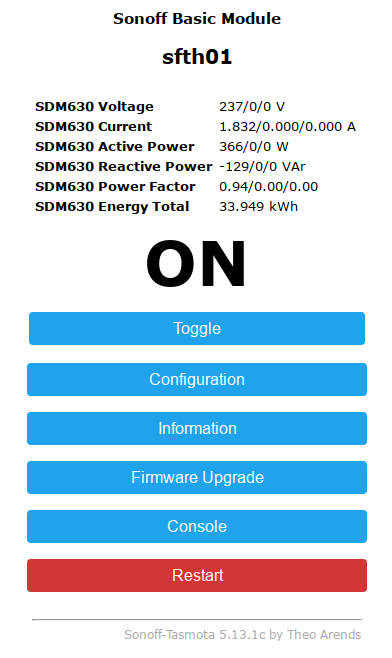
MQTT message seems also to be fine, compact and valid:
{
    "Time": "2018-05-15T17:03:40",
    "ENERGY": {
        "Total": 33.879,
        "ActivePower": [182, 0, 0],
        "ReactivePower": [-181, 0, 0],
        "Factor": [0.71, 0.00, 0.00],
        "Voltage": [237, 0, 0],
        "Current": [1.364, 0.000, 0.000]
    }
}
Ok,
But if you could add an option for extended parameters as we discused, one for mqtt and second for http displaing i.e. SDM630_BASIC and SDM630_EXTENDED, SDM630_EXTENDED_HTTP
where we can see the code ?
roblad
on 15 May 2018
Hi,
I can work on this but I prefer to verify if code works on a SDM630 because I tested it on a SDM120 (1-phase)... PR is available here https://github.com/arendst/Sonoff-Tasmota/pull/2735/commits/9376dca9925c481432c79f07563432cbae414a0d
gtortone
on 15 May 2018
We have to wait for China post :-)
roblad
on 15 May 2018
Will you synchronize with latest @arendst dev branch ? I will clone
roblad
on 15 May 2018
I submitted a PR, now it is @arendst turn ! :smile:
try to clone from my fork: https://github.com/gtortone/Sonoff-Tasmota
(it is updated to last commit)
gtortone
on 15 May 2018
roblad
on 15 May 2018
BTW, the 120 has function inside to set value of total energy or starts from 0 and the end?
roblad
on 16 May 2018
SDM120 starts from 0 to the end and it is not possible to reset kWh
gtortone
on 16 May 2018
Could yo think about that parameter in user.config to set initial value for adding to measured values from device
roblad
on 16 May 2018
Is sdm530 also work or only 120,630?
 eeprom23
on 16 May 2018
eeprom23
on 16 May 2018
SDM530 seems to be similar to SDM630... you can try to use SDM630 sensor on Sonoff-Tasmota and if it works let me know... I will update description of sensor!
gtortone
on 16 May 2018
Hi,
You probably forgot about domoticz :-)
roblad
on 17 May 2018
@roblad I have three values for each voltage, current and power while Domoticz accept a single value only for each metric... any suggestion ? :smile:
gtortone
on 17 May 2018
Hi,
The same is for DS sensors, and you can take values for sum of 3phase divided by 3 :-), and not for all but that one that are available from Sonoff POW :-)
roblad
on 17 May 2018
for three voltages value an average is fine, but for current (A) and power (kWh) a sum should be fine... isn't it ?
gtortone
on 17 May 2018
ifdef USE_DOMOTICZ
if (show_energy_period) {  // Only send if telemetry
  dtostrfd(energy_total * 1000, 1, energy_total_chr);
  DomoticzSensorPowerEnergy((uint16_t)energy_power, energy_total_chr);  // PowerUsage, EnergyToday
  DomoticzSensor(DZ_VOLTAGE, energy_voltage_chr);  // Voltage
  DomoticzSensor(DZ_CURRENT, energy_current_chr);  // Current
}
endif // USE_DOMOTICZ
roblad
on 17 May 2018
these are from a single-phase device with one voltage value, one current value and one power value...
I have them in SDM120 sensor code...
#ifdef USE_DOMOTICZ
    if (0 == tele_period) {
      DomoticzSensor(DZ_VOLTAGE, voltage);
      DomoticzSensor(DZ_CURRENT, current);
      DomoticzSensorPowerEnergy((uint16_t)sdm120_active_power, energy_total);
    }
#endif  // USE_DOMOTICZ
But it could be also in smd630 but voltage sumarise, current sumarised i.e.
roblad
on 17 May 2018
Hi,
BTW, is it possible to add initial value or save state value as in counter that also in the config you will be able to set initial sdm630_energy_total energy when the sensor starts fro 0 after reset or new one annatched ?
roblad
on 17 May 2018
the sensor (sdmxxx) does save the kwh internally! you can not set it to 0. so no need to save the values in tasmota.
MatzeJoerling
on 18 May 2018
Hi,
Ok, but starts from 0 I need to set initial value either internally or in tasmota, currently i.e I have 145kwh cosumption and I want to start from 146
roblad
on 18 May 2018
this Domoticz seems to be highly unflexible ;-) put some node-red between you sensors and domoticz.
cripple the sensor (Average Voltage, Amps) is not the right way, my 2ct.
MatzeJoerling
on 18 May 2018
dont get this initial value thing!
when tasmota starts and reads modbus all KWH values are read from SDM! And that are persistant values!
MatzeJoerling
on 18 May 2018
Hi,
When I plug SDM it will starts from 0, I do not know if it is possible to set any value as persistant value inside, I need to calibrate with my current consumption and continue with measure of tasmota. I do not know node-red, I have domoticz and I need to transfer some values there as normal tasmota has.
roblad
on 18 May 2018
what SDM do you have? will double check my 630 if it looses the values, but have to switch off my house for that test ;-) will report, but not next time...
MatzeJoerling
on 18 May 2018
Hi, but there is a qiestion if yo can set some initial value to eeprom on it?
roblad
on 18 May 2018
@MatzeJoerling
Hi,
Did you tested ?
roblad
on 22 May 2018
@roblad
sorry, no. i have to shutdown the whole house to test that. sdm630 is my main counter for everything.
MatzeJoerling
on 23 May 2018
This issue has been automatically marked as stale because it has not had recent activity. It will be closed if no further activity occurs. Thank you for your contributions.
![stale[bot] picture](https://avatars3.githubusercontent.com/in/1724?v=4&s=40) stale[bot]
on 7 Jul 2018
stale[bot]
on 7 Jul 2018
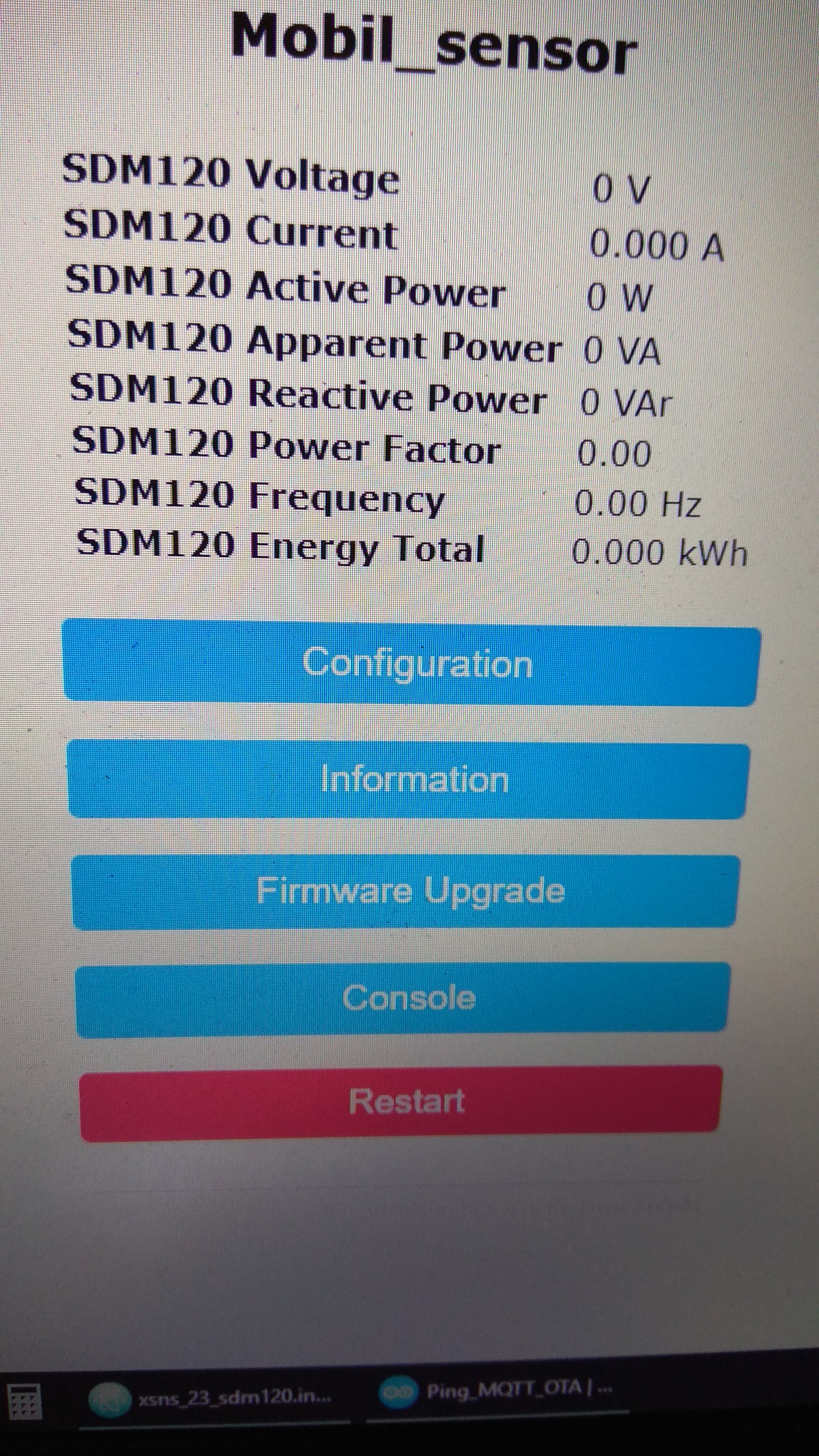
Update:
My mistake, in tasmota user_config.h baudrate 9600 => 2400. Works.
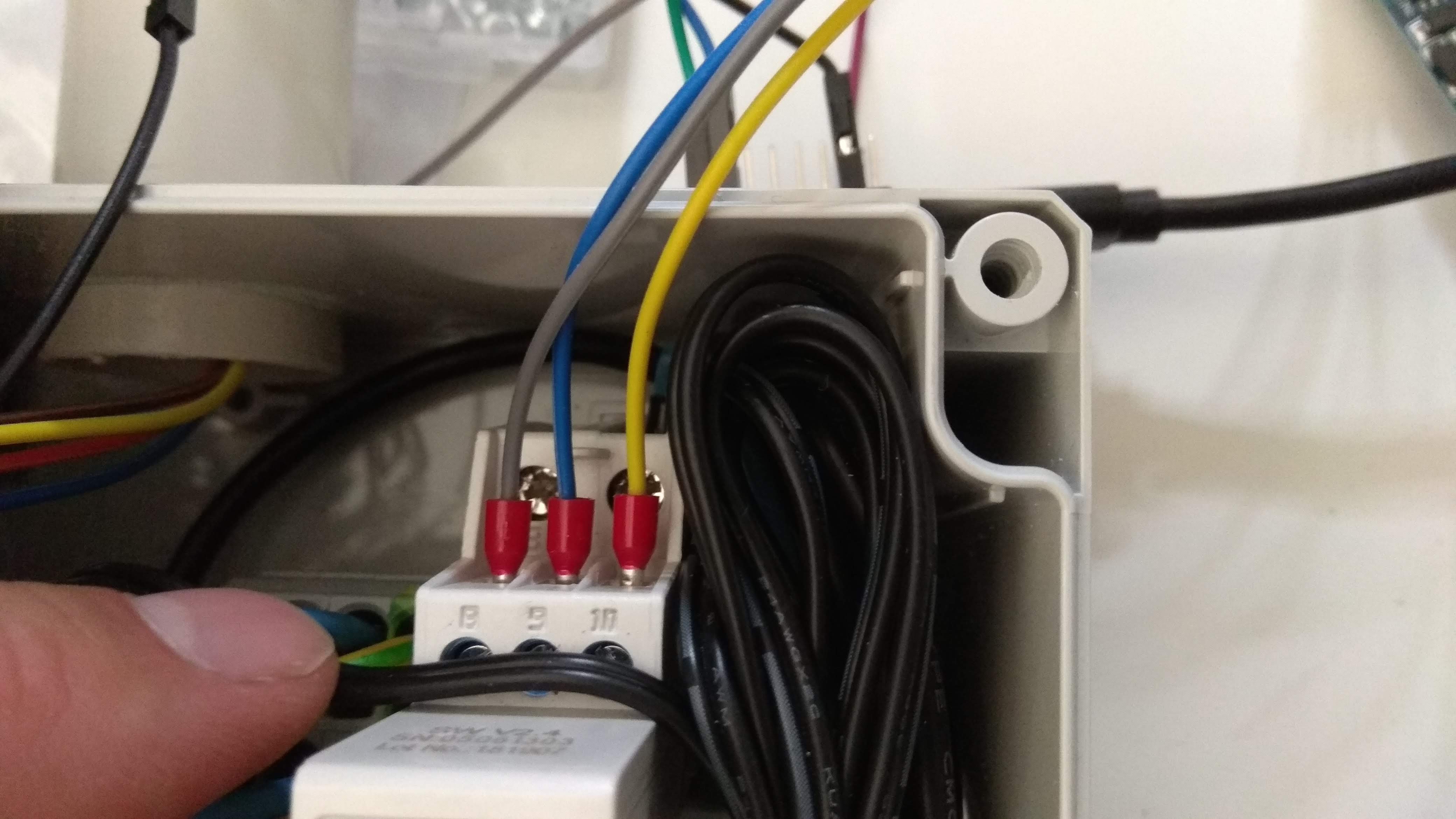
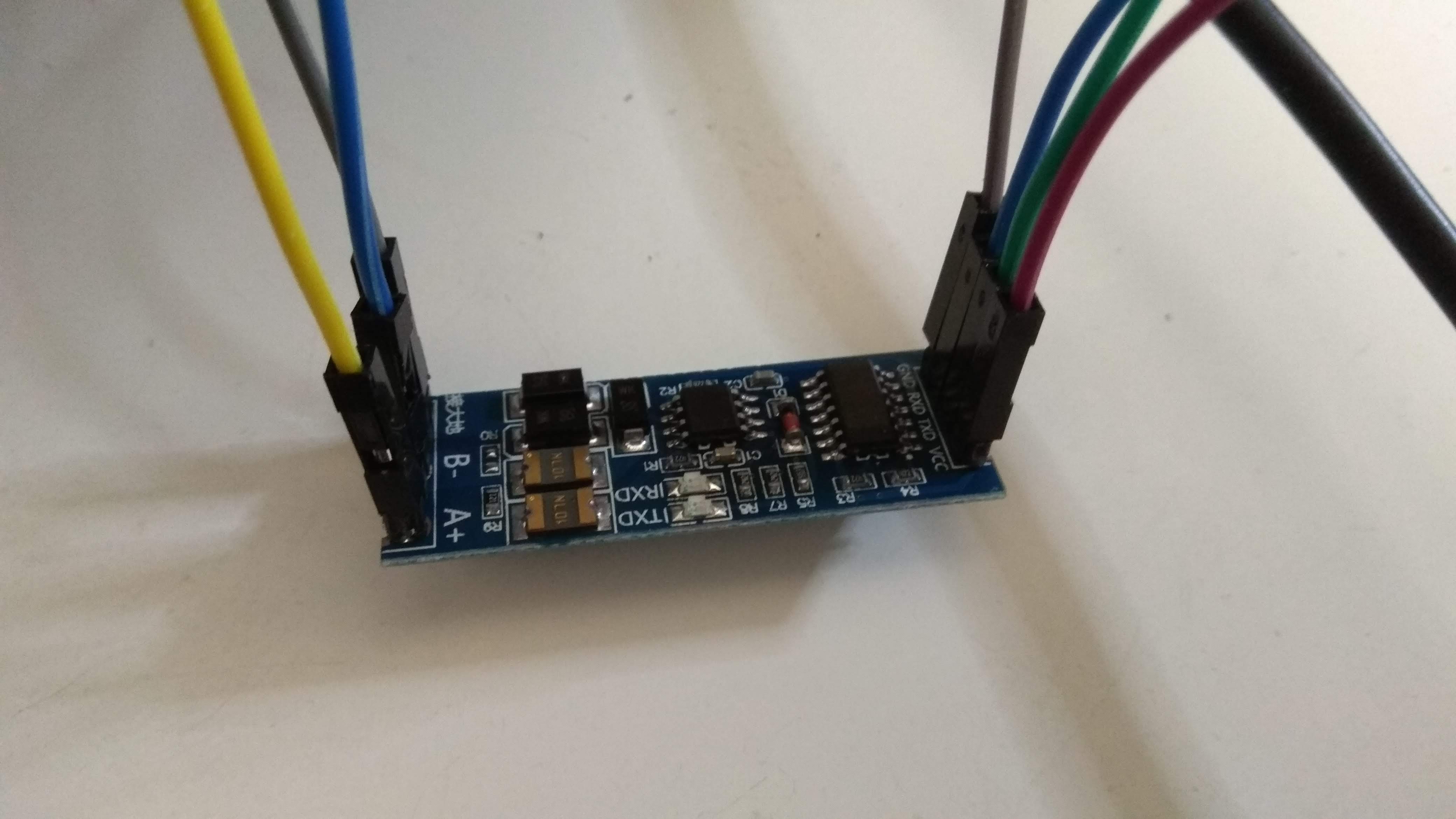
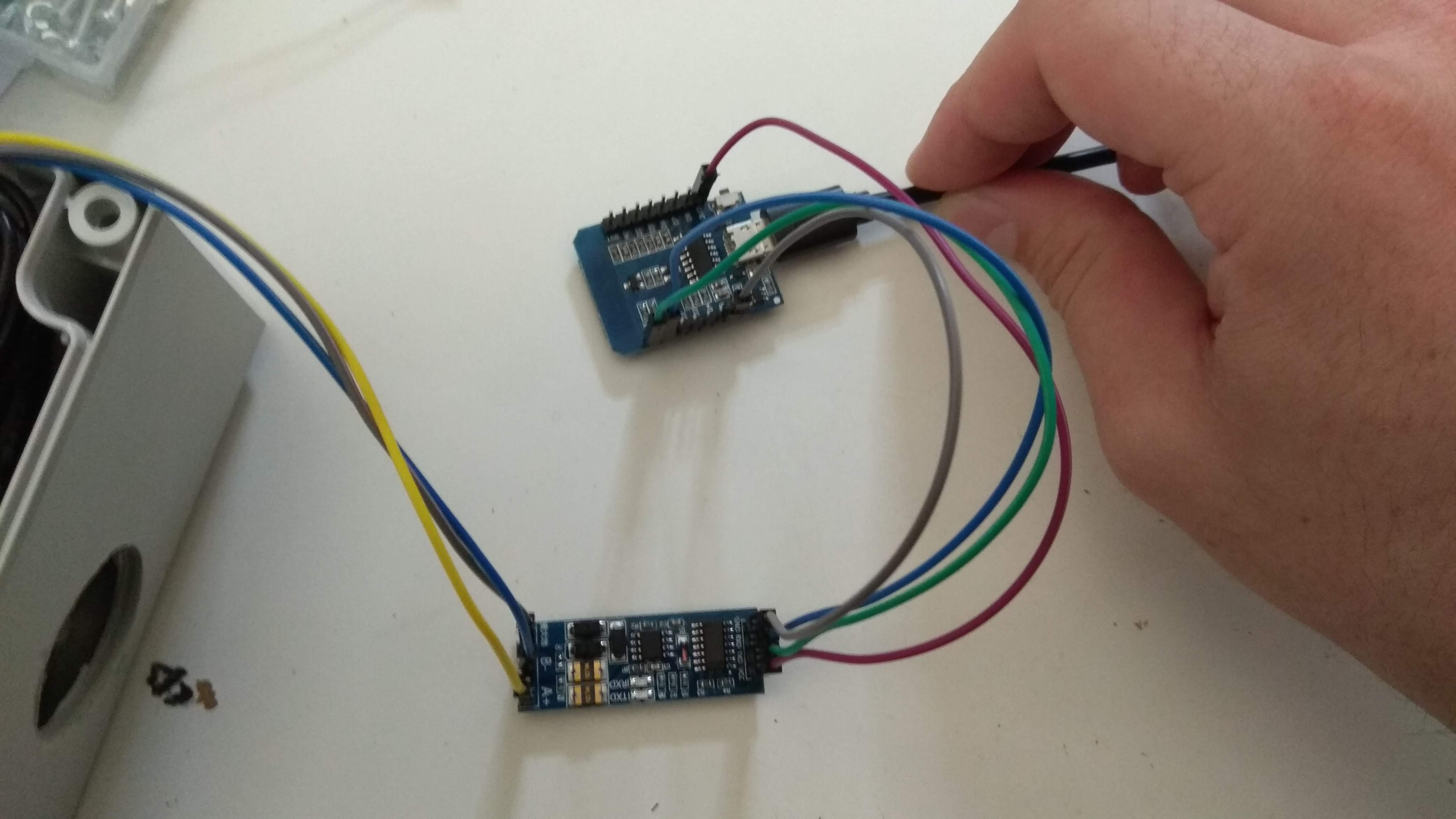
Hi, how should I connect the sdm120 with wemos?
Baudrate is on sdm120 2400bps I think it's wrong, because tasmota is 9600. How can I change?
 orimate
on 25 Jul 2018
orimate
on 25 Jul 2018
Hi @orimate,
you can change SDM120_SPEED in user_config.h
gtortone
on 26 Jul 2018
Hi all:) I just got the SDM630 device from eastron. It is working great - BUT do any of you know, if it is possible to delete / reset the TOTAL energy value? I cannot do it via the CLR option on the meter.:(
 jascdk
on 9 Oct 2018
jascdk
on 9 Oct 2018
have the same, running fine since months, and for you question:
no, you can´t! As described in the manual.
MatzeJoerling
on 9 Oct 2018
Hi all:) Would it be possible to add the Frequency to the sdm630 in tasmota? Also a function, where it shows how much power in kWh it uses per day would be nice (is this possible)?
jascdk
on 17 Oct 2018
Hi i have tested: Total kwh - kwh 0x0156 but it is ervery 0.0 ? Why ?
`/*
xsns_25_sdm630.ino - Eastron SDM630-Modbus energy meter support for Sonoff-Tasmota
Copyright (C) 2018 Gennaro Tortone
This program is free software: you can redistribute it and/or modify
it under the terms of the GNU General Public License as published by
the Free Software Foundation, either version 3 of the License, or
(at your option) any later version.
This program is distributed in the hope that it will be useful,
but WITHOUT ANY WARRANTY; without even the implied warranty of
MERCHANTABILITY or FITNESS FOR A PARTICULAR PURPOSE. See the
GNU General Public License for more details.
You should have received a copy of the GNU General Public License
along with this program. If not, see http://www.gnu.org/licenses/.
*/
ifdef USE_SDM630
/*******************************\
- Eastron SDM630-Modbus energy meter
* - Based on: https://github.com/reaper7/SDM_Energy_Meter
*******************************/
include
TasmotaSerial *SDM630Serial;
uint8_t sdm630_type = 1;
//uint8_t sdm630_state = 0;
float sdm630_voltage[] = {0,0,0};
float sdm630_current[] = {0,0,0,0};
float sdm630_active_power[] = {0,0,0,0};
float sdm630_reactive_power[] = {0,0,0};
float sdm630_power_factor[] = {0,0,0};
float sdm630_energy_total = 0;
float sdm630_hz_total = 0;
bool SDM630_ModbusReceiveReady()
{
return (SDM630Serial->available() > 1);
}
void SDM630_ModbusSend(uint8_t function_code, uint16_t start_address, uint16_t register_count)
{
uint8_t frame[8];
frame[0] = 0x01; // default SDM630 Modbus address
frame[1] = function_code;
frame[2] = (uint8_t)(start_address >> 8);
frame[3] = (uint8_t)(start_address);
frame[4] = (uint8_t)(register_count >> 8);
frame[5] = (uint8_t)(register_count);
uint16_t crc = SDM630_calculateCRC(frame, 6); // calculate out crc only from first 6 bytes
frame[6] = lowByte(crc);
frame[7] = highByte(crc);
while (SDM630Serial->available() > 0) { // read serial if any old data is available
SDM630Serial->read();
}
SDM630Serial->flush();
SDM630Serial->write(frame, sizeof(frame));
}
uint8_t SDM630_ModbusReceive(float *value)
{
uint8_t buffer[9];
*value = NAN;
uint8_t len = 0;
while (SDM630Serial->available() > 0) {
buffer[len++] = (uint8_t)SDM630Serial->read();
}
if (len < 9)
return 3; // SDM_ERR_NOT_ENOUGHT_BYTES
if (len == 9) {
if (buffer[0] == 0x01 && buffer[1] == 0x04 && buffer[2] == 4) {   // check node number, op code and reply bytes count

  if((SDM630_calculateCRC(buffer, 7)) == ((buffer[8] << 8) | buffer[7])) {  //calculate crc from first 7 bytes and compare with received crc (bytes 7 & 8)

    ((uint8_t*)value)[3] = buffer[3];
    ((uint8_t*)value)[2] = buffer[4];
    ((uint8_t*)value)[1] = buffer[5];
    ((uint8_t*)value)[0] = buffer[6];

  } else return 1; // SDM_ERR_CRC_ERROR

} else return 2;  // SDM_ERR_WRONG_BYTES
}
return 0; // SDM_ERR_NO_ERROR
}
uint16_t SDM630_calculateCRC(uint8_t *frame, uint8_t num)
{
uint16_t crc, flag;
crc = 0xFFFF;
for (uint8_t i = 0; i < num; i++) {
crc ^= frame[i];
for (uint8_t j = 8; j; j--) {
if ((crc & 0x0001) != 0) { // If the LSB is set
crc >>= 1; // Shift right and XOR 0xA001
crc ^= 0xA001;
} else { // Else LSB is not set
crc >>= 1; // Just shift right
}
}
}
return crc;
}
/*******************************/
const uint16_t sdm630_start_addresses[] {
0x0000, // L1 - SDM630_VOLTAGE [V]
0x0002, // L2 - SDM630_VOLTAGE [V]
0x0004, // L3 - SDM630_VOLTAGE [V]
0x0006, // L1 - SDM630_CURRENT [A]
0x0008, // L2 - SDM630_CURRENT [A]
0x000A, // L3 - SDM630_CURRENT [A]
0x0030, // ALL - SDM630_CURRENT [A]
0x000C, // L1 - SDM630_POWER [W]
0x000E, // L2 - SDM630_POWER [W]
0x0010, // L3 - SDM630_POWER [W]
0x0034, // Total system power [W]
0x0018, // L1 - SDM630_REACTIVE_POWER [VAR]
0x001A, // L2 - SDM630_REACTIVE_POWER [VAR]
0x001C, // L3 - SDM630_REACTIVE_POWER [VAR]
0x001E, // L1 - SDM630_POWER_FACTOR
0x0020, // L2 - SDM630_POWER_FACTOR
0x0022, // L3 - SDM630_POWER_FACTOR
0x0156, // Total - SDM630_TOTAL_ACTIVE_ENERGY [Wh]
0x0046 // Total - SDM630_FREQUENCY [Hz]
};
uint8_t sdm630_read_state = 0;
uint8_t sdm630_send_retry = 0;
void SDM630250ms() // Every 250 mSec
{
// sdm630_state++;
// if (6 == sdm630_state) { // Every 300 mSec
// sdm630_state = 0;
float value = 0;
bool data_ready = SDM630_ModbusReceiveReady();

if (data_ready) {
  uint8_t error = SDM630_ModbusReceive(&value);
  if (error) {
    snprintf_P(log_data, sizeof(log_data), PSTR(D_LOG_DEBUG "SDM630 response error %d"), error);

    AddLog(LOG_LEVEL_DEBUG);
  } else {

    Serial.print(sdm630_read_state);
    switch(sdm630_read_state) {
      case 0:
        sdm630_voltage[0] = value;
        break;

      case 1:
        sdm630_voltage[1] = value;
        break;

      case 2:
        sdm630_voltage[2] = value;
        break;

      case 3:
        sdm630_current[0] = value;
        break;

      case 4:
        sdm630_current[1] = value;
        break;

      case 5:
        sdm630_current[2] = value;
        break;

       case 6:
        sdm630_current[3] = value;
        break;

      case 7:
        sdm630_active_power[0] = value;
        break;

      case 8:
        sdm630_active_power[1] = value;
        break;

      case 9:
        sdm630_active_power[2] = value;
        break;
      case 10:
        sdm630_active_power[3] = value;
        break;

      case 11:
        sdm630_reactive_power[0] = value;
        break;

      case 12:
        sdm630_reactive_power[1] = value;
        break;

      case 13:
        sdm630_reactive_power[2] = value;
        break;

      case 14:
        sdm630_power_factor[0] = value;
        break;

      case 15:
        sdm630_power_factor[1] = value;
        break;

      case 16:
        sdm630_power_factor[2] = value;
        break;

      case 17:
        sdm630_energy_total = value;
        break;
       case 18:
        sdm630_hz_total = value;
        break;

    } // end switch

    sdm630_read_state++;

    if (sizeof(sdm630_start_addresses)/2 == sdm630_read_state) {
      sdm630_read_state = 0;
    }
  }
} // end data ready

if (0 == sdm630_send_retry || data_ready) {
  sdm630_send_retry = 5;
   SDM630_ModbusSend(0x04, sdm630_start_addresses[sdm630_read_state], 2);
} else {
  sdm630_send_retry--;
}
// } // end 300 ms
}
void SDM630Init()
{
sdm630_type = 0;
if ((pin[GPIO_SDM630_RX] < 99) && (pin[GPIO_SDM630_TX] < 99)) {
SDM630Serial = new TasmotaSerial(pin[GPIO_SDM630_RX], pin[GPIO_SDM630_TX], 1);
ifdef SDM630_SPEED
if (SDM630Serial->begin(SDM630_SPEED)) {
else
if (SDM630Serial->begin(2400)) {
endif
  if (SDM630Serial->hardwareSerial()) { ClaimSerial(); }
  sdm630_type = 1;
}
}
}
ifdef USE_WEBSERVER
const char HTTP_SNS_SDM630_DATA[] PROGMEM = "%s"
"{s}SDM630 " D_VOLTAGE "{m}%s/%s/%s " D_UNIT_VOLT "{e}"
"{s}SDM630 " D_CURRENT "{m}%s/%s/%s/%s " D_UNIT_AMPERE "{e}"
"{s}SDM630 " D_POWERUSAGE_ACTIVE "{m}%s/%s/%s/%s " D_UNIT_WATT "{e}"
"{s}SDM630 " D_POWERUSAGE_REACTIVE "{m}%s/%s/%s " D_UNIT_VAR "{e}"
"{s}SDM630 " D_POWER_FACTOR "{m}%s/%s/%s{e}"
"{s}SDM630 " "Gesamtverbrauch" "{m}%s " D_UNIT_KILOWATTHOUR "{e}"
"{s}SDM630 " "Frequenz" "{m}%s " "Hz" "{e}";
endif // USE_WEBSERVER
void SDM630Show(boolean json)
{
char voltage_l1[10];
char voltage_l2[10];
char voltage_l3[10];
char current_l1[10];
char current_l2[10];
char current_l3[10];
char current_all[10];
char active_power_l1[10];
char active_power_l2[10];
char active_power_l3[10];
char active_power_all[10];
char reactive_power_l1[10];
char reactive_power_l2[10];
char reactive_power_l3[10];
char power_factor_l1[10];
char power_factor_l2[10];
char power_factor_l3[10];
char energy_total[10];
char watt_total[10];
char hz_total[10];
dtostrfd(sdm630_voltage[0], Settings.flag2.voltage_resolution, voltage_l1);
dtostrfd(sdm630_voltage[1], Settings.flag2.voltage_resolution, voltage_l2);
dtostrfd(sdm630_voltage[2], Settings.flag2.voltage_resolution, voltage_l3);
dtostrfd(sdm630_current[0], Settings.flag2.current_resolution, current_l1);
dtostrfd(sdm630_current[1], Settings.flag2.current_resolution, current_l2);
dtostrfd(sdm630_current[2], Settings.flag2.current_resolution, current_l3);
dtostrfd(sdm630_current[3], Settings.flag2.current_resolution, current_all);
dtostrfd(sdm630_active_power[0], Settings.flag2.wattage_resolution, active_power_l1);
dtostrfd(sdm630_active_power[1], Settings.flag2.wattage_resolution, active_power_l2);
dtostrfd(sdm630_active_power[2], Settings.flag2.wattage_resolution, active_power_l3);
dtostrfd(sdm630_active_power[3], Settings.flag2.wattage_resolution, active_power_all);
dtostrfd(sdm630_reactive_power[0], Settings.flag2.wattage_resolution, reactive_power_l1);
dtostrfd(sdm630_reactive_power[1], Settings.flag2.wattage_resolution, reactive_power_l2);
dtostrfd(sdm630_reactive_power[2], Settings.flag2.wattage_resolution, reactive_power_l3);
dtostrfd(sdm630_power_factor[0], 2, power_factor_l1);
dtostrfd(sdm630_power_factor[1], 2, power_factor_l2);
dtostrfd(sdm630_power_factor[2], 2, power_factor_l3);
dtostrfd(sdm630_energy_total, Settings.flag2.energy_resolution, energy_total);
dtostrfd(sdm630_hz_total, Settings.flag2.energy_resolution, hz_total);
if (json) {
snprintf_P(mqtt_data, sizeof(mqtt_data), PSTR("%s,\"" D_RSLT_ENERGY "\":{\"" D_JSON_TOTAL "\":\"%s\",\""
"HZ" "\":\"%s\",\"" D_JSON_ACTIVE_POWERUSAGE "\":\"[%s,%s,%s,%s]\",\"" D_JSON_REACTIVE_POWERUSAGE "\":\"[%s,%s,%s]\",\""
D_JSON_POWERFACTOR "\":\"[%s,%s,%s]\",\"" D_JSON_VOLTAGE "\":\"[%s,%s,%s]\",\"" D_JSON_CURRENT "\":\"[%s,%s,%s,%s]\"}"),
mqtt_data, energy_total, hz_total, active_power_l1, active_power_l2, active_power_l3, active_power_all,
reactive_power_l1, reactive_power_l2, reactive_power_l3,
power_factor_l1, power_factor_l2, power_factor_l3,
voltage_l1, voltage_l2, voltage_l3,
current_l1, current_l2, current_l3, current_all);
ifdef USE_WEBSERVER
} else {
snprintf_P(mqtt_data, sizeof(mqtt_data), HTTP_SNS_SDM630_DATA, mqtt_data,
voltage_l1, voltage_l2, voltage_l3, current_l1, current_l2, current_l3, current_all,
active_power_l1, active_power_l2, active_power_l3, active_power_all,
reactive_power_l1, reactive_power_l2, reactive_power_l3,
power_factor_l1, power_factor_l2, power_factor_l3, energy_total, hz_total);
endif // USE_WEBSERVER
}
}
/*******************************\
- Interface
*******************************/
define XSNS_25
boolean Xsns25(byte function)
{
boolean result = false;
if (sdm630_type) {
switch (function) {
case FUNC_INIT:
SDM630Init();
break;
case FUNC_EVERY_250_MSECOND:
SDM630250ms();
break;
case FUNC_JSON_APPEND:
SDM630Show(1);
break;
ifdef USE_WEBSERVER
  case FUNC_WEB_APPEND:
    SDM630Show(0);
    break;
endif // USE_WEBSERVER
}
}
return result;
}
endif`
 dr-apple
on 21 Oct 2018
dr-apple
on 21 Oct 2018
Hi @dr-apple,
you modified source code,
try to use default xsns_25_sdm630.ino source code and check if value is correct...
gtortone
on 21 Oct 2018
i have try with the original xsns_25_sdm630.ino but it is the same, 0 kwh :-(
dr-apple
on 21 Oct 2018
I don't have a SDM630 meter (but SDM120) and I cannot check...
@roblad, @jascdk, @MatzeJoerling do you have same problem of @dr-apple ?
gtortone
on 21 Oct 2018
Hi - nope mine is working absolutely fine 😊
jascdk
on 21 Oct 2018
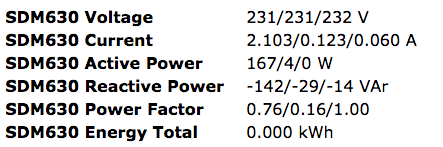
dr-apple
on 21 Oct 2018
What is wrong ?
dr-apple
on 21 Oct 2018
@dr-apple can you send your model number? if I remember there are two models of SDM630...
gtortone
on 21 Oct 2018
Can you tell me, how i found the number for the model ?
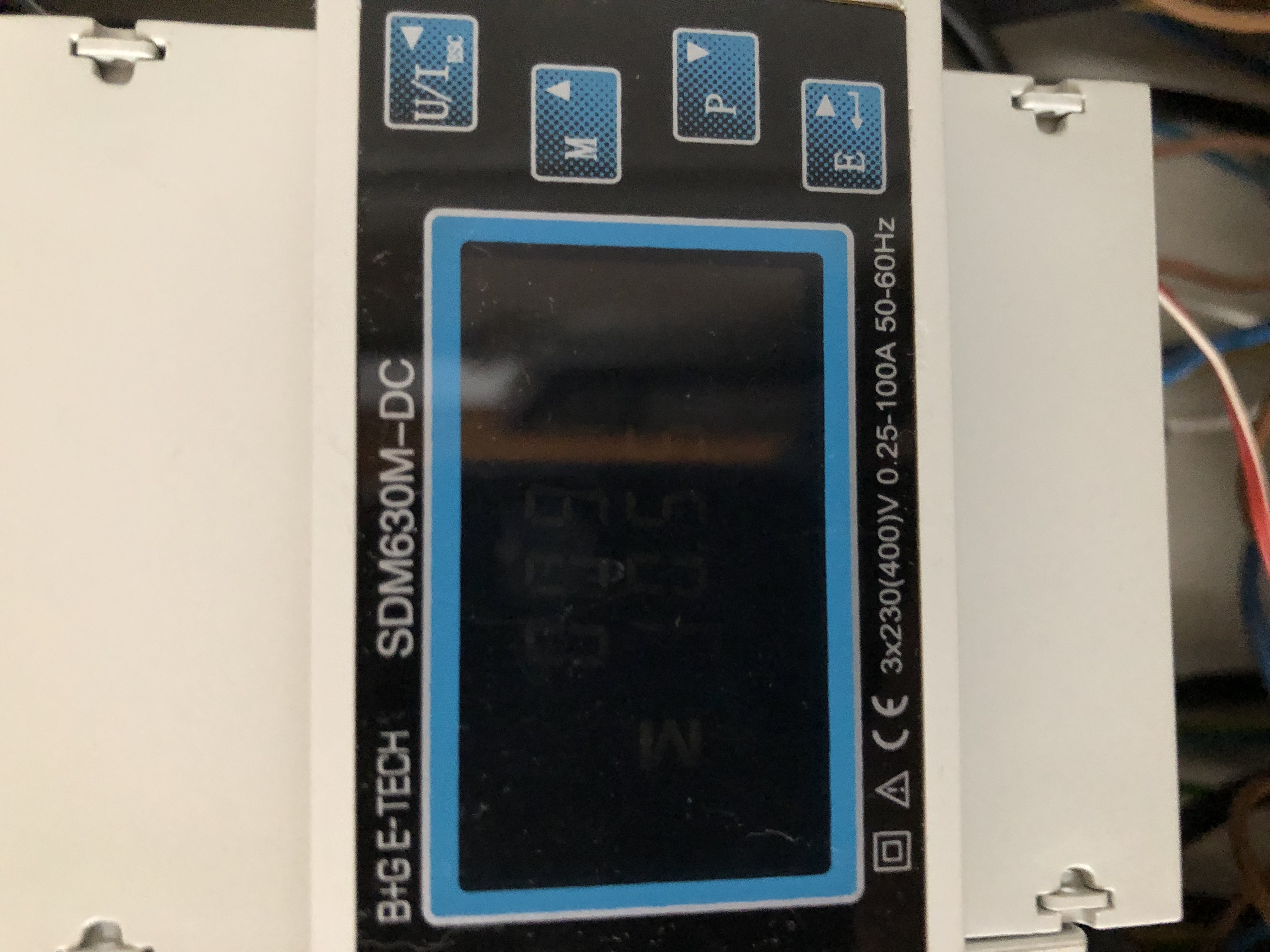
dr-apple
on 21 Oct 2018
@dr-apple this is a SDM630M-DC that seems to be different from a common SDM630. SDM modules are produced by Eastron but this is produced (or branded) from B+G ETECH... I suggest you to verify datasheet of module to check if the variable space is the same...
gtortone
on 21 Oct 2018
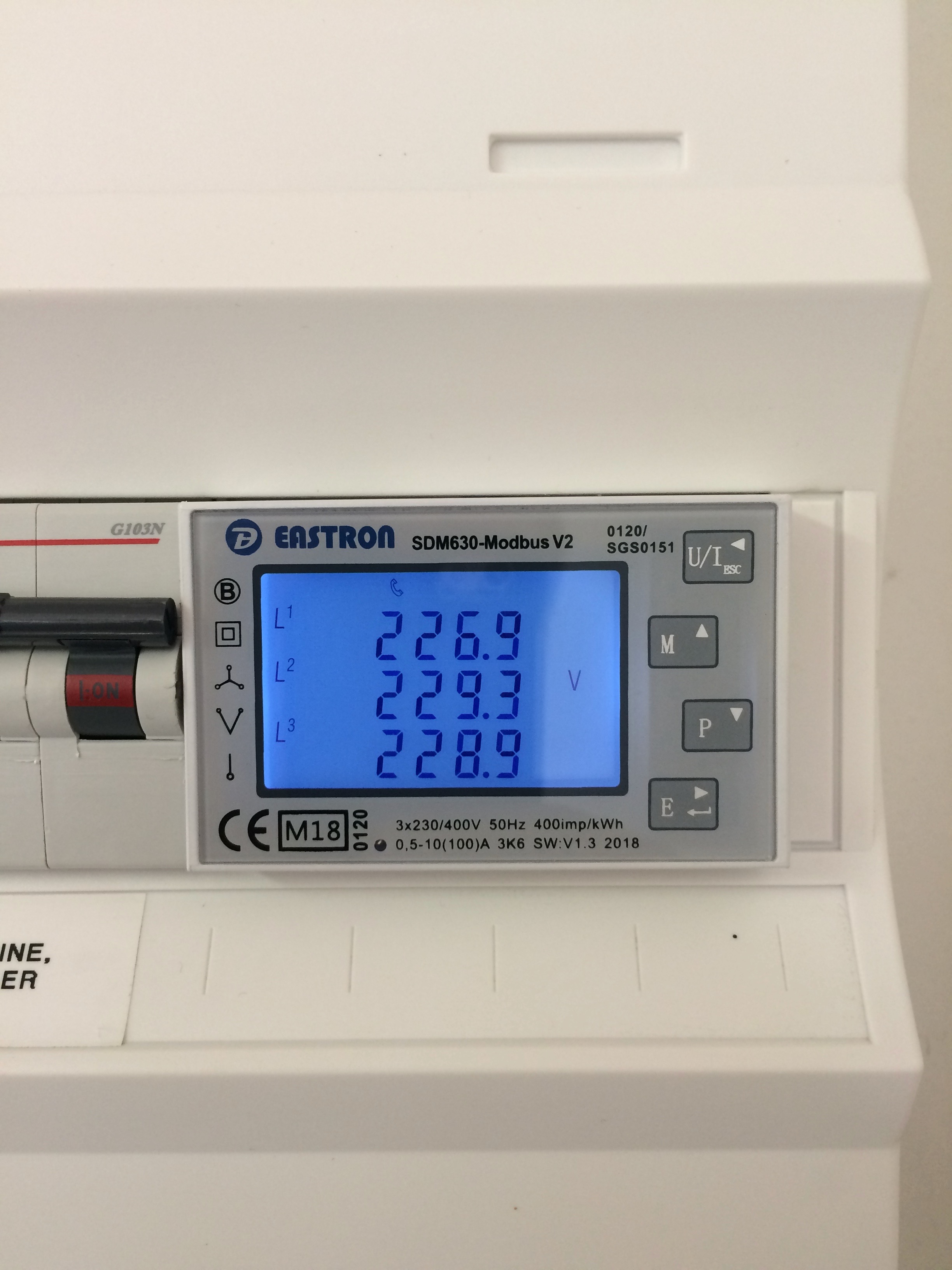
This is my module - and yes it is the eastern module - working great:=)
jascdk
on 21 Oct 2018
HM.. then i read the value with a usb rs484 adapter on the raspberry pi with my smarthomesoftware out, it works :

dr-apple
on 21 Oct 2018
if I understand correctly you read address 72 (decimal) that is 0x48 (hex) SDM630 code reads address 0x156... this could be the problem for your SDM630 that use a different address...
gtortone
on 21 Oct 2018
Thank you ! now with the adress 0x0048 it's works fine:
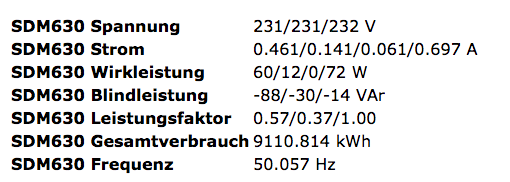
dr-apple
on 21 Oct 2018
Related issues
 kckepz
·
3Comments
kckepz
·
3Comments
 ximonline
·
3Comments
ximonline
·
3Comments
 Joeyhza
·
3Comments
Joeyhza
·
3Comments
 esp32x
·
3Comments
esp32x
·
3Comments
 grizewald
·
3Comments
grizewald
·
3Comments