Tasmota: Publishing MQTT messages only using GPIO1 and GPIO3 for HA automations
Hello everyone!
I was wondering: is it possible to use GPIOs TX (01) and RX (03) just to publish MQTT messages using a regular 3 button switch?
This is my setup:
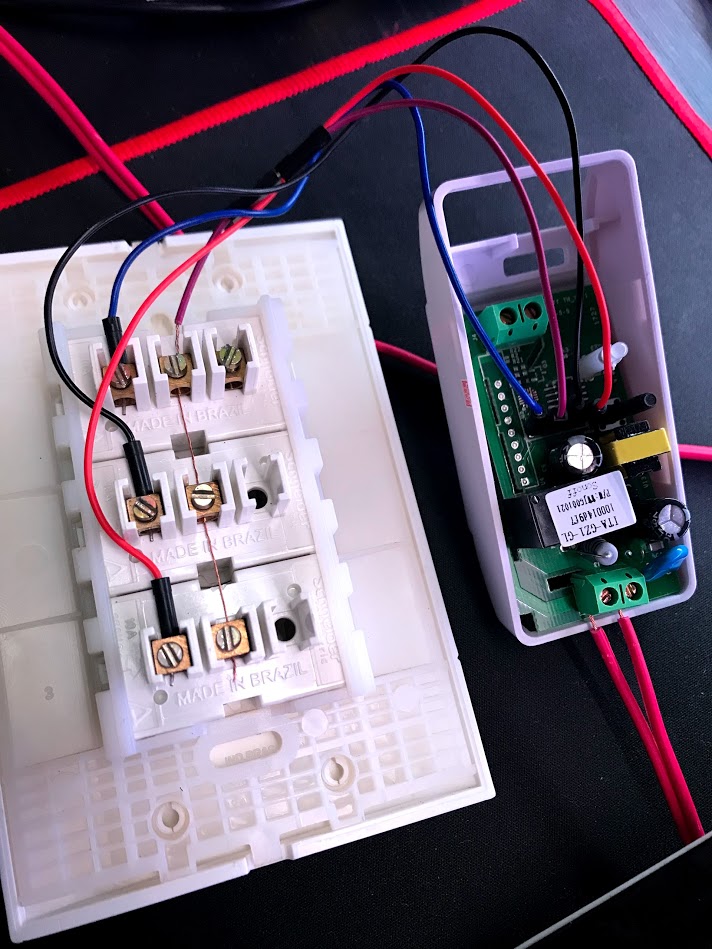
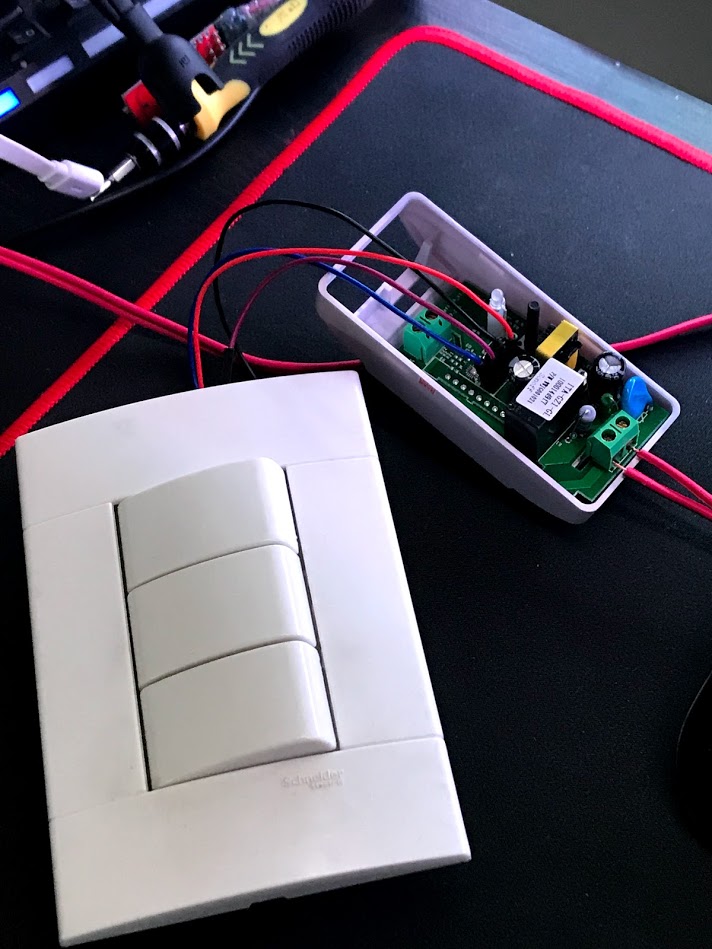
I’ve used the GND wire on all three buttons. This works if set relay on GPIOs 14, TX and RX (it turns the one and only relay on and off successfully) but no luck setting other switch type like this:
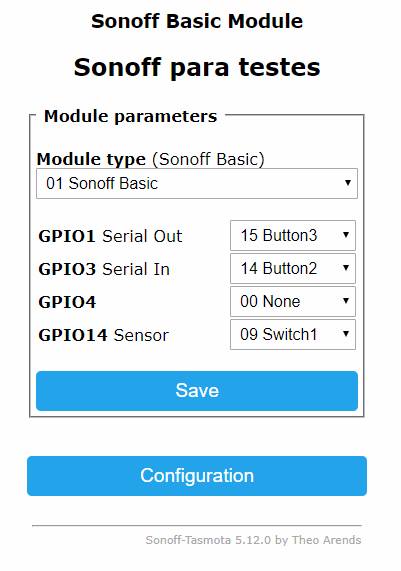
My idea is when I press buttons 2 or 3 (GPIO TX/RX) a message is published via MQTT so I can use it with an automation (MQTT trigger) to turn on/off a ceiling fan, for example, and so on.
Is it possible?
I wish I could just publish a MQTT message when the contacts are shorted (TX or RX and GND).
The odd part is if I set TX and RX to switch1, they both work just fine! Exactly like GPIO14 does. If I change to anything else, nothing is shown on the console screen. I’ve tried almost every option there.
I really think this could open a lot of possibilities with this already incredible device.
Thanks!
 tatunts
All 14 comments
Yes, this is possible, check the wiki here:
https://github.com/arendst/Sonoff-Tasmota/wiki/Understanding-SwitchMode-and-SwitchTopic
 emontnemery
on 29 Mar 2018
emontnemery
on 29 Mar 2018
I do hope you're going to ensure those power lines are pushed all the way in and not hanging in the breeze?
 roguestreak
on 30 Mar 2018
roguestreak
on 30 Mar 2018
Thanks a lot @emontnemery! I will check it out.
No worries @roguestreak, this is only a test prototype.
Thanks!!
tatunts
on 9 Apr 2018
This issue has been automatically marked as stale because it has not had recent activity. It will be closed if no further activity occurs. Thank you for your contributions.
![stale[bot] picture](https://avatars3.githubusercontent.com/in/1724?v=4&s=40) stale[bot]
on 5 Jun 2018
stale[bot]
on 5 Jun 2018
Hello @emontnemery! How are you today?
I was not able to make this work as you suggested... Two months later and there is nothing I could find on the internet do make this work. I've done just now a version 2 of this idea and still not able to set this thing.
Here are some photos I just took: https://photos.google.com/share/AF1QipPJKikcRM9v5Aau2FSuAnSX0nvzPnRpFC6tGz3aIAGWuEayIKI_2Mtd2EZEfHrnvg?key=ZmFTc2pBTVVacG5qWjhNWUVQLThBZXR2eTRVOThB
Can you please help me? I read somewhere that this could be done by using RULES but still doesn't work here. I am using Sonoff Basic Module.
Nothing is shown on console, even if I set like this:
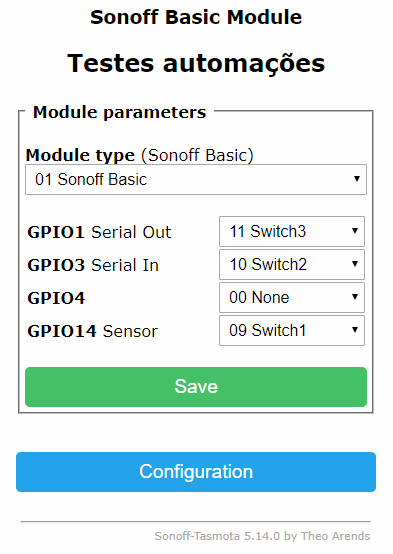
Thanks a lot!
tatunts
on 6 Jun 2018
Hi,
I think that rules should solve your request. Can you share the rules you used?
I'm very interested on this because it should be a very common use case of a sonoff basic.
 ascillato
on 6 Jun 2018
ascillato
on 6 Jun 2018
Hello!
I could not make this work. Have not tried to do it with rules, if anyone could share an example it would be very appreciated!
Thanks.
tatunts
on 9 Jun 2018
Hi,
Can you make something like this example of the wiki?
ascillato
on 9 Jun 2018
Hello @ascillato!
No, sorry. The odd thing is that even with seriallog off, nothing is shown on console. I've set the GPIOs to button, switch, relays, nothing happens.
Thanks!
tatunts
on 11 Jun 2018
have you tried NodMCU it has more GPIOs. or you want just tried it on Sonoff?
I am trying to do the same thing actually with NodeMCU
 ssinseeme
on 17 Jun 2018
ssinseeme
on 17 Jun 2018
I have not tried with a NodeMCU. Hope you can share your results!
tatunts
on 17 Jun 2018
Hi,
Any updates?
 ascillato2
on 21 Jul 2018
ascillato2
on 21 Jul 2018
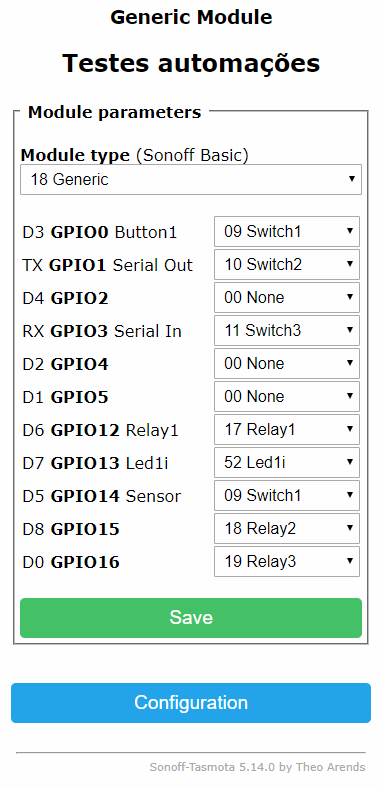
Hello! Yes! Got it working by setting the board as generic, like this:
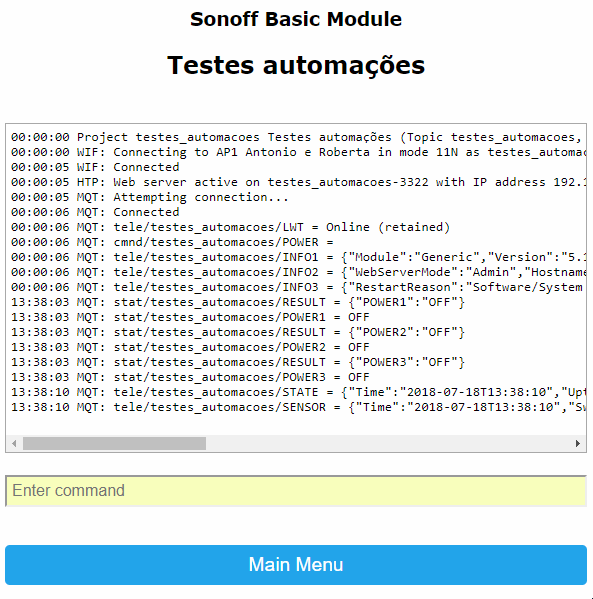
These are the results on logs:
Here you can see it working: https://photos.app.goo.gl/JdnB76mZkuPMPzTU7
Here is the backlog used: Backlog Module 18; GPIO0 9; GPIO1 10; GPIO2 0; GPIO3 11; GPIO4 0; GPIO5 0; GPIO12 17; GPIO13 52; GPIO14 9; GPIO15 18; GPIO16 19; SetOption13 1; SetOption26 0; SwitchTopic 1; switchmode1 3; switchmode2 3; switchmode3 3; switchmode4 3; SerialLog 0
tatunts
on 22 Jul 2018
Great! Thanks for share :+1:
ascillato
on 23 Jul 2018
Related issues
 j4k3
·
3Comments
j4k3
·
3Comments
 JoergZ2
·
3Comments
JoergZ2
·
3Comments
 grizewald
·
3Comments
grizewald
·
3Comments
 garret
·
3Comments
garret
·
3Comments
 esp32x
·
3Comments
esp32x
·
3Comments
Most helpful comment
Hello! Yes! Got it working by setting the board as generic, like this:
These are the results on logs:
Here you can see it working: https://photos.app.goo.gl/JdnB76mZkuPMPzTU7
Here is the backlog used:
Backlog Module 18; GPIO0 9; GPIO1 10; GPIO2 0; GPIO3 11; GPIO4 0; GPIO5 0; GPIO12 17; GPIO13 52; GPIO14 9; GPIO15 18; GPIO16 19; SetOption13 1; SetOption26 0; SwitchTopic 1; switchmode1 3; switchmode2 3; switchmode3 3; switchmode4 3; SerialLog 0