Tasmota: Sonoff *** [upload] Error 255 - any fix yet?
I have connected my Sonoff to FTDI 3.3v and try to upload Tasamota firmware using Platforio. I hold down the button on the Sonoff when connecting for 5sec. Also tried to hold it down until it uploads everyting.
No LED light signals from Sonoff. I have tried swapping the TX and RX cables.
Tried changing the baudarate also.
I get the error *** [upload] Error 255.
I have read the whole internet through and no fix found. What do to?

 Kepete
All 10 comments
I've uploaded using PlatformIO with no problems so don't believe there are any inherent errors that suggests there is an ongoing issue (as the issue title implies by using the word "yet" - have you got a link to details of an issue affecting more than just yourself?)
Basic questions but are worth checking:
- Do you have RX to TX and TX to RX or RX to RX and TX to TX?
- Have you tried flashing a stock firmware outside of PlatformIO?
- You only need to close GPIO0 for a second while powering on the ESP8266, are you doing this?
 SodoffBaldrick
on 26 Jan 2018
SodoffBaldrick
on 26 Jan 2018
Thank you for your comment @SodoffBaldrick !
Yes I have seen many others having the similar problem, some links:
https://github.com/arendst/Sonoff-Tasmota/issues/463
https://github.com/arendst/Sonoff-Tasmota/issues/840
https://github.com/arendst/Sonoff-Tasmota/issues/276
Answering your questions:
- Yes I have tried both ways, still error persist.
- No I haven't. Where to start?
- I have tried closing GPIO0 for a second, for 5 seconds, for the whole time etc
Kepete
on 26 Jan 2018
Sorry, I wasn't aware there was a larger issue, my mistake.
For point 2, try the following
- Download esptool.exe (sorry, I don't have a link, I forget where I got it from originally)
- Download sonoff.bin https://github.com/arendst/Sonoff-Tasmota/releases/download/v5.11.1/sonoff.bin
- Run the command "esptool.exe -vv -cb 115200 -cp COM5 -ca 0x00000 -bz 1M -bm dout -cf sonoff.bin"
- of course substituting the path of esp tool, sonoff.bin and also using the correct COM port
SodoffBaldrick
on 26 Jan 2018
Hello Friends,
I'm also having the same problem as @Kepete.
I tried adding a firmware via esptool but an error occurred while uploading
Follows link with some images of the process
1704
 rodolfoSant0s
on 26 Jan 2018
rodolfoSant0s
on 26 Jan 2018
@SodoffBaldrick So I'm using Mac OS and I tried the same steps following mac os tutorials :)
It went well I think
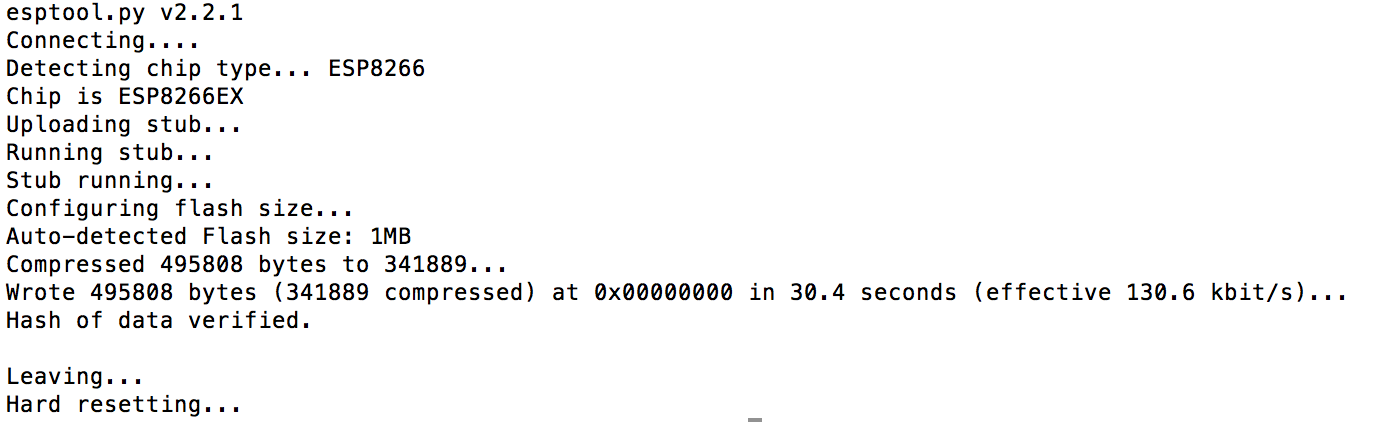
After this the green LED is now blinking if I connect again it to computer. How to other verify that it is working correctly?
What should the next steps be?
Kepete
on 26 Jan 2018
Excellent :)
Do you see a sonoff-#### wifi point on your computer? if so then connect to it and enter your SSID and password and then you should be set :)
SodoffBaldrick
on 26 Jan 2018
@SodoffBaldrick
I was few days away and couldn't test it more. Today got back and now going to play with it again.
Right now I have it connected with USB to my computer, but no wifi network is showing up. Do i have to connect it to wall socket for the wifi to appear?
EDIT: Also tried now connecting it to the wall socket. The light i on, I can manually press the buttion and it will switch the light on off, but holding 5sec or anything other won't make it discoverable by Wifi.
EDIT2: Got it working! 5 sec was the original Sonoff firmware, the Tasamota firmware button functions are described here: https://github.com/arendst/Sonoff-Tasmota/wiki/Button-usage
Special thanks to @SodoffBaldrick , the esptool worked nicely :)
Kepete
on 30 Jan 2018
I had a similar issue as above with platformio. I tried it in a macOs High Sierra with thunderbolt3, and it didn't connect the serial communication. Then tried with the esptool script, and also didn't work with that mac.
It worked smoothly fine using esptool on a windows machine.
After flashing it, just need to press 4 times to create a sonoff AP and update the network settings.
 johannarispe
on 11 May 2018
johannarispe
on 11 May 2018
For future people with this problem
Download drivers for mac from http://www.ftdichip.com/Drivers/VCP.htm
solution found at https://github.com/arendst/Sonoff-Tasmota/issues/957
 sweebel
on 31 Jul 2018
sweebel
on 31 Jul 2018
just for future reference, on a mac with osx if you get the issue COM5 not found, change upload_port = COM5 in platform.io to upload_port = /dev/cu.usbserial-AH00TU08 or whatever you actual port is you find in the serial monitor.
 four2six
on 11 Dec 2018
four2six
on 11 Dec 2018
Related issues
 wirelesssolution
·
3Comments
wirelesssolution
·
3Comments
 TylerDurden23
·
3Comments
TylerDurden23
·
3Comments
 garret
·
3Comments
garret
·
3Comments
 kckepz
·
3Comments
kckepz
·
3Comments
 grizewald
·
3Comments
grizewald
·
3Comments
Most helpful comment
For future people with this problem
Download drivers for mac from http://www.ftdichip.com/Drivers/VCP.htm
solution found at https://github.com/arendst/Sonoff-Tasmota/issues/957