Tasmota: Unresponsive button when MQTT connection fails
When the connection to the MQTT server fails the button on the Sonoff Touch / S20 becomes unresponsive. The buttons still works -sometimes- but starts to 'hang' regularly. This is probably because it's caught in the loop of trying to reach the MQTT server and therefor cannot handle the button press.
It would be very convenient if Tasmota could deal with a broken MQTT connection better. So that when there's is a problem with the network the physical Sonoff Touch button still works properly.
It removes a single point of failure and keeps me from having to explain to my girlfriend that she cannot switch the lights because there's a problem with my MQTT server 😅
 boyd91
All 12 comments
There is a bug in the TCP library that tasmota uses, when it is attempting to
establish a new connection, everything stops for up to 5 seconds.
 davidelang
on 2 Oct 2017
davidelang
on 2 Oct 2017
Please check the latest mqtt library @arendst update it few days ago.
 ionciubotaru
on 2 Oct 2017
ionciubotaru
on 2 Oct 2017
@davidelang, do you have any info about the bug in the TCP library?
 emontnemery
on 7 Oct 2017
emontnemery
on 7 Oct 2017
just that during the timeout while it trying to connect, it is waiting, so
nothing else can take place during that time.
They are 'not waiting correctly', that is, they are not releasing the CPU so
that other things can run during this time. This is probably not a trivial fix
because there is probably a lot of software out there now that assumes that the
other stuff won't run until you have a connection. Tasmota has a lot of stuff
that's interrupt driven (button presses, timers, etc), and the main loop that
we want to have continue to run while the connection is being established, so
they probably are going to need to create a new function that starts the
connection, and has a callback to execute when they get the connection, and
another callback to execute if the connection fails
davidelang
on 8 Oct 2017
any progress on this? My girlfriend is driving me nuts because the switch is sometimes unresponsive. Is the mqtt server the problem? I am using Alexa to control the switch.
would a separate mqtt server (RPi with wired connection) help in any way?
EDIT: Is it possible to get the device to first toggle the relay and afterwards try to send the mqtt message?
 orso7
on 23 Oct 2017
orso7
on 23 Oct 2017
In no particular order:
1) Get a new girlfriend
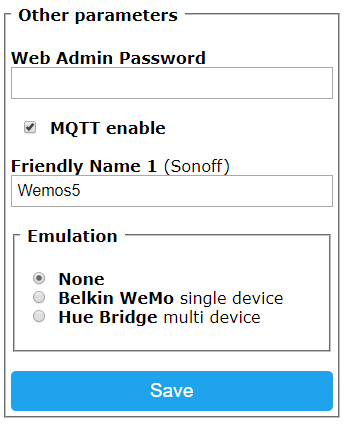
2) Disable MQTT
3) Use command MqttRetry to increase retry time
 arendst
on 23 Oct 2017
arendst
on 23 Oct 2017
- have to think about that, there are other advantages she has....
- is that possible over the console? can't find the option in the webinterface
- increasing the retry time will still introduce a delay of several seconds on the switch if the server does not answer.
orso7
on 23 Oct 2017
Check the Other Configuration tab:
arendst
on 23 Oct 2017
This is not something the tasmota project can solve, it's a bug in the Arduino
TCP library. While it is attempting to establish a connection, nothing else on
the device will work.
If you are connecting to a cloud MQTT server, switching to a local one on your
network would significantly increase your reliability.
davidelang
on 23 Oct 2017
Wow, could have seen that myself!... Thanks a lot, seems like it works now.
EDIT: yes I read about that in the first comments, but isn't it fixable in the library? Guess its not a simple task to do, but I guess someone on github must have solved it already
orso7
on 23 Oct 2017
This issue has been automatically marked as stale because it has not had recent activity. It will be closed if no further activity occurs. Thank you for your contributions.
![stale[bot] picture](https://avatars3.githubusercontent.com/in/1724?v=4&s=40) stale[bot]
on 23 Apr 2018
stale[bot]
on 23 Apr 2018
This issue will be auto-closed because there hasn't been any activity for a few months. Feel free to open a new one if you still experience this problem.
stale[bot]
on 7 May 2018
Related issues
 abzman
·
3Comments
abzman
·
3Comments
 JoergZ2
·
3Comments
JoergZ2
·
3Comments
 ximonline
·
3Comments
ximonline
·
3Comments
 esp32x
·
3Comments
esp32x
·
3Comments
 smadds
·
3Comments
smadds
·
3Comments
Most helpful comment
In no particular order:
1) Get a new girlfriend
2) Disable MQTT
3) Use command
MqttRetryto increase retry time