Tasmota: Show MAC address in Wifi manager mode (4 short presses)
Since some Wifi networks require you to allow devices using their MAC address, it'd be nice if the Wifi manager did display it.
 ulab
ulab
All 7 comments
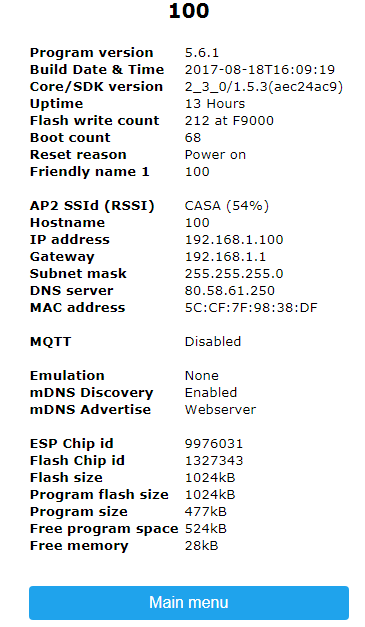
It is quite easy to get sonoff MAC address via http, just tap on information ( or type ipaddress/in? )
as example here's one of my sonoff
 jetema
on 8 Sep 2017
jetema
on 8 Sep 2017
This only works when the device is already connected to the Wifi in question.
In my case it is not (it can't) and I started the Wifi Manager Mode by pressing the button 4 times. This makes it run its own Wifi access point that you can connect to and enter Wifi username and password.
But since the Wifi I tried to connect to only allows whitelisted (by mac address) devices, I had to find it by listing the local machine's arp table which is not something most user are able to do.
If the Wifi Manager did show the Mac address directly it'd make this setup a whole lot easier.
ulab
on 9 Sep 2017
This issue has been automatically marked as stale because it has not had recent activity. It will be closed if no further activity occurs. Thank you for your contributions.
![stale[bot] picture](https://avatars3.githubusercontent.com/in/1724?v=4&s=40) stale[bot]
on 23 Apr 2018
stale[bot]
on 23 Apr 2018
This issue will be auto-closed because there hasn't been any activity for a few months. Feel free to open a new one if you still experience this problem.
stale[bot]
on 7 May 2018
It would be nice if it was possible to get the MAC address from console commands.
 badabing2005
on 27 Oct 2018
badabing2005
on 27 Oct 2018
From the Console:
STATUS 5for the device MACSTATUS 11for the MAC of the AP the device is connected to
 meingraham
on 27 Oct 2018
meingraham
on 27 Oct 2018
Thank you @meingraham
Much appreciated.
BB
badabing2005
on 27 Oct 2018
Related issues
 luisfpinto
·
3Comments
luisfpinto
·
3Comments
 renne
·
3Comments
renne
·
3Comments
 wirelesssolution
·
3Comments
wirelesssolution
·
3Comments
 abzman
·
3Comments
abzman
·
3Comments
 he-so
·
3Comments
he-so
·
3Comments
Most helpful comment
From the Console:
STATUS 5for the device MACSTATUS 11for the MAC of the AP the device is connected to