Tasmota: Fixed: Sonoff Basic Not Working After Flashing Tasmota
Hello.
I have flashed 8 Sonoff's in the past (About 2 months ago) 6 were Sonoff basics and one was a Dual and the other a TH10. I got some more Sonoff's consisting of a POW and 2 Basics. The POW flashed fine and is working fine but I cant get the basic's to work.
I successfully flashed them with the Arduino IDE and all went well but when I power them up from the mains I get nothing no LED, Button function or relay function. I'm quite new to all this and think it may be bricked??? However I can still re upload the code (I've done it 3 times now). I had verified that they were both working before flashing but after flashing them they do the symptoms above.
Any help is appreciated. If you want more information/pictures feel free to ask.
Thanks.
 LavaGlass
All 42 comments
I seem to be having the same issue, I've flashed the latest Tasmota to my Sonofff Basic, and it does nothing now. I get no serial output, no lights, nothing. I can however still flash the Basic until my hearts content, but it does not change the state. I've also tried clearing out the memory according to the troubleshooting wiki, then reflashing, and it did not make a difference.
 heschlie
on 18 Jul 2017
heschlie
on 18 Jul 2017
That's exactly the same issue I am having. I think it may be something with the newer Sonoff Basics as I pulled out one of my older Sonoff's and could flash it with the same Tasmota version as I am flashing thse new ones and it works fine. Hmm very annoying
LavaGlass
on 18 Jul 2017
Just flashed Tasmota to a spare NodeMCU and sure enough it works just fine. I could even get the Web interface up. So now I am convinced this is problem with the newer Sonoff's.
LavaGlass
on 18 Jul 2017
I just sorted mine out, it was either one of two problems:
- I built from tip of master and at the time it was borked
- I picked the wrong board type
I wiped and started over pulling from the 5.3.0 release instead of tip of master, and when I started the new project I picked the ESP8266 Generic 1M and I don't recall if I had picked that before. I've successfully flashed 2/4 of my Sonoff Basics and have them working now.
heschlie
on 18 Jul 2017
I will try that now. :)
LavaGlass
on 18 Jul 2017
Hey can you elaborate on what board you chose I don't have ESP8266 Generic 1M unless you mean something else.
Thanks
LavaGlass
on 18 Jul 2017
Figured it out and now all my Sonoff's are working! Just had to choose the right settings in the Arduino IDE. Make sure you have it set to 1M No SPIFFS.
LavaGlass
on 18 Jul 2017
Ah I used PlatformIO for my flashing (Specifically with the VSCode plugin) so when I "initialize" a project in VSCode it gives me a list of supported boards, I picked Espressif Generic ESP8266 ESP-01 1M and was able to flash all of my Sonoff Basics.
heschlie
on 18 Jul 2017
im having the same issue ,
but is independent , of which program i flash , flashing goes allways ok, but then it wont run , and the message seen on the monitor is allways the same
ets Jan 8 2013,rst cause:1, boot mode:(3,6)
load 0x4010f000, len 1384, room 16
tail 8
chksum 0x2d
csum 0x2d
v3de0c112
~ld
Fatal exception (0):
epc1=0x4021c1d4, epc2=0x00000000, epc3=0x00000000, excvaddr=0x00000000, depc=0x00000000
so it seams the problem still remains there ...
 gnkarn
on 15 Aug 2017
gnkarn
on 15 Aug 2017
Hi
I seem to also be having similar issues. I have just got 6 new sonoff basics, having used my last one that i had flashed in August. I flashed 1 with version 5.7.0b using Atom / Platform IO.
The flashing finished ok and I got no errors. However when I went to power up afterwards I get absolutely nothing.
The boards have a date of 2017-5-5. I have checked the FTDI board and it is set correctly to 3v3 and I know is working ok, as i have flashed another board (esp8266-07) with it, and that works fine.
Have also checked the 3v3 rail does not dip during programming but it is steady at 3v26.
I have tried esptool to erase the flash and reprogram but the end result is still the same. I have also followed several topics and tried those as well but to no avail.
Any further suggestions will be most gratefully received.
 papamole
on 10 Sep 2017
papamole
on 10 Sep 2017
Pls provide content of your platformio.ini file
 arendst
on 10 Sep 2017
arendst
on 10 Sep 2017
Info as requested below
Regards
; PlatformIO Project Configuration File
;
; Build options: build flags, source filter, extra scripting
; Upload options: custom port, speed and extra flags
; Library options: dependencies, extra library storages
;
; Please visit documentation for the other options and examples
; http://docs.platformio.org/en/stable/projectconf.html
[platformio]
src_dir = sonoff
; Uncomment one of the lines below to build/upload only one environment
env_default = sonoff
;env_default = sonoff-NL
;env_default = sonoff-minimal
;env_default = sonoff-ds18x20
; Sonoff et al
[env:sonoff]
platform = espressif8266
framework = arduino
board = esp01_1m
board_flash_mode = dout
build_flags = -Wl,-Tesp8266.flash.1m0.ld -DMQTT_MAX_PACKET_SIZE=512
lib_deps = PubSubClient, NeoPixelBus, IRremoteESP8266, ArduinoJSON
; Serial Monitor options
monitor_baud = 115200
; Sonoff et al
[env:sonoff-NL]
platform = espressif8266
framework = arduino
board = esp01_1m
board_flash_mode = dout
build_flags = -Wl,-Tesp8266.flash.1m0.ld -DMQTT_MAX_PACKET_SIZE=512 -DMY_LANGUAGE=nl-NL
lib_deps = PubSubClient, NeoPixelBus, IRremoteESP8266, ArduinoJSON
; Serial Monitor options
monitor_baud = 115200
; Sonoff minimal
[env:sonoff-minimal] ; Placeholder to be configured
platform = espressif8266
framework = arduino
board = esp01_1m
board_flash_mode = dout
build_flags = -Wl,-Tesp8266.flash.1m0.ld -DMQTT_MAX_PACKET_SIZE=512 -DBE_MINIMAL
lib_deps = PubSubClient, NeoPixelBus, IRremoteESP8266, ArduinoJSON
; Serial Monitor options
monitor_baud = 115200
; Sonoff multiple DS18x20
[env:sonoff-ds18x20]
platform = espressif8266
framework = arduino
board = esp01_1m
board_flash_mode = dout
build_flags = -Wl,-Tesp8266.flash.1m0.ld -DMQTT_MAX_PACKET_SIZE=758 -DUSE_DS18x20 -DMESSZ=600
lib_deps = PubSubClient, NeoPixelBus, IRremoteESP8266, ArduinoJSON, OneWire
; Serial Monitor options
monitor_baud = 115200
[env:esp8285]
platform = espressif8266
board = esp8285
framework = arduino
From: Theo Arends [mailto:[email protected]]
Sent: 10 September 2017 18:13
To: arendst/Sonoff-Tasmota
Cc: papamole; Comment
Subject: Re: [arendst/Sonoff-Tasmota] Fixed: Sonoff Basic Not Working After Flashing Tasmota (#611)
Pls provide content of your platformio.ini file
—
You are receiving this because you commented.
Reply to this email directly, view it on GitHub https://github.com/arendst/Sonoff-Tasmota/issues/611#issuecomment-328356975 , or mute the thread https://github.com/notifications/unsubscribe-auth/AdEVmg10oUuKMqFcF0tnxMfSgdwXQwVNks5shBiNgaJpZM4OZyNq . https://github.com/notifications/beacon/AdEVmmWvrCK8H9_QLMt2YQozpTCXajVGks5shBiNgaJpZM4OZyNq.gif
papamole
on 10 Sep 2017
Apart from the last four lines it's correct.
arendst
on 10 Sep 2017
yes. I added the 82265 as an additional board when i tried some notes in another topic, someone said that after they had reflashed the device it worked, so i thought i would give it a go, but unfortunately it diodnt work for me..
papamole
on 10 Sep 2017
What command line options did you use to program the firmware with esptool?
Take a look here https://github.com/arendst/Sonoff-Tasmota/wiki/Esptool and pay attention to the dout option.
arendst
on 11 Sep 2017
Hi.
I used the following to erase the flash.
esptool – port COM4 – baud 115200 erase_flash. I then re flashed the sonoff with the 5.7 firmware.
See attached screen shot for results.
Regards
From: Theo Arends [mailto:[email protected]]
Sent: 11 September 2017 07:13
To: arendst/Sonoff-Tasmota
Cc: papamole; Comment
Subject: Re: [arendst/Sonoff-Tasmota] Fixed: Sonoff Basic Not Working After Flashing Tasmota (#611)
What command line options did you use to program the firmware?
Take a look here https://github.com/arendst/Sonoff-Tasmota/wiki/Esptool and pay attention to the dout option.
—
You are receiving this because you commented.
Reply to this email directly, view it on GitHub https://github.com/arendst/Sonoff-Tasmota/issues/611#issuecomment-328426556 , or mute the thread https://github.com/notifications/unsubscribe-auth/AdEVmpb8WgT1a8peQKVZbmEA6hrBzr7vks5shM9rgaJpZM4OZyNq . https://github.com/notifications/beacon/AdEVmt8WZFxUDSc8UIxBLwiHDQ6KY6xOks5shM9rgaJpZM4OZyNq.gif
papamole
on 11 Sep 2017
I see no screenshot.
Apart from that, how did you flash? What command line did you use to flash?
arendst
on 11 Sep 2017
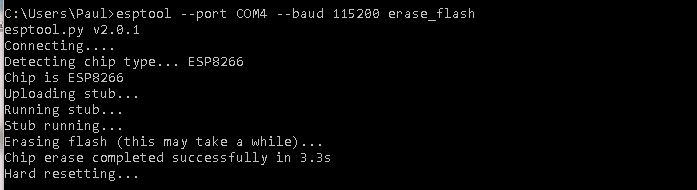
I used esptool --port COM4 --baud 115200 erase_flash
copy of screen attached
papamole
on 11 Sep 2017
OK, fine. That's the erase phase.
But what was the command line to flash the firmware using the esptool?
If you did not use the esptool to flash please try it now using the documentation in the wiki: https://github.com/arendst/Sonoff-Tasmota/wiki/Esptool
arendst
on 11 Sep 2017
I used platformio/atom previously. but will try esptool now and update asap.
regards
papamole
on 11 Sep 2017
have flashed using esptool
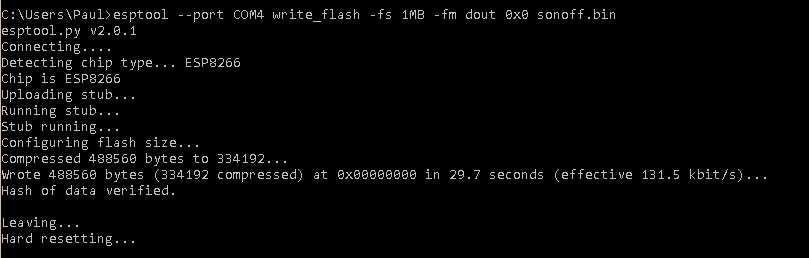
Afterwards plugged into power and after about 10 seconds led flashed 15-20 times steadied the went off, this repeated.
papamole
on 11 Sep 2017
Considering the flashing leds it seems some code is running...
Remove power and connect to your PC. Open serial interface set to 115200 baud en type command seriallog 3. Make sure your terminal sends cr/lf.
arendst
on 11 Sep 2017
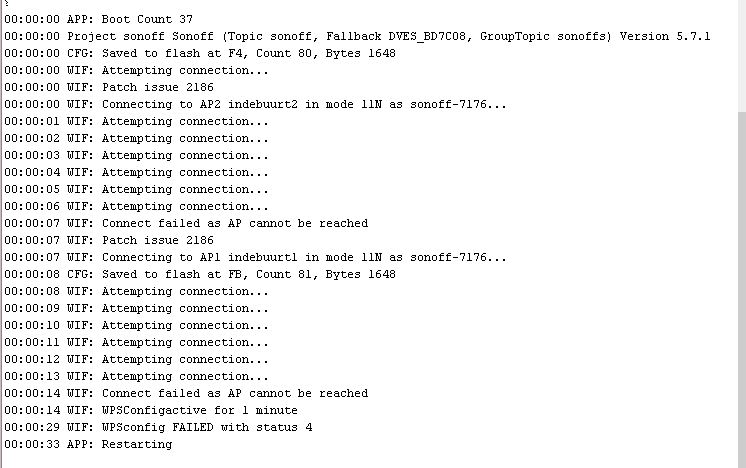
have connected and typed seriallog 3. got the following in the terminal screen
papamole
on 11 Sep 2017
!!!CONGRATULATIONS!!!
You managed to flash the correct firmware to your Sonoff Basic. Now it's time to configure Wifi parameters.
What you see here is the default initialization of the firmware. It tries to connect to your Access Points but it fails as the default SSID/Pasword are wrong. It then starts WPS config allowing you to press the WPS button on your Wifi router after which the device will configure it's wifi parameters accordingly.
You can also enter the parameters yourself with commands SSID1 and Password1 as documented in the wiki.
arendst
on 11 Sep 2017
Thanks. I will try this and update asap.
regards
papamole
on 11 Sep 2017
Great News .. All now working, just need to do final configs etc. and the sonoff will be good to go.
Many thanks for your help (and patience!!)
I will keep this page bookmarked .. just in case
Regards
papamole
on 11 Sep 2017
But are you now able to successfully upload the firmware using platformio too?
I suspect there is a catch regarding parameter dout in the platformio upload process.
arendst
on 11 Sep 2017
I will try and email back shortly
Regards
From: Theo Arends [mailto:[email protected]]
Sent: 11 September 2017 11:53
To: arendst/Sonoff-Tasmota
Cc: papamole; Comment
Subject: Re: [arendst/Sonoff-Tasmota] Fixed: Sonoff Basic Not Working After Flashing Tasmota (#611)
But are you now able to successfully upload the firmware using platformio too?
I suspect there is a catch regarding parameter dout in the platformio upload process.
—
You are receiving this because you commented.
Reply to this email directly, view it on GitHub https://github.com/arendst/Sonoff-Tasmota/issues/611#issuecomment-328494166 , or mute the thread https://github.com/notifications/unsubscribe-auth/AdEVmtKtQJp7nFQCNteolypluY15GD9gks5shRD1gaJpZM4OZyNq . https://github.com/notifications/beacon/AdEVmi1rtIFkck1bVMg0Itv6d4hgEfQMks5shRD1gaJpZM4OZyNq.gif
papamole
on 11 Sep 2017
Just tested using Atom / platformio and i am having trouble..
will continue playing.
papamole
on 11 Sep 2017
Just did a system restore to day prior to last Atom / Platformio update and programmed sonoff no problem, updated again and i have issues,.
Will keep looking.
papamole
on 11 Sep 2017
I had the same issue. I carried out the esptool erase_flash ok, however, when I tried write_flash to the latest bin I got
A fatal error occurred: Timed out waiting for packet content
This was solved by disconnecting USB CABLE, pull down GPIO00, reconnecting USB and the running write_flash with GPIO00 still pulled down. Not sure if that's normal or just gibbonry on my behalf.
 planestoner
on 12 Sep 2017
planestoner
on 12 Sep 2017
I have the same issue; I flashed a Sonoff Basic using Arduino IDE v 1.8.5. with Sonoff Tasmota v 5.11.1.
At first the flashing process looks fine; it says ‘100%’. However, then the LED doesn’t flash and there is no Wifi connection or other sign of life.
I’m no expert at this (my first Sonoff), so before asking for help I tried every solution I could find on this and other forums. I flashed it dozens of times now, trying the following:
• Arduino IDE Flash sizes “1M (no SPIFFS)” and “1M (64K SPIFFS)”
• Arduino IDE Upload speed 115200 and 57600
• Completely erased ESP8266 flash memory, using Espressif Systems’ “ESP flash tool” v3.6.3
• Used ESPeasy: esptool.exe -vv -cd nodemcu -cb 115200 -cp COM3 -ca 0x00000 -cf ESPEasy_R120_1024.bin
I would highly appreciate some help; does anyone have another solution I can try?
PS Great project !
PS 2 I’m on Windows 10.
Thanks
 Code2702
on 13 Feb 2018
Code2702
on 13 Feb 2018
Hi, I had the same problem .. I'm using ArduinoIDE, Sonoff Basic & Tasmota 5.12. Everything went OK, flash 100%, but after disconnecting programmer and connecting imput AC, Sonoff seems to be dead, no response on anything ..
I tried a lot of thing, but only this one works :] .. Read this post: https://github.com/arendst/Sonoff-Tasmota/issues/463#issuecomment-365139699
The only important thing is DOWNGRADE ESP8266 lib to 2.3.0 version! After that, problem solved!
Check sonoff board at the end of flashing, if it bling greenLED once, it's OK. If not, something went wrong ..
GL! :]
 JanSpacil
on 14 Feb 2018
JanSpacil
on 14 Feb 2018
Hi JanSpacil,
Thanks for your help. Can you tell me how I can downgrade the ESP8266 lib to 2.3.0? I tried out the following:
1) Search the Library Manager, couldn't find the appropriate library
2) Change "Additional Boards Manager URL's" setting (under File/Preferences), I changed "http://arduino.esp8266.com/stable/package_esp8266com_index.json" into "http://arduino.esp8266.com/versions/2.3.0/package_esp8266com_index.json", but no luck.
It would be great if you could help me -or, I suspect, us ;-) out.
Code2702
on 15 Feb 2018
Hi Code, it's easy, two steps:
- File > Preferences > Additional Board, paste this URL: http://arduino.esp8266.com/stable/package_esp8266com_index.json
- go Tools > Board: > Boards Manager > search ESP > in "esp8266 by ESP8266 Community" select version and choose 2.3.0.
That's all, good luck! :]
JanSpacil
on 16 Feb 2018
Thanks a lot JanSpacil! This did the trick, I finally got the Sonoff to work!
Code2702
on 19 Feb 2018
I had the same symptom as LavaGlass, except I was using Visual Studio Code with PlatformIO. I followed the instructions on the Visual Studio Code github page. The flash process worked fine, reaching 100% for the flash upload and showing SUCCESS, but after disconnecting the flash tool and connecting Sonoff to AC, nothing happened (no lights, no WIFI connection, no clicking sounds).
What resolved the issue for me was editing platformio.ini file and choosing the 2.4.1 platform version instead of the default one like so:
[common] ; ************************************************************
; *** Esp8266 core for Arduino version
;platform = [email protected]  ; v2.3.0
;platform = [email protected]  ; v2.4.0
platform = [email protected]  ; v2.4.1
;platform = https://github.com/platformio/platform-espressif8266.git#feature/stage
;platform = espressif8266
Also, don't forget to choose and uncomment one environment line in the platformio.ini file. I have a Sonoff basic and I got it working by uncommenting the following line:
env_default = sonoff
 fabian17
on 2 May 2018
fabian17
on 2 May 2018
getting the following error
23:19:32 MQT: Attempting connection...
23:19:45 MQT: Connect failed to domus1:1883, rc -2. Retry in 10 sec
23:
 WildcardTech
on 3 May 2018
WildcardTech
on 3 May 2018
Hey there! I have the same problem that programming works and while connected to the programmer the module works as expected. As soon as I disconnect from the programmer and connect it to AC it does nothing. I checked with a multimeter that 230 V is connected to the input. On the programmer connections there is no voltage.
What I tried already
I already tried to use platform 1.5 instead of 1.7 and also explicitly choosing 1.7 instead of the default, as suggested by @JanSpacil and @fabian17.
My system
I'm running Fedora Linux 27 with Visual Studio Code and PlatformIO extension.
I've cloned the most recent version of the master branch d875dae47ad4c9da7d186459bca2fc7f3b18e9a9.
I'm using the Sonoff Basic R2, v1.0, 2017-10-11.
The System looks like this:
AC 230V is connected to the Sonoff, which is connected to AC input of a power supply which translates to 5V/10A, which powers 6M/360 LEDs.
My settings are as follows:
[common] ; ************************************************************
; *** Esp8266 core for Arduino version
platform = [email protected] ; v2.3.0
;platform = [email protected] ; v2.4.0
;platform = [email protected] ; v2.4.1
;platform = https://github.com/platformio/platform-espressif8266.git#feature/stage
;platform = espressif8266
framework = arduino
board = esp01_1m
board_flash_mode = dout
; *** Fix [email protected] induced undesired all warnings
build_unflags = -Wall
build_flags =
-Wl,-Tesp8266.flash.1m0.ld
-DVTABLES_IN_FLASH
-DPIO_FRAMEWORK_ARDUINO_LWIP2_LOW_MEMORY
; -DUSE_CONFIG_OVERRIDE
; *** Fix Esp/Arduino core 2.4.x induced Tasmota unused floating point includes
extra_scripts = pio/strip-floats.py
; *** Serial Monitor options
monitor_baud = 115200
; *** Upload Serial reset method for Wemos and NodeMCU
upload_speed = 115200
;upload_speed = 512000
upload_resetmethod = ck
upload_port = /dev/ttyUSB0
The board looks like this:

 w4tsn
on 6 May 2018
w4tsn
on 6 May 2018
This issue has been automatically marked as stale because it has not had recent activity. It will be closed if no further activity occurs. Thank you for your contributions.
![stale[bot] picture](https://avatars3.githubusercontent.com/in/1724?v=4&s=40) stale[bot]
on 20 Jun 2018
stale[bot]
on 20 Jun 2018
This issue will be auto-closed because there hasn't been any activity for a few months. Feel free to open a new one if you still experience this problem.
stale[bot]
on 5 Jul 2018
I fixed the same issue on a shelly 1 v3. I bricked them by uploading the latest pre-compiled version.
Fixed it by....
- erase flash with esptool.exe -cp comX -ce
- reload new compiled firmware with using core 2.5.2.
See below
Program Version | 6.6.0.18(sonoff)
2019-10-15T02:35:00
2_5_2/2.2.2-dev(c0eb301)
 lobocobra
on 15 Oct 2019
lobocobra
on 15 Oct 2019
Related issues
 renne
·
3Comments
renne
·
3Comments
 JoergZ2
·
3Comments
JoergZ2
·
3Comments
 kckepz
·
3Comments
kckepz
·
3Comments
 Joeyhza
·
3Comments
Joeyhza
·
3Comments
 belidzs
·
3Comments
belidzs
·
3Comments
Most helpful comment
!!!CONGRATULATIONS!!!
You managed to flash the correct firmware to your Sonoff Basic. Now it's time to configure Wifi parameters.
What you see here is the default initialization of the firmware. It tries to connect to your Access Points but it fails as the default SSID/Pasword are wrong. It then starts WPS config allowing you to press the WPS button on your Wifi router after which the device will configure it's wifi parameters accordingly.
You can also enter the parameters yourself with commands SSID1 and Password1 as documented in the wiki.