I have started following the excellent guides on here to get started with Arduino and SonOff.
I have followed all the instructions and pre-requisites, I'm using Arduino IDE.
Its configured in a portable folder as suggested and I have just downloaded all the mentioned libraries.
Thanks in advance for advice and help :)
Error I get when trying to compile:-
Arduino: 1.8.3 (Windows 10), Board: "Generic ESP8266 Module, Serial, 80 MHz, 40MHz, DIO, 115200, 1M (no SPIFFS), ck, Disabled, None"
xdrv_ir_send:46: error: 'IRsend' does not name a type
IRsend *irsend = NULL;
^
D:Arduinoarduino-1.8.3portablesketchbooksonoffxdrv_ir_send.ino: In function 'void ir_send_init()':
xdrv_ir_send:50: error: 'irsend' was not declared in this scope
irsend = new IRsend(pin[GPIO_IRSEND]); // an IR led is at GPIO_IRSEND
^
xdrv_ir_send:50: error: expected type-specifier before 'IRsend'
irsend = new IRsend(pin[GPIO_IRSEND]); // an IR led is at GPIO_IRSEND
^
xdrv_ir_send:50: error: expected ';' before 'IRsend'
D:Arduinoarduino-1.8.3portablesketchbooksonoffxdrv_ir_send.ino: In function 'boolean ir_send_command(char, uint16_t, char, uint16_t, int16_t, char*, uint16_t)':
xdrv_ir_send:99: error: 'irsend' was not declared in this scope
       if      (!strcmp_P(protocol,PSTR("NEC")))     irsend->sendNEC(data, bits);

                                                     ^
xdrv_ir_send:100: error: 'irsend' was not declared in this scope
       else if (!strcmp_P(protocol,PSTR("SONY")))    irsend->sendSony(data, bits);

                                                     ^
xdrv_ir_send:101: error: 'irsend' was not declared in this scope
       else if (!strcmp_P(protocol,PSTR("RC5")))     irsend->sendRC5(data, bits);

                                                     ^
xdrv_ir_send:102: error: 'irsend' was not declared in this scope
       else if (!strcmp_P(protocol,PSTR("RC6")))     irsend->sendRC6(data, bits);

                                                     ^
xdrv_ir_send:103: error: 'irsend' was not declared in this scope
       else if (!strcmp_P(protocol,PSTR("DISH")))    irsend->sendDISH(data, bits);

                                                     ^
xdrv_ir_send:104: error: 'irsend' was not declared in this scope
       else if (!strcmp_P(protocol,PSTR("JVC")))     irsend->sendJVC(data, bits, 1);

                                                     ^
xdrv_ir_send:105: error: 'irsend' was not declared in this scope
       else if (!strcmp_P(protocol,PSTR("SAMSUNG"))) irsend->sendSAMSUNG(data, bits);

                                                     ^
exit status 1
'IRsend' does not name a type
This report would have more information with
"Show verbose output during compilation"
option enabled in File -> Preferences.
 Blue407
All 15 comments
With Verbose on:-
Using library pubsubclient at version 2.6 in folder: D:Arduinoarduino-1.8.3portablesketchbooklibrariespubsubclient
Using library Ticker at version 1.0 in folder: D:Arduinoarduino-1.8.3portablepackagesesp8266hardwareesp82662.3.0librariesTicker
Using library ESP8266WiFi at version 1.0 in folder: D:Arduinoarduino-1.8.3portablepackagesesp8266hardwareesp82662.3.0librariesESP8266WiFi
Using library ESP8266HTTPClient at version 1.1 in folder: D:Arduinoarduino-1.8.3portablepackagesesp8266hardwareesp82662.3.0librariesESP8266HTTPClient
Using library ESP8266httpUpdate at version 1.1 in folder: D:Arduinoarduino-1.8.3portablepackagesesp8266hardwareesp82662.3.0librariesESP8266httpUpdate
Using library ArduinoJson at version 5.11.0 in folder: D:Arduinoarduino-1.8.3portablesketchbooklibrariesArduinoJson
Using library ESP8266WebServer at version 1.0 in folder: D:Arduinoarduino-1.8.3portablepackagesesp8266hardwareesp82662.3.0librariesESP8266WebServer
Using library DNSServer at version 1.1.0 in folder: D:Arduinoarduino-1.8.3portablepackagesesp8266hardwareesp82662.3.0librariesDNSServer
Using library ESP8266mDNS in folder: D:Arduinoarduino-1.8.3portablepackagesesp8266hardwareesp82662.3.0librariesESP8266mDNS (legacy)
Using library Wire at version 1.0 in folder: D:Arduinoarduino-1.8.3portablepackagesesp8266hardwareesp82662.3.0librariesWire
Using library IRremoteESP8266 at version 2.0.3 in folder: D:Arduinoarduino-1.8.3portablesketchbooklibrariesIRremoteESP8266
Using library NeoPixelBus_by_Makuna at version 2.2.8 in folder: D:Arduinoarduino-1.8.3portablesketchbooklibrariesNeoPixelBus_by_Makuna
Using library SPI at version 1.0 in folder: D:Arduinoarduino-1.8.3portablepackagesesp8266hardwareesp82662.3.0librariesSPI
Blue407
on 27 Jun 2017
you are missing somee IR library on your system, go back through the prereq list
and check things. There was another similar issue within the last couple of
weeks, search the closed issues.
 davidelang
on 27 Jun 2017
davidelang
on 27 Jun 2017
Instructions in WIKI say to install IRremoteESP8266 v1.02, and the link in the WIKI no longer works.
It seems the owner upgraded the v2.0.3, as can be sen by my version above.
I'm looking to find the older version... If I can, I just hope it isn't automatically updated by Arduino IDE...
Blue407
on 27 Jun 2017
Supported library versions are in this repository in lib folder.
 arendst
on 27 Jun 2017
arendst
on 27 Jun 2017
Thanks, will give that a go :)
How can I stop the Arudino IDE from updating to newer libraries from the web?
Is this often a problem?
Blue407
on 27 Jun 2017
It normally does NOT update libraries unless you tell it to do so. Another option is disabling Check for Updates on startup in the IDE settings.
I prefer a dedicated esp8266 arduino environment which doesn't interfere with "normal" arduino stuff. See wiki how to set it up next to your arduino IDE.
arendst
on 27 Jun 2017
You Guys are brilliant, compiled perfectly now 👍
I have this already in a portable folder, is that what you meant?
Blue407
on 27 Jun 2017
Yep
arendst
on 27 Jun 2017
Blue407 can you write it down step by step how issue resolved .
 sujitrp
on 14 Jul 2017
sujitrp
on 14 Jul 2017
I'm having the same exact issue! Tried on 2 Macs and 2 PCs, same issue!
Please let us know the steps you took to solve this issue!!!
 idumzaes
on 28 Jul 2017
idumzaes
on 28 Jul 2017
OMG YES! I was able to get it complied successfully on one of my Macs.
What I did was...
- Show Package Contents of Arduino.app
- Go into Contents/Java/libraries
- Rename RobotIRremote folder to IRremote
- Compile Sonoff.ino
idumzaes
on 28 Jul 2017
You might also be able to just not use the IR stuff by disabling USE_IR_REMOTE in user_config.h.
 ulab
on 7 Sep 2017
ulab
on 7 Sep 2017
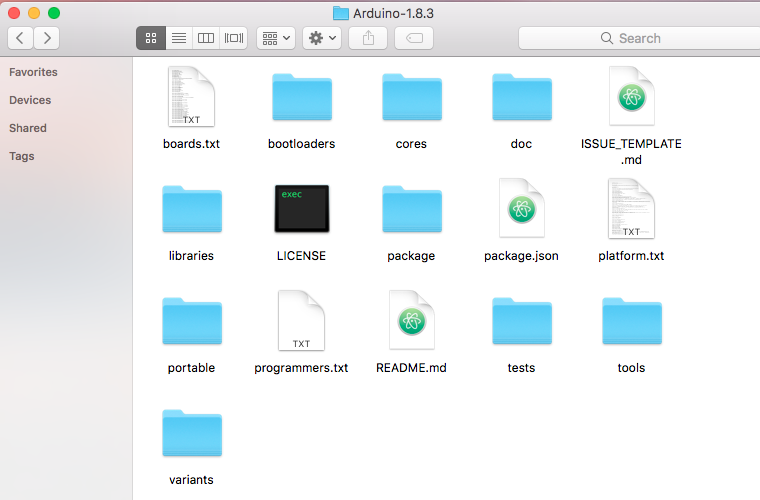
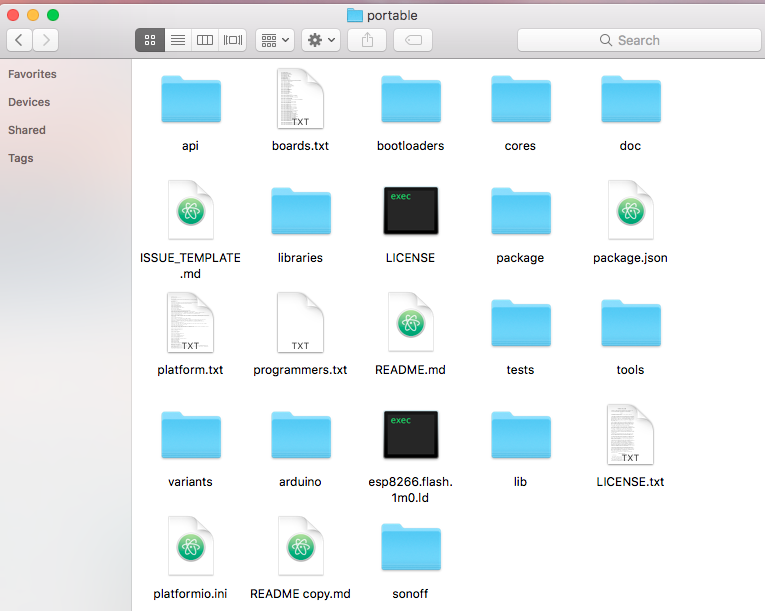
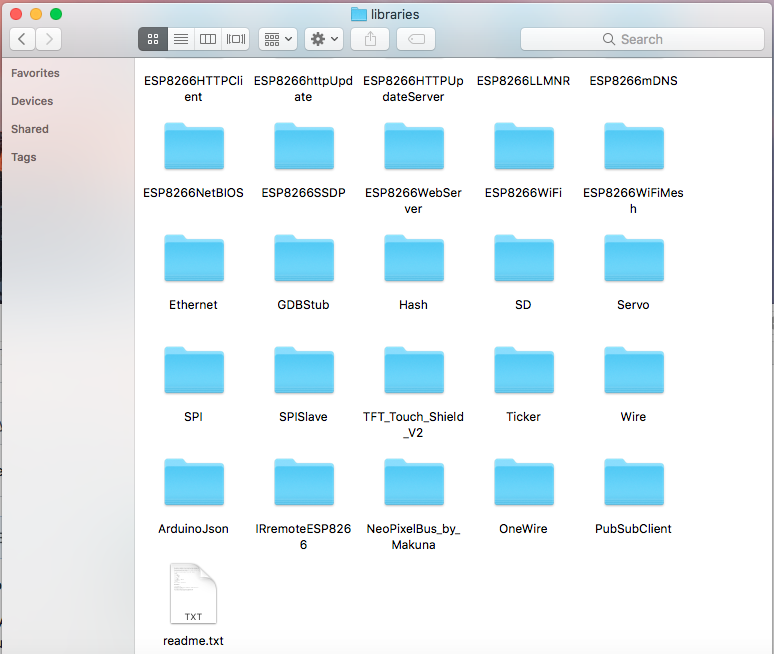
And idea why this error is coming out
/Users/jk/Documents/Arduino/Arduino-1.8.3/portable/sonoff/sonoff.ino:160:52: fatal error: PubSubClient.h: No such file or directory
#include
^
compilation terminated.
exit status 1
Error compiling for board Generic ESP8266 Module.
Directory Path
ArduinoArduino-1.8.3portableslibrariesPubSubClient
 jeylites
on 9 Sep 2017
jeylites
on 9 Sep 2017
This issue has been automatically marked as stale because it has not had recent activity. It will be closed if no further activity occurs. Thank you for your contributions.
![stale[bot] picture](https://avatars3.githubusercontent.com/in/1724?v=4&s=40) stale[bot]
on 23 Apr 2018
stale[bot]
on 23 Apr 2018
This issue will be auto-closed because there hasn't been any activity for a few months. Feel free to open a new one if you still experience this problem.
stale[bot]
on 7 May 2018
Related issues
 esp32x
·
3Comments
esp32x
·
3Comments
 JoergZ2
·
3Comments
JoergZ2
·
3Comments
 abzman
·
3Comments
abzman
·
3Comments
 smadds
·
3Comments
smadds
·
3Comments
 garret
·
3Comments
garret
·
3Comments
Most helpful comment
Supported library versions are in this repository in lib folder.