Tasmoadmin: Error State, Sonoff device Fatal exception
Unfortunately the state of this devices showed ERROR and after some time it looks oke with the info of the devices, but toggled into error after a few seconds....
The restart message from the sonoff console shows this message:
00:00:06 MQT: tele/sonoff-pow-1/INFO3 = {"RestartReason":"Fatal exception:9 flag:2 (EXCEPTION) epc1:0x40204eec epc2:0x00000000 epc3:0x00000000 excvaddr:0x000014e9 depc:0x00000000"}
 RaymondMouthaan
All 26 comments
To improve this issue, I changed on the Settings page the Refreshtime from 5 sec (default) to 60 Seconds.
The fatal exception doesn't show up anymore, but it's still very unstable ..
After each request for status from SonWeb to the Tasmota device it looks as if the device loses connection and reconnects .. it feels like its to "heavy" for the Sonoff to handle the requests from SonWeb ...
17:33:05 MQT: stat/sonoff-1/STATUS = {"Status":{"Module":1,"FriendlyName":"Bed Light","Topic":"sonoff-1","ButtonTopic":"0","Power":0,"PowerOnState":3,"LedState":1,"SaveData":1,"SaveState":1,"ButtonRetain":0,"PowerRetain":0}}
17:33:05 MQT: stat/sonoff-1/STATUS1 = {"StatusPRM":{"Baudrate":115200,"GroupTopic":"sonoffs","OtaUrl":"http://jakarta.indonesia/tasmota/bin/sonoff_latest-minimal.bin","Uptime":"0T00:01:55","Sleep":0,"BootCount":15,"SaveCount":270,"SaveAddress":"F6000"}}
17:33:05 MQT: stat/sonoff-1/STATUS2 = {"StatusFWR":{"Version":"5.12.0b","BuildDateTime":"2018-02-14T11:04:43","Boot":31,"Core":"2_4_0","SDK":"2.1.0(deb1901)"}}
17:33:05 MQT: stat/sonoff-1/STATUS3 = {"StatusLOG":{"SerialLog":2,"WebLog":2,"SysLog":0,"LogHost":"","LogPort":514,"SSId1":"indonesia23","SSId2":"","TelePeriod":300,"SetOption":"00000009"}}
17:33:05 MQT: stat/sonoff-1/STATUS4 = {"StatusMEM":{"ProgramSize":487,"Free":516,"Heap":15,"ProgramFlashSize":1024,"FlashSize":4096,"FlashMode":3}}
17:33:05 MQT: stat/sonoff-1/STATUS5 = {"StatusNET":{"Hostname":"sonoff-1-3276","IPAddress":"192.168.2.201","Gateway":"192.168.2.254","Subnetmask":"255.255.255.0","DNSServer":"192.168.2.10","Mac":"68:C6:3A:8B:AC:CC","Webserver":2,"WifiConfig":0}}
17:33:05 MQT: stat/sonoff-1/STATUS6 = {"StatusMQT":{"MqttHost":"mqtt.indonesia","MqttPort":1883,"MqttClientMask":"DVES_%06X","MqttClient":"DVES_8BACCC","MqttUser":"DVES_USER","MAX_PACKET_SIZE":1000,"KEEPALIVE":15}}
17:33:05 MQT: stat/sonoff-1/STATUS7 = {"StatusTIM":{"UTC":"Fri Feb 16 16:33:05 2018","Local":"Fri Feb 16 17:33:05 2018","StartDST":"Sun Mar 25 02:00:00 2018","EndDST":"Sun Oct 28 03:00:00 2018","Timezone":1}}
17:33:05 MQT: stat/sonoff-1/STATUS10 = {"StatusSNS":{"Time":"2018-02-16T17:33:05"}}
17:33:05 MQT: stat/sonoff-1/STATUS11 = {"StatusSTS":{"Time":"2018-02-16T17:33:05","Uptime":"0T00:01:55","Vcc":3.435,"POWER":"OFF","Wifi":{"AP":1,"SSId":"indonesia23","RSSI":52,"APMac":"30:D3:2D:70:05:4D"}}}
17:33:18 MQT: stat/sonoff-1/RESULT = {"POWER":"ON"}
17:33:18 MQT: stat/sonoff-1/POWER = ON
17:33:27 MQT: Attempting connection...
17:33:27 MQT: Connected
17:33:27 MQT: tele/sonoff-1/LWT = Online (retained)
17:33:27 MQT: cmnd/sonoff-1/POWER =
17:34:05 MQT: stat/sonoff-1/STATUS = {"Status":{"Module":1,"FriendlyName":"Bed Light","Topic":"sonoff-1","ButtonTopic":"0","Power":1,"PowerOnState":3,"LedState":1,"SaveData":1,"SaveState":1,"ButtonRetain":0,"PowerRetain":0}}
17:34:05 MQT: stat/sonoff-1/STATUS1 = {"StatusPRM":{"Baudrate":115200,"GroupTopic":"sonoffs","OtaUrl":"http://jakarta.indonesia/tasmota/bin/sonoff_latest-minimal.bin","Uptime":"0T00:02:55","Sleep":0,"BootCount":15,"SaveCount":271,"SaveAddress":"F5000"}}
17:34:05 MQT: stat/sonoff-1/STATUS2 = {"StatusFWR":{"Version":"5.12.0b","BuildDateTime":"2018-02-14T11:04:43","Boot":31,"Core":"2_4_0","SDK":"2.1.0(deb1901)"}}
17:34:05 MQT: stat/sonoff-1/STATUS3 = {"StatusLOG":{"SerialLog":2,"WebLog":2,"SysLog":0,"LogHost":"","LogPort":514,"SSId1":"indonesia23","SSId2":"","TelePeriod":300,"SetOption":"00000009"}}
17:34:05 MQT: stat/sonoff-1/STATUS4 = {"StatusMEM":{"ProgramSize":487,"Free":516,"Heap":10,"ProgramFlashSize":1024,"FlashSize":4096,"FlashMode":3}}
17:34:05 MQT: stat/sonoff-1/STATUS5 = {"StatusNET":{"Hostname":"sonoff-1-3276","IPAddress":"192.168.2.201","Gateway":"192.168.2.254","Subnetmask":"255.255.255.0","DNSServer":"192.168.2.10","Mac":"68:C6:3A:8B:AC:CC","Webserver":2,"WifiConfig":0}}
17:34:05 MQT: stat/sonoff-1/STATUS6 = {"StatusMQT":{"MqttHost":"mqtt.indonesia","MqttPort":1883,"MqttClientMask":"DVES_%06X","MqttClient":"DVES_8BACCC","MqttUser":"DVES_USER","MAX_PACKET_SIZE":1000,"KEEPALIVE":15}}
17:34:05 MQT: stat/sonoff-1/STATUS7 = {"StatusTIM":{"UTC":"Fri Feb 16 16:34:05 2018","Local":"Fri Feb 16 17:34:05 2018","StartDST":"Sun Mar 25 02:00:00 2018","EndDST":"Sun Oct 28 03:00:00 2018","Timezone":1}}
17:34:05 MQT: stat/sonoff-1/STATUS10 = {"StatusSNS":{"Time":"2018-02-16T17:34:05"}}
17:34:05 MQT: stat/sonoff-1/STATUS11 = {"StatusSTS":{"Time":"2018-02-16T17:34:05","Uptime":"0T00:02:55","Vcc":3.436,"POWER":"ON","Wifi":{"AP":1,"SSId":"indonesia23","RSSI":48,"APMac":"30:D3:2D:70:05:4D"}}}
The http://192.168.2.101:19999/index.php?doAjaxAll returns with:
{"1":{"ERROR":"JSON ERROR => 4: Syntax error<br\/><strong>Please copy the whole error message and copy it in a new issue on GitHub.\n
what happens if you call the http command directly?
http://192.168.2.201/cm?cmnd=status%200
try to spam it a lil bit to figure out how the device reacts.
even on 2 sec my devices are not crashing, but as faster you go as unstabe it gets. if the device does not responde cuz of too many request the error msg will be displayed.
the esp can handle only a handfull of request.
 reloxx13
on 16 Feb 2018
reloxx13
on 16 Feb 2018
I did some testing these are my findings...
Used Equipment
- Devices : Sonoff Basic, Sonoff Pow and Wemos D1 Mini v2.1.0
- Firmware : Sonoff-Tasmota 5.12.0b
- Tool : JMeter
Test 1 - SLOW
Request STATUS 0 - Show all status information (http://192.168.2.201/cm?cmnd=status%200) gives after 1 or 2 times a non-responsive Sonoff Tasmota device.
Test 2 - 60 req/min - STABLE
Separate requests for STATUS, STATUS 1, STATUS 2, STATUS 3, STATUS 4, STATUS 5, STATUS 6, STATUS 7, STATUS 10, STATUS 11 with a delay of 1000 ms between each request (thoughput 60 req/min) seems stable and gives correct responses.
Test 3 - 90 req/min - STABLE
Separate requests for STATUS, STATUS 1, STATUS 2, STATUS 3, STATUS 4, STATUS 5, STATUS 6, STATUS 7, STATUS 10, STATUS 11 with a delay of 667 ms between each request (thoughput 90 req/min) seems stable and gives correct responses.
Test 3 - 120 req/min - STABLE
Separate requests for STATUS, STATUS 1, STATUS 2, STATUS 3, STATUS 4, STATUS 5, STATUS 6, STATUS 7, STATUS 10, STATUS 11 with a delay of 500 ms between each request (thoughput 90 req/min) seems stable and gives correct responses.
Test 4 - 150 req/min - STABLE
Separate requests for STATUS, STATUS 1, STATUS 2, STATUS 3, STATUS 4, STATUS 5, STATUS 6, STATUS 7, STATUS 10, STATUS 11 with a delay of 400 ms between each request (thoughput 150 req/min) seems stable and gives correct responses.
Test 5 - 180 req/min - STABLE
Separate requests for STATUS, STATUS 1, STATUS 2, STATUS 3, STATUS 4, STATUS 5, STATUS 6, STATUS 7, STATUS 10, STATUS 11 with a delay of 333 ms between each request (thoughput 180 req/min) seems stable and gives correct responses.
Test 6 - 210 req/min - STABLE
Separate requests for STATUS, STATUS 1, STATUS 2, STATUS 3, STATUS 4, STATUS 5, STATUS 6, STATUS 7, STATUS 10, STATUS 11 with a delay of 286 ms between each request (thoughput 210 req/min) seems stable and gives correct responses.
Test 7 - 300 req/min - STABLE
Separate requests for STATUS, STATUS 1, STATUS 2, STATUS 3, STATUS 4, STATUS 5, STATUS 6, STATUS 7, STATUS 10, STATUS 11 with a delay of 200 ms between each request (thoughput 300 req/min) seems stable and gives correct responses.
Test 8 - 600 req/min - STABLE
Separate requests for STATUS, STATUS 1, STATUS 2, STATUS 3, STATUS 4, STATUS 5, STATUS 6, STATUS 7, STATUS 10, STATUS 11 with a delay of 100 ms between each request (thoughput 600 req/min) seems stable and gives correct responses.
Test 9 - EXTREEM - 1000 req/min = 16,7 req/sec - STABLE
Separate requests for STATUS, STATUS 1, STATUS 2, STATUS 3, STATUS 4, STATUS 5, STATUS 6, STATUS 7, STATUS 10, STATUS 11 with a delay of 60 ms between each request (thoughput 1000 req/min) seems stable and gives correct responses.
Test 10 - !!! ARE YOU NUTS??? !!! - 3000 req/min = 49,7 req/sec - STABLE
Separate requests for STATUS, STATUS 1, STATUS 2, STATUS 3, STATUS 4, STATUS 5, STATUS 6, STATUS 7, STATUS 10, STATUS 11 with a delay of 20 ms between each request (thoughput 3000 req/min) seems stable and gives correct responses. This test ran for more than 1 hour without any issues!
Test 11 - SLOW
Just to make sure, I run again the STATUS 0 test with 15 req/min, but it couldn't be reached because of the response time of the Sonoff. It could reach a throughput of 7 req/min. It did not crash the device but it was very slow on the web interface.
Conclusion
Based on these tests I would suggest to use individual / seperate requests with a minimal delay between each request, instead of requesting STATUS 0 to get all info at once. Or even better in a lazy loading way (request when needed).
RaymondMouthaan
on 16 Feb 2018
Heya,
bruuh thanks for that time you investigated :)
their must something be wrong with your firmware/config if status 0 per http is crashing.
i can spam status 0 per http so much i want, its not crashing.
this basically tells your tests too, every other status request is answering fast and stable
From https://github.com/SuperHouse/esp-open-rtos/wiki/Crash-Dumps, exception 9 is
Attempt to read/write memory with an unaligned address (for example, trying to read/write a 32-bit word at an address that is not a multiple of 4)
i think you have to open a ticket for theo the tasmota git :S
give it a try and disable mqtt on one device and spam it again (ctrl+r in browser is enough).
reloxx13
on 16 Feb 2018
if u like, you could also try the mod tasmota version from me.
check point 1 from here:
https://github.com/reloxx13/Sonoff-Tasmota-Modified/issues/1
i dont understand exactly what it does, @ascillato could this fix the status 0 crash if mqtt is enabled?
reloxx13
on 16 Feb 2018
As we speak a test is running on status 0 with MQTT disabled, so far it looks good.
RaymondMouthaan
on 16 Feb 2018
Hi,
I tested on my devices and they don't crash.
The firmware you are using was compiled by you? if yes, please check if your compiling options are like this:
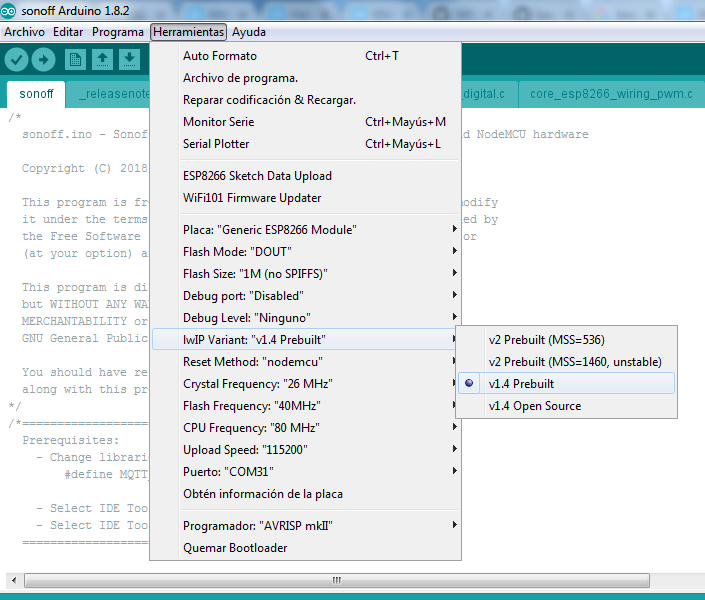
Because there is a problem with the new ESP8266 libraries. Tasmota works with IwIP v1.4
As explained on https://github.com/arendst/Sonoff-Tasmota/issues/1918
Kind of known problem with 2.4.0 library (esp8266/Arduino#4105)
If compiled on Arduino IDE check your LwIP settings as documented in the wiki.
As last resort use 2.3.0 library.
Please, rebuild your firmware or try the prebuilt ones. (Tasmota) or (Tasmota Mod)
 ascillato
on 16 Feb 2018
ascillato
on 16 Feb 2018
thanks @ascillato for those informations 👍
did not know it.
reloxx13
on 16 Feb 2018
Hope this solve @RaymondMouthaan problem
ascillato
on 16 Feb 2018
I disabled MQTT on the sonoff and ran a test for about 40 minutes on STATUS 0 with a load of 2.0 requests per second, with out any errors.
Also SonWeb runs fine now for this device.
Regarding my firmware - yes, i build it myself using platform.io in Atom. I have no idea how or where to set the settings you mentioned above @ascillato in platform.io Is there a way if these settings / libraries are the correct ones?
Meanwhile i will try the pre-build version and do another test :-)
Thanks for all the help so far 👍
RaymondMouthaan
on 16 Feb 2018
Pio uses 1.4 prebuilt. It's in a build script somewhere in your windows user/loginname/.pio folder so that's ok.
 arendst
on 16 Feb 2018
arendst
on 16 Feb 2018
Ok, for platform.io the configuration is as the wiki
Another test you can do (to see if this is a library problem) is uploading a precompiled version and run your tests.
ascillato
on 16 Feb 2018
i use atom too, but i dont have a mqtt server for now.
but i enabled mqtt and spammed status 0 without problems, too.
be sure you opened the project by the platformio.ini file (import arduino project) and did not create a new project by existing files (open project) on the PlatformIO Home Page (top menu->platformio->home).
reloxx13
on 16 Feb 2018
I have tested with a MQTT enabled.
If the mqtt server is UP, tasmota is responsive. I spammed it and also worked.
If the mqtt server is DOWN, tasmota is slow and very unresponsive (because it is trying to connect to mqtt server - known issue not resolved up to now) but is not restarting. it respond (with some seconds delay)
ascillato
on 16 Feb 2018
@RaymondMouthaan the prebuild version works for you?
ascillato
on 16 Feb 2018
It took a while to get my Pow flashed hahaha .. but i am running a test now (2 requests/sec) on STATUS 0 with pre-compiled version of Theo and it seems alright with MQTT enabled....
RaymondMouthaan
on 16 Feb 2018
nice :+1:
ascillato
on 16 Feb 2018
Alright this is what i found ...
Flashed it back to my own build (pio) where the MQTT Topic = sonoff (default) ... then the test ran fine ...
Then I change MQTT Topic = sonoff-pow-1 (as it was before) .. started the test again an it gave me the same non-responsiveness as before ...
Could this has to do with the dashes in the name of the topic?
RaymondMouthaan
on 16 Feb 2018
I tried different names for the mqtt topic
- sonoff-pow-1 : failed
- sonoff_pow_1 : failed
- sonoffpow1 : failed
- sonoffpow : failed
- sonoff : passed 👍
Confused ..
RaymondMouthaan
on 16 Feb 2018
wow, strange.
and those names with the prebuild firmware also fail?
ascillato
on 16 Feb 2018
With pre-build and topic name sonoff-pow-3 it fails ...
RaymondMouthaan
on 17 Feb 2018
I run some tests with _sonoff-pow-3_ and could not make it fail. Sorry. I check and recheck the data you post and could not find any clue.
I think that you should open a new issue under https://github.com/arendst/Sonoff-Tasmota because it seems to be a Firmware or device problem, and a lot of experienced people are there.
I will also follow your issue there because I want to know the fix for it.
ascillato
on 17 Feb 2018
I will do that ... thanks so far for your help !
I am just wondering, could it be related to the mqtt broker? Which one do you use?
I use emqtt (with in a docker container).
RaymondMouthaan
on 17 Feb 2018
I use the one embedded on Home Assistant (HBMQTT broker).
ascillato
on 17 Feb 2018
I am still stuck on this issue, which makes SonWeb unfortunately unusable for me :(
I am not sure whether it is related to the topic names or the firmware or my mqtt broker (emqtt) or my network setup or maybe even my docker swarm.
Anyways ... i'll open a new issue at https://github.com/arendst/Sonoff-Tasmota and do some more investigation and tests to hopefully tackle this issue. Hopefully you guys consider my proposal in the conclusion section of my previous comment.
RaymondMouthaan
on 17 Feb 2018
The story continues here 1968
RaymondMouthaan
on 19 Feb 2018
Related issues
 Zwerver91
·
4Comments
Zwerver91
·
4Comments
 eeprom23
·
5Comments
eeprom23
·
5Comments
 MaxBec
·
5Comments
MaxBec
·
5Comments
 riddik14
·
3Comments
riddik14
·
3Comments
 fragolinux
·
6Comments
fragolinux
·
6Comments
Most helpful comment
The story continues here 1968