Tasks: Raw JSON displayed when adding category
Steps to reproduce
- Create a task
- Start typing to add a category
Expected behaviour
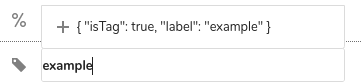
The text next to the plus sign should be just the name of the new category.
Actual behaviour
The text next to the plus sign is something like {"isTag": "true", "label": "example"}.
Server configuration
Operating system: Fedora 30
Web server: nginx
Database: MariaDB
PHP version: 7.2
Nextcloud version: 16.0.1
Tasks version: 0.10.1
Updated from an older Nextcloud or fresh install: Older install
Signing status: can't do at the moment, away from home
Client configuration
Browser: Chrome and Firefox
 jakeshaffer
All 11 comments
@skjnldsv Do you have an idea what might be wrong here?
 raimund-schluessler
on 20 May 2019
raimund-schluessler
on 20 May 2019
You need to specify the track-byand label data if you are not using the default id and name keys :)
https://github.com/nextcloud/nextcloud-vue/blob/85a469b461f9aab274e0f5584f63fc946faa2c93/src/components/Multiselect/Multiselect.vue#L48
https://github.com/nextcloud/nextcloud-vue/blob/85a469b461f9aab274e0f5584f63fc946faa2c93/src/components/Multiselect/Multiselect.vue#L132
https://vue-multiselect.js.org/#sub-single-select-object
 skjnldsv
on 20 May 2019
skjnldsv
on 20 May 2019
task.categories is a plain array. It doesn’t have a key and label. What do I specify then? Or doesn’t it work with an array?
raimund-schluessler
on 21 May 2019
@raimund-schluessler well, this is an array of objects, right?
You therefore needs to use label="label" and track-by="label"
But I would still suggest having a proper id here. Because you need to make sure there is no duplicate :thinking:
skjnldsv
on 21 May 2019
At the moment it is an array of strings coming from the VTODO https://github.com/nextcloud/tasks/blob/master/src/models/task.js#L405
I can of course create an array of objects from it.
raimund-schluessler
on 21 May 2019
@raimund-schluessler Well, if there is a json displayed, it means this is no longer a string but an object. So there must be an issue somewhere.
If you using only an array of string you don't need label/trackBy :)
skjnldsv
on 21 May 2019
To be honest, I think this is a bug in the vue-components.
This component
<template>
<div>
<Multiselect
v-model="categories"
:multiple="true"
:searchable="true"
:options="categories"
:placeholder="'Select categories'"
:taggable="true"
:tag-placeholder="'Add this as a new category'"
:close-on-select="false"
class="multiselect-vue"
@input="updateCategories"
@tag="updateCategory"
/>
</div>
</template>
<script>
import { Multiselect } from 'nextcloud-vue'
export default {
components: {
Multiselect,
},
data: function() {
return {
categories: ['a', 'b', 'c'],
}
},
methods: {
/**
* Sets the categories of a task
*
* @param {Array} categories The new categories
*/
updateCategories: function(categories) {
console.debug('Set categories to ' + categories)
},
/**
* Adds a category to the list of categories
*
* @param {String} category The name of the category to add
*/
updateCategory: function(category) {
console.debug('Add categoriy ' + category)
},
}
}
</script>
renders a multiselect like this

which shows the same error (Raw JSON) when typing
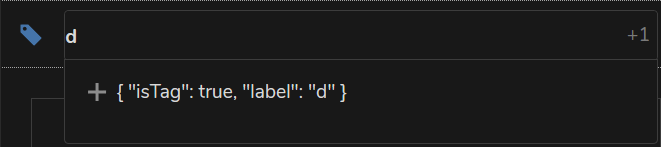
Also, if I am not wrong, this used to work correctly when I first implemented categories. I assume an update of the vue-components broke it. Shall I open an issue in the vue-components repo?
raimund-schluessler
on 21 May 2019
AH, I get it I think. You're creating a new tag.
I think you cannot use an array of string with @tag.
https://vue-multiselect.js.org/#sub-tagging
This needs to be objects.
skjnldsv
on 22 May 2019
I think you cannot use an array of string with @tag.
https://vue-multiselect.js.org/#sub-tagging
This needs to be objects.
That's a limitation / bug introduced by the vue-components. If I use the upstream vue-multiselect it works just fine with an array of strings:

Corresponding component:
<template>
    <div>
        <Multiselect
            v-model="categories"
            :multiple="true"
            :searchable="true"
            :options="categories"
            :placeholder="'Select categories'"
            :taggable="true"
            :tag-placeholder="'Add this as a new category'"
            :close-on-select="false"
            class="multiselect-vue"
            @input="updateCategories"
            @tag="updateCategory"
        />
    </div>
</template>

<script>
import Multiselect from 'vue-multiselect'

export default {
    components: {
        Multiselect,
    },
    data: function() {
        return {
            categories: ['a', 'b', 'c'],
        }
    },
    methods: {
        /**
         * Sets the categories of a task
         *
         * @param {Array} categories The new categories
         */
        updateCategories: function(categories) {
            console.debug('Set categories to ' + categories)
        },

        /**
         * Adds a category to the list of categories
         *
         * @param {String} category The name of the category to add
         */
        updateCategory: function(category) {
            console.debug('Add categoriy ' + category)
        },
    }
}
</script>
I will create an issue in the vue-components.
raimund-schluessler
on 22 May 2019
raimund-schluessler
on 22 May 2019
Was fixed with https://github.com/nextcloud/nextcloud-vue/pull/538 upstream, will come with the next release of vue-components.
raimund-schluessler
on 23 Aug 2019
Related issues
 thomas-mc-work
·
3Comments
thomas-mc-work
·
3Comments
 schiessle
·
9Comments
schiessle
·
9Comments
 gjgd
·
6Comments
gjgd
·
6Comments
 enboig
·
9Comments
enboig
·
9Comments
 jakobroehrl
·
3Comments
jakobroehrl
·
3Comments
Most helpful comment
That's a limitation / bug introduced by the vue-components. If I use the upstream

vue-multiselectit works just fine with an array of strings:Corresponding component:
I will create an issue in the vue-components.