Taro: 2.0.0 beta 版本测试通告(当前测试版本 2.0.0-beta.13,正式版2.0.1)
大家好~
Taro 1.x 版本自去年 9 月份发布以来,已经陪伴大家度过了一年多的时间,在此期间 Taro 一直保持高速成长,发布了多个具有重大意义的版本,让 Taro 成为如今一个功能尚算完善,拥有众多忠实拥趸的多端统一开发框架。
尽管 Taro 一直保持超高的迭代速度,Taro 的整体架构设计没有发生太大变化,这让 Taro 在这个时刻在变化的时代稍显佛系,且对于一个时刻想要突破自己的技术团队来说,常规性质的维护工作,显然无法安抚我们躁动的心,所以我们决定启动一系列的颠覆式重构设计。
我们从 CLI 开始入手进行改造,大家都知道,原来 Taro CLI 的小程序构建系统是自研的,整个构建系统逻辑复杂,要考虑的边际条件众多,这就导致了以下问题:
- 维护困难,每次需要新增一个功能,例如支持解析 JSON 文件,就需要直接改动 CLI,不够灵活
- 难以共建,CLI 的代码非常复杂,而且逻辑分支众多,让很多想要一起共建的人难以入手
- 可扩展性偏低,自研的构建系统,设计之初没有考虑到后续的扩展性,导致开发者想要添加自定义的功能无从下手
基于以上问题,我们决定使用 webpack 来实现小程序端的构建,于是诞生了 2.0,目前我们发布了 beta 测试版本。
相较于旧的构建系统,新的小程序编译带来了以下优势:
- 利于维护,大量的逻辑交由 webpack 来处理,我们只需要维护一些插件
- 更加稳定,相较于自研的构建系统,新的构建会更加稳定,降低一些奇怪错误的出现概率
- 可扩展性强,可以通过自行加入 webpack loader 与 plugin 的方式做自己想要的扩展
可以看到新的构建系统会有很大的进步。
欢迎大家进行尝试,目前可以直接使用 2.0.0-beta.13 版本进行尝鲜,遇到任何问题,请在此 issue 下进行回复,我们会一一解决。
需要注意的是,2.0 版本与 1.0 版本在项目编译配置上做了重大的改变,如果是旧项目升级,需要按照编译配置文档进行调整。
Taro CLI 改造只是一个开始,正如前文所提到的,我们将启动一系列的重构设计,甚至整个 Taro 的设计思想都将发生变化。希望大家能持续关注 Taro 后续的动态,我们将持续为大家带来更好用的解决方案。
升级方法示例
- 更新Taro cli版本,以下两种方式都可以。
- 在package.json中加上
"@tarojs/cli": "2.0.0-beta.13",这样做的好处是全局的Taro版本还是1.3.xx的稳定版本 - 更新全局Taro版本
npm install -g @tarojs/[email protected]
- 在package.json中加上
- 在package.json将Taro版本都改为最新的beta版本,删除
@tarojs/async-await - 新增
@tarojs/mini-runner、babel-plugin-transform-runtime"依赖,从app删除@tarojs/async-await - 重新安装依赖。
- 根据编译配置文档来改进配置,比如
weapp改为mini。
config/index.js配置示例
非最终版本,仅为代码实践版本
@shenghanqin 从 2.0.0 beta.0 到 beta.13 迭代中形成的配置,其中的 TODO 注释是要注意修改的。其他的可以根据自己项目进行添加。
const config = {
  projectName: 'taro-framework',
  date: '2019-11-2',
  designWidth: 750,
  deviceRatio: {
    640: 2.34 / 2,
    750: 1,
    828: 1.81 / 2
  },
  sourceRoot: 'src',
  outputRoot: 'dist',
  // TODO 特别要修改babel的配置
  babel: {
    sourceMap: true,
    presets: [
      [
        'env',
        {
          modules: false
        }
      ]
    ],
    plugins: [
      'transform-decorators-legacy',
      'transform-class-properties',
      'transform-object-rest-spread',
      ['transform-runtime', {
        "helpers": false,
        "polyfill": false,
        "regenerator": true,
        "moduleName": 'babel-runtime'
      }]
    ]
  },
  // TODO 将JSON.stringify()去掉
  defineConstants: {
    'process.env.SERVER_ENV': JSON.stringify(process.env.SERVER_ENV),
  },
  // TODO 小程序名称改为mini,可以删掉很多小配置
  mini: {
    postcss: {
      pxtransform: {
        enable: true,
        config: {

        }
      },
      url: {
        enable: true,
        config: {
          limit: 10240 // 设定转换尺寸上限
        }
      },
      cssModules: {
        enable: false, // 默认为 false,如需使用 css modules 功能,则设为 true
        config: {
          namingPattern: 'module', // 转换模式,取值为 global/module
          generateScopedName: '[name]__[local]___[hash:base64:5]'
        }
      }
    }
  },
  // 可以删掉很多小配置
  h5: {
    publicPath: '/',
    staticDirectory: 'static',
    postcss: {
      autoprefixer: {
        enable: true,
        config: {
          browsers: [
            'last 3 versions',
            'Android >= 4.1',
            'ios >= 8'
          ]
        }
      },
      cssModules: {
        enable: false, // 默认为 false,如需使用 css modules 功能,则设为 true
        config: {
          namingPattern: 'module', // 转换模式,取值为 global/module
          generateScopedName: '[name]__[local]___[hash:base64:5]'
        }
      }
    }
  }
}

module.exports = function (merge) {
  if (process.env.NODE_ENV === 'development') {
    return merge({}, config, require('./dev'))
  }
  return merge({}, config, require('./prod'))
}
 luckyadam
All 99 comments
强烈支持
 masteroy
on 14 Nov 2019
masteroy
on 14 Nov 2019
有新特性吗
 qwIvan
on 14 Nov 2019
qwIvan
on 14 Nov 2019
支持
 zhuxianguo
on 14 Nov 2019
zhuxianguo
on 14 Nov 2019
666
 qianxiaowu0520
on 14 Nov 2019
qianxiaowu0520
on 14 Nov 2019
期待!
 tourze
on 14 Nov 2019
tourze
on 14 Nov 2019
能不能把babel升到7+啊
 fred8617
on 15 Nov 2019
fred8617
on 15 Nov 2019
ts版本也升一下?
 BoringDays
on 15 Nov 2019
BoringDays
on 15 Nov 2019
@luckyadam 2.0.0 beta的bug也是正常走issue呗?
 shenghanqin
on 15 Nov 2019
shenghanqin
on 15 Nov 2019
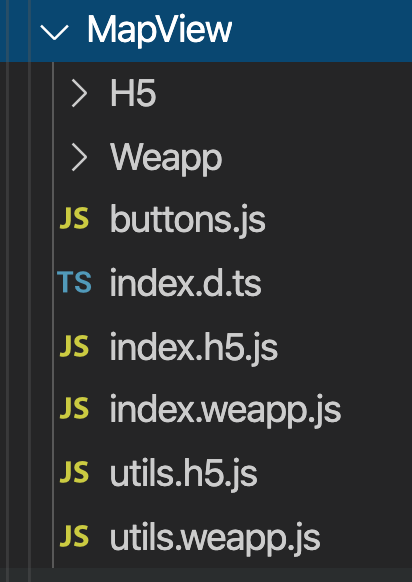
多端组件方案编译出错了

 rsnzh
on 15 Nov 2019
rsnzh
on 15 Nov 2019
多端组件方案编译出错了
收到~ 我看下
luckyadam
on 15 Nov 2019
经过简单测试,发现2个小问题
- async-await 模块有问题
- 基于Taro做的npm包可能会有问题(待测试)
shenghanqin
on 17 Nov 2019
希望能重点关注下window系统热重载随机报错的问题,虽然可能是微信开发者工具的问题,但如果你们有什么解决办法呢。。。
 david2tdw
on 18 Nov 2019
david2tdw
on 18 Nov 2019
升级之后, 即便是 使用了 async-await 模块, 依然会报 regeneratorRuntime
 twocucao
on 18 Nov 2019
twocucao
on 18 Nov 2019
升级之后, 即便是 使用了 async-await 模块, 依然会报 regeneratorRuntime
Me too.
shenghanqin
on 18 Nov 2019
升级之后, 即便是 使用了 async-await 模块, 依然会报 regeneratorRuntime
经过测试,2.0 版本不能用旧的方式来支持 async-await 了,新的使用方式如下:
在项目中分别安装 babel-plugin-transform-runtime 和 babel-runtime 两个包
$ yarn add babel-plugin-transform-runtime --dev
$ yarn add babel-runtime
然后在项目 config/index.js 的 babel 配置中增加 babel-plugin-transform-runtime 插件配置:
babel: {
  sourceMap: true,
  presets: [
    [
      'env',
      {
        modules: false
      }
    ]
  ],
  plugins: [
    'transform-decorators-legacy',
    'transform-class-properties',
    'transform-object-rest-spread',
    ['transform-runtime', {
      "helpers": false,
      "polyfill": false,
      "regenerator": true,
      "moduleName": 'babel-runtime'
    }]
  ]
}
不需要再引入 async-await 模块
luckyadam
on 18 Nov 2019
@luckyadam 老李666
twocucao
on 19 Nov 2019
在项目中分别安装
babel-plugin-transform-runtim
有个疑惑,这种方式兼容多端的吗?
tourze
on 19 Nov 2019
在项目中分别安装
babel-plugin-transform-runtim有个疑惑,这种方式兼容多端的吗?
支持,你可以试试
luckyadam
on 20 Nov 2019
用2.0.0-beta.3的cli初始化一个项目,编译成小程序时报如下错误

zhuxianguo
on 20 Nov 2019
用2.0.0-beta.3的cli初始化一个项目,编译成小程序时报如下错误
2.0.0 beta 的模板还没有更新,可以按照要求修改一个旧项目试试
luckyadam
on 20 Nov 2019
@luckyadam defineConstants会多出说引号!!!!!
defineConstants
用来配置一些全局变量供代码中进行使用,例如:
defineConstants: {
  A: '"a"' // JSON.stringify('a')
}
defineConstants: {
  'process.env.SERVER_ENV': JSON.stringify(process.env.SERVER_ENV),
},

console.log('env', process.env.SERVER_ENV)
//  输出:process.env.SERVER_ENV "yz"
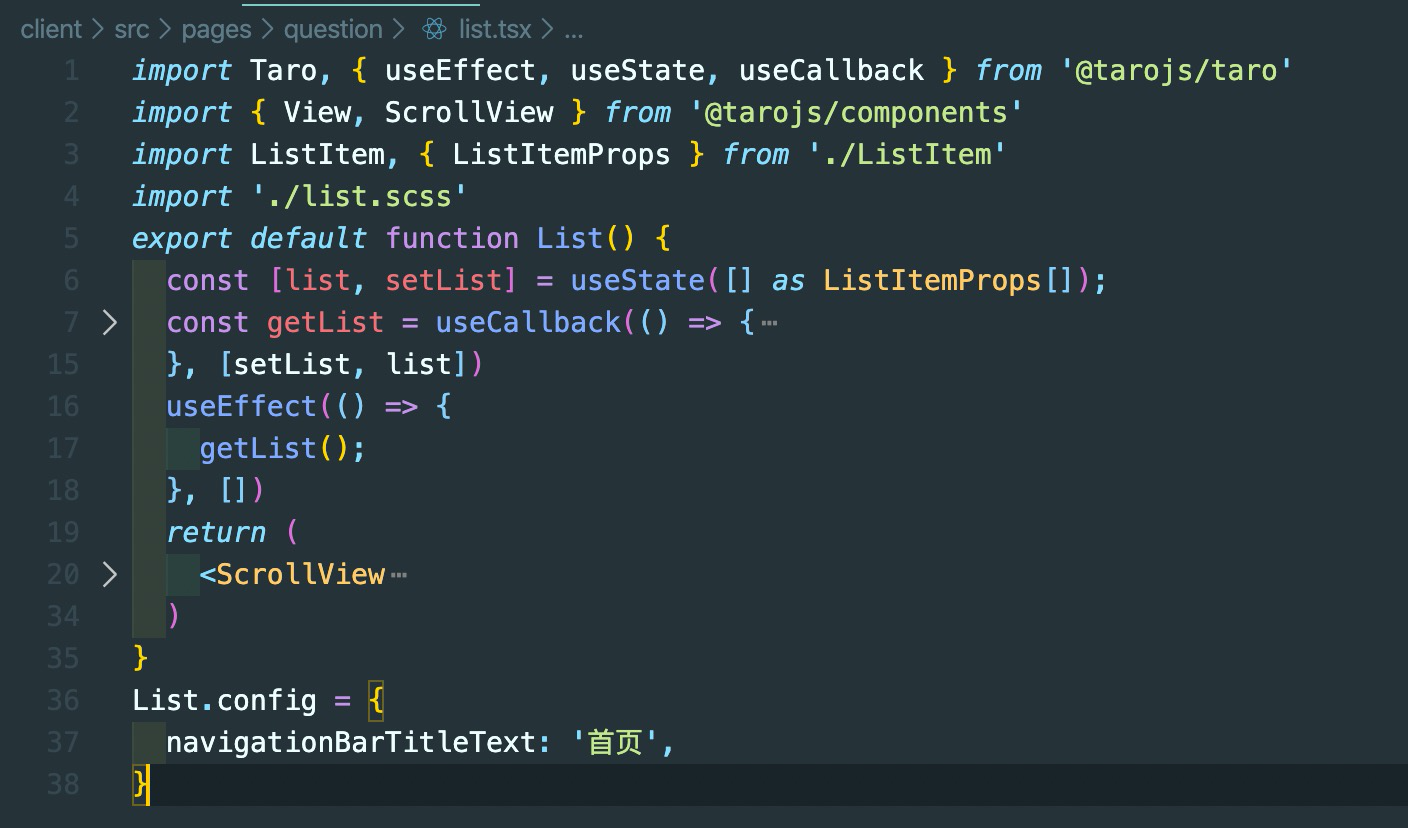
2.0.0.beta.4 微信小程序云开发模板hook写法页面配置navigationBarTitleText无效(不知道其他配置是否也是无效)

 xiaoxintang
on 25 Nov 2019
xiaoxintang
on 25 Nov 2019
2.0.0.beta.4 微信小程序云开发模板hook写法页面配置navigationBarTitleText无效(不知道其他配置是否也是无效)
其他配置也是无效的
 donniean
on 3 Dec 2019
donniean
on 3 Dec 2019
2.0.0.beta.4 微信小程序云开发模板hook写法页面配置navigationBarTitleText无效(不知道其他配置是否也是无效)
其他配置也是无效的
我看看
luckyadam
on 4 Dec 2019
用2.0.0-beta.3的cli初始化一个项目,编译成小程序时报如下错误
最新版本已修复
luckyadam
on 4 Dec 2019
支持 happypack 吗? 我试了一下, 报错:
Module build failed (from ./node_modules/happypack/loader.js):
TypeError: Cannot read property 'miniType' of undefined
 huangciyin
on 9 Dec 2019
huangciyin
on 9 Dec 2019
问题:
目前是单个 vendors 放在主包,导致主包体积偏大(某子包内公用的部分可提取到该子包内部), 是否有拆分vendors到子包的方案?
原因:
目前的做法是根据 MiniPlugin 的 commonChunks 配置在 app.js上注入 require(xxx) 代码, 这种做法比较难以拆分 vendors 到子包, 要改 mini-runner 的代码,主要是注入require 那部分.
解决方案(思路):
提供某种方式, 由开发者决定在某些页面构建后添加自定义 require 代码. 例如配置/注释.
我们目前的做法:
写了一个脚本, taro 构建完成后做一下 patch, 在子包的页面上加上该包的 vendors 依赖.
huangciyin
on 10 Dec 2019
问题:
目前是单个 vendors 放在主包,导致主包体积偏大(某子包内公用的部分可提取到该子包内部), 是否有拆分vendors到子包的方案?原因:
目前的做法是根据MiniPlugin的commonChunks配置在app.js上注入require(xxx)代码, 这种做法比较难以拆分 vendors 到子包, 要改mini-runner的代码,主要是注入require 那部分.解决方案(思路):
提供某种方式, 由开发者决定在某些页面构建后添加自定义 require 代码. 例如配置/注释.我们目前的做法:
写了一个脚本, taro 构建完成后做一下 patch, 在子包的页面上加上该包的 vendors 依赖.
可以把 commonChunks 配置放出来,然后自己配一下 webpackChain 自定义 webpack 配置
luckyadam
on 10 Dec 2019
2.0.0.beta.6 微信小程序,Hooks写法,通过 MyHookComponent.config = {...} 配置无效
 Jeepeng
on 11 Dec 2019
Jeepeng
on 11 Dec 2019
2.0.0.beta.6 微信小程序,Hooks写法,通过 MyHookComponent.config = {...} 配置无效
可以升级到 2.0.0-beta.7 试试
luckyadam
on 12 Dec 2019
版本:2.0.0-beta.8
在使用Decorator情况下:
若采用export default class Index写法:
@inject('appStore')
@observer
export default class Index extends Component {}
会报错:Uncaught ReferenceError: Index is not defined!
若改写为,则正常:
@inject('appStore')
@observer
class Index extends Component {}
export default Index
 rexerwang
on 14 Dec 2019
rexerwang
on 14 Dec 2019
版本:2.0.0-beta.8
在使用Decorator情况下:
若采用export default class Index写法:@inject('appStore') @observer export default class Index extends Component {}会报错:
Uncaught ReferenceError: Index is not defined!若改写为,则正常:
@inject('appStore')
@observer
class Index extends Component {}
export default Index
装饰器如此,那不用装饰器的普通component是正常的呗?
建议你提一个issue。
shenghanqin
on 15 Dec 2019

编译成小程序出错
 lzw1996-2020
on 16 Dec 2019
lzw1996-2020
on 16 Dec 2019
@modtwuji 麻烦单独提出一个 issue。
wxml 确实是 Webpack 不支持的文件类型,后续版本会修复。
 Garfield550
on 16 Dec 2019
Garfield550
on 16 Dec 2019
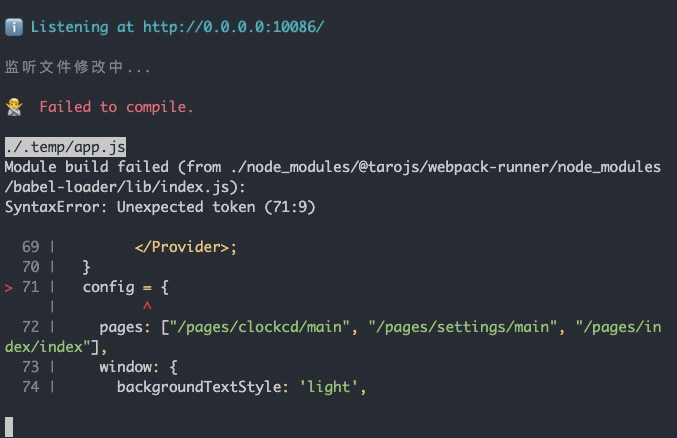 编译成H5就报这个错,微信小程序没有问题,很让人匪夷所思 TS
 luvletterldl
on 16 Dec 2019
luvletterldl
on 16 Dec 2019
麻烦按照 issue 里要求调整编译配置
luckyadam
on 17 Dec 2019
Maximum call stack size exceeded
 zjb19970804
on 17 Dec 2019
zjb19970804
on 17 Dec 2019
设置 babel-runtime 的 "helpers": true
会导致运行时报错

这里的 r 实际是
__webpack_require__
如果设置为 false 的话,babel 会在每个文件中注入helper 代码,大约会增大 5% 的体积
 tommytroylin
on 18 Dec 2019
tommytroylin
on 18 Dec 2019
2.0版本把js抽离成vender,然后在app.js里面引用,但是我们的taro项目只是小程序里面的一个子包,app.js好像不会执行。然后即使在pages/index/index文件里面引用vender,其他的组件引入都找不到,似乎组件的注册比页面执行还早
 xn330125
on 20 Dec 2019
xn330125
on 20 Dec 2019
请问一下, 2.0x 后是不是可以灵活使用别的第三方UI啊, 比如antd
 giantss
on 21 Dec 2019
giantss
on 21 Dec 2019
请问一下, 2.0x 后是不是可以灵活使用别的第三方UI啊, 比如antd
Taro小程序项目还是h5的呢?小程序那边,估计玄乎。其实可以这么想,taro目前是基于nervjs的,等可以使用react啦,再用antd,会更方便吧
shenghanqin
on 21 Dec 2019
好的 谢谢 @shenghanqin
giantss
on 21 Dec 2019
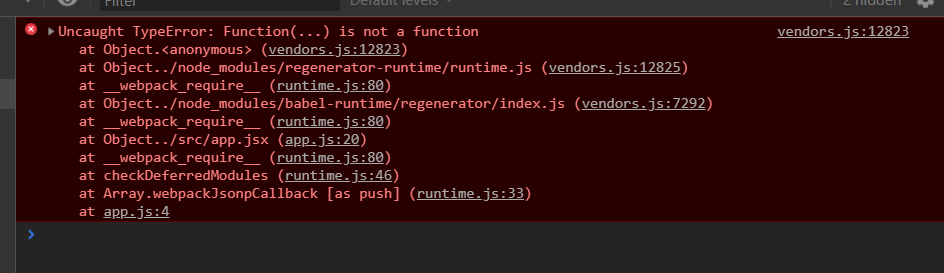
async await 已经修改了配置,微信小程序调试工具报的错误
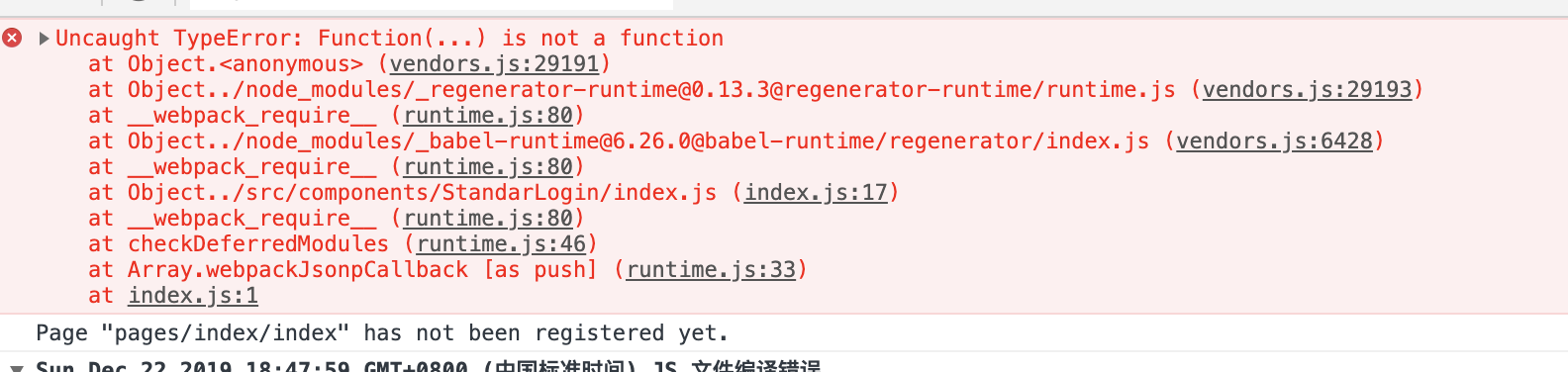

如何更好的定位到底是哪里错误?
 zhangfu-git
on 22 Dec 2019
zhangfu-git
on 22 Dec 2019
async await 已经修改了配置,微信小程序调试工具报的错误
如何更好的定位到底是哪里错误?
同样的报错
 mayocream
on 23 Dec 2019
mayocream
on 23 Dec 2019
多端组件方案编译出错了

组件是可以按照当前环境的,但是方法不可以。(2.0.0-beta.10)

 licanbluesea
on 23 Dec 2019
licanbluesea
on 23 Dec 2019
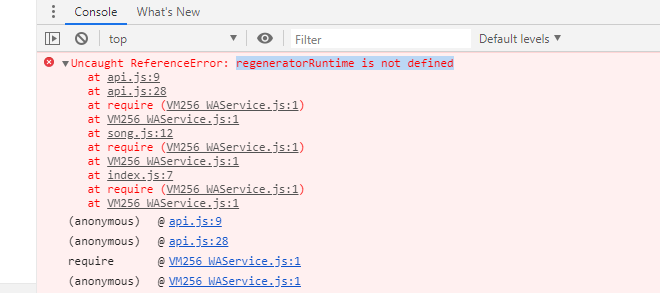
升级到2.0.0-beta.10,babel-plugin-transform-runtime和babel-runtime都已安装,config文件也按照文档配置,编译是成功的,但是在开发者工具中打开还是报regeneratorRuntime is not defined
 Nodewebzsz
on 23 Dec 2019
Nodewebzsz
on 23 Dec 2019
@Nodewebzsz app.js不需要再引入 async-await 模块。你得仔细看看上面的所有评论哟
shenghanqin
on 23 Dec 2019
@Nodewebzsz app.js不需要再引入 async-await 模块。你得仔细看看上面的所有评论哟
也去掉了async-await

Nodewebzsz
on 24 Dec 2019
@Nodewebzsz app.js不需要再引入 async-await 模块。你得仔细看看上面的所有评论哟
也去掉了async-await
请提供一个 demo 看下
luckyadam
on 24 Dec 2019
@Nodewebzsz app.js不需要再引入 async-await 模块。你得仔细看看上面的所有评论哟
也去掉了async-await
请提供一个 demo 看
@Nodewebzsz app.js不需要再引入 async-await 模块。你得仔细看看上面的所有评论哟
也去掉了async-await
请提供一个 demo 看下
Nodewebzsz
on 24 Dec 2019
@Nodewebzsz 解决了吗?我和你是一样的问题
 Ucself
on 24 Dec 2019
Ucself
on 24 Dec 2019
jsEnginScriptError
Component is not found in path "npm/taro-ui/dist/weapp/components/button/index" (using by "pages/login/index");onAppRoute
Error: Component is not found in path "npm/taro-ui/dist/weapp/components/button/index" (using by "pages/login/index")
at G (http://127.0.0.1:21335/appservice/__dev__/WAService.js:1:1470310)
at G (http://127.0.0.1:21335/appservice/__dev__/WAService.js:1:1470514)
at http://127.0.0.1:21335/appservice/__dev__/WAService.js:1:1491554
at Module.We (http://127.0.0.1:21335/appservice/__dev__/WAService.js:1:1492133)
at Function.value (http://127.0.0.1:21335/appservice/__dev__/WAService.js:1:1577143)
at Tt (http://127.0.0.1:21335/appservice/__dev__/WAService.js:1:1592944)
at http://127.0.0.1:21335/appservice/__dev__/WAService.js:1:1597206
at xt (http://127.0.0.1:21335/appservice/__dev__/WAService.js:1:1597699)
at Function.
at i.
调用taro-ui出现这个,有同志碰到这个问题吗?
 inkcar
on 24 Dec 2019
inkcar
on 24 Dec 2019
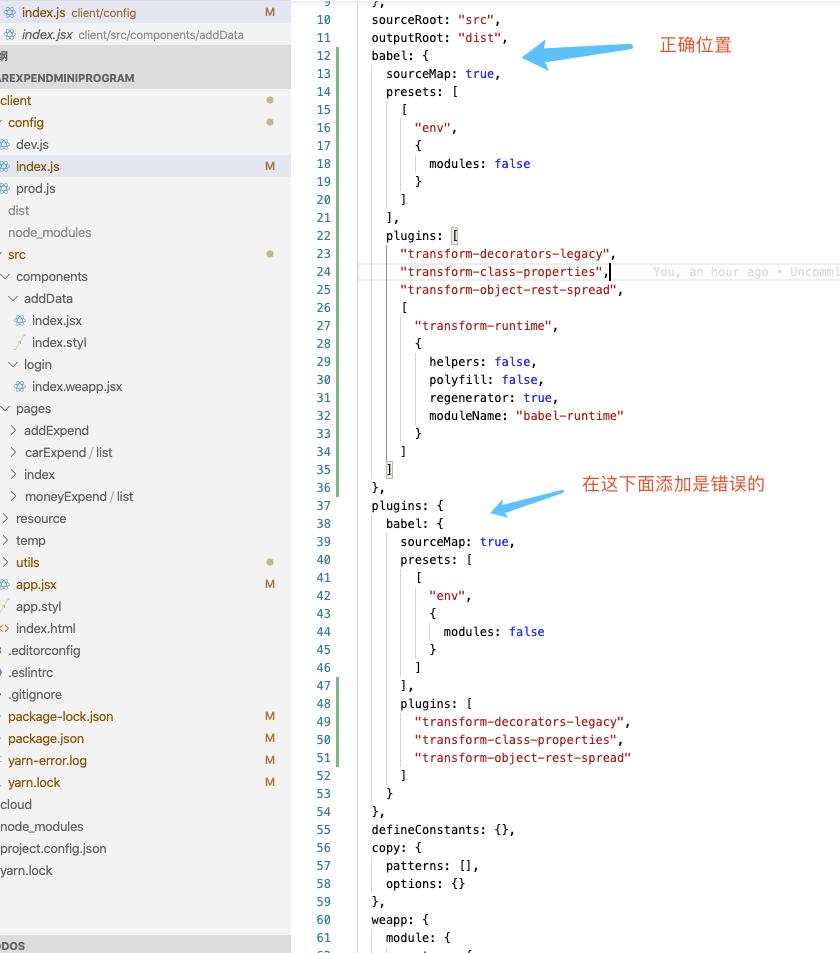
解决方式上图。是配置位置放错了。
Ucself
on 25 Dec 2019
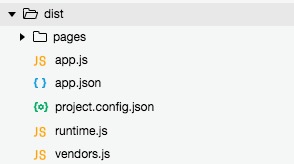
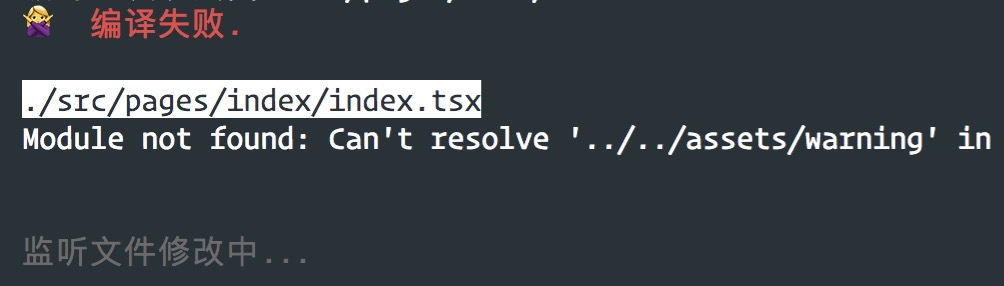
升级 2.0.0-beta.11 后, assets 文件夹内的图片编译后丢失, 导致编译出错. @luckyadam
2.0.0-beta.10 版本下, npm run dev:weapp 后编译代码如下

2.0.0-beta.11 版本下, npm run dev:weapp 后编译代码如下, 可以看到 png 文件丢失, 导致编译出错
 dpyzo0o
on 26 Dec 2019
dpyzo0o
on 26 Dec 2019
升级 2.0.0-beta.11 后,node_moudle的文件中,require文件带有.json后缀的没法正常解释。 @luckyadam 。

licanbluesea
on 26 Dec 2019
@Nodewebzsz app.js不需要再引入 async-await 模块。你得仔细看看上面的所有评论哟
也去掉了async-await
请提供一个 demo 看下
请问,上面的报错问题得到修复了
Nodewebzsz
on 26 Dec 2019
@dpyzo0o 你的问题解决了么?我也是这样子
 yiyou1992
on 26 Dec 2019
yiyou1992
on 26 Dec 2019

一直失败
yiyou1992
on 26 Dec 2019
一直失败
升级到 2.0.0-beta.12 试试
luckyadam
on 26 Dec 2019
{this.props.feedback.urls.map((value, index) => {
            return <Image style={imgStyle} onClick={delImage(index)} src={value} key={`${index}`}></Image>
          })}
当我改变this.props.feedback.urls的值的时候,onClick中的delImage()方法会自动执行this.props.feedback.urls.length - 1次,也就是最后一张图片上的事件没有执行
luvletterldl
on 2 Jan 2020
{this.props.feedback.urls.map((value, index) => {
            return <Image style={imgStyle} onClick={delImage(index)} src={value} key={`${index}`}></Image>
          })}
当我改变this.props.feedback.urls的值的时候,onClick中的delImage()方法会自动执行this.props.feedback.urls.length - 1次,也就是最后一张图片上的事件没有执行
luckyadam
on 2 Jan 2020
npm run build:weapp 分包的静态资源默认也会到主包里,之前版本是正常的 @luckyadam
 felemon
on 6 Jan 2020
felemon
on 6 Jan 2020
npm run build:weapp 分包的静态资源默认也会到主包里,之前版本是正常的 @luckyadam
是指什么样的资源
luckyadam
on 6 Jan 2020
@luckyadam 遇到和 @inkcar 一样的问题,编译正常但小程序端报错:jsEnginScriptError
Component is not found in path "npm/taro-ui/dist/weapp/components/tabs/index" (using by "components/HomeHeader");onAppRoute
Error: Component is not found in path "npm/taro-ui/dist/weapp/components/tabs/index" (using by "components/HomeHeader")
 georgezouq
on 6 Jan 2020
georgezouq
on 6 Jan 2020
@luckyadam 遇到和 @inkcar 一样的问题,编译正常但小程序端报错:jsEnginScriptError
Component is not found in path "npm/taro-ui/dist/weapp/components/tabs/index" (using by "components/HomeHeader");onAppRoute
Error: Component is not found in path "npm/taro-ui/dist/weapp/components/tabs/index" (using by "components/HomeHeader")
提供一个 demo 看下
luckyadam
on 6 Jan 2020
@luckyadam 我们用了 lerna + yarn workspace,把 taro 项目当作 lerna 中的一个模块使用,不引入taro-ui 的时候正常,引用taro-ui 就会报错,这里是demo https://github.com/georgezouq/taro-issue-demo. lerna bootstrap yarn run dev:weapp
georgezouq
on 6 Jan 2020
�🙅 编译失败
Cannot read property 'add' of undefined 表示很无奈
 lkkunheiheihei
on 7 Jan 2020
lkkunheiheihei
on 7 Jan 2020
�🙅 编译失败
Cannot read property 'add' of undefined 表示很无奈
麻烦给个 demo 看下
luckyadam
on 7 Jan 2020
@luckyadam 我们用了 lerna + yarn workspace,把 taro 项目当作 lerna 中的一个模块使用,不引入taro-ui 的时候正常,引用taro-ui 就会报错,这里是demo https://github.com/georgezouq/taro-issue-demo. lerna bootstrap yarn run dev:weapp
0687e78adb7f60fb21488b457c7a098ba78c3bb8 已修复,下个版本可以
luckyadam
on 7 Jan 2020
@luckyadam 非常感谢
georgezouq
on 8 Jan 2020
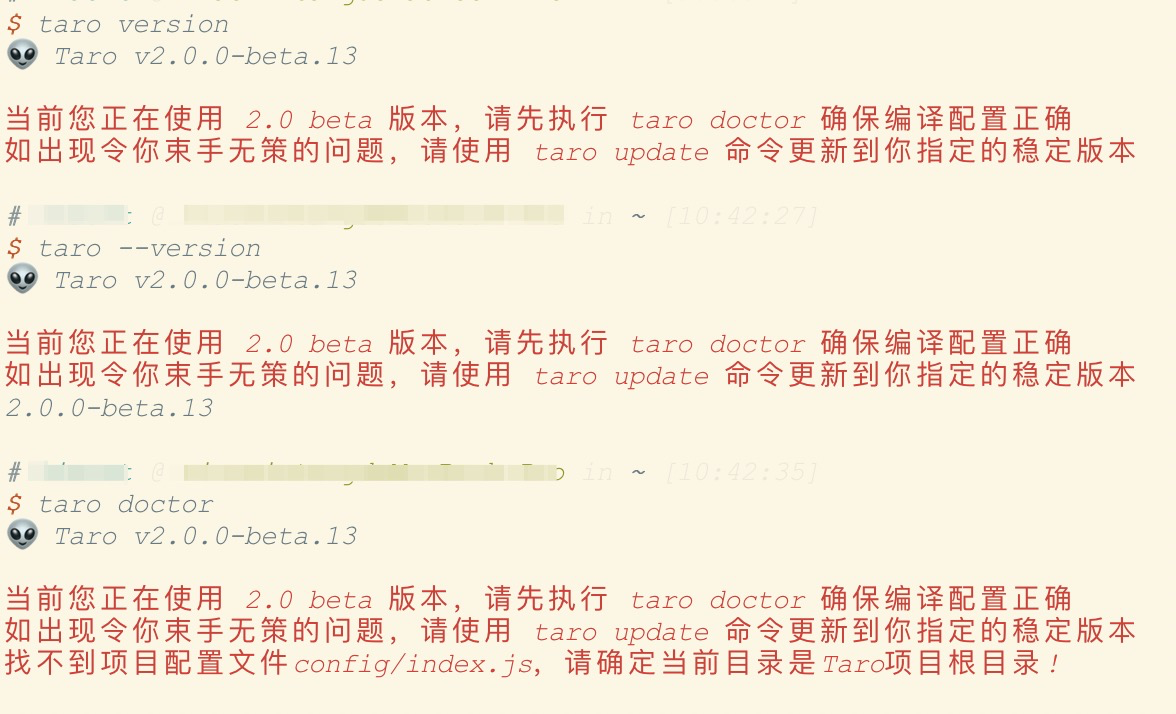
这个提示好像一直都在
 xiaoxintang
on 8 Jan 2020
xiaoxintang
on 8 Jan 2020
beta 版本就让它在吧
Garfield550
on 8 Jan 2020
这个提示好像一直都在
提示 5 次😝
luckyadam
on 8 Jan 2020
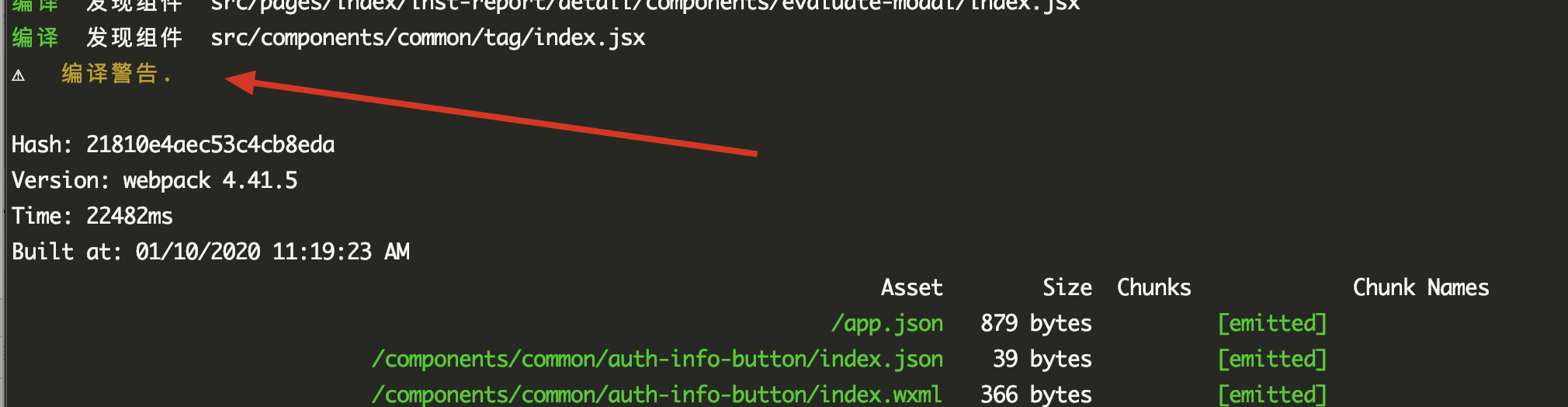
编完了报一”编译警告“是什么情况,关键是页看不到具体内容
$ taro info
👽 Taro v2.0.0
Taro CLI 2.0.0 environment info:
System:
OS: macOS 10.15.2
Shell: 5.7.1 - /bin/zsh
Binaries:
Node: 13.6.0 - /usr/local/bin/node
Yarn: 1.21.1 - /usr/local/bin/yarn
npm: 6.13.4 - /usr/local/bin/npm
npmPackages:
@tarojs/async-await: 2.0.0 => 2.0.0
@tarojs/components: 2.0.0 => 2.0.0
@tarojs/mini-runner: ^2.0.0 => 2.0.0
@tarojs/plugin-babel: 2.0.0 => 2.0.0
@tarojs/plugin-csso: 2.0.0 => 2.0.0
@tarojs/plugin-sass: 2.0.0 => 2.0.0
@tarojs/plugin-uglifyjs: 2.0.0 => 2.0.0
@tarojs/redux: 2.0.0 => 2.0.0
@tarojs/redux-h5: 2.0.0 => 2.0.0
@tarojs/router: 2.0.0 => 2.0.0
@tarojs/taro: 2.0.0 => 2.0.0
@tarojs/taro-alipay: 2.0.0 => 2.0.0
@tarojs/taro-h5: 2.0.0 => 2.0.0
@tarojs/taro-swan: 2.0.0 => 2.0.0
@tarojs/taro-tt: 2.0.0 => 2.0.0
@tarojs/taro-weapp: 2.0.0 => 2.0.0
@tarojs/webpack-runner: 2.0.0 => 2.0.0
eslint-config-taro: 2.0.0 => 2.0.0
eslint-plugin-taro: 2.0.0 => 2.0.0
nerv-devtools: ^1.5.6 => 1.5.6
nervjs: ^1.5.6 => 1.5.6
react: ^16.12.0 => 16.12.0
stylelint-config-taro-rn: 2.0.0 => 2.0.0
stylelint-taro-rn: 2.0.0 => 2.0.0
npmGlobalPackages:
typescript: 3.7.4
 cpocar
on 10 Jan 2020
cpocar
on 10 Jan 2020
编完了报一”编译警告“是什么情况,关键是页看不到具体内容
$ taro info
👽 Taro v2.0.0Taro CLI 2.0.0 environment info:
System:
OS: macOS 10.15.2
Shell: 5.7.1 - /bin/zsh
Binaries:
Node: 13.6.0 - /usr/local/bin/node
Yarn: 1.21.1 - /usr/local/bin/yarn
npm: 6.13.4 - /usr/local/bin/npm
npmPackages:
@tarojs/async-await: 2.0.0 => 2.0.0
@tarojs/components: 2.0.0 => 2.0.0
@tarojs/mini-runner: ^2.0.0 => 2.0.0
@tarojs/plugin-babel: 2.0.0 => 2.0.0
@tarojs/plugin-csso: 2.0.0 => 2.0.0
@tarojs/plugin-sass: 2.0.0 => 2.0.0
@tarojs/plugin-uglifyjs: 2.0.0 => 2.0.0
@tarojs/redux: 2.0.0 => 2.0.0
@tarojs/redux-h5: 2.0.0 => 2.0.0
@tarojs/router: 2.0.0 => 2.0.0
@tarojs/taro: 2.0.0 => 2.0.0
@tarojs/taro-alipay: 2.0.0 => 2.0.0
@tarojs/taro-h5: 2.0.0 => 2.0.0
@tarojs/taro-swan: 2.0.0 => 2.0.0
@tarojs/taro-tt: 2.0.0 => 2.0.0
@tarojs/taro-weapp: 2.0.0 => 2.0.0
@tarojs/webpack-runner: 2.0.0 => 2.0.0
eslint-config-taro: 2.0.0 => 2.0.0
eslint-plugin-taro: 2.0.0 => 2.0.0
nerv-devtools: ^1.5.6 => 1.5.6
nervjs: ^1.5.6 => 1.5.6
react: ^16.12.0 => 16.12.0
stylelint-config-taro-rn: 2.0.0 => 2.0.0
stylelint-taro-rn: 2.0.0 => 2.0.0
npmGlobalPackages:
typescript: 3.7.4
打包出来的效果正确么,下个版本把所有具体提示信息放出来
luckyadam
on 13 Jan 2020
在项目中分别安装 babel-plugin-transform-runtime 和 babel-runtime 两个包 以及配置完babel-plugin-transform-runtime后会报Function(...) is not a function错误
 sherfruit
on 13 Jan 2020
sherfruit
on 13 Jan 2020
在项目中分别安装 babel-plugin-transform-runtime 和 babel-runtime 两个包 以及配置完babel-plugin-transform-runtime后会报Function(...) is not a function错误
+1
 neobolo
on 13 Jan 2020
neobolo
on 13 Jan 2020
编完了报一”编译警告“是什么情况,关键是页看不到具体内容
$ taro info
👽 Taro v2.0.0
Taro CLI 2.0.0 environment info:
System:
OS: macOS 10.15.2
Shell: 5.7.1 - /bin/zsh
Binaries:
Node: 13.6.0 - /usr/local/bin/node
Yarn: 1.21.1 - /usr/local/bin/yarn
npm: 6.13.4 - /usr/local/bin/npm
npmPackages:
@tarojs/async-await: 2.0.0 => 2.0.0
@tarojs/components: 2.0.0 => 2.0.0
@tarojs/mini-runner: ^2.0.0 => 2.0.0
@tarojs/plugin-babel: 2.0.0 => 2.0.0
@tarojs/plugin-csso: 2.0.0 => 2.0.0
@tarojs/plugin-sass: 2.0.0 => 2.0.0
@tarojs/plugin-uglifyjs: 2.0.0 => 2.0.0
@tarojs/redux: 2.0.0 => 2.0.0
@tarojs/redux-h5: 2.0.0 => 2.0.0
@tarojs/router: 2.0.0 => 2.0.0
@tarojs/taro: 2.0.0 => 2.0.0
@tarojs/taro-alipay: 2.0.0 => 2.0.0
@tarojs/taro-h5: 2.0.0 => 2.0.0
@tarojs/taro-swan: 2.0.0 => 2.0.0
@tarojs/taro-tt: 2.0.0 => 2.0.0
@tarojs/taro-weapp: 2.0.0 => 2.0.0
@tarojs/webpack-runner: 2.0.0 => 2.0.0
eslint-config-taro: 2.0.0 => 2.0.0
eslint-plugin-taro: 2.0.0 => 2.0.0
nerv-devtools: ^1.5.6 => 1.5.6
nervjs: ^1.5.6 => 1.5.6
react: ^16.12.0 => 16.12.0
stylelint-config-taro-rn: 2.0.0 => 2.0.0
stylelint-taro-rn: 2.0.0 => 2.0.0
npmGlobalPackages:
typescript: 3.7.4打包出来的效果正确么,下个版本把所有具体提示信息放出来
跟这个大兄弟遇到一样的问题5278
cpocar
on 14 Jan 2020
在项目中分别安装 babel-plugin-transform-runtime 和 babel-runtime 两个包 以及配置完babel-plugin-transform-runtime后会报Function(...) is not a function错误
删掉 node_modules 、yarn.lock、package-lock ,重新安装一下依赖
luckyadam
on 14 Jan 2020
@luckyadam 很奇怪,我从 1.3.35 升级到 2.0.1,按照上边的做法配置之后一切正常。但是我重装了一下依赖就报错了
Uncaught TypeError: Function(...) is not a function
 theprimone
on 15 Jan 2020
theprimone
on 15 Jan 2020
@luckyadam 很奇怪,我从 1.3.35 升级到 2.0.1,按照上边的做法配置之后一切正常。但是我重装了一下依赖就报错了
Uncaught TypeError: Function(...) is not a function
删掉 node_modules 、yarn.lock、package-lock ,重新安装一下依赖
luckyadam
on 15 Jan 2020
就是删除后重新安装的 :joy:
theprimone
on 15 Jan 2020
就是删除后重新安装的 😂
我尝试了一下,发现没有复现,目测还是依赖的问题,建议清一下 npm 缓存再安装
luckyadam
on 15 Jan 2020
npm cache clear 之后,再删除重装,还是一样,不会又是平台问题吧,我是 windows
theprimone
on 15 Jan 2020
npm cache clear之后,再删除重装,还是一样,不会又是平台问题吧,我是 windows
那你重新建个项目看看
luckyadam
on 15 Jan 2020
Awesome ! 新建的项目按照上面的说明添加没问题,所以我应该怎么操作呢?有点懵了
theprimone
on 15 Jan 2020
npm cache clear之后,再删除重装,还是一样,不会又是平台问题吧,我是 windows
特地找了了一台陈年 windows 机器试了一把,确实没有复现,再检查一下咯,config 配置也检查一下
luckyadam
on 15 Jan 2020
Awesome ! 新建的项目按照上面的说明添加没问题,所以我应该怎么操作呢?有点懵了
你看看自己的项目有没有自己安装什么依赖包引用到了 @babel/runtime, https://github.com/NervJS/taro/issues/5304#issuecomment-573491316
luckyadam
on 15 Jan 2020
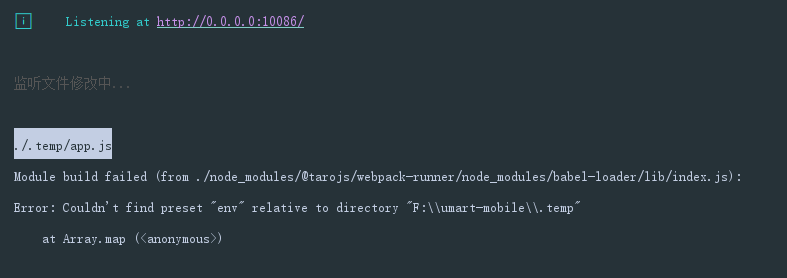
ba把就项目按照上面的步骤升级到2.0.1版本之后 报这个错误 早上刚开始弄到2.0.0版本 h5编译是可以的 小程序有问题 然后就升到2.0.1
 sprout-echo
on 15 Jan 2020
sprout-echo
on 15 Jan 2020
@luckyadam 我是用 taro 1.3.35 从小程序迁移过来的,目前还没有自己装过依赖。现在升级到 2.0.1 才装了升级文档里边的依赖,另外我的 config 文件我也翻来覆去的看了好几遍,真没看出来哪儿不一样 :joy:
// var path = require('path');

const config = {
  projectName: 'taroConvert',
  date: '2020-1-9',
  designWidth: 750,
  deviceRatio: {
    '640': 2.34 / 2,
    '750': 1,
    '828': 1.81 / 2
  },
  sourceRoot: 'src',
  outputRoot: 'dist',
  plugins: [],
  babel: {
    sourceMap: true,
    presets: [
      ['env', {
        modules: false
      }]
    ],
    plugins: [
      'transform-decorators-legacy',
      'transform-class-properties',
      'transform-object-rest-spread',
      ['transform-runtime', {
        "helpers": false,
        "polyfill": false,
        "regenerator": true,
        "moduleName": 'babel-runtime'
      }]
    ]
  },
  defineConstants: {
  },
  // alias: {
  //   '@/': path.resolve(__dirname, '..', 'src/'),
  // },
  mini: {
    postcss: {
      autoprefixer: {
        enable: true,
        config: {
          browsers: [
            'last 3 versions',
            'Android >= 4.1',
            'ios >= 8'
          ]
        }
      },
      pxtransform: {
        enable: true,
        config: {

        }
      },
      url: {
        enable: true,
        config: {
          limit: 10240 // 设定转换尺寸上限
        }
      },
      cssModules: {
        enable: false, // 默认为 false,如需使用 css modules 功能,则设为 true
        config: {
          namingPattern: 'module', // 转换模式,取值为 global/module
          generateScopedName: '[name]__[local]___[hash:base64:5]'
        }
      }
    }
  },
  h5: {
    publicPath: '/',
    staticDirectory: 'static',
    postcss: {
      autoprefixer: {
        enable: true,
        config: {
          browsers: [
            'last 3 versions',
            'Android >= 4.1',
            'ios >= 8'
          ]
        }
      },
      cssModules: {
        enable: false, // 默认为 false,如需使用 css modules 功能,则设为 true
        config: {
          namingPattern: 'module', // 转换模式,取值为 global/module
          generateScopedName: '[name]__[local]___[hash:base64:5]'
        }
      }
    }
  }
}

module.exports = function (merge) {
  if (process.env.NODE_ENV === 'development') {
    return merge({}, config, require('./dev'))
  }
  return merge({}, config, require('./prod'))
}
ba把就项目按照上面的步骤升级到2.0.1版本之后 报这个错误 早上刚开始弄到2.0.0版本 h5编译是可以的 小程序有问题 然后就升到2.0.1
原来是要安装这个 babel-preset-env
sprout-echo
on 15 Jan 2020
npm i -S [email protected]
解决了 async 的问题
theprimone
on 15 Jan 2020
@theprimone 确实,我昨天升级了3个项目到2.0.0,首先安装的就是这个runtime,所以我觉得在升级说明方面还得改进。 @luckyadam
shenghanqin
on 16 Jan 2020
taro脚手架生成的项目有把babel升级到7的打算吗,还是说需要开发者手动升级呢
 yuwanlin
on 16 Jan 2020
yuwanlin
on 16 Jan 2020
taro脚手架生成的项目有把babel升级到7的打算吗,还是说需要开发者手动升级呢
5341
yuwanlin
on 17 Jan 2020
大家有对比1.3与2.0 build出来的包体积吗?我这2.0的比1.3的多了300k左右。
 ziruozimi
on 17 Jan 2020
ziruozimi
on 17 Jan 2020
awesome 😝 : )
 BinZhiZhu
on 17 Jan 2020
BinZhiZhu
on 17 Jan 2020
大家有对比1.3与2.0 build出来的包体积吗?我这2.0的比1.3的多了300k左右。
有对比过,uglify貌似没有起到效果,以前uglify是放在plugins底下的,现在放在里面和放在外面,哪里都不起作用。
 dreamthen
on 17 Jan 2020
dreamthen
on 17 Jan 2020
大家有对比1.3与2.0 build出来的包体积吗?我这2.0的比1.3的多了300k左右。
现在我这边是大了400k,之前是1.3.35版本是1.4M,现在是1.8M,所以我只好退回了1.3.35版本
dreamthen
on 18 Jan 2020
Related issues
 fuyue111
·
3Comments
fuyue111
·
3Comments
 GreatAuk
·
3Comments
GreatAuk
·
3Comments
 leafchao
·
3Comments
leafchao
·
3Comments
 XT-0515
·
3Comments
XT-0515
·
3Comments
 waahai
·
3Comments
waahai
·
3Comments
Most helpful comment
经过测试,2.0 版本不能用旧的方式来支持 async-await 了,新的使用方式如下:
在项目中分别安装
babel-plugin-transform-runtime和babel-runtime两个包然后在项目
config/index.js的babel配置中增加babel-plugin-transform-runtime插件配置:不需要再引入 async-await 模块