问题描述
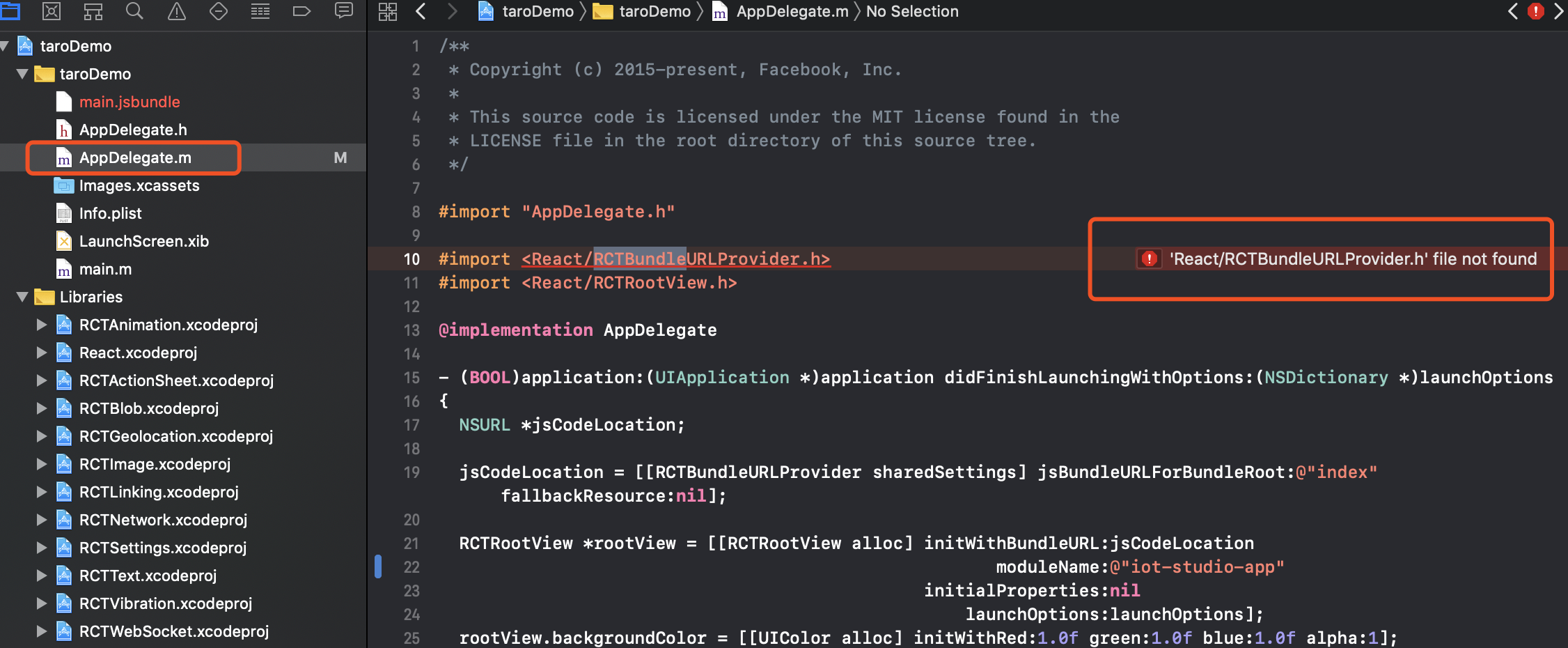
按照 react native 端开发流程文档,使用 xcode 打开 taro-native-shell 的 ios 文件夹,build失败,
xcode 提示错误: 'React/RCTBundleURLProvider.h' file not found
复现步骤
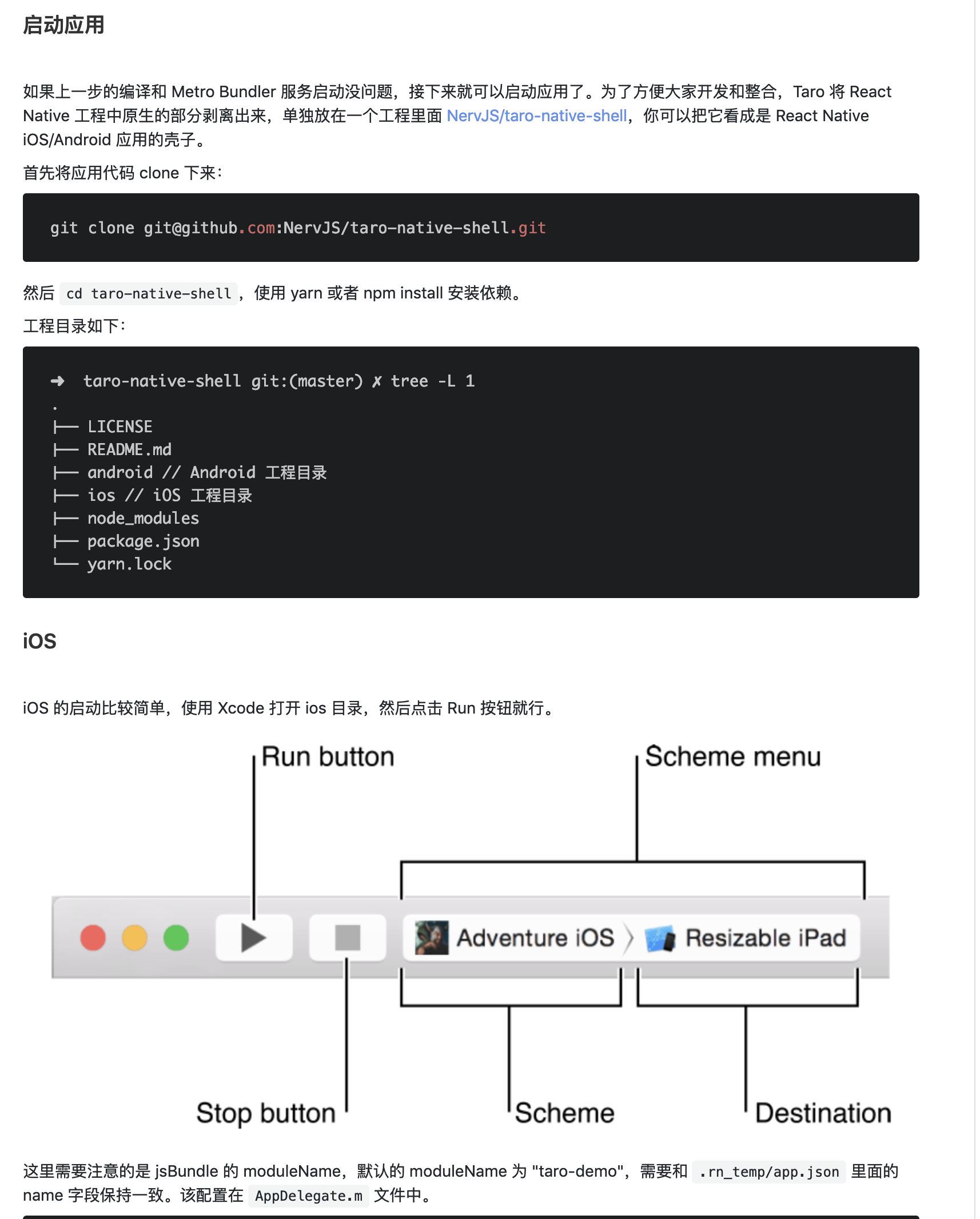
按照 taro 官方文档操作 https://nervjs.github.io/taro/docs/react-native.html :
期望行为
使用 xcode 能成功在模拟器上运行项目
报错信息
appDelegate.m 文件中报错: 'React/RCTBundleURLProvider.h' file not found
系统信息
Taro v1.2 及以上版本已添加
taro info命令,方便大家查看系统及依赖信息,运行该命令后将结果贴下面即可。
- 操作系统: macOS 10.14.3
- Taro 版本: v1.2.21
- Node.js 版本: 11.12.0
- 报错平台: react-native: 0.55.4 => 0.55.4
补充信息
[可选]
[根据你的调查研究,出现这个问题的原因可能在哪里?]
 szm1002
All 12 comments
欢迎提交 Issue~
如果你提交的是 bug 报告,请务必遵循 Issue 模板的规范,尽量用简洁的语言描述你的问题,最好能提供一个稳定简单的复现。🙏🙏🙏
如果你的信息提供过于模糊或不足,或者已经其他 issue 已经存在相关内容,你的 issue 有可能会被关闭。
Good luck and happy coding~
![taro-bot[bot] picture](https://avatars.githubusercontent.com/in/20114?v=4&s=40) taro-bot[bot]
on 22 Mar 2019
taro-bot[bot]
on 22 Mar 2019
CC @Pines-Cheng
taro-bot[bot]
on 22 Mar 2019
react-native: 0.55.4 => 0.55.4
RN 依赖换成 0.55.4 还有这个报错吗?
 Pines-Cheng
on 22 Mar 2019
Pines-Cheng
on 22 Mar 2019
react-native: 0.55.4 => 0.55.4
RN 依赖换成 0.55.4 还有这个报错吗?
换成0.55.4还有这个报错。
而且我用xcode直接run react-native cli新建的项目是OK的,说明我电脑上rn环境应该没问题
szm1002
on 22 Mar 2019
这个问题解决了吗? @szm1002
Pines-Cheng
on 25 Mar 2019
这个问题解决了吗? @szm1002
没有。。因为项目比较急我已经弃taro转原生rn开发了。。
szm1002
on 26 Mar 2019
我也碰到这个问题了,有解决办法么@Pines-Cheng
 szc807414589
on 26 Mar 2019
szc807414589
on 26 Mar 2019
引起这个错误的原因很多,大家看看这个有没有帮助:“RCTBundleURLProvider.h” file not found - AppDelegate.m
Pines-Cheng
on 26 Mar 2019
参考一下这个:error: Unable to resolve build file: XCBCore.BuildFile
Xcode 10 特有的问题。
Pines-Cheng
on 19 Apr 2019
删除node_modules ,在 xcode 里面Command + Shift + K清理 cache 然后重新npm install,我用这个可以了
 glitterlip
on 21 Apr 2019
glitterlip
on 21 Apr 2019
这个 issue 有用:'config.h' file not found
通过以下几步成功解决:
rm -rf node_modules/ && yarn cache clean && yarn install
node_modules/react-native/scripts/ios-install-third-party.sh
cd node_modules/react-native/third-party/glog-0.3.4
./configure
参考 comment:https://github.com/facebook/react-native/issues/19529#issuecomment-423898864
Pines-Cheng
on 20 May 2019
这个错误耗了我足足一整天的时间
Xcode的版本有可能导致报错, 我现在是10.1, 看了一些评论说10.2会有问题
在上面 'config.h' file not found 这个错误解决后, 还可能碰到下面这个错误
假如Xcode报错地方在 react-native/Libraries/WebSocket/libfishhook.a not found的话
试一试这个, https://github.com/facebook/react-native/issues/19569#issuecomment-422691829
终于跑起来了, 太不容易了, 泪流满面
 czy0729
on 6 Jun 2019
czy0729
on 6 Jun 2019
Related issues
 LadyChatterleyLover
·
3Comments
LadyChatterleyLover
·
3Comments
 fuyue111
·
3Comments
fuyue111
·
3Comments
 leafchao
·
3Comments
leafchao
·
3Comments
 liuchuzhang
·
3Comments
liuchuzhang
·
3Comments
 zhuxianguo
·
3Comments
zhuxianguo
·
3Comments
Most helpful comment
这个 issue 有用:'config.h' file not found
通过以下几步成功解决:
参考 comment:https://github.com/facebook/react-native/issues/19529#issuecomment-423898864