问题描述
重新编译src/pages/index/index.js(pages目录下任一页面的**.js文件)
报:未找到 Taro.Component 的类定义
复现步骤
- 编辑器打开src/pages/index/index.js
- 保存(ctrl+s)
此问题不是每次都会重现,我本地环境报错概率超过90%,如遇没有重现多保存几次
// src/pages/index/index.js
import Taro, { Component } from '@tarojs/taro'
import { View, Button, Text, Map, CoverView, CoverImage } from '@tarojs/components'
import { observer, inject } from '@tarojs/mobx'
import { USER_STATE } from '../../constant';

import me from '../../asset/images/me.png';
import search from '../../asset/images/icon_search.png';
import filter from '../../asset/images/filter.png';
import plug_marker_normal from "../../asset/images/plug_marker_normal.png";
import pin from '../../asset/images/pin.png';
import locate from '../../asset/images/locate.png';
import scan from '../../asset/images/icon_scan.png';
import './index.scss'


@inject('homeStore', 'authStore')
@observer
class Index extends Component {
  config = {
    navigationBarTitleText: '首页'
  }

  onShareAppMessage(){
    return{
      title: "测试项目",
      page: "/pages/index/index"
    }
  }

  markers = [{
    iconPath: plug_marker_normal,
    id: 0,
    latitude: 23.14463,
    longitude: 113.36199,
    width: 40,
    height: 56
  }]

  componentWillMount () {
    const { homeStore } = this.props;
    Taro.getLocation({
      type: "gcj02"
    }).then((res)=>{
      homeStore.setLocation({
        latitude: res.latitude,
        longitude: res.longitude
      })
    })
  }

  state = {
    animationData: {}
  }
  map = null;
  getMap(){
    if(!this.map){
      this.map = Taro.createMapContext("map");
    }
    return this.map;
  }

  getLocation(){
    const that = this;
    const { homeStore } = this.props;
    Taro.getLocation({
      type: "gcj02"
    }).then((res)=>{
      homeStore.setLocation({
        latitude: res.latitude,
        longitude: res.longitude
      })
      that.getMap().moveToLocation()
    })
  }

  regionchange(e){
    const animation = Taro.createAnimation({
      duration: 300,
      timingFunction: "ease",
      delay: 0
    })
    this.animation = animation;
    animation.translateY(-50).step();
    if(e.type == "end"){
      this.setState({
        animationData: animation.export()
      })

      setTimeout(()=>{
        animation.translateY(0).step();
        this.setState({
          animationData: animation.export()
        })
      }, 300)
    }
  }

  handleScan(){
    Taro.scanCode().then((res)=>{
      console.log("scan success")
      console.log(res)
    })
  }

  goToLogin(){
    const { authStore: { userState } } = this.props;
    const { authStore } = this.props;
    if(userState == USER_STATE.LOGINED){
      Taro.navigateTo({
        url: "/pages/me/me"
      })
    }else{
      authStore.login()
    }
  }


  render () {
    const { homeStore: { location } } = this.props;
    const { authStore: { userInfo } } = this.props;
    return (
      <View className='index'>
        <Map
          className = "map"
          subkey= ""
          id="map"
          longitude = {location.longitude}
          latitude = {location.latitude}
          showLocation = {true}
          markers = {this.markers}
          onRegionChange = {this.regionchange}
        >
        </Map>
        <CoverView class="search">
          <CoverImage onTap= {this.goToLogin} className='me-img' src={userInfo ? userInfo.avatar : me} />
          <CoverView class="search-input">
            <CoverImage className='search-img' src={search} />
            <CoverView>查找省市、充电点</CoverView>
          </CoverView>
          <CoverImage className='filter-img' src={filter} />
        </CoverView>
        <CoverImage className="pin-img" animation={this.state.animationData} src={pin} />
        <CoverImage onTap={this.getLocation} className='locate-img' src={locate} />
        <CoverImage onTap={this.handleScan} className='scan-img' src={scan} />
      </View>
    )
  }
}

export default Index
报错信息
修改 页面文件 src/pages/index/index
编译 页面文件 src/pages/index/index
错误 页面编译 页面/home/nandudu/study/taroApp/src/pages/index/index编译失败!
Error: 未找到 Taro.Component 的类定义
at transform (/home/nandudu/.nvm/versions/node/v10.10.0/lib/node_modules/@tarojs/cli/node_modules/@tarojs/transformer-wx/lib/src/index.js:451:15)
at buildSinglePage (/home/nandudu/.nvm/versions/node/v10.10.0/lib/node_modules/@tarojs/cli/src/weapp.js:1312:29)
at FSWatcher.watcher.on.on.on (/home/nandudu/.nvm/versions/node/v10.10.0/lib/node_modules/@tarojs/cli/src/weapp.js:2039:19)
at FSWatcher.emit (events.js:182:13)
at FSWatcher.
at FSWatcher._emit (/home/nandudu/.nvm/versions/node/v10.10.0/lib/node_modules/@tarojs/cli/node_modules/chokidar/index.js:241:5)
at FSWatcher.
at FSReqWrap.oncomplete (fs.js:155:5)
系统信息
Taro v1.2 及以上版本已添加
taro info命令,方便大家查看系统及依赖信息,运行该命令后将结果贴下面即可。
- 操作系统: Linux 4.15 Ubuntu 18.04.1 LTS (Bionic Beaver)
- Taro 版本 v1.2.7
- Node.js 版本 v10.10.0
- 报错平台 weapp
补充信息
我使用的是vscode编辑器,在webpack 文档里看到"编辑器的安全写入"调整,但文档里没有提到vscode,另之前也在webpack文档中看到调整watch监控内存的设置,会不会也和本地环境这方面的设置有关?
webpack 调整文本编辑器文档 https://webpack.docschina.org/guides/development/
调整watcher内存的文档没有找到,sorry!
最后,感谢提供这个平台
 467057463
All 13 comments
欢迎提交 Issue~
如果你提交的是 bug 报告,请务必遵循 Issue 模板的规范,尽量用简洁的语言描述你的问题,最好能提供一个稳定简单的复现。🙏🙏🙏
如果你的信息提供过于模糊或不足,或者已经其他 issue 已经存在相关内容,你的 issue 有可能会被关闭。
Good luck and happy coding~
![taro-bot[bot] picture](https://avatars.githubusercontent.com/in/20114?v=4&s=40) taro-bot[bot]
on 21 Jan 2019
taro-bot[bot]
on 21 Jan 2019
CC @luckyadam
taro-bot[bot]
on 21 Jan 2019
在 Mac 上没有复现这个问题,看了下逻辑也没有发现有问题的地方
 luckyadam
on 23 Jan 2019
luckyadam
on 23 Jan 2019
同有 这个 问题 , 才下的模板 启动 都有, 办好ts js 版本 版本1.2.9,
 zhengybo
on 29 Jan 2019
zhengybo
on 29 Jan 2019
@zhengybo 给一下你的系统等信息
luckyadam
on 29 Jan 2019
同样的问题:
复现步骤
- 使用taro build --type weapp --watch
- 保存任一文件即报错,即使是注释部分的修改,且修改没有热重载
系统信息 - 操作系统: Linux 4.15 Ubuntu 16.04.1 LTS
- Taro 版本 v1.2.25
- Node.js 版本 v10.15.3
- 报错平台 weapp
 MakerGYT
on 14 Apr 2019
MakerGYT
on 14 Apr 2019
@MakerGYT 你的问题解决了吗?我也遇到同样的问题了
 PWDream
on 19 Apr 2019
PWDream
on 19 Apr 2019
我也遇到一样的问题。
我是用windows的vscode修改samba挂载的网络虚拟文件。
但是若我用notepad或是wsl的vim修改,不存在这样的问题。
又或者直接在虚拟机中使用vscode修改,不存在这样的问题。
我怀疑和vscode对network的写方式有关,导致fs.readFileSync读到了空文件。
Taro底层用了chokidar代替fs.watch/wathcFile.
chokidar设置awaitWriteFinish: true后能解决我的问题。
但官方不推荐,不知道是否有大佬能指点一下?
 teanoon
on 21 Apr 2019
teanoon
on 21 Apr 2019
我也遇到一样的问题。
我是用windows的vscode修改samba挂载的网络虚拟文件。
但是若我用notepad或是wsl的vim修改,不存在这样的问题。
又或者直接在虚拟机中使用vscode修改,不存在这样的问题。
我怀疑和vscode对network的写方式有关,导致fs.readFileSync读到了空文件。Taro底层用了chokidar代替fs.watch/wathcFile.
chokidar设置awaitWriteFinish: true后能解决我的问题。但官方不推荐,不知道是否有大佬能指点一下?
遇到和你一样的问题。
在vscode的extension中安装Remote - WSL插件,然后使用code .重新打开项目,问题就解决了。
 EpplaLee
on 22 Jul 2019
EpplaLee
on 22 Jul 2019
我也遇到了这个问题!
- 按照官网文档初始化项目 (初始化后没有修改任何文件!)
- 进入项目目录,安装依赖,运行
yarn dev:weapp - 保存任意一个文件
详细报错如下:
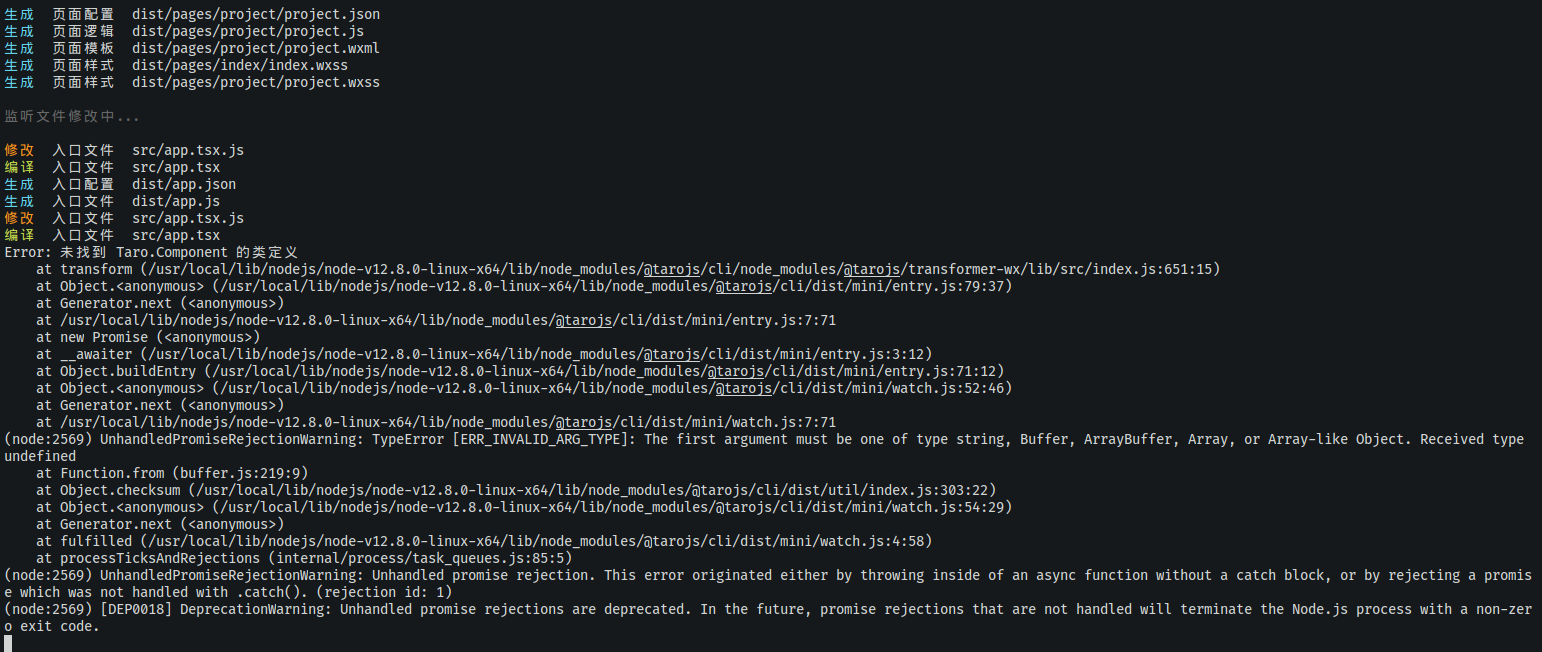
生成  页面样式  dist/pages/project/project.wxss

监听文件修改中...

修改  入口文件  src/app.tsx.js
编译  入口文件  src/app.tsx
生成  入口配置  dist/app.json
生成  入口文件  dist/app.js
修改  入口文件  src/app.tsx.js
编译  入口文件  src/app.tsx
Error: 未找到 Taro.Component 的类定义
    at transform (/usr/local/lib/nodejs/node-v12.8.0-linux-x64/lib/node_modules/@tarojs/cli/node_modules/@tarojs/transformer-wx/lib/src/index.js:651:15)
    at Object.<anonymous> (/usr/local/lib/nodejs/node-v12.8.0-linux-x64/lib/node_modules/@tarojs/cli/dist/mini/entry.js:79:37)
    at Generator.next (<anonymous>)
    at /usr/local/lib/nodejs/node-v12.8.0-linux-x64/lib/node_modules/@tarojs/cli/dist/mini/entry.js:7:71
    at new Promise (<anonymous>)
    at __awaiter (/usr/local/lib/nodejs/node-v12.8.0-linux-x64/lib/node_modules/@tarojs/cli/dist/mini/entry.js:3:12)
    at Object.buildEntry (/usr/local/lib/nodejs/node-v12.8.0-linux-x64/lib/node_modules/@tarojs/cli/dist/mini/entry.js:71:12)
    at Object.<anonymous> (/usr/local/lib/nodejs/node-v12.8.0-linux-x64/lib/node_modules/@tarojs/cli/dist/mini/watch.js:52:46)
    at Generator.next (<anonymous>)
    at /usr/local/lib/nodejs/node-v12.8.0-linux-x64/lib/node_modules/@tarojs/cli/dist/mini/watch.js:7:71
(node:2569) UnhandledPromiseRejectionWarning: TypeError [ERR_INVALID_ARG_TYPE]: The first argument must be one of type string, Buffer, ArrayBuffer, Array, or Array-like Object. Received type undefined
    at Function.from (buffer.js:219:9)
    at Object.checksum (/usr/local/lib/nodejs/node-v12.8.0-linux-x64/lib/node_modules/@tarojs/cli/dist/util/index.js:303:22)
    at Object.<anonymous> (/usr/local/lib/nodejs/node-v12.8.0-linux-x64/lib/node_modules/@tarojs/cli/dist/mini/watch.js:54:29)
    at Generator.next (<anonymous>)
    at fulfilled (/usr/local/lib/nodejs/node-v12.8.0-linux-x64/lib/node_modules/@tarojs/cli/dist/mini/watch.js:4:58)
    at processTicksAndRejections (internal/process/task_queues.js:85:5)
(node:2569) UnhandledPromiseRejectionWarning: Unhandled promise rejection. This error originated either by throwing inside of an async function without a catch block, or by rejecting a promise which was not handled with .catch(). (rejection id: 1)
(node:2569) [DEP0018] DeprecationWarning: Unhandled promise rejections are deprecated. In the future, promise rejections that are not handled will terminate the Node.js process with a non-zero exit code.
请问这个问题怎么解决呢,@luckyadam
- 操作系统: Linux 5.0.0-29-generic Ubuntu 19.04
- Taro 版本 👽 Taro v1.3.18
- Node.js 版本 v12.8.0
- 报错平台 weapp
 jsonleex
on 22 Sep 2019
jsonleex
on 22 Sep 2019
我也遇到同样问题.
操作系统: windows10
Taro 版本 👽 Taro v1.3.22
Node.js 版本 v13.0.1
报错平台 weapp
import Taro, { useState, useCallback } from '@tarojs/taro'
import { AtTabBar } from 'taro-ui'

interface IProp {
  readonly current: number
}

export default Taro.memo<IProp>((props) => {
  const { current } = props
  const [index, setIndex] = useState(0)

  return (
    <AtTabBar
      fixed
      tabList={[
        { title: '首页', iconType: 'home' },
        { title: '购物车', iconType: 'shopping-cart' },
        { title: '我的', iconType: 'user' }
      ]}
      onClick={setIndex}
      current={current}
    />
  )
})
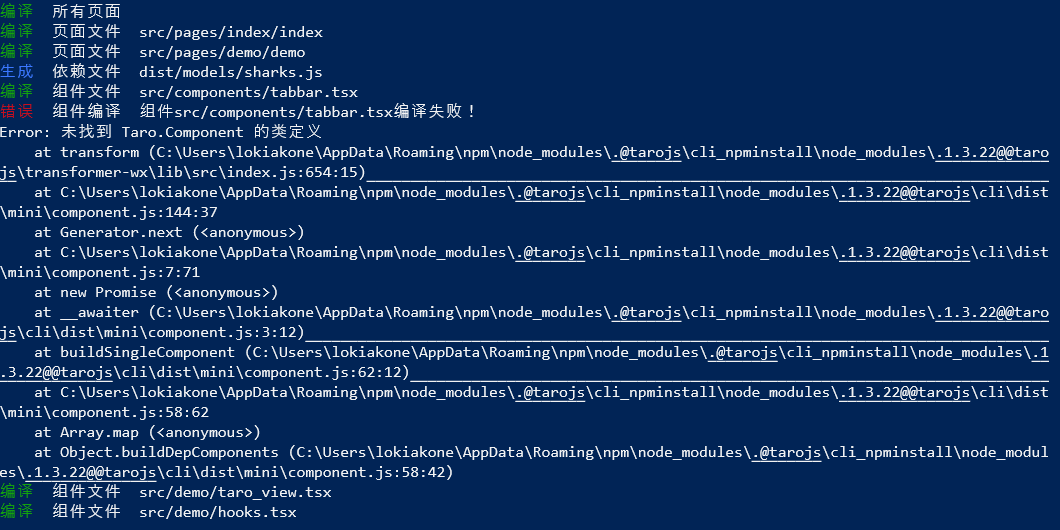
更新:
如果不使用Taro.memo, 直接输出 export default (props) => {...} 就没有错误.
但 React.memo 是hook组件里非常重要的优化方式!
 zicjin
on 10 Nov 2019
zicjin
on 10 Nov 2019
试试看最新版如何?
 shenghanqin
on 12 Nov 2019
shenghanqin
on 12 Nov 2019
试试 Taro3 咯
 Chen-jj
on 2 Jul 2020
Chen-jj
on 2 Jul 2020
Related issues
 leafchao
·
3Comments
leafchao
·
3Comments
 deepcoldy
·
3Comments
deepcoldy
·
3Comments
 qilovehua
·
3Comments
qilovehua
·
3Comments
 GreatAuk
·
3Comments
GreatAuk
·
3Comments
 XT-0515
·
3Comments
XT-0515
·
3Comments
Most helpful comment
我也遇到一样的问题。
我是用windows的vscode修改samba挂载的网络虚拟文件。
但是若我用notepad或是wsl的vim修改,不存在这样的问题。
又或者直接在虚拟机中使用vscode修改,不存在这样的问题。
我怀疑和vscode对network的写方式有关,导致fs.readFileSync读到了空文件。
Taro底层用了chokidar代替fs.watch/wathcFile.
chokidar设置
awaitWriteFinish: true后能解决我的问题。但官方不推荐,不知道是否有大佬能指点一下?