Tampermonkey: Tampermonkey causes network requests to stall on pending state
(Please fill out the issue template with your details)
Expected Behavior
Tampermonkey does nothing on sites that are not configured in any of the scripts
Actual Behavior
Some time ago (days, weeks?) I noticed Login With Google stopped working in my browser
This happens because
https://accounts.google.com/o/oauth2/auth?*
stalls on "pending".
The issue goes away when I disable Tampermonkey extension.
The issue is present on all websites that use Login With Google.
Specifications
- Chrome Version 72.0.3626.121 (Official Build) (64-bit)
- TM: 4.8
- MacOS 10.14.3
Script
The issue is present even with all scripts disabled
 damga
damga
All 15 comments
I can not reproduce this. Please give me more context on what you are doing. Was Chrome opened recently or is it open quite a while? Do you have other tabs open?...
 derjanb
on 5 Mar 2019
derjanb
on 5 Mar 2019
NB:
https://bugs.chromium.org/p/chromium/issues/detail?id=933470
https://bugs.chromium.org/p/chromium/issues/detail?id=931588
derjanb
on 5 Mar 2019
From issue 933470:
Setting chrome://flags/#network-service to Disabled fixes the issue
Can you please try that?
derjanb
on 5 Mar 2019
derjanb
on 5 Mar 2019
Flipping the flag solved the issue, thank you.
damga
on 5 Mar 2019
@damga This is great news.
I'll keep this issue open until the underlying external issue is fixed.
derjanb
on 5 Mar 2019
Can someone please set chrome://flags/#network-service to "Default" again and try it with Chrome 73 beta?
Thank you.
derjanb
on 11 Mar 2019
Still does not work
MacOS
Version 72.0.3626.121 (Official Build) (64-bit)
damga
on 12 Mar 2019
Chrome 73 was released.
derjanb
on 27 Mar 2019
This issue is still occurring for me on Chrome 79.
In my instance it's been caused by a 302 redirect happening inside an XHR call on app startup:

(Yes, we have to call a "logout" endpoint while in the process of logging in)
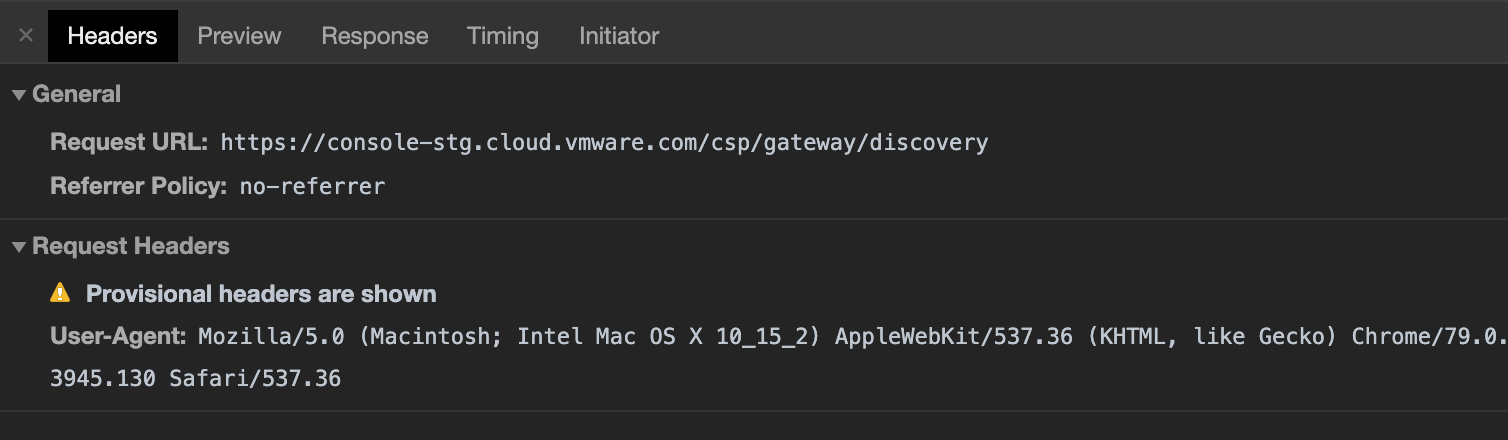
As before, only the TM Chrome Extension needs to be enabled, no scripts are running. Seems to be a bit of a race condition as it's more likely to happen (99% of the time) if more Extensions are loaded, but the probably still occurs about 70-80% of the time when TM is the only one.
 kbuffington
on 27 Jan 2020
kbuffington
on 27 Jan 2020
This issue may be reintroduced in chrome79.
https://bugs.chromium.org/p/chromium/issues/detail?id=938560
 hughfenghen
on 3 Mar 2020
hughfenghen
on 3 Mar 2020
still having this issue, disabling tampermonkey in chrome fixes it.
do not have #network-service flag to disable. only #network-service-in-process and it has no effect with any value
chrome version 81.0.4044.138
 Skiftcha
on 6 May 2020
Skiftcha
on 6 May 2020
now fixed in canary
Skiftcha
on 18 Jun 2020
This issue is really frustating, I tried the BETA version but still not working.
Any news?
 dilsonnn
on 7 Jul 2020
dilsonnn
on 7 Jul 2020
The issue should be fixed at Chrome dev/canary (85.0.4175.0 or later) now.
https://bugs.chromium.org/p/chromium/issues/detail?id=938560#c29
derjanb
on 15 Jul 2020
Related issues
 jacklul
·
6Comments
jacklul
·
6Comments
 Mottie
·
4Comments
Mottie
·
4Comments
 AhmetEmsal
·
4Comments
AhmetEmsal
·
4Comments
 AlfonsoML
·
4Comments
AlfonsoML
·
4Comments
 RussiaVk
·
4Comments
RussiaVk
·
4Comments