Talk: tokenUserNotFound is not triggered (SSO implementation)
Hello,
I have an issue regarding to the signin use with SSO.
First I read this issue in this forum which is very similar to mine and tried to cover the probable cases of failure:
https://github.com/coralproject/talk/issues/1723
Here is what I did:
Firstly I installed and ran the Talk through docker on build.
After I ran ./bin/cli-plugins create from this documentation :
https://docs.coralproject.net/talk/building-basic-plugin/
to generate the template.
Here is the structure of the plugin folders:
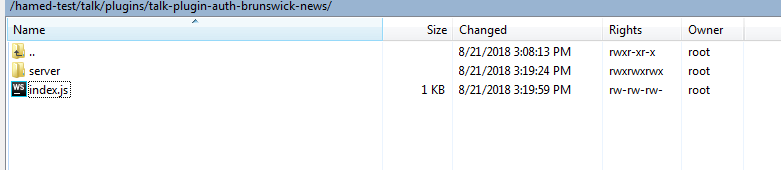
and the server folder:
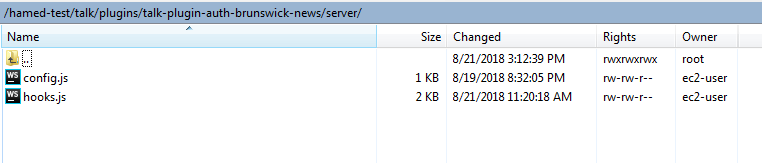
Then after I added the following code to the generated plugin folder:
here is the code in index.js
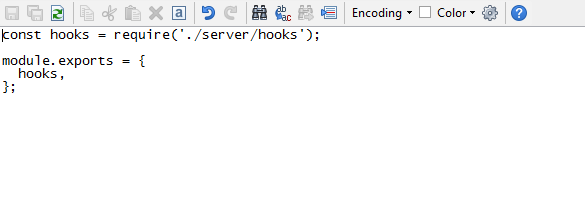
and here is the hook.js inside the server:
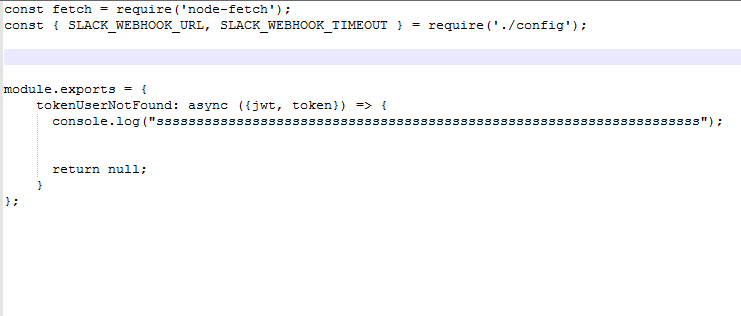
As you see I only added console log just to make sure at least the request can trigger the Custom plugin.
Then after I generated the token using the talk-token-example
https://github.com/coralproject/talk-token-example
and here is an example of a generated token:
{"token":"eyJhbGciOiJIUzI1NiIsInR5cCI6IkpXVCJ9.eyJpYXQiOjE1MzQ5MzgyNzgsImV4cCI6MTU1NjUzODI3OCwiYXVkIjoidGFsayIsImlzcyI6Imh0dHA6Ly9sb2NhbGhvc3Q6MzAwMCIsInN1YiI6IjEiLCJqdGkiOiIwZmIyMWRkZS1mNzcwLTRkYzgtOWU5OC05YTc0NjcyMzJlNjYifQ.BnCaUB2v30T1EY35-tPO97qUruxxMaZF1RDZeL6poyA"}
eventually I added the following to my website:
Coral.Talk.render(document.getElementById("comment-talk-"+this.props.storyId), {
            talk: path.COMMENT_DOMAIN,
            auth_token: "eyJhbGciOiJIUzI1NiIsInR5cCI6IkpXVCJ9.eyJpYXQiOjE1MzQ5MzgyNzgsImV4cCI6MTU1NjUzODI3OCwiYXVkIjoidGFsayIsImlzcyI6Imh0dHA6Ly9sb2NhbGhvc3Q6MzAwMCIsInN1YiI6IjEiLCJqdGkiOiIwZmIyMWRkZS1mNzcwLTRkYzgtOWU5OC05YTc0NjcyMzJlNjYifQ.BnCaUB2v30T1EY35-tPO97qUruxxMaZF1RDZeL6poyA"
        });
And also I have the docker-compose up running and this way I see whatever logs and activities happen in the terminal.
When I open the website which contains the Talk I can see it is loading in the page but I do not see any
ssssssssssssssssssssssssssssssssssssssssssssssssssssssssssssssssssss
which should be logged by
console.log("ssssssssssssssssssssssssssssssssssssssssssssssssssssssssssssssssssss")
which means that the hook.js is not triggered at all.
Here is what I get:
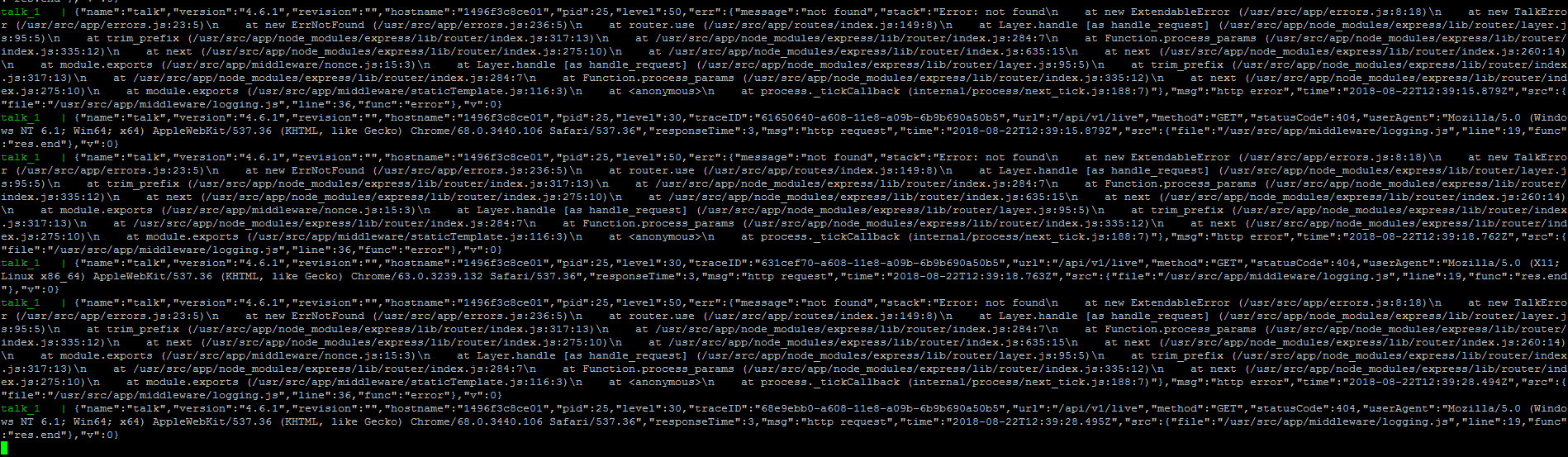
I appreciate if you can shed light on this?
 hminaeeBrunswicknews
All 10 comments
If the tokenUserNotFound is not firing, then your token is not valid. Your token (as viewed on https://jwt.io/) contains the following claims:
{
  "iat": 1534938278,
  "exp": 1556538278,
  "aud": "talk",
  "iss": "http://localhost:3000",
  "sub": "1",
  "jti": "0fb21dde-f770-4dc8-9e98-9a7467232e66"
}
This means one of a few things:
- Your
TALK_ROOT_URLon your Talk instance is nothttp://localhost:3000, so theisscheck is failing - Your
TALK_JWT_AUDIENCEon your Talk instance is nottalk, so theaudcheck is failing - The secret used to generate the token is not the same that Talk is configured with, hence the token secret verification is failing.
Refer to the documentation on integration for more details on this: https://docs.coralproject.net/talk/integrating/authentication/#implement-tokenusernotfound
 wyattjoh
on 22 Aug 2018
wyattjoh
on 22 Aug 2018
Thanks,
I generated the following token making sure it is pointing to my root url and with the right secret key.
Here is my token:
eyJhbGciOiJIUzI1NiIsInR5cCI6IkpXVCJ9.eyJpYXQiOjE1MzQ5NjAzNzMsImV4cCI6MTU1NjU2MDM3MywiYXVkIjoidGFsayIsImlzcyI6Imh0dHBzOi8vY29tbWVudDMuc3RnMi5kZXYtdGVsZWdyYXBoam91cm5hbC5jb20vIiwic3ViIjoiMSIsImp0aSI6IjM3MTRhMzYxLWIyZDYtNDExZi05NzllLWVjOTNjNzk5NjMzNiJ9.n1r2UiPJSpkvyuoj1Bf2hjlM8UM_Z9Y-2p2npUx163E
Still I do not see the hook triggered.
The only thing is I could not find where TALK_JWT_AUDIENCE is set. I know for the fact I have not set it up. So I think it is set to default one.
Any idea?
For more explanation for generating the token I use talk token example and here is my config file
`// Parse a .env file.
require('dotenv').config();
const convict = require('convict');
const config = convict({
port: {
env: 'PORT',
default: 3000,
format: 'port',
doc: 'the port to bind to',
},
secret: {
env: 'SECRET',
default: 'password',
format: '',
doc: 'the secret used to sign the jwt tokens',
},
jwt_audience: {
env: 'JWT_AUDIENCE',
default: 'talk',
format: '',
doc: 'the JWT audience used to sign the token',
},
jwt_issue_subject: {
env: 'JWT_ISSUE_SUBJECT',
default: 'TALK_TOKEN_EXAMPLE',
format: '',
doc: 'the JWT subject used for issuing tokens',
},
jwt_issue_audience: {
env: 'JWT_ISSUE_AUDIENCE',
default: 'TALK_TOKEN_EXAMPLE_AUDIENCE',
format: '',
doc: 'the JWT audience used for issuing tokens',
},
jwt_issuer: {
env: 'JWT_ISSUER',
default: 'https://comment3.stg2.dev-telegraphjournal.com/',
format: '*',
doc: 'the JWT issuer used to sign the token',
},
jwt_expiry: {
env: 'JWT_EXPIRY',
default: '6 hours',
format: 'duration',
doc: 'the JWT expiry duration used to sign the token',
},
});
// Perform validation
config.validate({ allowed: 'strict' });
module.exports = config;`
I only set the secret and talk url to the ones I set for talk and left the others untouched.
and here is what I get when I generate the token:
curl -H 'Authorization: Bearer eyJhbGciOiJIUzI1NiIsInR5cCI6IkpXVCJ9.eyJpYXQiOjE1MzQ5NjAzMTYsImF1ZCI6IlRBTEtfVE9LRU5fRVhBTVBMRV9BVURJRU5DRSIsImlzcyI6Imh0dHBzOi8vY29tbWVudDMuc3RnMi5kZXYtdGVsZWdyYXBoam91cm5hbC5jb20vIiwic3ViIjoiVEFMS19UT0tFTl9FWEFNUExFIn0.ofdzHhFCDD8Renihg-pAMhjzo1cpRW0rgejKefs9ZZA' -H 'Content-Type: application/json' --data '{"id": "1"}' --silent http://localhost:3000/
{"token":"eyJhbGciOiJIUzI1NiIsInR5cCI6IkpXVCJ9.eyJpYXQiOjE1MzQ5NjAzNzMsImV4cCI6MTU1NjU2MDM3MywiYXVkIjoidGFsayIsImlzcyI6Imh0dHBzOi8vY29tbWVudDMuc3RnMi5kZXYtdGVsZWdyYXBoam91cm5hbC5jb20vIiwic3ViIjoiMSIsImp0aSI6IjM3MTRhMzYxLWIyZDYtNDExZi05NzllLWVjOTNjNzk5NjMzNiJ9.n1r2UiPJSpkvyuoj1Bf2hjlM8UM_Z9Y-2p2npUx163E"}
hminaeeBrunswicknews
on 22 Aug 2018
If the hook isn't showing up, it could also be the case that the user was already found in your database.
You can set DEBUG=* in your environment to enable verbose logging, that should hopefully provide enough information to figure out what's going on here.
wyattjoh
on 23 Aug 2018
Should I set the DEBUG=* in docker-compose?
hminaeeBrunswicknews
on 23 Aug 2018
You'll set this in your .env file
 kgardnr
on 23 Aug 2018
kgardnr
on 23 Aug 2018
@kgardnr
In the Talk project when I search I only see this:
https://github.com/coralproject/talk/blob/master/plugins.env.js
Is that what you mean?
hminaeeBrunswicknews
on 23 Aug 2018
No. Node and many other apps use a .env file to load environment variables. Such as: https://docs.coralproject.net/talk/configuration/
This is where you would put
DEBUG=*
kgardnr
on 23 Aug 2018
FYI, we do provide a hosted version of Talk where we can take care of all of this for you, and we charge a monthly fee. If you're interested, send an email to [email protected].
kgardnr
on 23 Aug 2018
Hey Kim & Wyatt, thanks for all your help so far. I'm a colleague of @hminaeeBrunswicknews
If we can't get this working ourselves, perhaps we'll need to look at your hosted version, though I feel like we should be able to handle it.
I've taken a second look over our JWTs, and I'm feeling pretty good about them at this point. It looks to me like we're setting the right claims and corresponding environment variables now.
Something that I'm not feeling so good about is these errors. We keep getting these two messages in our logs over and over:
{
    "name": "talk",
    "version": "4.6.1",
    "revision": "",
    "hostname": "9b642bfd669d",
    "pid": 25,
    "level": 50,
    "err":
    {
        "message": "not found",
        "stack":
                "Error: not found
                at new ExtendableError (/usr/src/app/errors.js:8:18)
                at new TalkError (/usr/src/app/errors.js:23:5)
                at new ErrNotFound (/usr/src/app/errors.js:236:5)
                at router.use (/usr/src/app/routes/index.js:149:8)
                at Layer.handle [as handle_request] (/usr/src/app/node_modules/express/lib/router/layer.js:95:5)
                at trim_prefix (/usr/src/app/node_modules/express/lib/router/index.js:317:13)
                at /usr/src/app/node_modules/express/lib/router/index.js:284:7
                at Function.process_params (/usr/src/app/node_modules/express/lib/router/index.js:335:12)
                at next (/usr/src/app/node_modules/express/lib/router/index.js:275:10)
                at /usr/src/app/node_modules/express/lib/router/index.js:635:15
                at next (/usr/src/app/node_modules/express/lib/router/index.js:260:14)
                at module.exports (/usr/src/app/middleware/nonce.js:15:3)
                at Layer.handle [as handle_request] (/usr/src/app/node_modules/express/lib/router/layer.js:95:5)
                at trim_prefix (/usr/src/app/node_modules/express/lib/router/index.js:317:13)
                at /usr/src/app/node_modules/express/lib/router/index.js:284:7
                at Function.process_params (/usr/src/app/node_modules/express/lib/router/index.js:335:12)
                at next (/usr/src/app/node_modules/express/lib/router/index.js:275:10)
                at module.exports (/usr/src/app/middleware/staticTemplate.js:116:3)
                at <anonymous>
                at process._tickCallback (internal/process/next_tick.js:188:7)"
    },
    "msg": "http error",
    "time": "2018-08-23T15:23:31.417Z",
    "src":
    {
        "file": "/usr/src/app/middleware/logging.js",
        "line": 36,
        "func": "error"
    },
    "v": 0
}
{
    "name": "talk",
    "version": "4.6.1",
    "revision": "",
    "hostname": "9b642bfd669d",
    "pid": 25,
    "level": 30,
    "traceID": "7e2975f0-a6e8-11e8-b75a-eb8cc7615e39",
    "url": "/api/v1/live",
    "method": "GET",
    "statusCode": 404,
    "userAgent": "Mozilla/5.0 (X11; Linux x86_64) AppleWebKit/537.36 (KHTML, like Gecko) Chrome/63.0.3239.132 Safari/537.36",
    "responseTime": 23,
    "msg": "http request",
    "time": "2018-08-23T15:23:31.432Z",
    "src":
    {
        "file": "/usr/src/app/middleware/logging.js",
        "line": 19,
        "func": "res.end"
    },
    "v": 0
}
Sorry, I'm a total newbie with talk, but is this something to be concerned with? Could it be related to why we don't seem to be getting our tokens though talk properly?
 WhiteHotLoveTiger
on 23 Aug 2018
WhiteHotLoveTiger
on 23 Aug 2018
Hi,
@kgardnr @wyattjoh
We found the issue.
The issue was the build process. For some reason the docker was still building on the docker repo and not taking our changes into account. I had to build everything out of docker and I was able to see the the custom plugin is triggered.
Thanks
hminaeeBrunswicknews
on 25 Aug 2018
Related issues
 Jetbo
·
4Comments
Jetbo
·
4Comments
 raphaelpor
·
4Comments
hminaeeBrunswicknews
·
3Comments
raphaelpor
·
4Comments
hminaeeBrunswicknews
·
3Comments
 allanassis
·
3Comments
allanassis
·
3Comments
 honzie
·
4Comments
honzie
·
4Comments