Tailwindcss: info and warn console messages duplicated
Describe the problem:
Using the new version 1.7, with future or experimental flags,
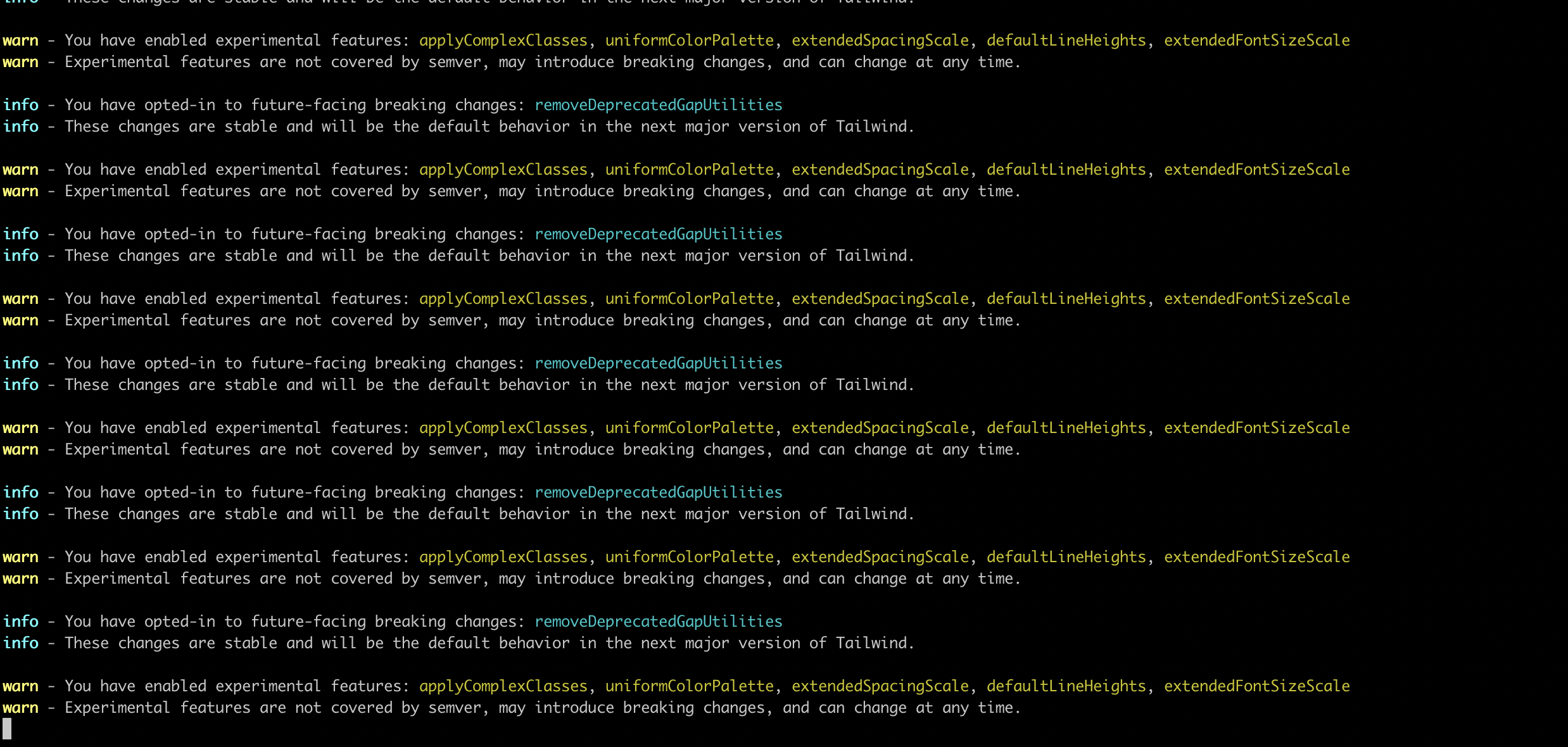
in console the warn and info messages are duplicated during build or using npm run hot
 exodusanto
All 7 comments
I also have the same issue using Tailwind 1.7 with Angular without any flags set. I tried setting removeDeprecatedGapUtilities: true in future setting but this just changes the warnings in to info messages. The messages are repeated over 200 times. The previous version works without issue.

 akturatech
on 19 Aug 2020
akturatech
on 19 Aug 2020
I am facing a similar issue to this, however, in my case, the message is somehow being attached to the top of my minified css file during build, which causes the browser to no be able to read it and thus removes all css from my website. I realize there is something else at play in this case, but allowing an option to simply silence all console messages during build would be incredibly helpful here.

 LandGod
on 19 Aug 2020
LandGod
on 19 Aug 2020
It looks like the amount of the duplicated warning messages scales with the amount of CSS modules
I created a sample project for consistently reproducing this duplication: https://github.com/wongmjane/sampletail
The build log is available here: https://vercel.com/wongmjane/sampletail/g2vnyrd05
 wongmjane
on 19 Aug 2020
wongmjane
on 19 Aug 2020
Fixed in v1.7.1, might be able to improve the fix but wanted to get something out quickly to at least stop annoying people for now :)
 adamwathan
on 19 Aug 2020
adamwathan
on 19 Aug 2020
The upcoming page says that gap-x/y- should replace col/row-gap- but it's warning me about files where i'm only using gap-! has this also been deprecated?
 mustafawm
on 19 Aug 2020
mustafawm
on 19 Aug 2020
Tailwind doesn't read your HTML files at all to detect usage, it simply warns you until you explicitly opt-in saying you are comfortable disabling the old utilities. You will continue to see that warning forever unless you add removeDeprecatedGapUtilities: true, even if you are only using the new utility names.
adamwathan
on 19 Aug 2020
Updated to 1.7.1, added removeDeprecatedGapUtilities: true, now I'm only getting this once:
info - You have opted-in to future-facing breaking changes: removeDeprecatedGapUtilities
info - These changes are stable and will be the default behavior in the next major version of Tailwind.
Thanks
mustafawm
on 19 Aug 2020
Related issues
 divdax
·
3Comments
divdax
·
3Comments
 benface
·
3Comments
benface
·
3Comments
 spyric
·
3Comments
spyric
·
3Comments
 rgaufman
·
3Comments
rgaufman
·
3Comments
 ghost
·
3Comments
ghost
·
3Comments
Most helpful comment
Fixed in v1.7.1, might be able to improve the fix but wanted to get something out quickly to at least stop annoying people for now :)