Tailwindcss: hover:bg-opacity-* not working
Describe the problem:
hover:bg-opacity-* not working when using custom color variable using css variable.
hover:bg-opacity-* works when using default Tailwind color variable
I have custom css color variable generated using tailwind.config.js
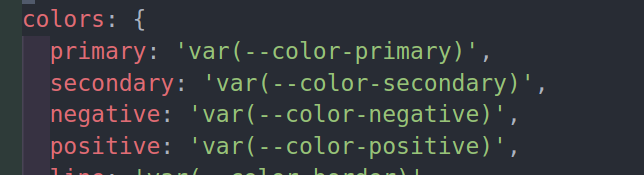
when I am using bg-gray-500 hover:bg-opacity-50 it works fine.
But when I am using bg-primary hover:bg-opacity-50 , it doesn't work. Opacity have no effect.
Tailwind Version: 1.5.2
Link to a minimal reproduction: Not any
 rahadkc
All 3 comments
The opacity utils use a --bg-opacity var for the opacity, so your colours will need to use that. Make a look through the code, you'll see what needs to change.
 kevinruscoe
on 15 Aug 2020
kevinruscoe
on 15 Aug 2020
If you set your variables like
:root {
  --primary: 0 0 0;
  --secondary: 0 255 0;
}
You can do:
{
  primary: 'rgb(var(--primary) / var(--bg-opacity, 1))',
  secondary: 'rgb(var(--secondary) / var(--bg-opacity, 1))',
}
Unfortunately no simple way to approach this with hex as far as I'm aware.
 crswll
on 16 Aug 2020
crswll
on 16 Aug 2020
@crswll it's bit complex though. I'm just using opacity-* instead of bg-opacity-*. It serves the purpose now.
Anyway, thanks for your answer.
rahadkc
on 16 Aug 2020
Related issues
 Quineone
·
3Comments
Quineone
·
3Comments
 smbdelse
·
3Comments
smbdelse
·
3Comments
 ghost
·
3Comments
ghost
·
3Comments
 AlexVipond
·
3Comments
AlexVipond
·
3Comments
 spyric
·
3Comments
spyric
·
3Comments
Most helpful comment
If you set your variables like
You can do:
Unfortunately no simple way to approach this with hex as far as I'm aware.