Tailwindcss: Bug Report: Font Weight not working properly after v1.2.0 release
I've just upgraded tailwindcss from v1.1.x to v1.2.0, then the font weight is not working properly as before.
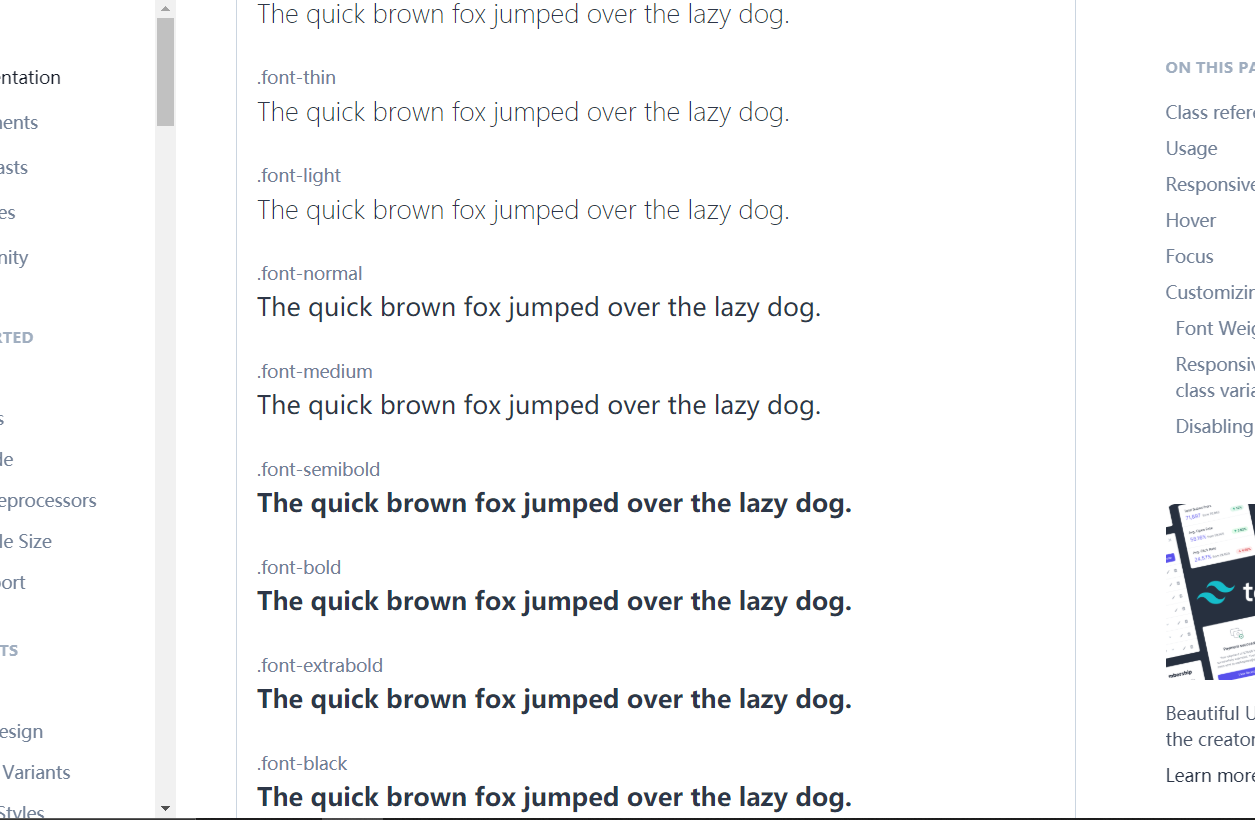
As shown in the screenshot below, the weight differences between some of the classes seem to be gone. E.g. the weight of "semibold", "bold", "extrabold" are all the same now. Screenshot taken from tailwind website.
 zhzhang-4390
All 16 comments
Behaviour hasn’t changed actually, I’m guessing you’re on Linux where the system font has a very limited number of weights? If you check the dev tools you’ll see the actual font weight values are correct.
 adamwathan
on 20 Feb 2020
adamwathan
on 20 Feb 2020
Behaviour hasn’t changed actually, I’m guessing you’re on Linux where the system font has a very limited number of weights? If you check the dev tools you’ll see the actual font weight values are correct.
Yes, I've just checked the dev tools, the font weight values are indeed correct.
But I'm using Windows 10 & chrome browser all the time. The font-weight display was correct before my package update today. My package update only includes tailwind & vue cli.
Do you have any other guesses about what might be the real problem? Thanks.
zhzhang-4390
on 20 Feb 2020
What font does it say is being used in the dev tools? It should be listed at the very very bottom of the "Computed" tab near styles in the elements section:

After checking that, revert to the earlier version of Tailwind and confirm the problem is fixed and check what font is displayed then.
adamwathan
on 20 Feb 2020
Ah yes this seems to be the real issue here.
Under v1.2.0: Rendered Fonts -- "Microsoft YaHei UI—Local file(6 glyphs)" (problematic case).
Under v1.1.4: Rendered Fonts -- "Segoe UI Semibold—Local file(6 glyphs)" (correct case).
When I revert to v1.1.4, the problem is fixed.
(Above all tested with chrome)
However, when I switch the browser (use Microsoft Edge & IE instead), even under v1.2.0, the font weights are being displayed correctly as well. This issue only happens with chrome.
zhzhang-4390
on 20 Feb 2020
Ah got it I see what happened here...
@argyleink looks like this is a result of introducing system-ui to the font stack. Any thoughts on this?
adamwathan
on 20 Feb 2020
@zhzhang2016 In the mean time you can get the old behavior by changing your font stack to what we had in 1.1:
https://github.com/tailwindcss/tailwindcss/blob/v1.1.4/stubs/defaultConfig.stub.js#L222-L236
adamwathan
on 20 Feb 2020
@zhzhang2016 In the mean time you can get the old behavior by changing your font stack to what we had in 1.1:
https://github.com/tailwindcss/tailwindcss/blob/v1.1.4/stubs/defaultConfig.stub.js#L222-L236
OK removing the "system-ui" fixed my problem as well.
Thank you.
zhzhang-4390
on 20 Feb 2020
YaHei UI seems to cover even fewer variants, then Segoe UI then.
Chinese locale windows I'm guessing.
Tbf Segoe UI covers more weights, but not even close to all.
100-300: light
400: normal
500-600: semibold
700: bold
800-900: black
The font would also provide a semilight and medium variant, but no weights in the browser uses those.
I believe pre-chromium edge used those too, but not the chromium one.
 tlgreg
on 20 Feb 2020
tlgreg
on 20 Feb 2020
cool, i can dig into this more. def related to chinese locale on windows 👍 nice deduction
sounds like we have 3 issues:
- YaHei UI doesnt have as many weights as Segoe (font problem)
- Chrome on Windows 10 for Chinese locale is using YaHei before it's trying to use Segeo UI (desired for some but not for all)
- By setting the font to Segoe UI, your Chinese users on Windows won't get their optimized Chinese characters font YaHei (which very much could be their preference as it's the daily reader font), they'll get what you've set explicitly, Segoe, a font with more weights but English optimized. Microsoft has put lots of effort into YaHei, they've got articles on it, and now none of your users will get it.
If you as a user of a Chinese locale Window machine wanted to, have you tried setting the system font to Segoe so you dont have to mess with it anywhere else? Curious if Chrome will pick it up then. The best scenario here might be you controlling your machine, but leaving the font as system-ui so you're not forcing other's into your preference.
Looks like Edge never supported system-ui until they went Edgium. I assume new Edge uses the same system-ui font as Chrome now? Have you tested latest Edge? So makes sense they hard coded Segoe into old Edge, they never taught it to use the platform font.
To me it sounds like you have a preference, which is to see more weights in english as if you had an English locale windows machine, but this personal preference will clobber other's preferences to use a font made for legibility of their native language. almost like your preference, which i agree more weights is more fun, will remove the native optimized system font from all your users coming from alternative locales, not just chinese.
phew, that's a lot. this is the most in depth i've researched the issue, and i see both sides here. i see wanting more weights (which, you havent lost the weights for english locale users), but i also see benefits to using an optimized system font for generic text across all locales. if i was you, i'd convert my machine to english locale, or figure out how to trick chromium into thinking that's your system font. then i get to see all of tailwind's weights, without the side effects of all my users losing their optimized fonts for their locale.
thoughts?
 argyleink
on 21 Feb 2020
argyleink
on 21 Feb 2020
Yes I'm using Chinese locale Windows 10.
Windows 10 previously had a place to change system font, but the latest version seem to have removed it......don't know why they did that. If I were to change by force, have to use some dirty hack.
I have used Windows 10 English locale before, but then some of my Chinese desktop software would display random characters instead of Chinese, so I had to change it back.
The Microsoft Edge on my machine should be the latest version cos it's automatic system update.
The project that I'm working on is pure English though.
Is there anything I can do in the code to keep the font display stable on any machine, without getting affected by system ui?
zhzhang-4390
on 21 Feb 2020
You could have the change be local to your machine and use Chrome devtools to reapply even after page reload: https://css-tricks.com/chrome-devtools-local-overrides/
argyleink
on 21 Feb 2020
I have this issue as well: with tailwind v1.3.5
 christianbradley
on 29 Apr 2020
christianbradley
on 29 Apr 2020
@adamwathan I faced font weight issue with Chrome + Edge (both MacOS), it seems they have weird bug with font-size for -apple-system, BlinkMacSystemFont bigger than 19px, the font will lose its weight. Perhaps, it covers the same bug?
 abdusfauzi
on 29 Apr 2020
abdusfauzi
on 29 Apr 2020
@adamwathan It seems more than just a locale issue now and more people are facing it. Is this considered the same Chrome bug as described in #1402 ?
If not, is there anything that tailwind can do to resolve this? Cos the temporary solution of removing "system ui" will not make sense when I build my code for Production.
zhzhang-4390
on 29 Apr 2020
They are related but not the same issues. That one is a chrome bug. This one is an inherent limitation of using a system UI font, which fonts are sometimes lacking in styles. This will apply with or without the -system-ui keyword.
For 2.0 moving the naming to system/sys could be considered imo, and an alternative, maybe simplified sans stack in addition.
tlgreg
on 29 Apr 2020
No plans to make changes here, would recommend overriding the default font family if you don't want to use the system font.
adamwathan
on 6 Sep 2020
Related issues
 afuno
·
3Comments
afuno
·
3Comments
 Tjoosten
·
3Comments
Tjoosten
·
3Comments
 paulhuisman
·
3Comments
paulhuisman
·
3Comments
 benface
·
3Comments
benface
·
3Comments
 divdax
·
3Comments
divdax
·
3Comments
Most helpful comment
@adamwathan I faced font weight issue with Chrome + Edge (both MacOS), it seems they have weird bug with font-size for
-apple-system, BlinkMacSystemFontbigger than 19px, the font will lose its weight. Perhaps, it covers the same bug?