Tailwindcss: Linting in markup for class order and duplicates
As I'm using tailwind more and more it's great but I'd like to enforce some kind of linting in my markup (in this case I'm using Vue single file components for the markup) to ensure things are consistent and maintainable.
It would be good to have linting errors when classes for a given element are duplicated, like when it's the same value (text-red appearing twice, or text-red followed by text-blue meaning the first one isn't used). Also when classes are out of order, which can make it easier to find a class when you use a lot of them if they're in an expected order (here's a sample order for a different framework https://github.com/brigade/scss-lint/blob/master/data/property-sort-orders/concentric.txt).
I know tailwind isn't the right place for such a tool but some discussion around this kind of tooling that could meet this requirement is good and a section could be added to the documentation for people who are interested.
 rightaway
All 12 comments
I think this is an interesting idea, especially highlighting instances where class names clash, e.g. text-red and text-blue on the same element.
I’d definitely consider adding something like this to Tailwind CSS IntelliSense.
 bradlc
on 10 Oct 2018
bradlc
on 10 Oct 2018
@bradlc So some kind of eslint plugin connected to that project or part of that project itself?
Slightly related, does that intellisense use the values from the tailwind.js file, so if you add/remove keys it those new ones will appear in intellisense?
rightaway
on 10 Oct 2018
So some kind of eslint plugin connected to that project or part of that project itself?
I was thinking just part of that extension. ESLint is a JavaScript linter so wouldn’t work on HTML. I don’t know if there’s an equivalent for HTML?
Slightly related, does that intellisense use the values from the tailwind.js file, so if you add/remove keys it those new ones will appear in intellisense?
Yeah, exactly!
bradlc
on 10 Oct 2018
I'll have to try this extension thanks.
rightaway
on 11 Oct 2018
Sorting classes in markup would be nice to have, so you don't have to manually move classes into the preferred order. I made a quick little POC for reordering them following the definition order: https://jsfiddle.net/rigor789/jyc9Lg5q/
This would have to go into a linter plugin, and will need to cover more cases presumably but it's a start!
 rigor789
on 19 Oct 2018
rigor789
on 19 Oct 2018
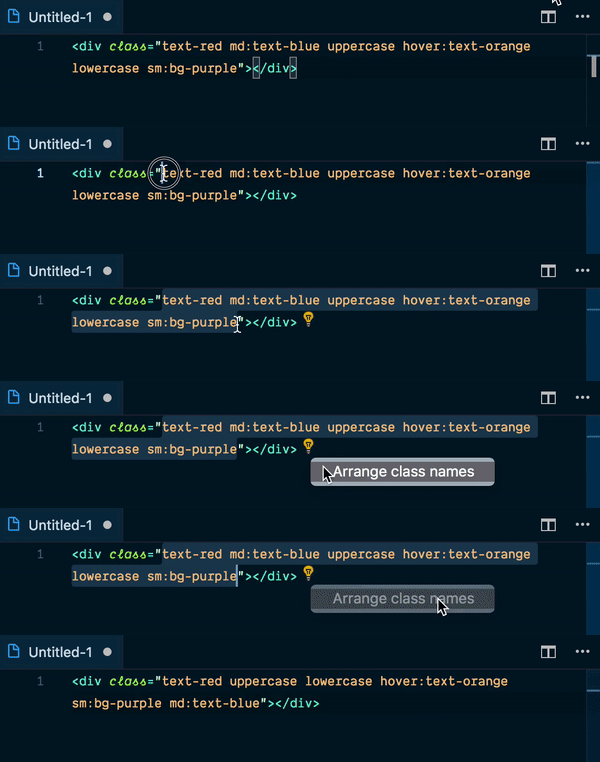
@rigor789 I am working on adding a similar feature to the VS Code extension:
bradlc
on 20 Oct 2018
@bradlc Nice! I'm a PHPStorm/Webstorm user myself, so will either have to make my own, or wait for someone to make it 😂
rigor789
on 21 Oct 2018
@bradlc That looks great! Would it be possible to trigger automatically on vscode's format on save feature?
rightaway
on 22 Oct 2018
Would it be possible to trigger automatically on vscode's format on save feature?
@rightaway Yeah! I can add that in as an option. I probably won’t have it enabled by default though.
bradlc
on 23 Oct 2018
Going to close this as not really an "issue" per se, but feel free to keep the discussion going. It would be neat if some sort of linter existed, maybe as a Prettier plugin? If someone has the skills to put that together I'd be happy to host it under the tailwindcss organization on GitHub.
 adamwathan
on 2 Nov 2018
adamwathan
on 2 Nov 2018
@adamwathan I am adding linting to the VS Code extension. Do you think there’s anything else that you could lint, besides redundant class names (e.g. text-red and text-blue on the same element), and class name order?
bradlc
on 2 Nov 2018
@bradlc @adamwathan what are you thoughts about @apply orderings? I'm just wondering for bigger components if it makes sense to do something like Twitter's Recess library where we order/split based on properties. For example, let's use the Username input from the forms example on the Tailwind site:
<input class="shadow appearance-none border rounded w-full py-2 px-3 text-grey-darker leading-tight focus:outline-none focus:shadow-outline" id="username" type="text" placeholder="Username">
Normally we extract this:
.field-text {
  @apply shadow appearance-none border rounded w-full py-2 px-3 text-grey-darker leading-tight focus:outline-none focus:shadow-outline;
}
But what if we could do the above and auto-fix it to something like this:
.field-text {
  @apply w-full;
  @apply py-2 px-3;
  @apply text-grey-darker leading-tight;
  @apply border rounded;
  @apply appearance-none focus:outline-none focus:shadow-outline;
  @apply shadow;
}
I think we could almost use the groupings on the Tailwind site as the "categories" for which lines are grouped together too... ie. "Layout", "Typography", "Backgrounds", "Borders", etc.
Hmmm... it could also be interesting to have a set of alias functions to increase readability too. They just use the @apply underneath, but help increase readability/expressiveness:
.field-text {
  @sizing w-full;
  @spacing py-2 px-3;
  @type text-grey-darker leading-tight;
  @borders border rounded;
  @interactivity appearance-none  focus:outline-none focus:shadow-outline;
  @effects shadow;
}
 ksaturnius
on 13 Mar 2019
ksaturnius
on 13 Mar 2019
Related issues
 Quineone
·
3Comments
Quineone
·
3Comments
 lamberttraccard
·
3Comments
lamberttraccard
·
3Comments
 afuno
·
3Comments
afuno
·
3Comments
 jbardnz
·
3Comments
jbardnz
·
3Comments
 Tjoosten
·
3Comments
Tjoosten
·
3Comments
Most helpful comment
@rigor789 I am working on adding a similar feature to the VS Code extension: