Tailwindcss: Allow embedded @responsive directive
Hi,
@responsive directive is just awesome, i could use tailwindcss only for that particular feature !
But it could be even more powerful if it was possible to use @responsive inside @responsive.
I will give you a particular example if you want.
Thanks.
 lamberttraccard
All 5 comments

Yes an example would be great! 😄
 adamwathan
on 8 Nov 2017
adamwathan
on 8 Nov 2017
I was so deep into it, I think I didn't know what I needed exactly !
But I'm glad I asked because otherwise I wouldn't have seen your gif ! I'm still laughing looking at it !
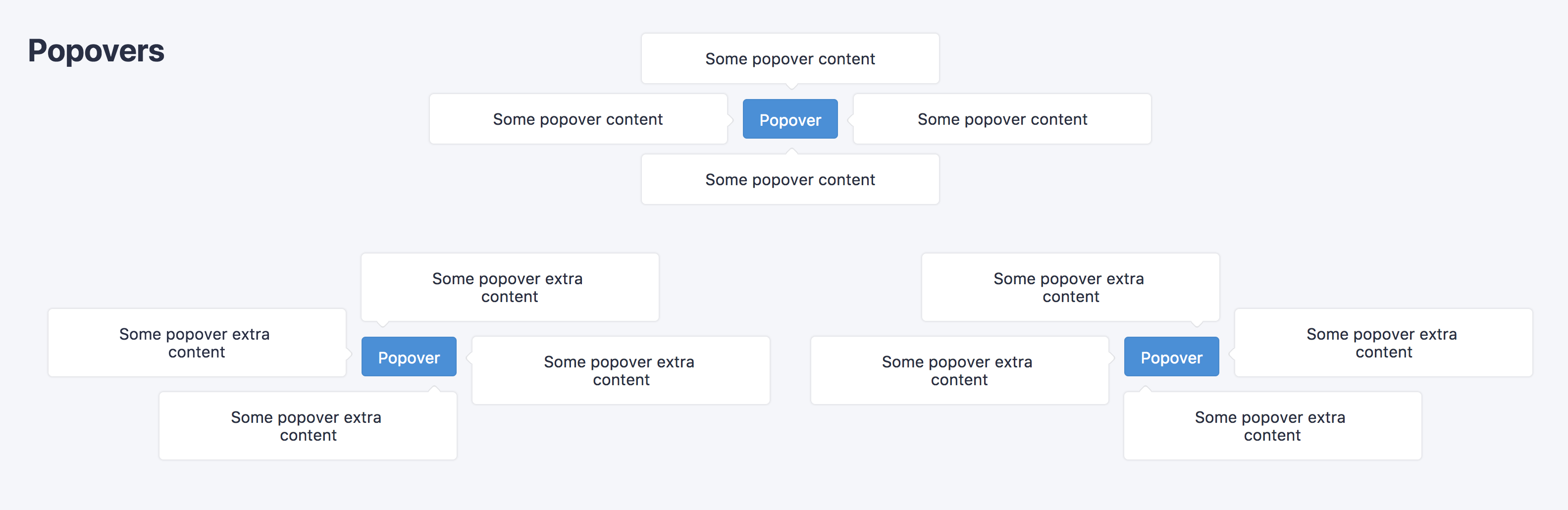
I've got 2 sets of responsive utility classes for my popover component. One for direction and another one for alignment. I needed to override a specific property when a combination of those classes where use together.
@responsive {.popover-top {...}}
@responsive {.popover-left {...}}
@responsive {.popover-right {...}}
@responsive {.popover-bottom  {...}}
 ```

```sass
@responsive {.popover-align-top {...}}
@responsive {.popover-align-left {...}}
@responsive {.popover-align-right {...}}
@responsive {.popover-align-bottom  {...}}
 ```

```sass
@responsive {
  .popover-top {
    bottom: 100%;
    left: 50%;
    transform: translateX(-50%) translateY(20px) scale(.8);
    transform-origin: bottom;
    @apply .m-0 .mb-4;

    &.is-visible {
      transform: translateX(-50%) translateY(0) scale(1);
    }

    &:after {
      bottom: -8px;
      left: 50%;
      box-shadow: 1px 1px 0 0 rgba(0, 0, 0, 0.08);
    }
  }
}
@responsive {
  .popover-align-left {
    left: 0;
    right: auto;

    &.popover-top {
      transform: translateX(0) translateY(20px) scale(.8);
      transform-origin: left bottom;
    }

    &.popover-bottom {
      transform: translateX(0) translateY(-20px) scale(.8);
      transform-origin: left top;
    }

    &:after {
      left: 20px;
      right: auto;
    }
  }
}
I didn't want to write each possible combination, so using sass nesting I wanted to do something like that
@responsive {
  .popover-align-right {
    right: 0;
    left: auto;

  @responsive {
    &.popover-top {
      transform: translateX(0) translateY(20px) scale(.8);
      transform-origin: right bottom;
    }
  }

  @responsive {
    &.popover-bottom {
      transform: translateX(0) translateY(-20px) scale(.8);
      transform-origin: right top;
    }
  }

    &:after {
      right: 14px;
      left: auto;
    }
  }
}
I ended up writing this which does what I needed
@responsive {
  .popover-align-left {
    left: 0;
    right: auto;

    &.popover-top,
    &.sm\:popover-top,
    &.md\:popover-top,
    &.lg\:popover-top,
    &.xl\:popover-top {
      transform: translateX(0) translateY(20px) scale(.8);
      transform-origin: left bottom;
    }

    &.popover-bottom,
    &.sm\:popover-bottom,
    &.md\:popover-bottom,
    &.lg\:popover-bottom,
    &.xl\:popover-bottom {
      transform: translateX(0) translateY(-20px) scale(.8);
      transform-origin: left top;
    }

    &:after {
      left: 20px;
      right: auto;
    }
  }
}
It generates some unnecessary lines but it's a lot quicker than writing everything by hand.
.xl\:popover-align-left.popover-top, // unnecessary
  .xl\:popover-align-left.sm\:popover-top, // unnecessary
  .xl\:popover-align-left.md\:popover-top, // unnecessary
  .xl\:popover-align-left.lg\:popover-top, // unnecessary
  .xl\:popover-align-left.xl\:popover-top {
    -webkit-transform: translateX(0) translateY(20px) scale(0.8);
            transform: translateX(0) translateY(20px) scale(0.8);
    -webkit-transform-origin: left bottom;
            transform-origin: left bottom;
  }

  .xl\:popover-align-left.popover-bottom, // unnecessary
  .xl\:popover-align-left.sm\:popover-bottom, // unnecessary
  .xl\:popover-align-left.md\:popover-bottom, // unnecessary
  .xl\:popover-align-left.lg\:popover-bottom, // unnecessary
  .xl\:popover-align-left.xl\:popover-bottom {
    -webkit-transform: translateX(0) translateY(-20px) scale(0.8);
            transform: translateX(0) translateY(-20px) scale(0.8);
    -webkit-transform-origin: left top;
            transform-origin: left top;
  }
I'm open to suggestion if there is a better way to do it.

I know now it was not the purpose of the @responsive directive. I'm sorry if I wasn't entirely clear 😂.
It was very hard to stay focus writing this comment while seeing your gif ! 😂
Thanks a lot for your time and sorry for the inconvenience.
lamberttraccard
on 8 Nov 2017
Ok so my brain has turned to mush going through all that but I THINK what we really would want to support here to solve your problem is applying responsive prefixes to compound class selectors.
So this:
@responsive {
  .foo.bar {
    color: blue;
  }
}
...would generate this:
.foo.bar {
  color: blue;
}

@media (min-width: 576px) {
  .sm\:foo.sm\:bar {
    color: blue;
  }
}

@media (min-width: 768px) {
  .md\:foo.md\:bar {
    color: blue;
  }
}

@media (min-width: 992px) {
  .lg\:foo.lg\:bar {
    color: blue;
  }
}

@media (min-width: 1200px) {
  .xl\:foo.xl\:bar {
    color: blue;
  }
}
I am not sure if we want to support this right now because it probably comes along with complexity that is hard for me to anticipate, but it's probably possible to do it 🤔
I also wonder if there's not another solution to your problem where you just have completely separate utilities for each combination instead of using compound selectors, ie:
.popover-top-left {
  left: 0;
  right: auto;
  transform: translateX(0) translateY(20px) scale(.8);
  transform-origin: left bottom;
}

.popover-bottom-left {
  left: 0;
  right: auto;
  transform: translateX(0) translateY(-20px) scale(.8);
  transform-origin: left top;
}
You could easily make those responsive 👍🏻
adamwathan
on 9 Nov 2017
Thanks Adam, I followed your advise, looks much cleaner in my opinion.
lamberttraccard
on 10 Nov 2017
Sounds like we've got this resolved. Closing this, but feel free continue the discussion if needed @lamberttraccard! 🤘
 reinink
on 10 Nov 2017
reinink
on 10 Nov 2017
Related issues
 ouun
·
3Comments
ouun
·
3Comments
 jvanbaarsen
·
3Comments
jvanbaarsen
·
3Comments
 Tjoosten
·
3Comments
Tjoosten
·
3Comments
 manniL
·
3Comments
manniL
·
3Comments
 benface
·
3Comments
benface
·
3Comments
Most helpful comment
Yes an example would be great! 😄