Tailscale: Hosts behind a NAT on isolated VLANs experience exactly 83% packet loss when communicating through tailscale
Describe the bug
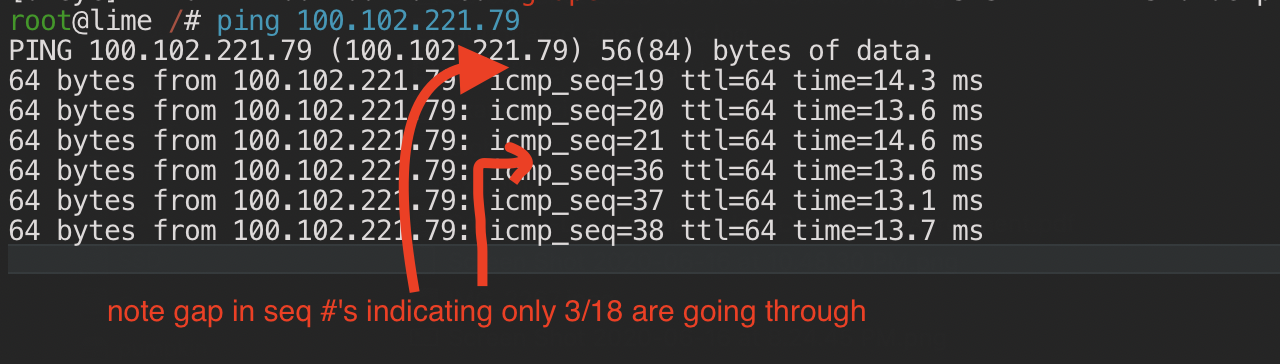
I'm experiencing a strange issue where only 3/18 packets get through between hosts that are on isolated VLANs in one NAT.
The network topology looks like this (simplified):
- WAN
- Home NAT
<WAN IP> - Home VLAN 1:
192.168.1.1/24
pumpkinserver:192.168.1.41,100.72.4.97squashlaptop:192.168.1.221,100.102.221.79- phone, etc.
- Home VLAN 101:
192.168.101.1/24
limeguest:192.168.101.20,100.83.182.123
grapeVPS:<WAN IP>,100.100.104.60cherryVPS:<WAN IP>,100.71.8.105- and several other WAN hosts...
- Home NAT
None of the WAN devices have trouble pinging each other, and none of the devices in my house have trouble pinging the WAN devices, or being pinged by them. e.g. grape -> lime and lime -> grape both work perfectly fine with 0% packet loss.
However, if two of the devices in my house on separate VLANs try to ping each other, only 3 out of every 18 packets gets through (exactly)!
- ✅
grape<->lime/squash/pumpkinover WAN & TS = 0% loss, good in both directions (NAT traversal works into both VLANS) - ✅
squash<->pumpkinover LAN & TS: 0% loss, fast rtt (as expected within the same VLAN) - ✅
squash/pumpkin<->limevia LAN: 100% loss (as expected, connections across VLANs are prevented) - ❌
squash/pumpkin<->limevia TS: exactly 83.33% packet loss consistently (should bounce via DERP-1 or hairpin)
Everything works perfectly except for the case where the host being pinged through TS is in another VLAN. The ping times also confirm that traffic is routed directly for all of these (no DERP bounce). The 3 packets that do succeed have 10-16ms rtt, implying they went through DERP-1 (which is ~10ms away from my house).
To Reproduce
- Set up two hosts on a NAT in two isolated VLANs (with no hairpinning)
- Confirm both hosts are accessible over TS from other hosts across WAN
- Attempt to ping the host in one VLAN from the other VLAN over TS
- Only 3/18 packets get through with a 10-15ms ping (my LAN latency is <1ms so it must be via a bounce server?)
Expected behavior
It should detect that there is no route between the VLANs, and that traffic cant be hairpin bounced at the NAT router, and route via the nearest DERP server instead with 0% packet loss.
Screenshots
ping output from squash <-> lime (pumpkin <-> lime also has the same behavior)
tailscale netcheck and tailscale status output from lime and pumpkin (not sure how to run the tailscale CLI on macOS, if you can tell me how I can get you the squash output as well)


Version information:
I am able to consistently reproduce this issue across multiple devices inside and outside my house including iOS 13.5, Ubuntu 20.04 (0.99.1~0), and macOS 15.5 (100.83.182.123), it appears to be a routing/protocol-level bug that exists on all platforms independent of which OS or client is used.
The router doing the NAT for my house is a Unifi Security Gateway on the latest firmware.
Extra context:
My working theory based on the rtt of the packets that go through and tailscale's logs is that the timeline is something like this:
- attempts to route via LAN IP (fails because the router blocks cross-VLAN traffic)
- attempts to route via WAN IP (remember both nodes are NAT'ed behind the same WAN IP)
- √ check that WAN IP of the other host is routable responds (ICMP to NAT's WAN IP from inside, router responds in 1ms)
- tailscale starts routing traffic to WAN IP:prt of other node
- X UDP packets fail to route as NAT hairpinning is disabled (UDP/TCP to a port on NAT's WAN IP is dropped)
- tailscale sees packet loss to the node but the IP is still reachable so tailscale doesn't disconnect?
- eventually when the packet loss hits some threshold it flips to routing DERP-1 (which works for 3 packets)
- ??? something happens here where it switches back to trying the NAT hairpin route, which fails again
- repeat ...
Or maybe it's just an edge case in the backend/protocol layer that isn't handled when two nodes have the same WAN IP but can't route over the LAN they share?
Edit: Yeah looks like my NAT hairpin drop theory is wrong, it's just trying to route directly across VLANs through the LAN when it's failing, doesn't look like it's even trying the hairpin route:

(note the *192.168.1.221:60961* selected route, which is inaccessible from lime's 192.168.101.20 src addr)
sorry for the wall of text, tracking this down was pretty fun 😁
 pirate
All 4 comments
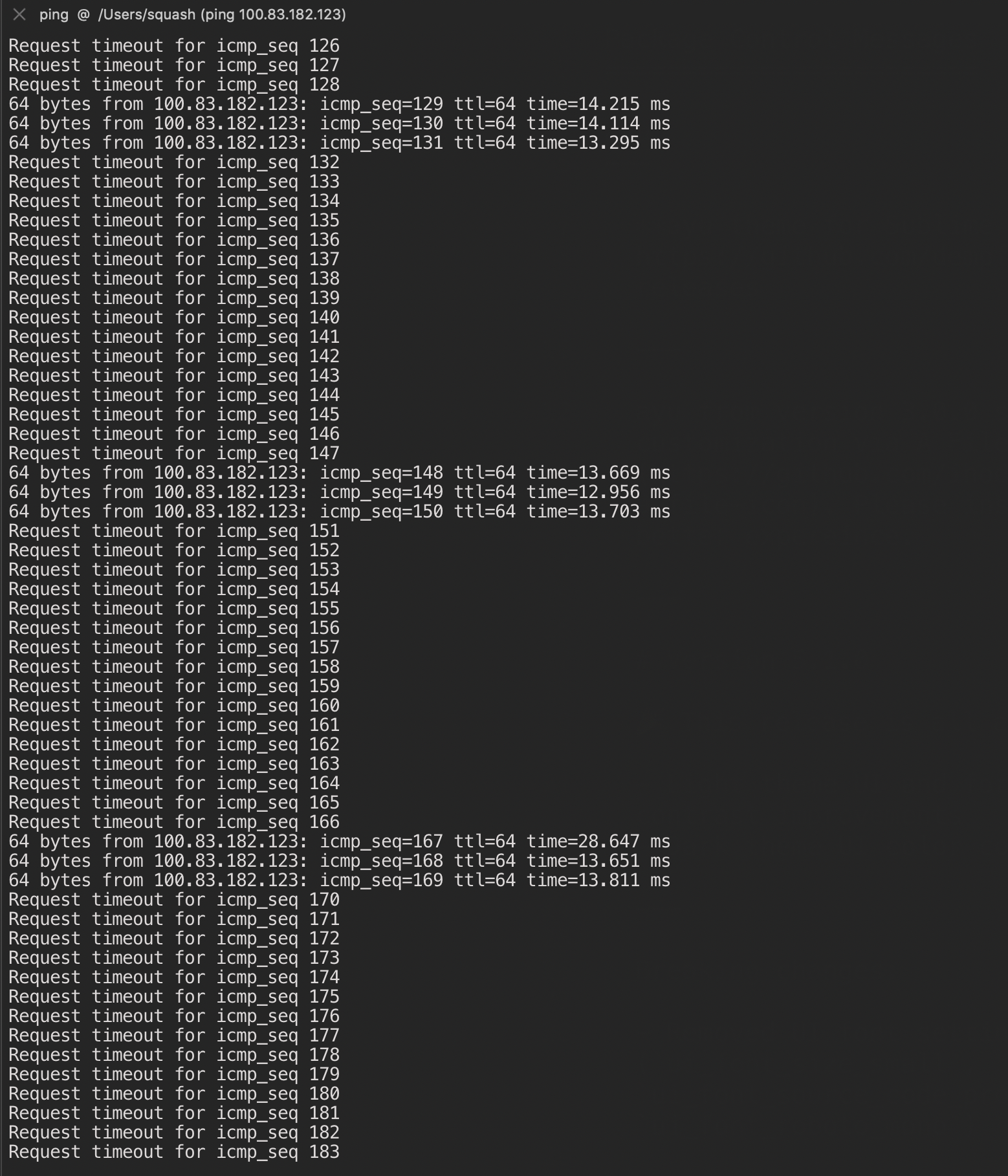
Experiencing a similar same issue here; macOS <-> linux; in my case, the machines are on the same LAN, and can ping each other 0 packet loss. But experience ~83% packet loss if ping over tailscale network.
Both tailscale v0.99:
Request timeout for icmp_seq 364
Request timeout for icmp_seq 365
Request timeout for icmp_seq 366
64 bytes from 100.109.72.55: icmp_seq=367 ttl=64 time=5.980 ms
64 bytes from 100.109.72.55: icmp_seq=368 ttl=64 time=4.648 ms
64 bytes from 100.109.72.55: icmp_seq=369 ttl=64 time=5.292 ms
Request timeout for icmp_seq 370
Request timeout for icmp_seq 371
Request timeout for icmp_seq 372
Request timeout for icmp_seq 373
Request timeout for icmp_seq 374
Request timeout for icmp_seq 375
Request timeout for icmp_seq 376
Request timeout for icmp_seq 377
Request timeout for icmp_seq 378
Request timeout for icmp_seq 379
Request timeout for icmp_seq 380
Request timeout for icmp_seq 381
Request timeout for icmp_seq 382
Request timeout for icmp_seq 383
Request timeout for icmp_seq 384
64 bytes from 100.109.72.55: icmp_seq=385 ttl=64 time=5.323 ms
64 bytes from 100.109.72.55: icmp_seq=386 ttl=64 time=6.839 ms
64 bytes from 100.109.72.55: icmp_seq=387 ttl=64 time=4.687 ms
Request timeout for icmp_seq 388
Request timeout for icmp_seq 389
Request timeout for icmp_seq 390
Request timeout for icmp_seq 391
Request timeout for icmp_seq 392
Request timeout for icmp_seq 393
Request timeout for icmp_seq 394
Request timeout for icmp_seq 395
Request timeout for icmp_seq 396
Request timeout for icmp_seq 397
Request timeout for icmp_seq 398
Request timeout for icmp_seq 399
Request timeout for icmp_seq 400
Request timeout for icmp_seq 401
Request timeout for icmp_seq 402
64 bytes from 100.109.72.55: icmp_seq=403 ttl=64 time=7.593 ms
64 bytes from 100.109.72.55: icmp_seq=404 ttl=64 time=30.956 ms
64 bytes from 100.109.72.55: icmp_seq=405 ttl=64 time=5.358 ms
Request timeout for icmp_seq 406
Request timeout for icmp_seq 407
Request timeout for icmp_seq 408
... etc
... logs are relatively silent until the 3 successful icmp
Jun 26 00:27:32 hal9000 tailscaled[827523]: 7.9M/87.0M [B8yHM] - Retrying handshake because we stopped hearing back after 15 seconds
Jun 26 00:27:32 hal9000 tailscaled[827523]: 8.0M/87.0M [B8yHM] - [jM8+1] Send handshake init [127.3.3.40:4, 105.163.238.206:54037, 10.0.0.3:54037, 192.168.100.75:54037*]
Jun 26 00:27:32 hal9000 tailscaled[827523]: 8.0M/87.0M magicsock: rx [B8yHM] from 192.168.100.75:54037 (3/4), set as new priority
Jun 26 00:27:32 hal9000 tailscaled[827523]: 8.0M/87.0M [B8yHM] - Received handshake response from 192.168.100.75:54037
Jun 26 00:27:33 hal9000 tailscaled[827523]: 8.1M/87.0M Received invalid response message from 127.3.3.40:4
Jun 26 00:27:33 hal9000 tailscaled[827523]: 8.1M/87.0M Accept: ICMP{100.86.54.1:0 > 100.109.72.55:0} 84 icmp ok
... relatively silent again ... until the next 3 icmp, etc..
 rwanyoike
on 25 Jun 2020
rwanyoike
on 25 Jun 2020
Hi to both of you,
3 seconds working, then 15 seconds not working, sounds suspiciously like the following cycle:
- Tailscale negotiates a connection, then has a 3-5 second timer where it tries using all possible routes (including DERP) to talk between nodes.
- After 3-5 seconds, it picks the "best" return path (ie. the fastest arrival of a given packet) and uses only that for future packets
- If the "best" path is wrong (eg. due to route asymmetry), then wireguard's 15-second session key timeout kicks in, starts a renegotiation, and the cycle continues.
Route asymmetry can happen with eg. VLANs, if there is a "private" VLAN that is allowed to send packets to the "guest" VLAN but not vice versa. This might happen if the firewall between them is not stateful, for example.
Something you (both) can do to help narrow this down is to tcpdump on both nodes, on both the tailscale0 and physical (eth0?) interfaces:
sudo tcpdump -ni tailscale0 icmp 2>&1 | tee tailscale0.cap
# Note: replace 41641 with whatever UDP port your tailscaled is bound to
sudo tcpdump -eni eth0 port 41641 or icmp 2>&1 | tee eth0.cap
If you capture both of these files on both ends (four files total) for about 60 seconds, and upload the results, we can try to look into it.
 apenwarr
on 26 Jun 2020
apenwarr
on 26 Jun 2020
The new Tailscale stable release is out for Linux & macOS (other builds+approvals in process now) and should fix this bug.
@pirate, can you try again with the new 0.100 release?
 bradfitz
on 17 Jul 2020
bradfitz
on 17 Jul 2020
Confirmed fixed! 0% packet loss from the get-go in both direction.
pirate
on 18 Jul 2020
Related issues
 kylrth
·
9Comments
kylrth
·
9Comments
 cee-dub
·
6Comments
apenwarr
·
3Comments
cee-dub
·
6Comments
apenwarr
·
3Comments
 gitirabassi
·
5Comments
gitirabassi
·
5Comments
 crawshaw
·
5Comments
crawshaw
·
5Comments
Most helpful comment
The new Tailscale stable release is out for Linux & macOS (other builds+approvals in process now) and should fix this bug.
@pirate, can you try again with the new 0.100 release?