Taiko: Element with text is covered by other element error when clicking a button
Expected behavior
Should be able to click the button located by its text.
Actual behavior
It looks like the text() function is locating the button because if I do console.log("Exists: " + await text("Execute Contract").exists()) it prints true to the console, but when the button is clicked I get the following error message:
Failed Step: Click on the Execute Contract menu option
Specification: specs/example.spec:12
Error Message: Error: Element with text "Execute Contract" is covered by other element
Stacktrace:
Error: Element with text "Execute Contract" is covered by other element
Having only just picked up Gauge I am at a loss as to why it cannot click the button when it can find it by its label. Any ideas? Many thanks in advance.
Steps to reproduce
The step impl code that is failing is:
step("Click on the Execute Contract menu option", async function() {
  console.log("Exists: " + await text("Execute Contract").exists())
  await click(text("Execute Contract"));
});
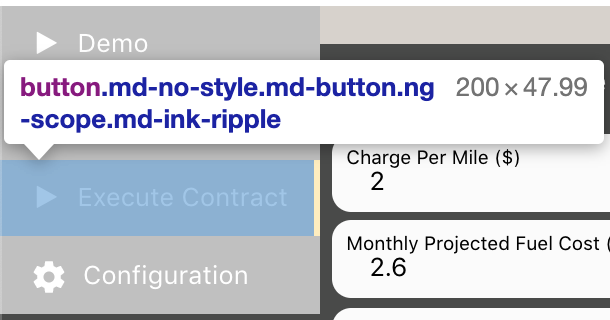
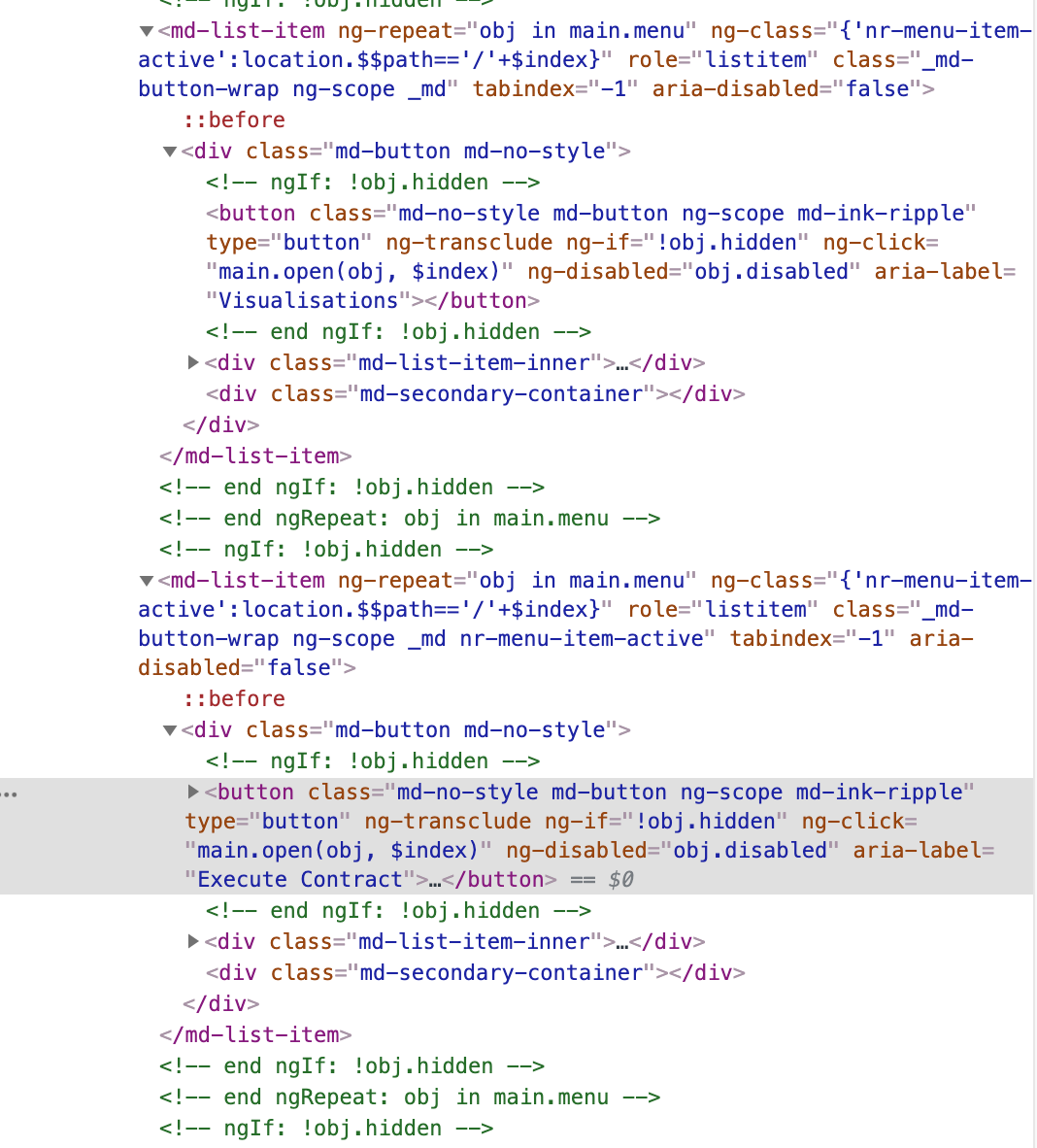
The following screen shots show the button and the code:
Versions
Node version: v11.6.0
Gauge version: 2.7.4
Taiko version: 1.0.0
 jphillips-bp3
All 11 comments
I have also tried await click(button("Execute Contract")); and I get the following error:
 Failed Step: Click on the Execute Contract menu option
 Specification: specs/example.spec:12
 Error Message: Error: Button with label Execute Contract  not found
 Stacktrace:
 Error: Button with label Execute Contract  not found
@jphillips-bp3 Two things to note here
exists()doesn't check if the element is covered, butclick()does.- If the element you are trying to click is covered by any other element, even the when using
buttonapi it should show the same error. But looks like that is not the case here.
Could you please share the html snippet/the site you are testing(url), that will help us understand the structure also if the element is inside iframe.
 Apoorva-GA
on 25 Jul 2019
Apoorva-GA
on 25 Jul 2019
Hi @Apoorva-GA here is an anonymised version of the HTML. This is for a customer so I cannot post up the whole web app (and is an internal app - not public facing). Many thanks for looking.
jphillips-bp3
on 25 Jul 2019
@jphillips-bp3 Tried with the html file shared and I am able to click the element with text Execute Contract.
My script looks something like this.
const { openBrowser, text, goto, button, click, closeBrowser } = require('taiko');
(async () => {
    try {
        await openBrowser();
        await goto('file:///page.html');
        await text("Execute Contract").exists();
        await click(text("Execute Contract"));
    } catch (error) {
        console.error(error);
    } finally {
        await closeBrowser();
    }
})();
@Apoorva-GA OK thanks. I guess there is a difference between the actual page rendered by the web site and the saved HTML page, but there is nothing I can do about that.
So my question is, if an element is being covered by another, is there another way of getting access to it?
jphillips-bp3
on 29 Jul 2019
currently click api cannot be used to perform click action on element that is covered by another element, workaround would be to try evaluate api to trigger click event on the element.
(e.g) await evaluate(text("Execute Contract"),(elem) => elem.click())
 NivedhaSenthil
on 29 Jul 2019
NivedhaSenthil
on 29 Jul 2019
currently
clickapi cannot be used to perform click action on element that is covered by another element, workaround would be to tryevaluateapi to trigger click event on the element.(e.g)
await evaluate(text("Execute Contract"),(elem) => elem.click())
OK thanks, I will give this a go and report back.
jphillips-bp3
on 29 Jul 2019
@jphillips-bp3 Any update on this?
Apoorva-GA
on 16 Aug 2019
@Apoorva-GA None of the suggestions work, but for the moment I no longer need to use this framework now so closing. If I have a fix in the future I will post it here.
jphillips-bp3
on 16 Aug 2019
Hi,
I am facing the same issue while clicking on the image(alt:'sample-3') which is sliding on home page
website: http://automationpractice.com/index.php
I need help with this.
 vishwa6800
on 22 May 2020
vishwa6800
on 22 May 2020
@vishwa6800 - did evaluate not work for you as mentioned above ?
I could see evaluate(image({alt:'sample-3'}), e => e.click()) take me to another page, I assume that's the expected behaviour?
 sriv
on 29 Jun 2020
sriv
on 29 Jun 2020
Related issues
 varayal
·
9Comments
varayal
·
9Comments
 sceee
·
3Comments
sriv
·
5Comments
sceee
·
3Comments
sriv
·
5Comments
 suleytron
·
3Comments
suleytron
·
3Comments
 HaroldPutman
·
4Comments
HaroldPutman
·
4Comments
Most helpful comment
currently
clickapi cannot be used to perform click action on element that is covered by another element, workaround would be to tryevaluateapi to trigger click event on the element.(e.g)
await evaluate(text("Execute Contract"),(elem) => elem.click())