Taiko: Timeout error occurs when I try to navigate to certain url immediately after opening the browser.
Issue: Timeout error occurs when I try to navigate to certain URL immediately after opening the browser. But when I try to navigate second time, I was able to navigate.
Please make sure I am able to navigate to any url immediately after opening the browser consistently.
I am attaching the screenshot for reference.
Steps:
Expected behavior
I should able to navigate to any url immediately after opening the browser.
Actual behavior
I am not able to navigate to certain url immediately after opening the browser. Timeout error occurs. Only after second time i am able to navigate successfully.
Steps to reproduce
- OpenBrowser()
- goto("url")
Error: Navigation took more than 30000ms. Please increase the timeout.,
- Repeat step 2 again.. Now it will work.
 Prakash0989
All 50 comments
Suspect this is happening because whenever a browser is opened it is opened in clean state (i.e.) without any cache and localstorage with new profile, in the subsequent gotos there could be some requests loaded from cache which might make the load time lesser than the one done immediately after openBrowser since there will be no cache and everything has to be loaded from source when loaded for the first time.
Can you please try increasing the timeout?
goto("url",{timeout:60000})
 NivedhaSenthil
on 11 Feb 2019
NivedhaSenthil
on 11 Feb 2019
@NivedhaSenthil Even after adding timeout i am getting timeout error message.But i could see the url is launched.
goto("url",{timeout:60000})
Also i feel sometimes chromium browser is slow.Tough this issue is inconsistent.
Prakash0989
on 11 Feb 2019
@Prakash0989 Do you get the timeout error running your tests in headless as well? Or its always in the REPL?
 saikrishna321
on 11 Feb 2019
saikrishna321
on 11 Feb 2019
Yes i am getting error running headless as well.
Prakash0989
on 12 Feb 2019
I think @saikrishna321 wanted to know if this happening only on REPL or even when running script in headless mode. Like,
code.js
const { openBrowser, goto, closeBrowser } = require('taiko');
(async () => {
    try {
        await openBrowser();
        await goto("google.com");
    } catch (e) {
        console.error(e);
    } finally {
        await closeBrowser();
    }
})();
and run taiko code.js does it timeout even then. To confirm if it an issue with REPL or with general execution.
NivedhaSenthil
on 12 Feb 2019
I think there are potentially 2 issues wrapped up here. I will try my best to give a decent explanation.
I noticed in the REPL. If you take focus away from the chromium browser window (perhaps click another browser window or another application). Then return to the REPL and proceed to navigate the chromium browser will run the next action (e.g
goto ('somewhere'). However, sometimes, the repl window will report an errore.g
Error: Navigation took more than 30000ms. Please increase the timeout., run.tracefor more info.
If I can manage to consistently recreate this I will report it separately.
The reason I mention this is because I think it is occuring in some instances alongside issue 2 (below) and it all seems like it is part of the same problem.
- @NivedhaSenthil to answer your question in the particular endpoint we are testing. The issue is in both the .code version and REPL. I think you are right that the speed of the endpoint is causing some of the issue with clean cache, I believe this is shown this can be seen by:
i. Hitting the same URL in the same REPL session twice. The second time it will usually succeed with loading.
II. Not everyone is experiencing the same issue with navigating to the site with either method.
However, the concern is when the page does appear to complete loading in ample time, but then the subsequent actions are not run. I'm not sure if the timeout you pass waits for anything particular to occur before it proceeds (or waits for the DOM to complete loading) with the next action?
As a guess - Maybe the loading of the page occurs in an obscure way passing what you are waiting to see but then it still doesn't have the next element available at this time the product is an off the shelf one, so i am limited in my understanding of how it works.
 suleytron
on 12 Feb 2019
suleytron
on 12 Feb 2019
Guess Point 1 is related to https://github.com/getgauge/taiko/issues/369
Taiko waits for page load and first meaningful paint events by default for every load. Even when navigation timeouts subsequent action should happen from REPL wherein taiko runner will break on any error.
NivedhaSenthil
on 12 Feb 2019
@NivedhaSenthil Should we just wait for first meaningful paint(that proves the content is loaded) to resolve and give access to the users to add waits on _networkIdle_ and _loadEventFired_
saikrishna321
on 12 Feb 2019
Ideally yes waiting for firstMeaningfulPaint should ensure document load and page load, that way user don't have to wait for networkIdle and loadEventFired since those event should get triggered before firstMeaningfulPaint. I feel it will be great to give user the flexibility to choose any events to wait for and if not given default to firstMeaningfulPaint.
This may not be related to to the timeout issue though.
NivedhaSenthil
on 13 Feb 2019
Dear Team, Do we have any update on this inconsistent issue which is blocking me to move forward.
Even with google.com i am getting timeout exception.
Prakash0989
on 15 Feb 2019
@Prakash0989 can you please try with master, there are some fixes gone in for navigation timeout which are yet to be released.
npm install git+https://[email protected]/getgauge/taiko.git -g this should install taiko from master
NivedhaSenthil
on 15 Feb 2019
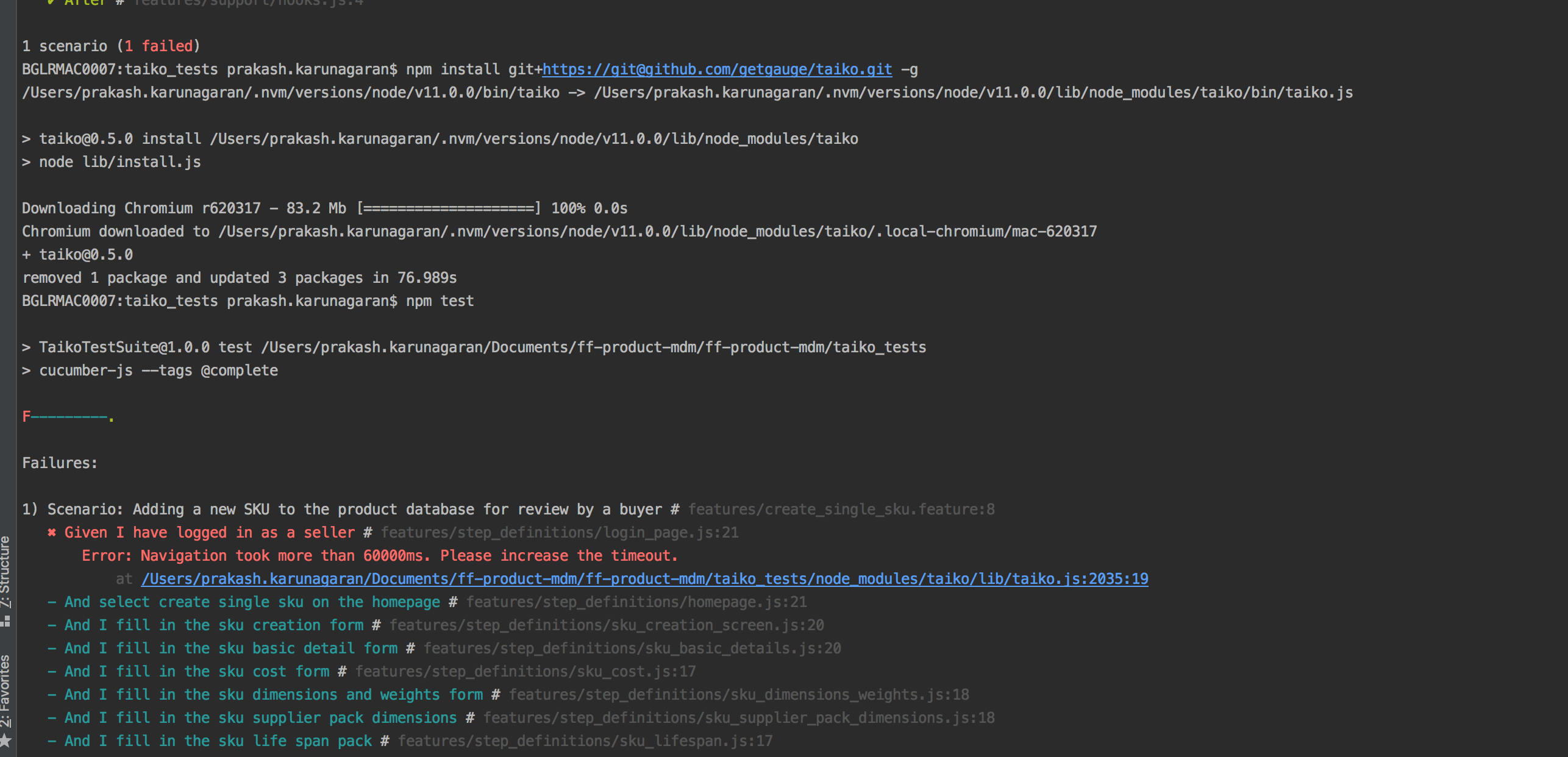
@NivedhaSenthil Still i am getting timeout error though after successful navigation. Sometimes I also observe chromium browser response speed is slow, compare to other browser's at same time.
Prakash0989
on 15 Feb 2019
@Prakash0989 you have installed Taiko globally from the master, are you sure the project has Taiko from master?
Can you make sure in your package.json has "taiko": "git+https://github.com/getgauge/taiko.git", if Yes, please remove the node_modules (rm -rf node_modules) and run npm test to make sure you have the latest master.
saikrishna321
on 15 Feb 2019
Navigation timeout error.docx
@saikrishna321 Still i am facing the same issue. Can you please look into my screenshot attached.
Additional information:
1) Always 1st navigation fails and sometimes its understandable navigation took more than the specified time ( But not always, even after successful navigation, timeout exception occurs)
2) In my case, my application fails even after successful navigation (Attached screenshot)
Prakash0989
on 15 Feb 2019
@Prakash0989 can you please provide more info about your environment like OS, npm and node versions?
It is very difficult to fix such issue without a repro, I don't face any issue with navigating to google.com.
NivedhaSenthil
on 15 Feb 2019
node -v : v11.0.0
npm -v : 6.4.1
System Details:
Mac OS High Sierra, version : 10.13.3
Model Name: MacBook Pro
Model Identifier: MacBookPro14,1
Processor Name: Intel Core i5
Processor Speed: 2.3 GHz
Number of Processors: 1
Total Number of Cores: 2
L2 Cache (per Core): 256 KB
L3 Cache: 4 MB
Memory: 16 GB
Prakash0989
on 15 Feb 2019
@Prakash0989 Thanks for the info.
You did say you cant navigate to google.com and it timeouts https://github.com/getgauge/taiko/issues/393#issuecomment-463936172
Did you try on other machine ? Are you behind proxy network? Can you try switching to different network and try ?
saikrishna321
on 15 Feb 2019
@saikrishna321 : I understand sometimes google.com takes longer time ( more than 2 mins to load completely) hence navigation timeout error occurs .Thats fine. Its different story, we have to see why its taking longer time to load only in chromium browser not in other browser at same time. As mentioned, this issue is inconsistent.
I am more concerned when my application fails with navigation timeout error though the page gets navigated completely. Please refer the screenshot which i mentioned in my previous comments.
To answer your question, regarding proxy network, i was able to open same web applications in other browser without any issues.
I have used two different network and gave a try..
I will see if i can try in another machine.Will keep you posted once i get an opportunity.
Prakash0989
on 15 Feb 2019
If you are behind proxy, can you please try setting proxy command line args like given here to see if it helps ?
NivedhaSenthil
on 18 Feb 2019
I am seeing the same issue with master. The page was loaded but the test failed the timeout error.
 yingzuo
on 18 Feb 2019
yingzuo
on 18 Feb 2019
@yingzuo can you pls share the URL or sample to reproduce
saikrishna321
on 18 Feb 2019
The URL I used is not public accessible. It is an authenticated page, so there's a redirect going on. I can't reproduce the issue with 'google.com'.
yingzuo
on 18 Feb 2019
If you are behind proxy, can you please try setting proxy command line args like given here to see if it helps ?
@NivedhaSenthil Please let me know once your available for call.Let me share my screen and we will sort out this issue. Below is the link to join the call. (Kindly Inform me before you join this link)
@suleytron
Prakash0989
on 19 Feb 2019
@NivedhaSenthil Please let me know once your available for call.Let me share my screen and we will sort out this issue. Below is the link to join the call. (Kindly Inform me before you join this link)
@suleytron
Prakash0989
on 19 Feb 2019
@Prakash0989 @suleytron can you try with master, we have {waitForNavigation: false} added to goto()
saikrishna321
on 20 Feb 2019
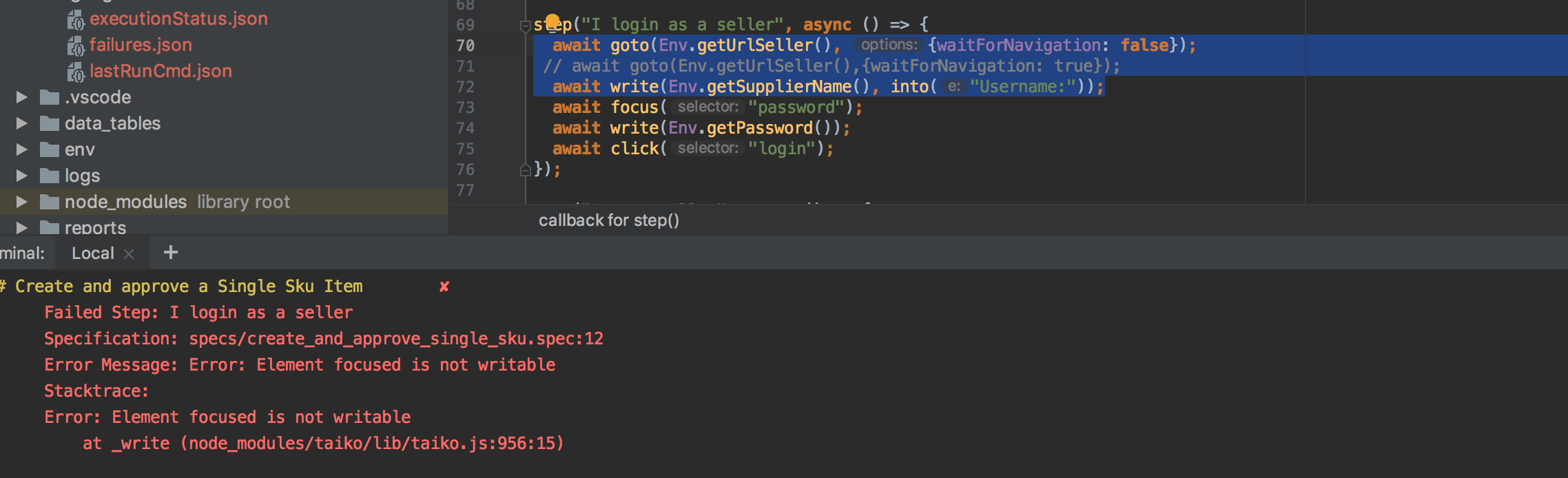
@saikrishna321 I have pulled the latest changes from master and gave a try. I am able to see navigation timeout is skipped, since we have added {waitForNavigation: false},but then after my navigation step( step1), immediately it looks to execute the next step(step 2) which is inputting the user name and it fails since navigation is not originally completed. Can you provide me a suggestion/solution so that i instruct to wait for specific time interval before executing step 2. similar to sleep command before executing the step2.refer screenshot for reference.
Prakash0989
on 20 Feb 2019
write api does not accept plain text currently, this need to be handled in Taiko.
you can try write('something',into(inputField({id:'id'}))) this will wait for the inputfield and then writes into it
NivedhaSenthil
on 20 Feb 2019
focus and then write to the field. See if that works as well
saikrishna321
on 20 Feb 2019
@NivedhaSenthil @saikrishna321 Please refer the screenshot attached. I have skipped navigation timeout by adding {waitForNavigation: false},but then as i mentioned in my above comment, once url is launched in browser, immediately it goes on to execute the next step which is, looking for Input field. Since the URL is not completely loaded, input field is not visible or not loaded in this point ,hence failing to see input field in DOM. can you provide me some solution so that i wait for element to be visible in DOM .Any keyword which waits until the element is visible will do.
navigation workaround observation.docx
@suleytron
Prakash0989
on 21 Feb 2019
exists method in selectors should ideally wait for the element to appear, default timeout is 10sec and it should be configurable. That feature seems to be broken now https://github.com/getgauge/taiko/issues/406
you could still try await inputField({id:'id'}).exists() before focusing which will wait for element to exists within 10 secs.
NivedhaSenthil
on 21 Feb 2019
@NivedhaSenthil Tried with 'exists' method but no luck. Understandable its going to fail since my navigation is taking more than 10sec. Let me know once exists method configurable feature is fixed so that i can configure and will give a try.
Also please feel free to add any another solution to this issue.
exists functionality.docx
@suleytron
Prakash0989
on 21 Feb 2019
Raised an issue in devtools protocol to understand why firstMeaningfulPaint event is missed https://github.com/ChromeDevTools/devtools-protocol/issues/159.
Meanwhile you can try waiting for custom events, like
await goto("google.com",{waitForEvents:['loadEventFired']}). Changes are in master yet to be released.
NivedhaSenthil
on 27 Feb 2019
Finally its working. Thanks for your workaround. Lets keep this issue open until original issue is resolved.
Prakash0989
on 27 Feb 2019
@NivedhaSenthil Today I have pulled the latest changes from master and when I execute I am getting some exception.(Refer screenshot). The reason behind executing from master is i believe 'waitforevents' workaround is released only in master. Note, i was not getting same exception when i execute from latest version of taiko, only getting exception from master. Assume some changes are made in master. Refer the screenshot attached and add your thoughts.

Prakash0989
on 5 Mar 2019
Can you please tell us what command you are using to run gauge test suite ?
yes there are some changes done around taiko runner, seems that is causing the issue. We will be fixing and making a release soon with waitForEvents
NivedhaSenthil
on 5 Mar 2019
@NivedhaSenthil Tried the below two commands
- npm test
- gauge run specs/create_and_approve_single_sku.spec
Prakash0989
on 5 Mar 2019
NivedhaSenthil
on 5 Mar 2019
@NivedhaSenthil Thanks for the quick fix. Able to run gauge taiko tests
Prakash0989
on 5 Mar 2019
Hello!
Is the timeout issue has already been resolved? I am currently experiencing timeout issues intermittently when checking for multiple pages in a single scenario.
SPECS:
## Validate URL Redirection
* Goto Sample UPWA Homepage
* Open page "bussmann"
* Page lands in brand directory page
* Close browser
SAMPLE RUNS SCREENSHOT:

Imagine that the blue highlights are Sample.
Please note that sometimes it works, sometimes it is not. Please advise. Thank you!
 qaryas
on 25 Sep 2019
qaryas
on 25 Sep 2019
Sometimes this issue is encountered. All test specs PASSED but a timeout is still encountered.

qaryas
on 25 Sep 2019
@qaryas you have a test closing the browser? why? Do you have an additional afterSuite closing the browser again? Maybe that's the timeout happening?
 paulwellnerbou
on 26 Sep 2019
paulwellnerbou
on 26 Sep 2019
Seems you are right @paulwellnerbou. It seems to be working perfectly without the close browser. Thanks!
qaryas
on 26 Sep 2019
Seems you are right @paulwellnerbou. It seems to be working perfectly without the close browser. Thanks!
Ooops! Encountered Error Message: Error: Timed out again without the close browser. :(
qaryas
on 26 Sep 2019
@qaryas Are you able to reproduce issue with taiko example project?
 JaniJegoroff
on 27 Sep 2019
JaniJegoroff
on 27 Sep 2019
to reproduce issue with taiko example project?
@JaniJegoroff , No, it is only happening in the project I am currently working with.
qaryas
on 27 Sep 2019
Raised an issue in devtools protocol to understand why
firstMeaningfulPaintevent is missed ChromeDevTools/devtools-protocol#159.
Meanwhile you can try waiting for custom events, like
await goto("google.com",{waitForEvents:['loadEventFired']}). Changes are in master yet to be released.
This worked for me as well. Thank you @NivedhaSenthil !
 dennismphil
on 7 Oct 2019
dennismphil
on 7 Oct 2019
I'm seeing the same issue. Unfortunately I don't have a simple test case for you, and see it in my app.
Using waitForEvents:['loadEventFired'] in goto, does seem to work around the issue.
Before I saw that workaround, I had tried using waitForNavigation = false, and hit #922.
My app has websockets. Is it possible that's the cause of this issue? Watching the network tab, it does show the websocket request is always pending.
 trein-homeroom
on 5 Nov 2019
trein-homeroom
on 5 Nov 2019
Updating my comment above - it turns out the waitForEvents:['loadEventFired'] doesn't really solve the issue. Problems just seem to move around to different test steps and cause random hanging of commands. Looking at the code, I assume that's because its not just gotos that are waiting on network requests.
However I finally figured out what the cause was in my case. The problem is that we use various 3rd party services. Some of them frequently pinging their servers. Two examples are Log Rocket and Intercom. I highly suspect that their constant traffic to their servers is causing issues for Taiko's network waiting mechanisms.
To test my theory, I modified Taiko code (networkHandler) to whitelist which requests it watched. That worked. I also tried turning off those services during test runs. That worked as well.
I imagine it would be nice to have Taiko support a whitelist feature so we don't have to modify our app for test runs. However I'm not convinced the issue is really the frequent pinging of these services. I still occasionally see Taiko get stuck (but it's so infrequent its very hard for me to track down further). I think there still can be an issue within Taiko code itself, or made the Chrome protocol. It's not clear to me. Regardless, if you want a fairly reproducible way of seeing Taiko get stuck, as Intercom and Log Rocket to your app. With that in place, I could reproduce the issue on our app, in about 5 Taiko commands.
I'm not sure if this info is related this issue or not, and happy to file a new one if you'd like.
trein-homeroom
on 6 Nov 2019
Does using intercept to add those url's act like a whitelist?
Either way this needs fixing for apps that use those services. The assumption was that services like Intercom and Log Rocket are turned off on test instances. But it must be possible to run Taiko scripts against production instances.
Thanks for investigating and finding the cause can you create a separate issue for this?
 zabil
on 6 Nov 2019
zabil
on 6 Nov 2019
In my case, it the error ("Navigation took more than 30000ms. Please increase the timeout") is shown if the URL I'm navigating to loads TOO quickly (ie: from localhost).
In our Rails dev environments, we use a local tool called "Letter Opener". It's a local Inbox that traps any email your Rails app would normally send out to the world when in production. It's small, lightweight, and after a few times loading it, will reload lightening quick.
goto() and openBrowser() both use this option when they start navigation. The default value for the "waitForStart" option is 100ms.
When I dialled this back down to 0ms, the error no longer appears for me. Setting it back to 100, and the error returns. Seems like some events fire before Taiko has a change to spot them.
await goto("https://localhost:3023/letter_opener", { waitForStart: 0 })
see https://taiko.gauge.org/?#taiko-wait-mechanism
 dennismclaugh
on 21 Nov 2019
dennismclaugh
on 21 Nov 2019
Related issues
 jaydevonline
·
6Comments
jaydevonline
·
6Comments
 sceee
·
3Comments
sceee
·
3Comments
 luciferankon
·
7Comments
luciferankon
·
7Comments
 varayal
·
9Comments
varayal
·
9Comments
 rmallof
·
4Comments
rmallof
·
4Comments
Most helpful comment
Finally its working. Thanks for your workaround. Lets keep this issue open until original issue is resolved.