Taiga: Anime List: "Start new rewatch" option in context menu
For completed series, I think it would be nice to have an option that you can click to start a new rewatch. Here's the proposed process:
- Right-click an anime on the completed list
- Select "Start rewatch"/ " Start new rewatch"
- Several things happen in the background:
- the show is set as being in a rewatch (normally toggled via settings tab in the information view)
- the episode watch count is set to 0
- the anime is moved to the currently watching list
- the first episode is opened in the default media player if it can be found locally
This makes it the same number of steps to rewatch a show as it is to start a new one.
I also wonder if having a "cancel rewatch" option might be useful, but I don't know that doing that is a very common action.
 ConnorKrammer
All 3 comments
Any updates on this? Would also appreciate if it was possible.
In addition it would be nice if the Status dropdown included "Rewatching".
 robflop
on 1 Jan 2019
robflop
on 1 Jan 2019
Hi! I've been working on this feature since I'm a fan of it as well. @erengy Is this something that could be added, and if so, would something like this work?
Context menu:
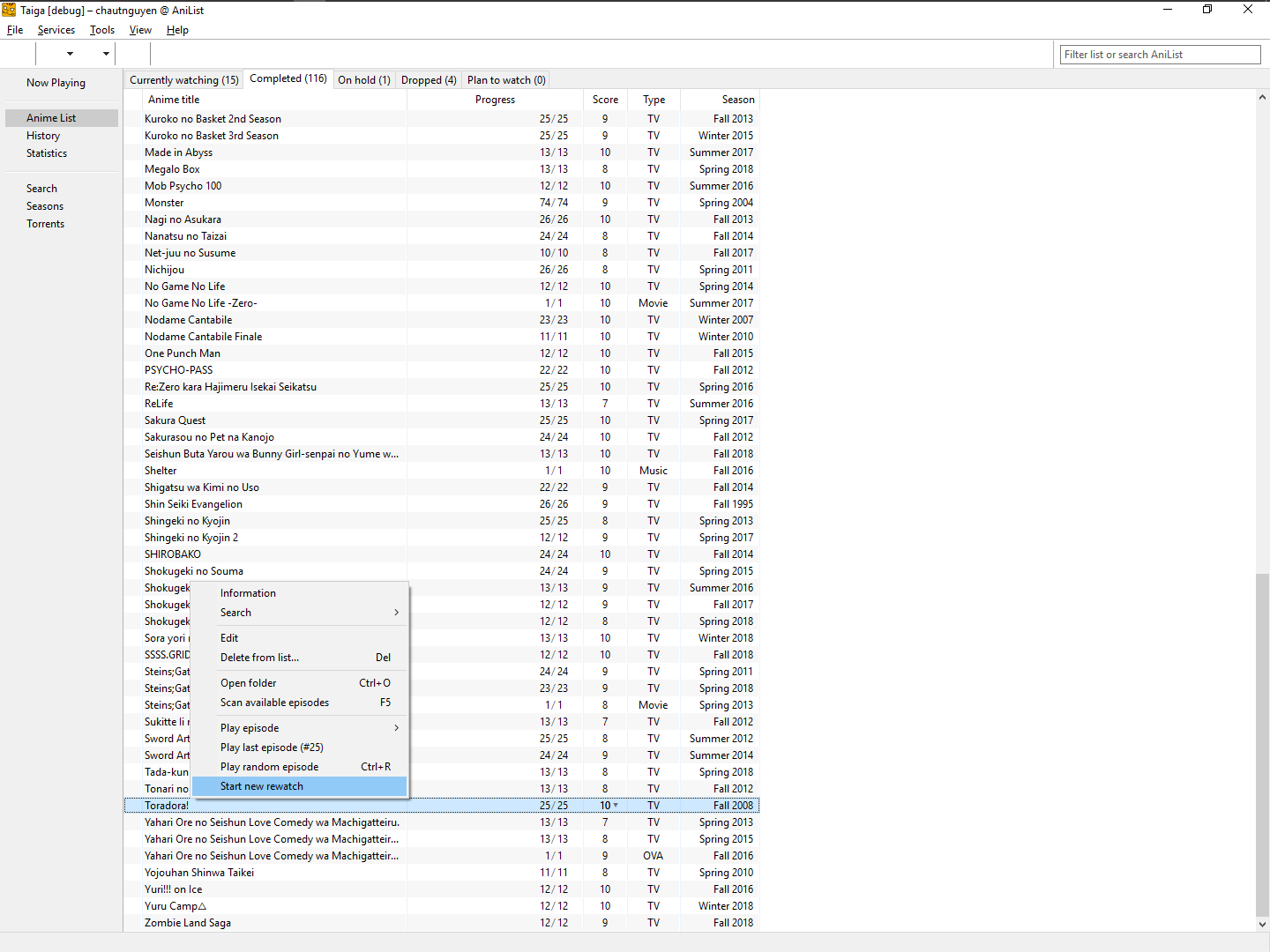
Full workflows (each image is a "step") can be found here:
Successful rewatch: https://imgur.com/a/nkjOrIo
Error on rewatch when anime episodes cannot be found (identical to Play Random Anime error): https://imgur.com/a/EdMZ3YZ
Implemented:
- Context menu: Rewatch
- The show is set as being in a rewatch (normally toggled via settings tab in the information view)
- The episode watch count is set to 0
- The anime is moved to the currently watching list
- The first episode is opened in the default media player if it can be found locally
Not implemented:
- "In addition it would be nice if the Status dropdown included "Rewatching"."
- "Cancel rewatch"
====
I can send a PR and we can talk more about specifics (UI/code) if so.
 cnguy
on 4 Jan 2019
cnguy
on 4 Jan 2019
That looks great.
robflop
on 4 Jan 2019
Related issues
 dobbleg1000
·
5Comments
dobbleg1000
·
5Comments
 Paraxnoir
·
7Comments
Paraxnoir
·
7Comments
 Tensai-Otaku
·
6Comments
Tensai-Otaku
·
6Comments
 kempol181
·
5Comments
kempol181
·
5Comments
 otvenharom
·
6Comments
otvenharom
·
6Comments
Most helpful comment
Hi! I've been working on this feature since I'm a fan of it as well. @erengy Is this something that could be added, and if so, would something like this work?
Context menu:

Full workflows (each image is a "step") can be found here:
Successful rewatch: https://imgur.com/a/nkjOrIo
Error on rewatch when anime episodes cannot be found (identical to Play Random Anime error): https://imgur.com/a/EdMZ3YZ
Implemented:
Not implemented:
====
I can send a PR and we can talk more about specifics (UI/code) if so.