Taiga-front: Changing task status in user story screen fails with high frequency in firefox
BUG - In Firefox, while on the User Story screen with multiple Tasks, changing task status frequently results in the status not updating and errors appear in the Console (see below)
Error: t.isModified is not a function
t</e.prototype.save@https://taiga.mysite.com/v-1537436040060/js/app.js:13:17828
r/</<@https://taiga.mysite.com/v-1537436040060/js/app.js:5:15671
$eval@https://taiga.mysite.com/v-1537436040060/js/libs.js:12:16438
$apply@https://taiga.mysite.com/v-1537436040060/js/libs.js:12:16670
r/<@https://taiga.mysite.com/v-1537436040060/js/app.js:5:15644
r@https://taiga.mysite.com/v-1537436040060/js/libs.js:7:18503
i@https://taiga.mysite.com/v-1537436040060/js/libs.js:7:18553
f@https://taiga.mysite.com/v-1537436040060/js/libs.js:7:18937
dispatch@https://taiga.mysite.com/v-1537436040060/js/libs.js:5:1987
add/g.handle@https://taiga.mysite.com/v-1537436040060/js/libs.js:5:97
angular.js:13550
o/<
angular.js:13550
t/<
app.js:8930:15
$apply
angular.js:17334
r/<
app.js:8775:17
r
lodash.js:10325
i
lodash.js:10335
f
lodash.js:10402
dispatch
jquery.js:4736
add/g.handle
jquery.js:4549

Firefox can’t establish a connection to the server at wss://taiga.mysite.com/events. app.js:3205:16

WebSocket error: [object Event] angular.js:13550
    o/< angular.js:13550
    e</t.prototype.onError app.js:3432:6
    r lodash.js:4941

WebSocket closed.

Firefox can’t establish a connection to the server at wss://taiga.mysite.com/events.

The connection to wss://taiga.mysite.com/events was interrupted while the page was loading.
 george-viaud
All 9 comments
Additional info: The WebSocket error above is unrelated and was due to misconfigured service for taiga-event - specifically the docs show a location for coffee that is not the same for a default install of 18.04 ubuntu which is /usr/local/bin/coffee and not /usr/bin/coffee in my case.
I am still able to reproduce this bug readily by creating a task with subtasks and then toggling their status between various settings, eventually getting the console to show the error depicted (t.isModified is not a function) and the status no longer changed on the UI
george-viaud
on 22 Sep 2018
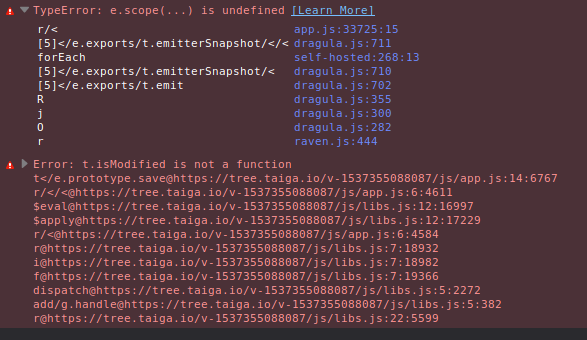
Additional info: I was just able to reproduce this on taiga.io itself
Also saw an e.scope is underfined error which may be associated in this case

george-viaud
on 22 Sep 2018
Hi,
You’re using Ubuntu 18.04, but the documentation states you should be using 16.04
“This tutorial assumes that you are using a clean, recently updated Ubuntu 16.04 image.”
This is important because using a newer Ubuntu distro could also mean you’re using a newer python 🐍 which could also result in different kind of issues.
 theriverman
on 23 Sep 2018
theriverman
on 23 Sep 2018
@theriverman please note that the above bug is also expressed (easily reproducible) in the live demo website taiga.io
Edit for clarity: This bug is reproducible and as-described on the main taiga.io website which (as far as I know) is running a setup as described in the docs.
george-viaud
on 24 Sep 2018
I've been running into this myself. We are running taiga in k8s. I can reproduce the problem 100% of the time by dragging an element a few pixels prior to trying to modifying it.
For example, if I select then drag the user-selection box a few pixels, then release it, I can no longer modify that particular item. The same applies for the status. I can still modify other ones.
This is quite likely due to the design of the UI. The selection menu either pops up in the middle of the screen, or as a drop-down slightly displaced from where you clicked. This means that if you start moving the mouse to your desired selection prior to release the button, you'll introduce the issue.
Additional Info:
I'm getting this error on my chrome console:
angular.js:13550 TypeError: t.isModified is not a function
    at e.save (app.js:24028)
    at app.js:8869
    at p.$eval (angular.js:17229)
    at p.$apply (angular.js:17329)
    at HTMLAnchorElement.<anonymous> (app.js:8868)
    at r (lodash.js:10335)
    at i (lodash.js:10345)
    at HTMLAnchorElement.f (lodash.js:10412)
    at HTMLDivElement.dispatch (jquery.js:4737)
    at HTMLDivElement.g.handle (jquery.js:4549)
_Taiga version_: 4.1.1
_Browser_: Chrome 72.0.3626.81
_OS_: Ubuntu 18.04
 klarose
on 14 Feb 2019
klarose
on 14 Feb 2019
Still an issue with newer versions
Taiga version: 5.0.7
Browser: Microsoft Edge 81.0.416.62
OS: Windows 10 1909
 h0t1ce
on 23 Apr 2020
h0t1ce
on 23 Apr 2020
Is this being addressed? I can confirm that the issue is present and easily replicatable not only in Chrome, but other browsers as well.
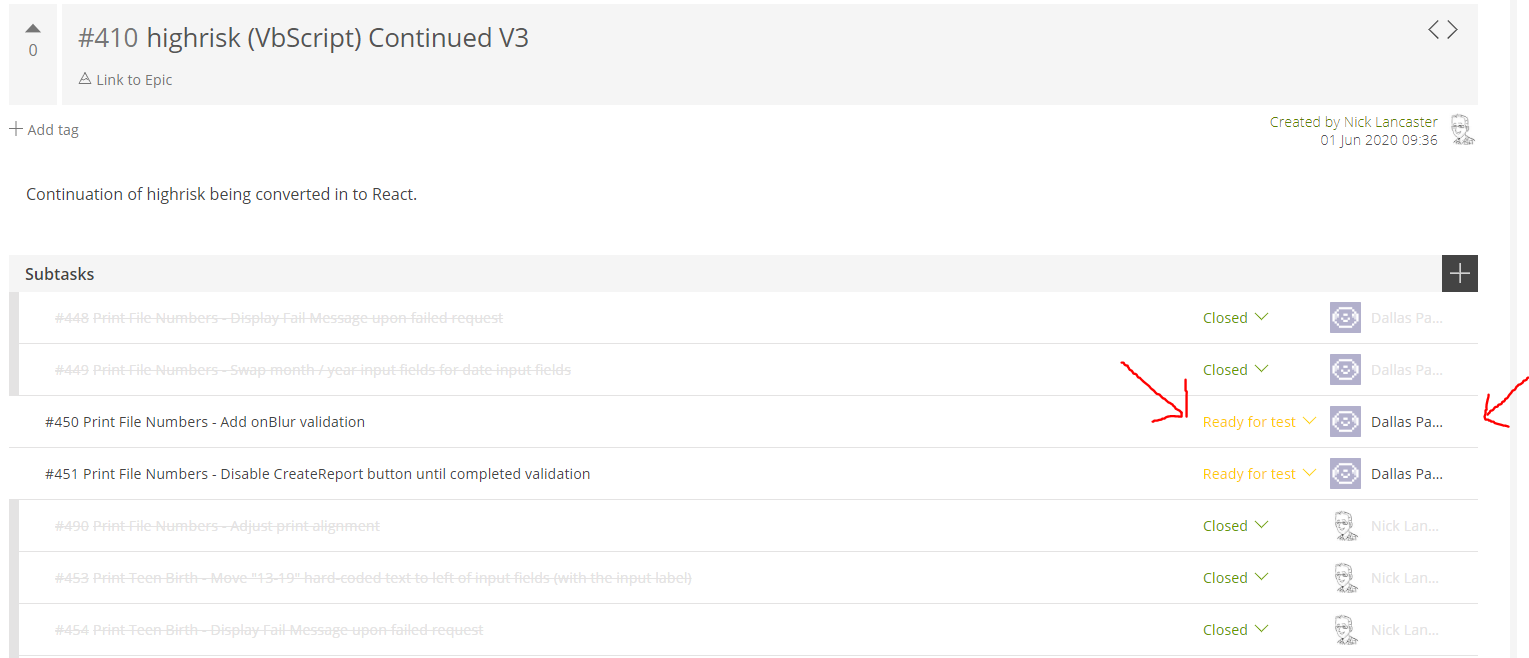
To be more specific, it seems you can only change one status in the subtask bar at a time, before having to refresh the page, and typically even successful status changes are accompanied by rather long wait.
This may be related to the issue: in console, I get "[Violation] 'setTimeout' handler took 137ms" when switching subtasks
 green6060
on 29 Jun 2020
green6060
on 29 Jun 2020
Still an issue with recent version. Very annoying bug on an awesome platform.
Taiga version: 5.5.4
Browser: Chrome 86.0.4240.75 64 bits
OS: Windows 10 19041
 lucasarod
on 15 Oct 2020
lucasarod
on 15 Oct 2020
We have been doing some housekeeping work prior to Taiga6 upcoming release and we are reviewing old issues that we didn't correctly attend back then.
Since Taiga6 brings a significant UX/UI rework, we encourage you to wait and see if Taiga6 satisfies this need and open a new issue if that's not the case. This time we will make sure to review it when it comes through.
Thank you very much on behalf of the Taiga Team!
 NatachaMenjibar
on 1 Dec 2020
NatachaMenjibar
on 1 Dec 2020
Related issues
 iki
·
7Comments
iki
·
7Comments
 SplendornetTech
·
19Comments
SplendornetTech
·
19Comments
 Gim6626
·
6Comments
Gim6626
·
6Comments
 Rob-bb
·
6Comments
Rob-bb
·
6Comments
 teamcoltra
·
12Comments
teamcoltra
·
12Comments