Taichi: IDLE still doesn't work for me
Describe the bug
I saw this post today https://github.com/taichi-dev/taichi/pull/1222 and I realized this is already in 0.6.14 release, and I decided to try it out, but it still doesn't work for me.
To Reproduce
the codes are these:
import taichi as ti

ti.init()

a = 1


@ti.kernel
def test_kernel_print():
    print(a)


test_kernel_print()
Log/Screenshots
When I do it in IDLE concole, it still gives me this:
Traceback (most recent call last):
  File "<pyshell#6>", line 1, in <module>
    test_kernel_print()
  File "C:\Users\Eary\AppData\Local\Programs\Python\Python38\lib\site-packages\taichi\lang\kernel.py", line 559, in wrapped
    return primal(*args, **kwargs)
  File "C:\Users\Eary\AppData\Local\Programs\Python\Python38\lib\site-packages\taichi\lang\kernel.py", line 488, in __call__
    self.materialize(key=key, args=args, arg_features=arg_features)
  File "C:\Users\Eary\AppData\Local\Programs\Python\Python38\lib\site-packages\taichi\lang\kernel.py", line 300, in materialize
    src = remove_indent(oinspect.getsource(self.func))
  File "C:\Users\Eary\AppData\Local\Programs\Python\Python38\lib\inspect.py", line 985, in getsource
    lines, lnum = getsourcelines(object)
  File "C:\Users\Eary\AppData\Local\Programs\Python\Python38\lib\inspect.py", line 967, in getsourcelines
    lines, lnum = findsource(object)
  File "C:\Users\Eary\AppData\Local\Programs\Python\Python38\lib\inspect.py", line 798, in findsource
    raise OSError('could not get source code')
OSError: could not get source code
When I try it in IDLE with a file, it kind of runs but it prints nothing.
[Taichi] mode=release
[Taichi] version 0.6.18, llvm 10.0.0, commit 35845482, python 3.8.1
[Taichi] Starting on arch=x64
>>>
After reading the manual's "warning" section at https://taichi.readthedocs.io/en/stable/debugging.html?highlight=idle#run-time-print-in-kernels , I tried to change the ti.init() to ti.init(arch=ti.opengl)
but it doesn't work.
[Taichi] mode=release
[Taichi] version 0.6.18, llvm 10.0.0, commit 35845482, python 3.8.1
[Taichi] Starting on arch=opengl
>>>
Another thing, it works in PyCharm with ti.init() ti.init(arch=ti.cuda) etc., it will print a 1 for me. But when using ti.init(arch=ti.opengl), PyCharm also prints nothing at all.
I try it in Blender's scripting workspace as well. (I assume this is related based on @yuanming-hu 's reply at https://github.com/taichi-dev/taichi_elements/issues/54#issuecomment-645720321) It gives me the same error in both the console and the file:
[Taichi] mode=release
[Taichi] version 0.6.18, llvm 10.0.0, commit 35845482, python 3.7.7
[Taichi] Starting on arch=x64
Traceback (most recent call last):
  File "\Text", line 13, in <module>
  File "C:\Users\Eary\Desktop\blender-2.90.0-taichi-branch\blender-2.90.0-4db63b648643-windows64\2.90\python\lib\site-packages\taichi\lang\kernel.py", line 559, in wrapped
    return primal(*args, **kwargs)
  File "C:\Users\Eary\Desktop\blender-2.90.0-taichi-branch\blender-2.90.0-4db63b648643-windows64\2.90\python\lib\site-packages\taichi\lang\kernel.py", line 488, in __call__
    self.materialize(key=key, args=args, arg_features=arg_features)
  File "C:\Users\Eary\Desktop\blender-2.90.0-taichi-branch\blender-2.90.0-4db63b648643-windows64\2.90\python\lib\site-packages\taichi\lang\kernel.py", line 300, in materialize
    src = remove_indent(oinspect.getsource(self.func))
  File "C:\Users\Eary\Desktop\blender-2.90.0-taichi-branch\blender-2.90.0-4db63b648643-windows64\2.90\python\lib\inspect.py", line 973, in getsource
    lines, lnum = getsourcelines(object)
  File "C:\Users\Eary\Desktop\blender-2.90.0-taichi-branch\blender-2.90.0-4db63b648643-windows64\2.90\python\lib\inspect.py", line 955, in getsourcelines
    lines, lnum = findsource(object)
  File "C:\Users\Eary\Desktop\blender-2.90.0-taichi-branch\blender-2.90.0-4db63b648643-windows64\2.90\python\lib\inspect.py", line 778, in findsource
    raise OSError('source code not available')
OSError: source code not available
Also I noticed Blender is still crashing when using ti.init(arch=opengl), so I guess that was the reason for https://github.com/taichi-dev/taichi_elements/issues/54 then?
 EaryChow
All 31 comments
Thank for reporting these bugs.
IIUC this issue contains 5 issues:
- OSError in IDLE interactive mode
printnot working in IDLE file modeprinton OpenGL not working in PyCharm- OSError in Blender scripting module
- OpenGL crashes in Blender
 archibate
on 13 Jul 2020
archibate
on 13 Jul 2020
For the 2 and 3, could you try adding ti.sync() at the end of program?
archibate
on 13 Jul 2020
It works! In Pycharm ti.sync() works, in IDLE ti.sync() works only when using opengl.
[Taichi] mode=release
[Taichi] version 0.6.18, llvm 10.0.0, commit 35845482, python 3.8.1
[Taichi] Starting on arch=opengl
1
>>>
Great! For the 1 and 4, that's because of IDLE limitation, we can't get source code in interactive mode. However, using IPython and Jupyter have no such problem.
In fact, I used to make a PR #1308 to perform a dirty hack into IDLE to make Taichi work with it (succeed!). But I finally closed it since I believe people should be able to install IPython to replace IDLE for development.
WDYT? Dirty hack or request people to install IPython?
archibate
on 13 Jul 2020
My thought is to use taichi in Blender's scripting module, that's all I want. It seems very troublesome to use IPython in Blender, so I would vote for dirty hack, if it does not have some serious drawbacks.
EaryChow
on 13 Jul 2020
Yes, that's very reasonable especially considering the Blender people's experience.
We can't make IDLE happy without modifying it's source code. In #1308, to make Taichi work in IDLE, we request user run sudo python3 -m taichi idle_hacker to inject a piece of IPC code into IDLE, so that Taichi can retrieve the code, is this still reasonable? @EaryChow @yuanming-hu @k-ye Inputs are welcome!
archibate
on 13 Jul 2020
Due to my lack of knowledge I have idea what means lol
As what I said, I am fine with it as long as it does not have some serious drawbacks.
EaryChow
on 14 Jul 2020
A quick question here, will there be an option to revert back to the original IDLE in case some problems happen?
EaryChow
on 14 Jul 2020
Yes, the ti idle_hacker will save a backup of the old file, so no worry :) We may also have a ti idle_hacker -r command for easy revert.
archibate
on 14 Jul 2020
Looks like it's done? So we need to pip install another package, right? No sure how it works, do you mind explaining?
EaryChow
on 10 Aug 2020
So we need to pip install another package, right?
Yes, please see https://github.com/taichi-dev/sourceinspect.git.
The package sourceinspect will be automatically installed when installing taichi, thanks to pip's dep resolving mechanism.
No sure how it works, do you mind explaining?
In fact, it's really simple, here's the simplified workflow:
I wrote sourceinspect, providing exactly the same API as inspect (a Python builtin module).
In Taichi, we perform import sourceinspect as inspect, now our source code inspection are redirected into sourceinspect.
When no Blender detected, sourceinspect simply redirect invocations back to inspect, nothing changes.
When Blender is detected, sourceinspect will begin to do its own mocks to inspect source code in Blender.
def get_blender_text_name(file):
    if file.startswith('/') and file.count('/') == 1:
        return file[1:]      # untitled blender file, "/Text"

    i = file.rfind('.blend/')
    if i != -1:
        return file[i + 7:]  # saved blender file, "hello.blend/Text"

    return None
Thanking blender devs :confused:
archibate
on 10 Aug 2020
The package sourceinspect will be automatically installed when installing taichi, thanks to pip's dep resolving mechanism.
I just tried to upgrade taichi via pip, but it didn't install sourceinspect with it. I also tried to uninstall taichi and install it again, sourceinspect is still nowhere to be seen.
So I tried pip install sourceinspect separately, but not sure what to do afterwards.
Could you provide a step by step tutorial?
EaryChow
on 10 Aug 2020
Hi, despite it's now merged into master, the next version 0.6.26 of taichi not released on PyPI yet. It will be likely released in Wed. Sorry :)
archibate
on 11 Aug 2020
Alright, then, thanks :)
EaryChow
on 11 Aug 2020
Hi I just successfully installed it, but still am not sure what to do. Again, could you provide a step by step tutorial?
EaryChow
on 13 Aug 2020
Simply run pip install --upgrade taichi (upgrade to v0.5.26), and import taichi as ti in Blender or IDLE.
archibate
on 13 Aug 2020
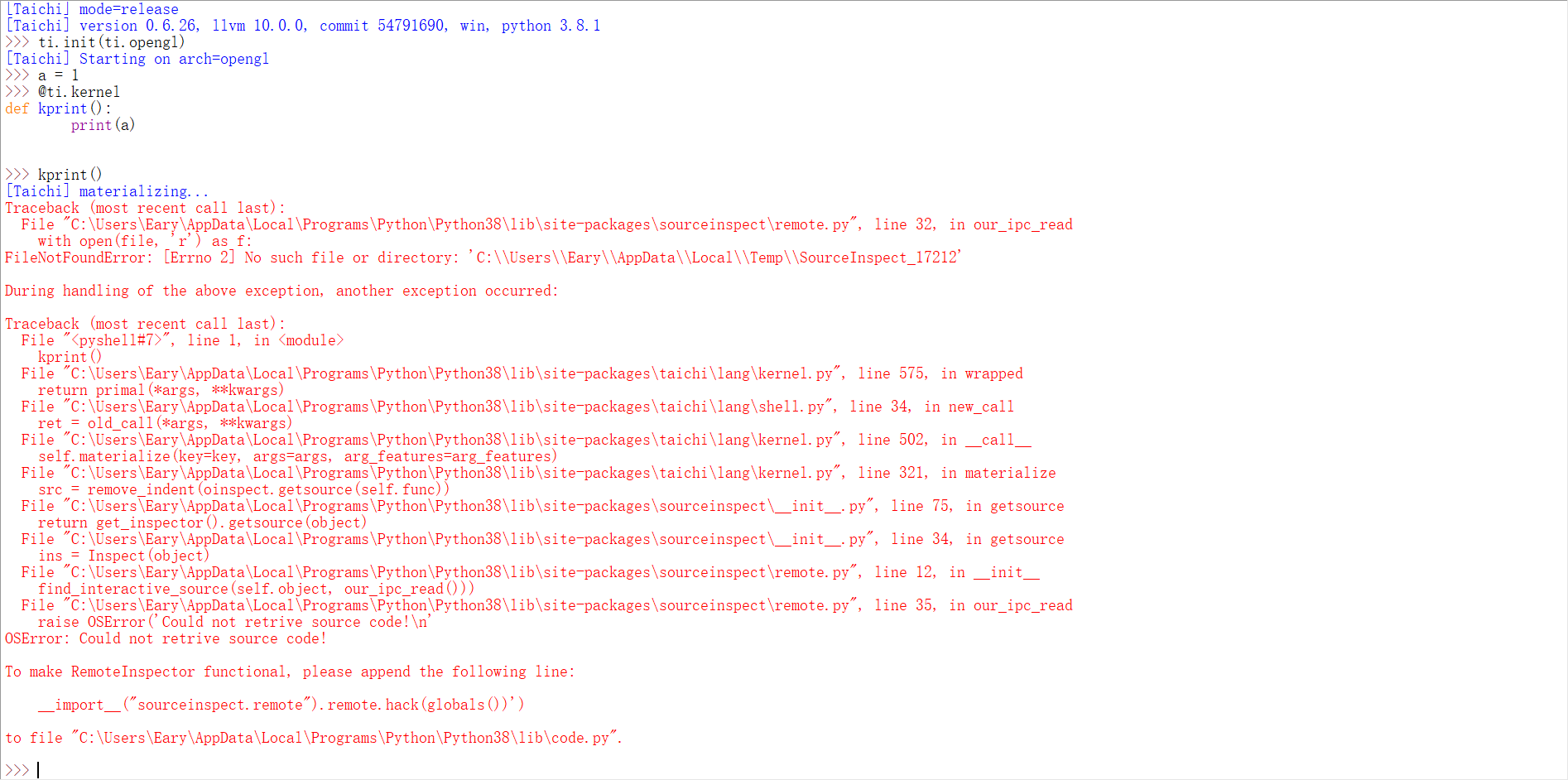
well...

EaryChow
on 13 Aug 2020
For the IDLE error, please follow its instruction and add that 'hack code'.
For the Blender error, what's your sourceinspect version? (run pip show sourceinspect to yield the version number)
archibate
on 13 Aug 2020
Name: sourceinspect
Version: 0.0.1
Summary: A unified inspector for retriving source from Python objects
Home-page: UNKNOWN
Author: 彭于斌
Author-email: [email protected]
License: UNKNOWN
Location: c:\users\eary\desktop\blender-2.90.0-taichi-branch\blender-2.90.0-4db63b648643-windows64\2.90\python\lib\site-packages
Requires: dill
Required-by: taichi
I just realize 0.02 is out, let me try to upgrade it then
EaryChow
on 13 Aug 2020
Name: sourceinspect
Version: 0.0.2
Summary: A unified inspector for retriving source from Python objects
Home-page: UNKNOWN
Author: 彭于斌
Author-email: [email protected]
License: UNKNOWN
Location: c:\users\eary\desktop\blender-2.90.0-taichi-branch\blender-2.90.0-4db63b648643-windows64\2.90\python\lib\site-packages
Requires: dill
Required-by: taichi
Just upgraded it to 0.02 in Blender, but same result
EaryChow
on 13 Aug 2020
For the IDLE error, please follow its instruction and add that 'hack code'.
So I need to manually copy the line to the .py file? That sounds a bit troublesome... But I will try.
EaryChow
on 13 Aug 2020
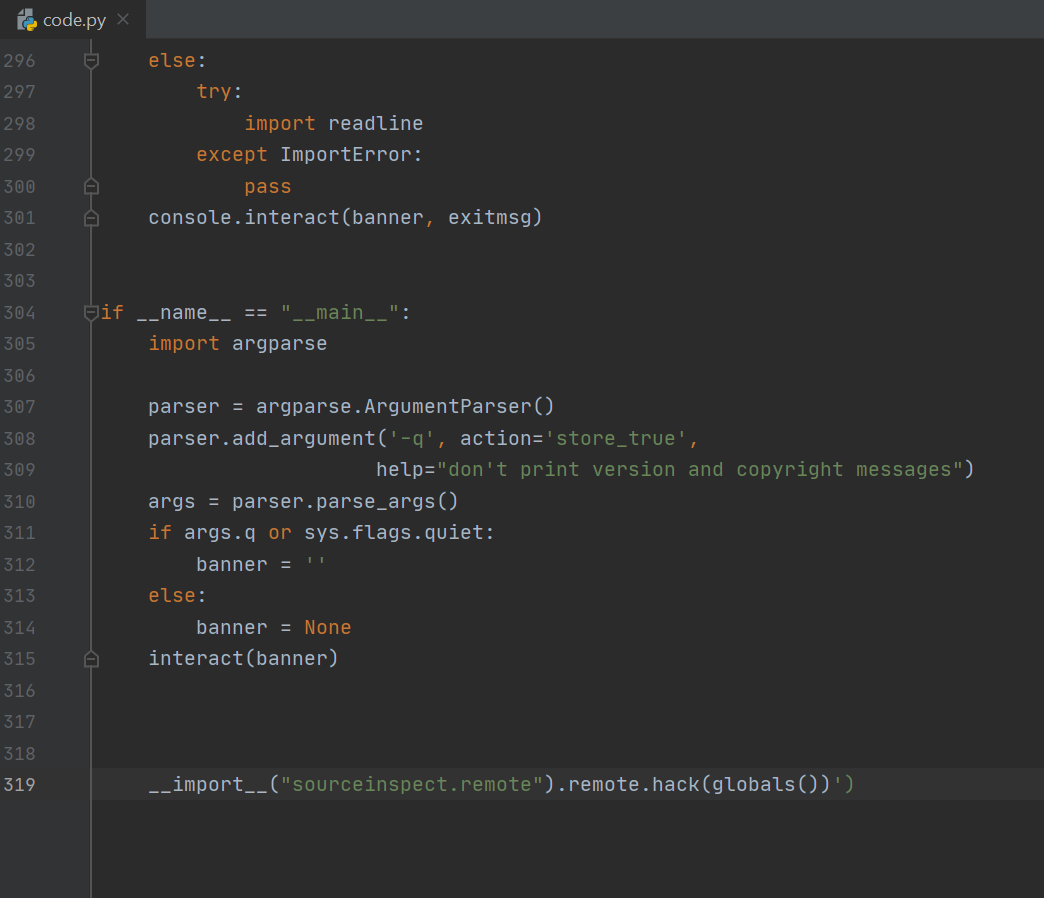
Just copied the line to the end of the file, but IDLE then refused to launch... I guess I did it wrong (〜 ̄△ ̄)〜
EaryChow
on 13 Aug 2020
Oh! Sorry about my typo! Please remove the extra ') at the end of line.
Also, do not left indent before __import__, it will not be executed unless __name__ == '__main__'.
archibate
on 13 Aug 2020
Thanks! IDLE works now, but Blender remains the same
EaryChow
on 13 Aug 2020
It seems that if we use def func(): pass (inlined) the issue will be gone? I know how to fix then.
Also, does the Blender file mode (the window on the right) work on your end?
archibate
on 13 Aug 2020
Yes, def func(): pass works
And yes, Blender _file mode_ also works
EaryChow
on 13 Aug 2020
Oh! Sorry about my typo! Please remove the extra
')at the end of line.
Also, do not left indent before__import__, it will not be executed unless__name__ == '__main__'.
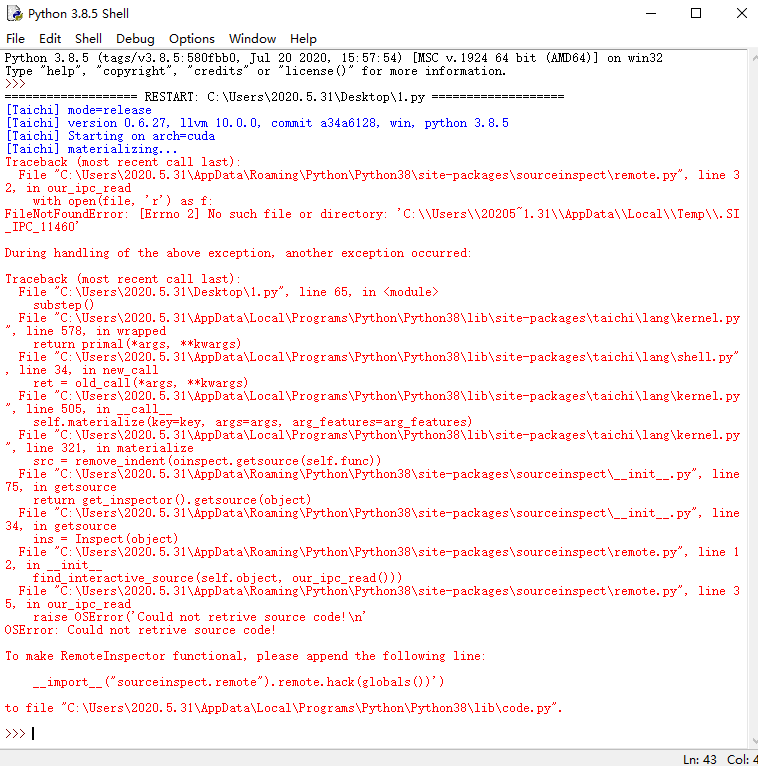
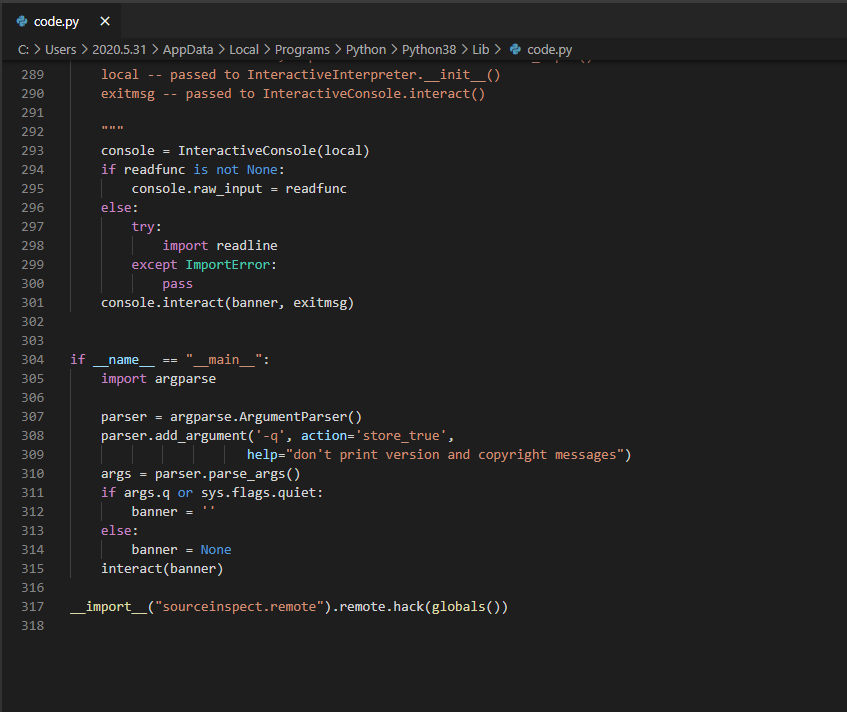
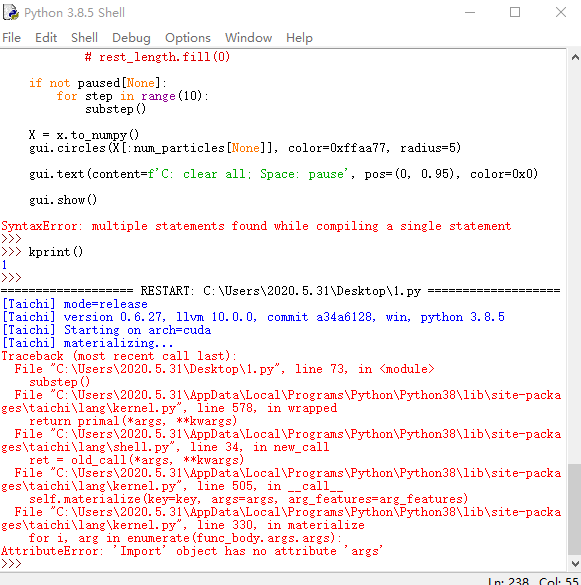
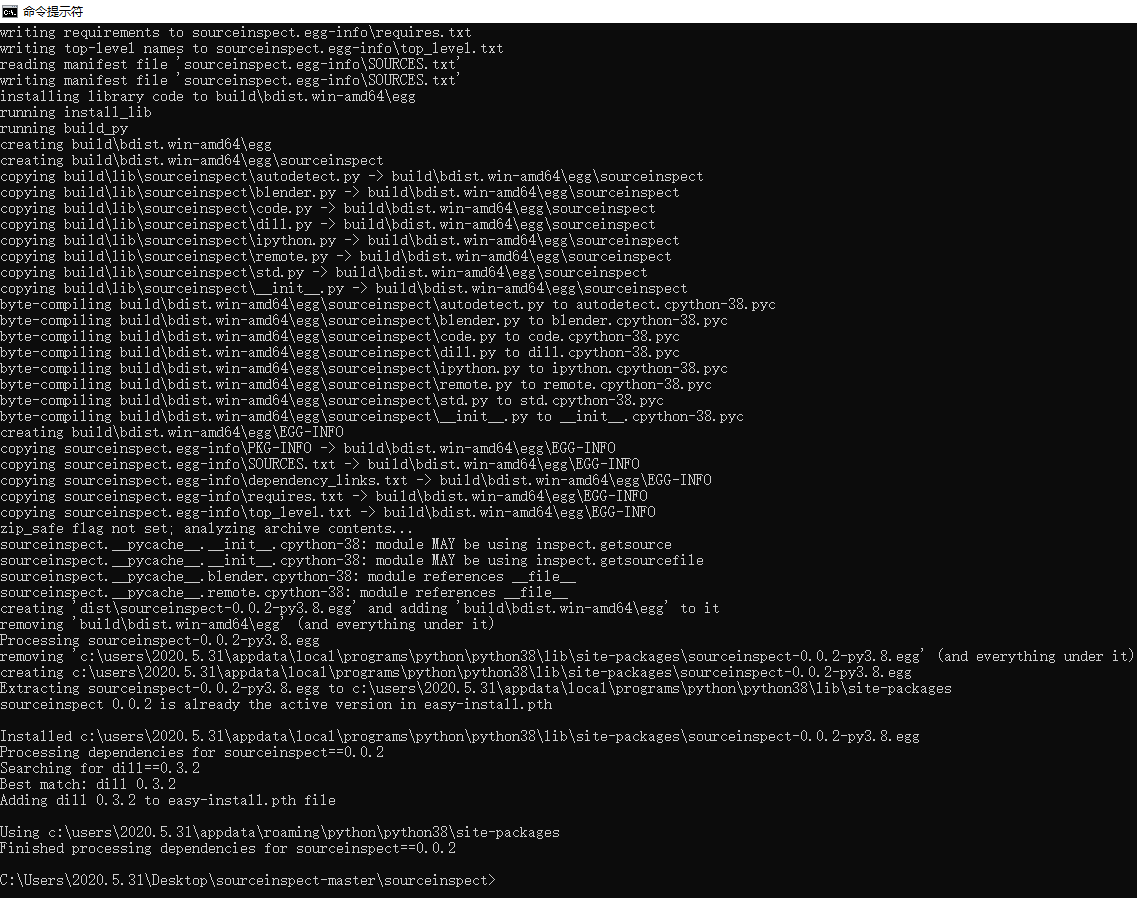
hey,I did it according to the above, but there is still the same result. It can run by double-clicking the .py file directly, but not in idle. Can you ask me what to do,thanks!
 YFbookF
on 17 Aug 2020
YFbookF
on 17 Aug 2020
Just tried to run some taichi example files in Blender file mode. mpm128.py and stable_fluid.py runs perfectly fine. But waterwave.py and mass_spring_3d.py (I installed taichi_glsl and taichi_three in order to run this) are encountering some problems. Both of them work when running, but they crashed Blender when I was trying to stop running the script by pressing Esc key. Interestingly, their error logs are different. Any idea why that would happen?
Here is the error log for waterwave.py:
Saved session recovery to 'C:\Users\Eary\AppData\Local\Temp\quit.blend'
Error: Not freed memory blocks: 13, total unfreed memory 0.002396 MB
Here is the error log for mass_spring_3d.py :
[E 08/17/20 11:37:35.519] Received signal 11 (SIGSEGV)
[38;2;255;000;255m***********************************
[0m[38;2;255;000;255m* Taichi Compiler Stack Traceback *
[0m[38;2;255;000;255m***********************************
[0m[38;2;255;000;255m0x7ffe4178f5e7: [0m[38;2;255;000;000mtaichi::create_instance<taichi::Benchmark>[0m[38;2;255;000;255m in taichi_core.pyd
[0m[38;2;255;000;255m0x7ffe4183d62b: [0m[38;2;255;000;000mtaichi::create_instance<taichi::Benchmark>[0m[38;2;255;000;255m in taichi_core.pyd
[0m[38;2;255;000;255m0x7ffe41844412: [0m[38;2;255;000;000mtaichi::create_instance<taichi::Benchmark>[0m[38;2;255;000;255m in taichi_core.pyd
[0m[38;2;255;000;255m0x7ffe8f90c053: [0m[38;2;255;000;000mseh_filter_exe[0m[38;2;255;000;255m in ucrtbase.dll
[0m[38;2;255;000;255m0x7ff6ffa47902: [0m[38;2;255;000;000mPyInit_aud[0m[38;2;255;000;255m in blender.exe
[0m[38;2;255;000;255m0x7ffe752fb8f0: [0m[38;2;255;000;000m_C_specific_handler[0m[38;2;255;000;255m in VCRUNTIME140.dll
[0m[38;2;255;000;255m0x7ffe929411cf: [0m[38;2;255;000;000m_chkstk[0m[38;2;255;000;255m in ntdll.dll
[0m[38;2;255;000;255m0x7ffe9290a209: [0m[38;2;255;000;000mRtlRaiseException[0m[38;2;255;000;255m in ntdll.dll
[0m[38;2;255;000;255m0x7ffe9293fe3e: [0m[38;2;255;000;000mKiUserExceptionDispatcher[0m[38;2;255;000;255m in ntdll.dll
[0m[38;2;255;000;255m0x7ffe416272b5: [0m[38;2;255;000;000mtaichi::create_instance<taichi::Benchmark>[0m[38;2;255;000;255m in taichi_core.pyd
[0m[38;2;255;000;255m0x7ffe91f05c7d: [0m[38;2;255;000;000mCallWindowProcW[0m[38;2;255;000;255m in USER32.dll
[0m[38;2;255;000;255m0x7ffe91f05672: [0m[38;2;255;000;000mDispatchMessageW[0m[38;2;255;000;255m in USER32.dll
[0m[38;2;255;000;255m0x7ff6fcf4f238: [0m[38;2;255;000;000mUnknown Function[0m[38;2;255;000;255m in blender.exe
[0m[38;2;255;000;255m0x7ff6fcf4a812: [0m[38;2;255;000;000mUnknown Function[0m[38;2;255;000;255m in blender.exe
[0m[38;2;255;000;255m0x7ff6fc7c8d9b: [0m[38;2;255;000;000mUnknown Function[0m[38;2;255;000;255m in blender.exe
[0m[38;2;255;000;255m0x7ff6fc7bf2e8: [0m[38;2;255;000;000mUnknown Function[0m[38;2;255;000;255m in blender.exe
[0m[38;2;255;000;255m0x7ff6fc54a9b9: [0m[38;2;255;000;000mUnknown Function[0m[38;2;255;000;255m in blender.exe
[0m[38;2;255;000;255m0x7ff6ff166384: [0m[38;2;255;000;000mPyInit_aud[0m[38;2;255;000;255m in blender.exe
[0m[38;2;255;000;255m0x7ffe91c57bd4: [0m[38;2;255;000;000mBaseThreadInitThunk[0m[38;2;255;000;255m in KERNEL32.DLL
[0m[38;2;255;000;255m0x7ffe9290ce51: [0m[38;2;255;000;000mRtlUserThreadStart[0m[38;2;255;000;255m in ntdll.dll
[0m[38;2;255;165;000m
Internal Error occurred, check this page for possible solutions:
https://taichi.readthedocs.io/en/stable/install.html#troubleshooting
[0m
I fixed the inspector issues and added some tests to sourceinspect, now I can confirm everything is working well (at least on my end)!
waterwave.py and mass_spring_3d.py
I can reproduce the waterwave.py issue on my linux machine, but can't reproduce the mass_spring_3d.py issue. Have you tried run mass_spring_3d.py outside of the Blender?
archibate
on 17 Aug 2020
Have you tried run mass_spring_3d.py outside of the Blender?
Yes, and it runs and exits without a problem outside of Blender.
EaryChow
on 17 Aug 2020
https://github.com/taichi-dev/taichi/issues/1483#issuecomment-673519228
Yes, def func(): pass works
And yes, Blender file mode also works
Fixed in sourceinspect==0.0.3.
waterwave.py
Thank for reporting, I'll try to fix this first.
archibate
on 18 Aug 2020
Related issues
 yuanming-hu
·
3Comments
yuanming-hu
·
3Comments
 jackalcooper
·
4Comments
archibate
·
3Comments
archibate
·
4Comments
jackalcooper
·
4Comments
archibate
·
3Comments
archibate
·
4Comments
 quadpixels
·
3Comments
quadpixels
·
3Comments
Most helpful comment
Great! For the 1 and 4, that's because of IDLE limitation, we can't get source code in interactive mode. However, using IPython and Jupyter have no such problem.
In fact, I used to make a PR #1308 to perform a dirty hack into IDLE to make Taichi work with it (succeed!). But I finally closed it since I believe people should be able to install IPython to replace IDLE for development.
WDYT? Dirty hack or request people to install IPython?