Taichi: Something wrong with Cornell box example
- os: macOS Catalina 10.15.5
- Python version: 3.7.0
- taichi version: 0.6.7
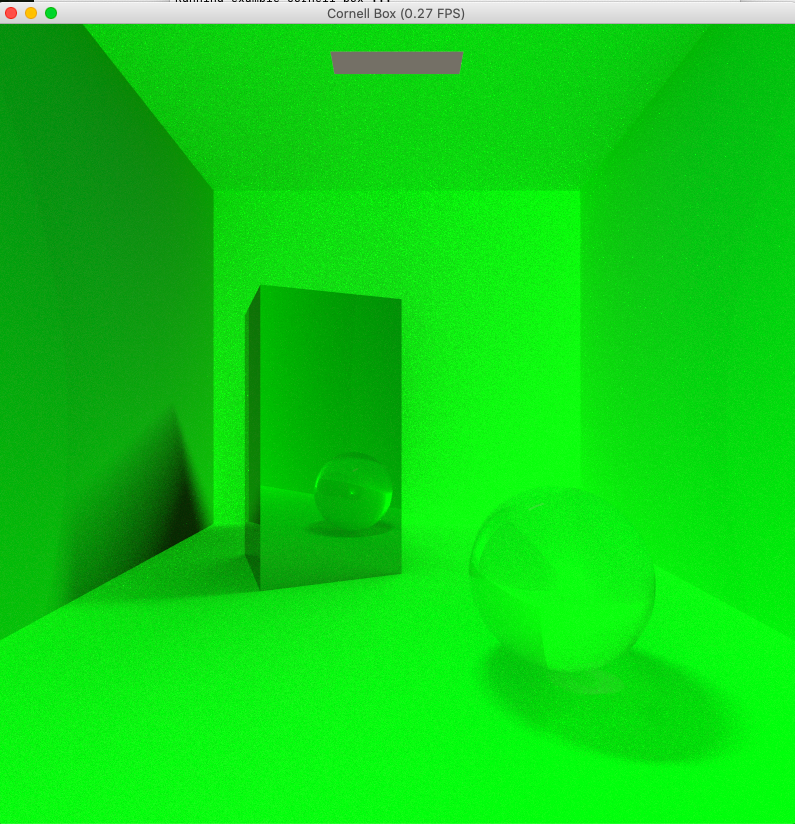
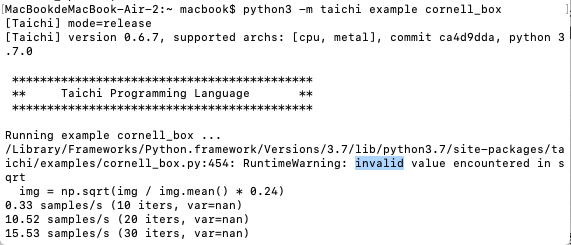
It seems that there is something wrong with the example 'Cornell box' .
Thanks for your help in advance.
 leo-luo-lzy
All 6 comments
The error itself seems like a numpy warning indicating img / img.mean() * 0.24 got a negative number therefore all var become nan. But I failed to reproduce it with python 3.7.7 and numpy 1.18.4, not sure if it was caused by the version
[Taichi] mode=release
[Taichi] version 0.6.7, supported archs: [cpu, metal], commit ca4d9dda, python 3.7.7

0.44 samples/s (10 iters, var=0.15163780748844147)
14.49 samples/s (20 iters, var=0.14393506944179535)
15.90 samples/s (30 iters, var=0.13919679820537567)
16.09 samples/s (40 iters, var=0.13583609461784363)
15.96 samples/s (50 iters, var=0.1332968771457672)
16.11 samples/s (60 iters, var=0.13132062554359436)
16.11 samples/s (70 iters, var=0.12971432507038116)
 rexwangcc
on 3 Jun 2020
rexwangcc
on 3 Jun 2020
Would you mind sharing your numpy info via pip show numpy? I can not reproduce this on my mac either.
 TH3CHARLie
on 3 Jun 2020
TH3CHARLie
on 3 Jun 2020
pip show numpy
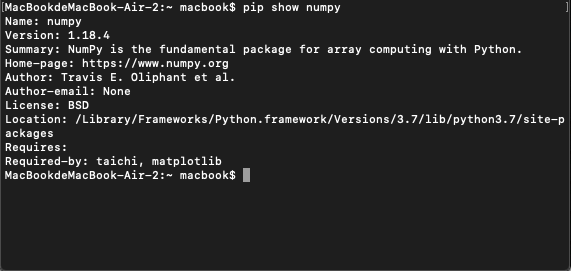
Here it is. Thank you!
leo-luo-lzy
on 3 Jun 2020
Thanks for sharing, but again I can not reproduce this. A quick workaround would be adding a line of img = np.clip(img, 0, 1) right after line 453 to ensure no negative value presents
TH3CHARLie
on 3 Jun 2020
img = np.clip(img, 0, 1)
Thanks for your help! I tried it and also updated the python version to 3.8.3 ,however, the problem is still not solved.
leo-luo-lzy
on 3 Jun 2020
Hi,
Thank you for reporting this!
This is an issue due to the graphics card. My MBP has two cards:
- AMD Radeon Pro 5500M
- Intel(R) UHD Graphics 630
I can repro this on 2, but not 1. My wild guess would be that this was due to some floating point arithmetics differences. Maybe some denominators were close to zero and led to this problem? (@yuanming-hu have you encountered such kind of errors before? I.e. numerical rounding errors led to NaN..? )
Unfortunately, my understanding of Metal is not enough for me to easily spot where the problem was :( It is even possible that Apple had a poor support on the integrated graphics cards.. (We once observed that Metal's memory order went completely nonsense on an old MBP model)
I could make a patch to disable direct light sampling in this case. The result will be more noisy, but hopefully it can at least present a reasonable result.
 k-ye
on 4 Jun 2020
k-ye
on 4 Jun 2020
Related issues
 jackalcooper
·
4Comments
jackalcooper
·
4Comments
 yuanming-hu
·
3Comments
yuanming-hu
·
3Comments
 KLozes
·
4Comments
KLozes
·
4Comments
 liaopeiyuan
·
3Comments
liaopeiyuan
·
3Comments
 archibate
·
3Comments
archibate
·
3Comments
Most helpful comment
Hi,
Thank you for reporting this!
This is an issue due to the graphics card. My MBP has two cards:
I can repro this on 2, but not 1. My wild guess would be that this was due to some floating point arithmetics differences. Maybe some denominators were close to zero and led to this problem? (@yuanming-hu have you encountered such kind of errors before? I.e. numerical rounding errors led to NaN..? )
Unfortunately, my understanding of Metal is not enough for me to easily spot where the problem was :( It is even possible that Apple had a poor support on the integrated graphics cards.. (We once observed that Metal's memory order went completely nonsense on an old MBP model)
I could make a patch to disable direct light sampling in this case. The result will be more noisy, but hopefully it can at least present a reasonable result.