Describe the bug
Some examples (mpm88, mpm99) have memory leak.
Log/Screenshots
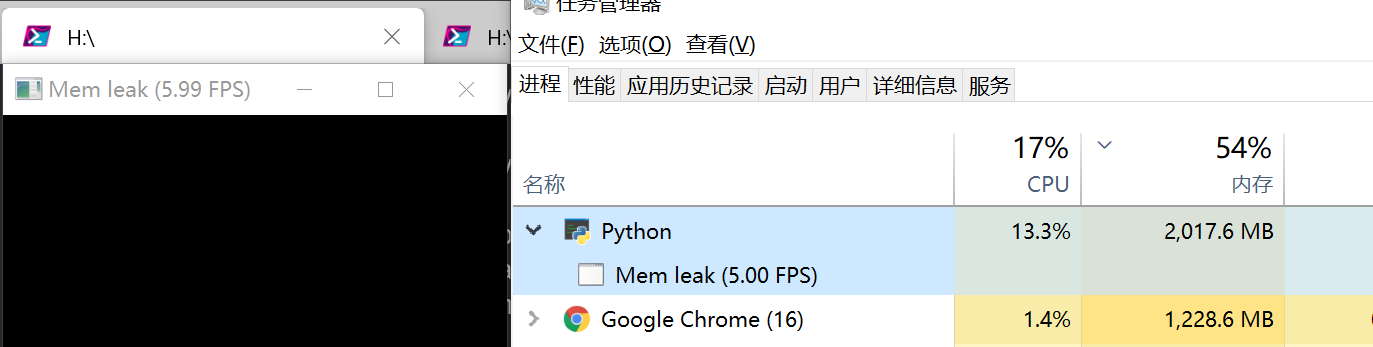
There is no errors. Just run POC and watch memory use.
system env:
- Python 3.7.1
- [Taichi] version 0.6.7, supported archs: [cpu, cuda, opengl], commit ca4d9dda, python 3.7.1
- NumPy version: 1.15.4 Python version: 3.7.1 (default, Dec 10 2018, 22:54:23) [MSC v.1915 64 bit (AMD64)]
log and screenshot
use ti.init(debug=True, arch=ti.cpu) and y = np.zeros((350_000,2))
❯ python .\mem.py
[Taichi] mode=release
[Taichi] version 0.6.7, supported archs: [cpu, cuda, opengl], commit ca4d9dda, python 3.7.1
[T 06/02/20 14:56:14.846] [program.cpp:taichi::lang::Program::Program@48] Program initializing...
[T 06/02/20 14:56:14.847] [memory_pool.cpp:taichi::lang::MemoryPool::MemoryPool@9] Memory pool created. Default buffer size per allocator = 1024 MB
[T 06/02/20 14:56:14.849] [llvm_context.cpp:taichi::lang::TaichiLLVMContext::TaichiLLVMContext@46] Creating Taichi llvm context for arch: x64
[T 06/02/20 14:56:14.850] [llvm_context.cpp:taichi::lang::TaichiLLVMContext::get_this_thread_data@620] Creating thread local data for thread 1976
[T 06/02/20 14:56:14.852] [llvm_context.cpp:taichi::lang::TaichiLLVMContext::TaichiLLVMContext@71] Taichi llvm context created.
[T 06/02/20 14:56:14.853] [program.cpp:taichi::lang::Program::Program@134] Program (0x184e81387c0) arch=x64 initialized.
Traceback (most recent call last):
  File ".\mem.py", line 13, in <module>
    time.sleep(0.1)
KeyboardInterrupt
[T 06/02/20 14:56:56.142] [program.cpp:taichi::lang::Program::finalize@514] Program finalizing...
[T 06/02/20 14:56:56.146] [program.cpp:taichi::lang::Program::finalize@553] Program (0x184e81387c0) finalized.
To Reproduce
run mem.py and check memory use.
mem.py
import taichi as ti
import time
import numpy as np

ti.init(debug=True, arch=ti.cpu)
# ti.init(arch=ti.gpu)

# y = np.zeros((28_000,2)) # ~ 10 MB/s
y = np.zeros((350_000,2)) # ~ 100 MB/s

gui = ti.GUI("Mem leak")
while not gui.get_event(ti.GUI.ESCAPE):
    time.sleep(0.1)
    gui.circles(y)
    gui.show()
This new POC could print mem use.
import taichi as ti
import time
import numpy as np

import sys
import psutil
import os

ti.init(debug=True, arch=ti.cpu)
# ti.init(arch=ti.gpu)

# y = np.zeros((28_000,2)) # ~ 10 MB/s
y = np.zeros((350_000,2)) # ~ 100 MB/s

i = 0
gui = ti.GUI("Mem leak")
while not gui.get_event(ti.GUI.ESCAPE):
    time.sleep(0.1)
    gui.circles(y)
    gui.show()

    # mem use
    i = i + 1
    if i % 5 == 0:
        info = psutil.Process(os.getpid()).memory_info()
        print(time.strftime("[%H:%M:%S] ", time.localtime()), end='')
        print(f'vms={info.vms/1024/1024:.1f}MB, rss={info.rss/1024/1024:.1f}MB')
output
❯ python .\mem.py
[Taichi] mode=release
[Taichi] version 0.6.7, supported archs: [cpu, cuda, opengl], commit ca4d9dda, python 3.7.1
[T 06/02/20 15:37:29.155] [program.cpp:taichi::lang::Program::Program@48] Program initializing...
[T 06/02/20 15:37:29.156] [memory_pool.cpp:taichi::lang::MemoryPool::MemoryPool@9] Memory pool created. Default buffer size per allocator = 1024 MB
[T 06/02/20 15:37:29.157] [llvm_context.cpp:taichi::lang::TaichiLLVMContext::TaichiLLVMContext@46] Creating Taichi llvm context for arch: x64
[T 06/02/20 15:37:29.158] [llvm_context.cpp:taichi::lang::TaichiLLVMContext::get_this_thread_data@620] Creating thread local data for thread 15816
[T 06/02/20 15:37:29.159] [llvm_context.cpp:taichi::lang::TaichiLLVMContext::TaichiLLVMContext@71] Taichi llvm context created.
[T 06/02/20 15:37:29.160] [program.cpp:taichi::lang::Program::Program@134] Program (0x1ce2a1470a0) arch=x64 initialized.
[15:37:30] vms=193.9MB, rss=181.6MB
[15:37:31] vms=239.0MB, rss=248.4MB
[15:37:32] vms=306.7MB, rss=315.1MB
[15:37:32] vms=408.3MB, rss=381.9MB
[15:37:34] vms=560.7MB, rss=448.7MB
[15:37:34] vms=560.7MB, rss=515.4MB
[15:37:36] vms=789.2MB, rss=582.2MB
[15:37:36] vms=789.2MB, rss=648.9MB
[15:37:37] vms=789.2MB, rss=715.7MB
[15:37:38] vms=789.2MB, rss=782.5MB
[15:37:39] vms=1132.0MB, rss=852.4MB
[15:37:40] vms=1132.0MB, rss=919.2MB
[15:37:41] vms=1132.0MB, rss=985.9MB
[15:37:42] vms=1132.0MB, rss=1052.7MB
[15:37:43] vms=1132.0MB, rss=1119.5MB
[15:37:44] vms=1646.2MB, rss=1186.2MB
[15:37:45] vms=1646.2MB, rss=1253.0MB
[15:37:46] vms=1646.2MB, rss=1319.7MB
[15:37:47] vms=1646.2MB, rss=1386.5MB
[15:37:48] vms=1646.2MB, rss=1453.3MB
[15:37:49] vms=1646.2MB, rss=1520.0MB
[15:37:50] vms=1646.2MB, rss=1586.8MB
[15:37:51] vms=1646.2MB, rss=1653.6MB
notes about vms and rss
rss: aka “Resident Set Size”, this is the non-swapped physical memory a process has used. On UNIX it matches “top“‘s RES column). On Windows this is an alias for wset field and it matches “Mem Usage” column of taskmgr.exe.
vms: aka “Virtual Memory Size”, this is the total amount of virtual memory used by the process. On UNIX it matches “top“‘s VIRT column. On Windows this is an alias for pagefile field and it matches “Mem Usage” “VM Size” column of taskmgr.exe.
 inkydragon
All 10 comments
Thank for reporting!
Have you tried removing gui.circles(y)?
Have you tried making time.sleep(0.1) to time.sleep(1) and see if leakage slows down?
 archibate
on 2 Jun 2020
archibate
on 2 Jun 2020
Have you tried removing
gui.circles(y)?
remove gui.circles(y), program use 50MB~ forever.
Have you tried making
time.sleep(0.1)totime.sleep(1)and see if leakage slows down?
Yes.
If you remove gui.circles(y), ~10MB/s -> ~60MB/s.
And if you increase the size of y, program use more memory.
inkydragon
on 2 Jun 2020
Successfully reproduced on a Linux machine. gui.set_image doesn't have leakage. Maybe numpy array np.ascontigiousarray leakage?
archibate
on 2 Jun 2020
I actually reproduced this (memory leak) on MacOS 10.15.4. I did this with originally reported mpm99.py and I simply commented out all GUI code and replace loop control statement while ti.gui... with while True, the memory usage still goes up and soon freeze my laptop.
 TH3CHARLie
on 2 Jun 2020
TH3CHARLie
on 2 Jun 2020
My guess: Taichi's GUI system forgot to call clear (at least I don't find it being called anywhere)...
 k-ye
on 2 Jun 2020
k-ye
on 2 Jun 2020
I don't find it being called anywhere
It seems like that they've called clear in python.
https://github.com/taichi-dev/taichi/blob/c8b2e94c5f98f7404a7fe36fb2321e57661cf712/taichi/python/export_visual.cpp#L39-L40
https://github.com/taichi-dev/taichi/blob/43e1da5d511f6ac949504c80fa242b14fde1cf12/python/taichi/misc/gui.py#L45-L48
https://github.com/taichi-dev/taichi/blob/43e1da5d511f6ac949504c80fa242b14fde1cf12/python/taichi/misc/gui.py#L145-L149
inkydragon
on 2 Jun 2020
Then probably it wasn't the correct overload being called. Currently it's this one
which doesn't clear circles or lines.
I can make a fix, but it needs a new release..
k-ye
on 2 Jun 2020
I can make a fix, but it needs a new release..
I am pro for getting a new release for this because it is pretty bad(it crashes my laptop so it has the potential to do so on other users), the true difficulty would be to encourage the new users(who just installed v0.6.7 yesterday) to bump up the version...
TH3CHARLie
on 2 Jun 2020
the new users(who just installed v0.6.7 yesterday) to bump up the version...
Thanks! I think it's actually preferable to ask users to keep their taichi up-to-date...
k-ye
on 2 Jun 2020
Thanks! I think it's actually preferable to ask users to keep their taichi up-to-date...
I just did it in the WeChat group but it would be better to be emphasized by the instructor during the lecture.
TH3CHARLie
on 2 Jun 2020
Related issues
 jackalcooper
·
4Comments
archibate
·
4Comments
jackalcooper
·
4Comments
archibate
·
4Comments
 yuanming-hu
·
3Comments
archibate
·
4Comments
yuanming-hu
·
3Comments
archibate
·
4Comments
 g1n0st
·
3Comments
g1n0st
·
3Comments
Most helpful comment
Then probably it wasn't the correct overload being called. Currently it's this one
https://github.com/taichi-dev/taichi/blob/43e1da5d511f6ac949504c80fa242b14fde1cf12/taichi/gui/gui.h#L409-L411
which doesn't clear
circlesorlines.I can make a fix, but it needs a new release..