Tagify: Arrows dropdown selection doesn't work with custom dropdownItemActive class
Prerequisites
- [x] I am running the latest version
- [x] I checked the documentation and found no answer
- [x] I checked to make sure that this issue has not already been filed
Demo Page
https://jsbin.com/keduzuqibi/edit?html,js,output
Explanation
- What is the expected behavior?
WhendropdownItemActiveclassname is changed to the custom onetagifyshould still work the same way as without it. - What is happening instead?
Dropdown arrow navigation has issues (doesn't work at all). - What error message are you getting?
None.
I've already found & fixed that bug in the #693 PR
 FRSgit
All 8 comments
The jsbin does not show any issue and is basically very simple. Are you sure you shared the right url?
var input = document.querySelector('input')
var tagify = new Tagify(input, {
  dropdown: {
    enabled: 0
  },
   whitelist: ["a", "aa", "aaa", "b", "bb", "ccc"]
})
 yairEO
on 6 Nov 2020
yairEO
on 6 Nov 2020
@yairEO Sorry, I must've not saved the previous jsbin or sth - do not use it often.
I've updated the demo page link in the original issue description
FRSgit
on 6 Nov 2020
May I know why you wish to change that class name?
yairEO
on 7 Nov 2020
I'm using CSS-modules and all of the classnames are generated by the bundler. It's more clearly visible in the production build where all of the classnames are being mangled (minified).
So e.g. the classname dropdown-item--active in the production bundle will become something like aE3 (some random, the shortest possible, generated hash).
So, the queries like class$=--active will never work in my app.
FRSgit
on 7 Nov 2020
Here is a screenshot of the DOM of my app with elements generated by tagify:
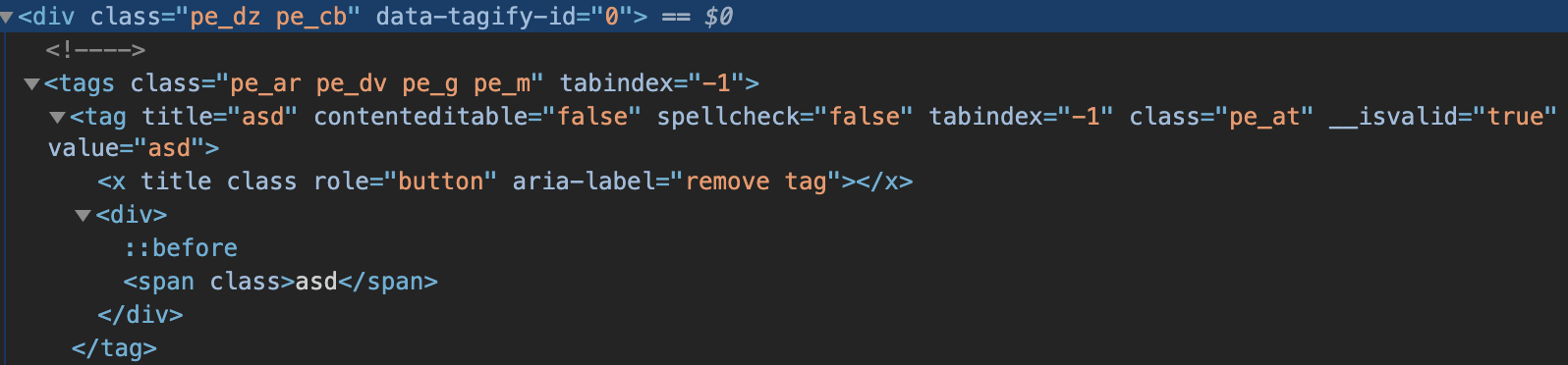
All of the mangles classnames are prefixed with pe_ because of how this app should be working, but other then that - they're completely random.
FRSgit
on 7 Nov 2020
But Tagify works only after the page has been served to the user and the javascript is executed. Are you serving pre-rendered HTML?
I still don't understand why would you change any of the Tagify class names. what is the benefit?
It's more clearly visible in the production build where all of the classnames are being mangled (minified).
This sentence does not explain anything to me..
If you did not change ant of the classnames Tagify generates, and simply use Tagify out-of-the-box, will things not work for you?
yairEO
on 7 Nov 2020
No, I'm not serving prerendered HTML (though I probably will for this app, but that won't make any difference in this case).
I still don't understand why would you change any of the Tagify class names. what is the benefit?
The benefit is that I can mangle CSS classnames to keep the output bundle file is smaller.
If you did not change ant of the classnames Tagify generates, and simply use Tagify out-of-the-box, will things not work for you?
With my current configuration I cannot import CSS/SCSS files without some kind of mangling happening. I'm working with CSS-modules, not only to minify class names, but also to keep track of used classnames, so it's possible for the bundler to remove unused part of styling.
I used this library primarily because it seemed that the classNames were thoughtfully added into the configurable settings object.
This single line changed in my PR is the only thing which helds the users back from changing the original class names. Also, the code after the change should be more performant, since class selector is superior to attribute selector in this regard.
FRSgit
on 7 Nov 2020
Thanks for the informative explanation, now I understand the situation and will incorporate the fix and publish a new version shortly. I will wait a few days to gather some more changed before deploying.
yairEO
on 8 Nov 2020
Related issues
 8483
·
4Comments
8483
·
4Comments
 raoul2000
·
6Comments
raoul2000
·
6Comments
 arnoldmatusz
·
6Comments
arnoldmatusz
·
6Comments
 Mushr0000m
·
6Comments
Mushr0000m
·
6Comments
 conquext
·
3Comments
conquext
·
3Comments