Hi there
I'm having problems to set up tagify inside a Formik component on a Next JS app.
Code:
import { Formik, Form } from 'formik';
import Tags from "@yaireo/tagify/dist/react.tagify";

const App = () => {
  const validate = val => {
    const errors = {};
    Object.keys(val).map(field => {
      if (val[field] === '') {
        errors[field] = 'Required';
      }
    })
    return errors;
  }
  return (
    <Formik
      initialValues={{
        keywords: '[{"value":"a"},{"value":"b"},{"value":"c"}]'
      }}
      validate={e => validate(e)}
    >
      {({ values, setFieldValue }) => (
        <Form style={{ width: "50%", margin: "20%" }}>
          <Tags
            value={values['keywords']}
            onChange={e => {
              setFieldValue('keywords', e.target.value)
            }}
          />
          Values: {values['keywords']}
        </Form>
      )}
    </Formik>
  );
}

export default App;
Result:
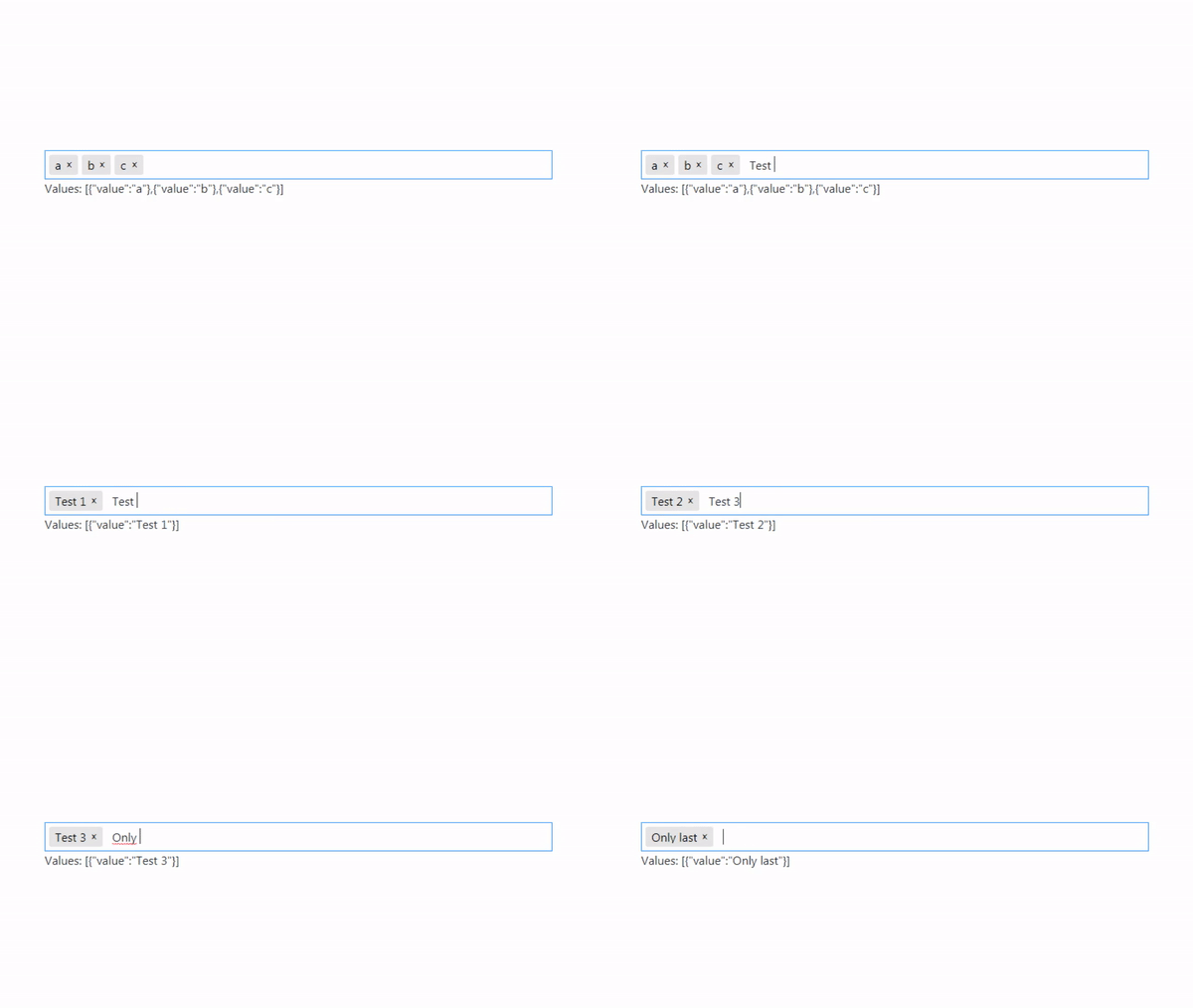
As you can see, only the last text entered remains after typing Enter.
I made a repository in https://github.com/erniomaldo/tagify_formik with the problem, you can install it and see for yourself.
What am I doing wrong?
Thank you very much in advance
 erniomaldo
All 5 comments
Apparently some small delay was needed. I've also improved your code:
import { Formik, Form } from 'formik';
import Tags from "@yaireo/tagify/dist/react.tagify";

// if a function is pure function and is not connected to the component's state, then its
// best to be placed outside of the component, so it won't be re-create on every component render
const validate = val => {
  const errors = {}

  for( let field in val )
    if (val[field] === '')
      errors[field] = 'Required'

  return errors
}

// same as above
const onChange = setFieldValue => e => {
  e.persist()
  setTimeout(setFieldValue, 0, 'keywords', e.target.value)
}

const App = () => (
  <Formik
    initialValues={{
      keywords: '[{"value":"a"},{"value":"b"},{"value":"c"}]'
    }}
    validate={validate}
  >
    {({ values, setFieldValue }) => (
      <Form style={{ width: "50%", margin: "20%" }}>
        <Tags
          value={values['keywords']}
          onChange={onChange(setFieldValue)}
        />
        Values: {values['keywords']}
      </Form>
    )}
  </Formik>
)

export default App
 yairEO
on 26 Sep 2020
yairEO
on 26 Sep 2020
Hi again
I have some problems after update to NextJS 10, solved this way:
<Tags
  value={values['keywords']}
  onChange={e => {
    setFieldValue('keywords', e.target.value)
  }}
/>
Because this seems to be the only Google hit on this problem, I thought I'd share my solution:
import { FieldArray } from 'formik'
import Tags from "@yaireo/tagify/dist/react.tagify";

const FormikTags = ({...props}) => {
    return (
        <FieldArray {...props}>
            {({ push, remove, form }) => (
                <div>
                    <label htmlFor={props.name}>{props.label}</label>
                    <Tags
                        value={form.initialValues[props.name]}
                        onAdd={e => push(e.detail.data.value)}
                        onRemove={e => remove(e.detail.index)}
                    />
                </div>
            )}
        </FieldArray>
    )
}

export default FormikTags;
Usage:
import {Formik, Form} from 'formik'

const ExampleForm = () => {
    const handleSubmit = (values) => {
        console.log("Submitting with values", values);
    }

    return (
        <Formik initialValues={{tags: ["these"]}} onSubmit={handleSubmit}>
            <Form>
                <FormikTags
                    name="tags"
                    id="tags"
                    label="Tags"
                    tagProps={{
                        settings: {
                            enforceWhitelist: true
                        },
                        whitelist: ["only", "these", "allowed"],
                        className: "customTags"
                    }}
                />
                <button type="submit">Submit</button>
            </Form>
        </Formik>
    );
}

export default ExampleForm;
Note that there are a bunch of issues to be sorted out, for example if enforceWhitelist is true, but the initialValues supplied to the component contains an item not in the whitelist, that kind of breaks it. Also this doesn't work for mixed more or select mode. There are probably more problems, but hopefully this is a useful template for whoever sees this to work from!
 defucilis
on 9 Dec 2020
defucilis
on 9 Dec 2020
"if enforceWhitelist is true, but the initialValues supplied to the component contains an item not in the whitelist, that kind of breaks it"
It is up to you, as the implementer to pre-filter the initialValues. This is not a bug but on purpose, to allow manually by-passing the enforceWhitelist with initial values.
I assumed developers won't save to the database unwanted values in the first-place
yairEO
on 9 Dec 2020
Oh yeah I didn't mean to imply that was a problem with tagify, just that my example implementation was very barebones! Tagify is bloody amazing 👍
defucilis
on 10 Dec 2020
Related issues
 collimarco
·
3Comments
collimarco
·
3Comments
 pcolmer
·
4Comments
pcolmer
·
4Comments
 raoul2000
·
6Comments
raoul2000
·
6Comments
 Hardikraja
·
4Comments
Hardikraja
·
4Comments
 braydensterrett
·
4Comments
braydensterrett
·
4Comments