Tacotron-2: multi gpu training support?
@Rayhane-mamah ,
hey Rayhane, it's really a great work you are driving here,
I wonder if there's any multi gpu implementation or plan in the future?
 unwritten
All 29 comments
Hello @unwritten, thank you for your support!
Actually, there are plans of multi gpu training in the future, but some things are slightly more important for the moment so it has been delayed.
The original idea was to adopt some parallel procedure similar to tensorflow cifar-10 multi-gpu scheme. This will typically alleviate the problem of small batch sizes for low memory gpus and give the model the opportunity to be trained on more representative mini-batches.
If you are aware of any other multi-gpu training techniques please let me know.
As for the multi-gpu for synthesis (mainly for GTA or synthesis on a big number of sentences), I believe it can be done with no problem.
 Rayhane-mamah
on 15 May 2018
Rayhane-mamah
on 15 May 2018
Also interested in multi gpu now
 butterl
on 21 May 2018
butterl
on 21 May 2018
Hi @Rayhane-mamah, trying to implement the tensorflow cifar-10 multi-gpu scheme.
Having problems figuring out how to organise the code for the CPU-based weight server?
Also should we split Tacotron.add_optimizer(self, global_step) into e.g. Tacotron.get_gradients(...) & Tacotron.optimize(...) ??? (So that we can pass gradients back to the CPU weight server and optimise there)
 duvtedudug
on 29 May 2018
duvtedudug
on 29 May 2018
I implemented like this :
    def add_optimizer(self, global_step):
        '''Adds optimizer. Sets "gradients" and "optimize" fields. add_loss must have been called.
        Args:
            global_step: int32 scalar Tensor representing current global step in training
        '''

        # 1. Declare GPU Devices
        gpus = ["/gpu:{}".format(i) for i in range(self.num_gpus)]

        tower_gradients = []
        with tf.device('/cpu:0') :
            with tf.variable_scope('optimizer') as scope:
                self.learning_rate = tf.train.exponential_decay(
                    self.initial_learning_rate, global_step, self.learning_rate_decay_halflife, 0.5)
                optimizer = tf.train.AdamOptimizer(self.learning_rate, self.adam_beta1, self.adam_beta2)

        # 2. Compute Gradient
        for i in range(self.num_gpus) :
            # 3. Device placement
            with tf.device(tf.train.replica_device_setter(ps_tasks=1,ps_device="/cpu:0",worker_device=gpus[i])) :
                with tf.variable_scope('optimizer') as scope:
                    # grads_vars = [(grad, var), ...]
                    grads_vars = optimizer.compute_gradients(self.tower_loss[i])

                    tower_gradients.append(grads_vars)

        # 3. Average Gradient
        with tf.device('/cpu:0') :
            grads = []
            vars = []
            for grad_and_vars in zip(*tower_gradients):
                # grads_vars = [(grad1, var), (grad2, var), ...]
                grad = tf.stack([g for g,_ in grad_and_vars])
                grad = tf.reduce_mean(grad, axis=0)

                v = grad_and_vars[0][1]
                grads.append(grad)
                vars.append(v)

            self.gradients = grads
            grads, _ = tf.clip_by_global_norm(grads, 0.5)

            # Add dependency on UPDATE_OPS; otherwise batchnorm won't work correctly. See:
            # https://github.com/tensorflow/tensorflow/issues/1122
            with tf.control_dependencies(tf.get_collection(tf.GraphKeys.UPDATE_OPS)):
                self.optimize = optimizer.apply_gradients(zip(grads, vars), global_step=global_step)
 a3626a
on 8 Jun 2018
a3626a
on 8 Jun 2018
@a3626a , thanks for sharing your code. where and how do you define tower_loss? thank you in advance!
 babua
on 10 Jun 2018
babua
on 10 Jun 2018
inside add_loss(self).
initialize(self, ..) : split inputs into num_gpus chunks and creates outputs for each chunk of inputs.
add_loss(self) : computes losses for each chunk of outputs which created at initialize(self, ..). These losses are stored inside tower_loss.
a3626a
on 10 Jun 2018
I see, thank you @a3626a . One final question, if you have the time:
Enforcing GPU placement during creating the input chunks is also necessary right? (i.e. placing the tensors on the GPUs at creation).
Also, do you use a similar block of code in add_loss() to ensure GPU placement as the one you use in add_optimizer()?
Something like this, maybe?
for i in range(self._hparams.num_gpus) :
    # 3. Device placement
    with tf.device(tf.train.replica_device_setter(ps_tasks=1,ps_device="/cpu:0",worker_device=gpus[i])) :
        with tf.variable_scope('loss') as scope:
            tw_loss = self._tower_loss(self.gpu_inputs[i])
            self.tower_loss.append(tw_loss)
Thank you for your help!
babua
on 11 Jun 2018
Enforcing GPU placement during creating the input chunks is also necessary right? (i.e. placing the tensors on the GPUs at creation).
No. You must do tf.split inputs with /cpu:0. If you do this with /gpu:0, this might cause inefficient tensor flow RAM->/gpu:0->/gpu:i. After tf.split, Further preprocessing should be done with each /gpu:i
Also, do you use a similar block of code in add_loss() to ensure GPU placement as the one you use in add_optimizer()?
Yes.
a3626a
on 11 Jun 2018
Ah, I understand, thank you very much @a3626a , you've been a big help!
babua
on 11 Jun 2018
@a3626a So is your version a single producer but multiple consumers model?
 MlWoo
on 12 Jun 2018
MlWoo
on 12 Jun 2018
@a3626a So is your version a single producer but multiple consumers model?
Yes if you consider feeder as producer, tacotron as consumers. In my case, I re-write entire feeder using tf.Dataset to avoid possible bottleneck. However I concluded that it was not necessary with my environment (4 gpus)
a3626a
on 12 Jun 2018
@a3626a Thank for your quick reply. I just modify the email address so that I could recieve the notification from github in time. There are some problems need to be confirm by you.
The parameters of the model of your version is pinned on CPU to distribute the calculation to the GPUS. Is it right?
I am not familar to TF. Looking forward to your reply. Thanks again in advance.
MlWoo
on 14 Jun 2018
There are many ways to store parameters. The best, or fastest way depends on environment like PCIe bandwidth, DMA. Storing variables on CPU is general solution. If your GPUs are all interconnected by DMA, it is better to distribute variables evenly on multiple GPUs.
a3626a
on 14 Jun 2018
@a3626a Thanks a lot. If I want to pin the parameters on CPU, I need to modify other the model defination such as _Encoder_ and _Decoder_ and so on besides the functions like _optimizer_ as you mentioned above. Is it right?
MlWoo
on 14 Jun 2018
Right.
Inside initialize(self,...), maybe you have used with tf.device("/gpu:0") to specify GPUs for each tower. This will store variables on GPU:0. tf.train.replica_device_setter can help you store them on CPU.
a3626a
on 14 Jun 2018
@a3626a I used the tf.split to get multi inputs. All data have been preprocessed in feeder. The data are paded with the same max size of the whole batch. So the dimensions of paded target are the same. Howerver, RNNs are implemented with dynamical_rnn of different lengths of multi inputs, so the dimension of outputs are maybe different. It failed to pass the assertion that the output and target should have the same dimension when calculating the loss. Could you have any suggestions?
MlWoo
on 24 Jun 2018
@a3626a Thanks a lot. I have enabled the multi-gpus training with your help.
MlWoo
on 25 Jun 2018
@MlWoo
For the problem above, you should calculate loss / gradient with each gpu device.
a3626a
on 25 Jun 2018
@a3626a I have resolved the problems already, thanks for your help and patient instructions.
MlWoo
on 25 Jun 2018
@a3626a @MlWoo thanks for sharing your experience on test, maybe it will help more people save debug time with your pull request :)
butterl
on 27 Jun 2018
@butterl It seems that the repo has not updated for a while. I will release the repo on my mainpage of github when the wavenet multi-GPUs training is completed.
MlWoo
on 9 Jul 2018
@butterl I released the tacotron 2 with multi-GPUs support in my repo and fixed the wavenet bug. I am very happy you can try it and give some suggestion.
MlWoo
on 10 Jul 2018
@MlWoo cool ! will try that out :+1:
butterl
on 10 Jul 2018
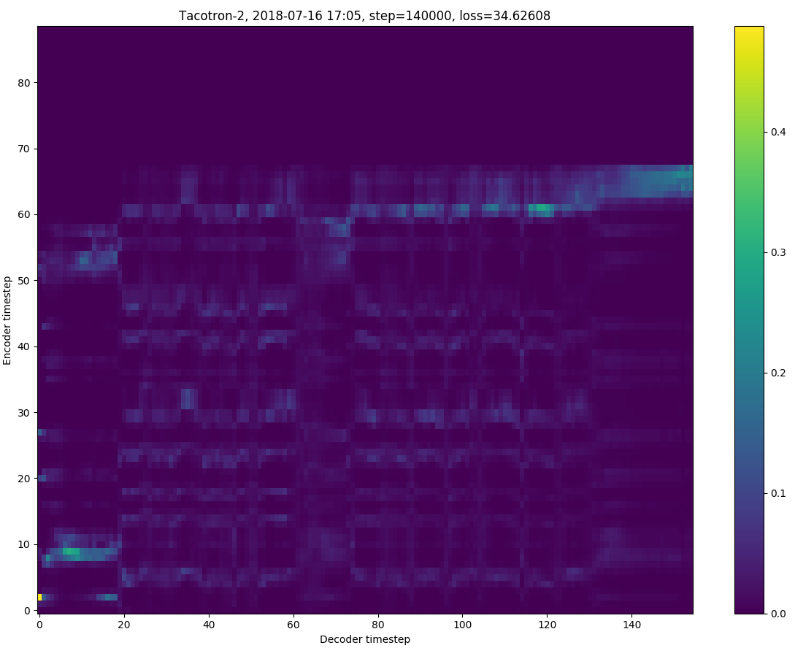
@MlWoo I tried your patch, and the training speed is great, but I got one problem: the encoder and decoder will not get aligned even to 140K step,and the loss from training log is 0.06 but from the align map, it's 30+, not sure if the big batch size will affect that?
butterl
on 16 Jul 2018
@butterl We are also trying to train the model with multi-gpus. I have no idea on your question. The evaluation loss is 34.62 while your training loss is 0.06. Maybe you can help me check the code of evaluation or you should check whether overfitting exists or not.
MlWoo
on 16 Jul 2018
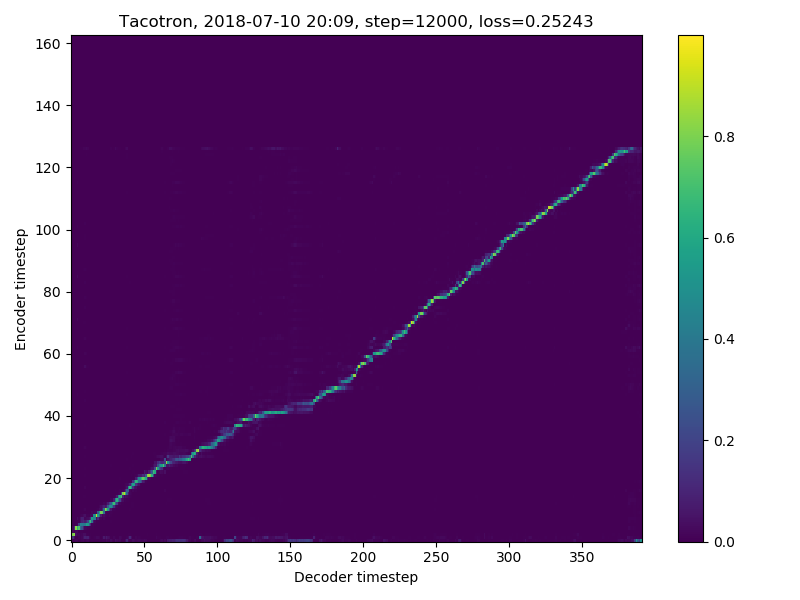
@butterl hi, I also tried MLWoo's code. It works well here. I only did 12k steps. Both of my training loss and eval loss are around 0.25. Since your training loss is 0.06 while your eval loss is 30+, I m wondering yours may get an overfitting issue.
btw, my batchsizes are 48*4.
 zhangyizhong17
on 17 Jul 2018
zhangyizhong17
on 17 Jul 2018
My experiments with multi-gpu did not show any major boost in speed compared to mono-GPU, I thus trust @MlWoo will do the multi-gpu perfectly.
Rayhane-mamah
on 4 Aug 2018
@Rayhane-mamah Actually we boosted the training with learning rate scaling tech mentioned in the paper.
MlWoo
on 7 Aug 2018
@MIWoo, interesting! I will make sure to give that a look as soon as possible. Awesome work!
Rayhane-mamah
on 7 Aug 2018
Related issues
 zhf459
·
12Comments
zhf459
·
12Comments
 a8568730
·
6Comments
a8568730
·
6Comments
 gloriouskilka
·
6Comments
gloriouskilka
·
6Comments
 pandaGst
·
4Comments
pandaGst
·
4Comments
 Yeongtae
·
8Comments
Yeongtae
·
8Comments
Most helpful comment
@butterl I released the tacotron 2 with multi-GPUs support in my repo and fixed the wavenet bug. I am very happy you can try it and give some suggestion.