Tachiyomi: Can't install any extention
App version: 0.8.4
Android version: 9.0
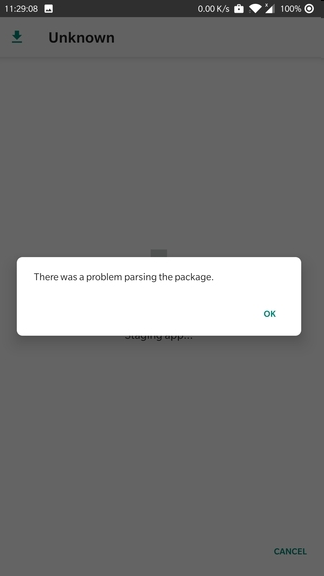
Issue/Request: I can't install any extention, always “There was a problem parsing the package".
No VPN, unkown source allowed.
 ParanoiaIsGreat
All 10 comments
Delete the file and redownload it again to see if it works.
 joseph619
on 21 Sep 2019
joseph619
on 21 Sep 2019
Delete the file and redownload it again to see if it works.
No use...
For now I can just manually download extention.apks and install it.
ParanoiaIsGreat
on 22 Sep 2019
I had same problem sometime ago, only reverting phone back to factory settings helped me.
 WH1T3No1SE
on 25 Sep 2019
WH1T3No1SE
on 25 Sep 2019
Same here, I upgraded to Android 9 today then failed to install any extension from the app.
 Digi1980s
on 7 Oct 2019
Digi1980s
on 7 Oct 2019
I have managed to figure out a workaround:
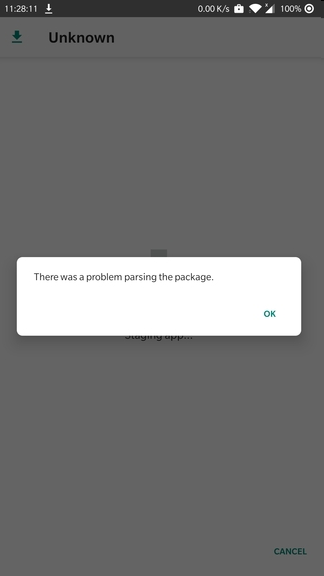
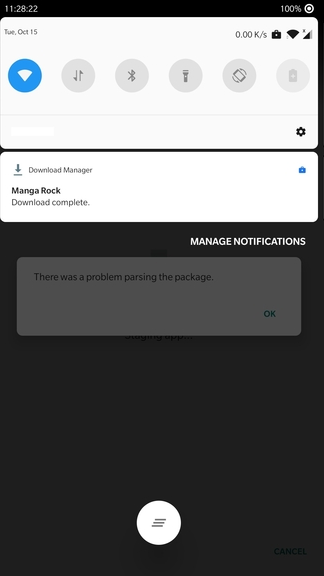
When it prompts "There was a problem parsing the package", instead of tapping "OK" here, swipe down notification bar, there is "Download complete" and by tapping it you proceed the normal installation.
Digi1980s
on 8 Oct 2019
https://github.com/inorichi/tachiyomi/issues/2237#issuecomment-539542882
Had the same problem, tried doing what you said but it only lead me to extension with nothing installed, does anyone had solution?
 Seiyu12
on 15 Oct 2019
Seiyu12
on 15 Oct 2019
@Seiyu12
With screenshots it should be much easier to follow:
This is the problem we run into here.
Swipe down the notification bar, we will see the extension has been downloaded. Just tap it.
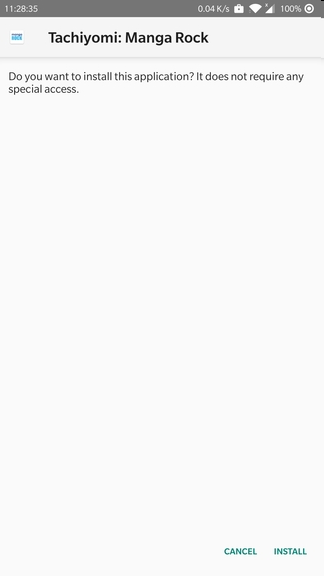
Here we have the familiar normal installation interface.
And it just will finish as expected, at least in my case.
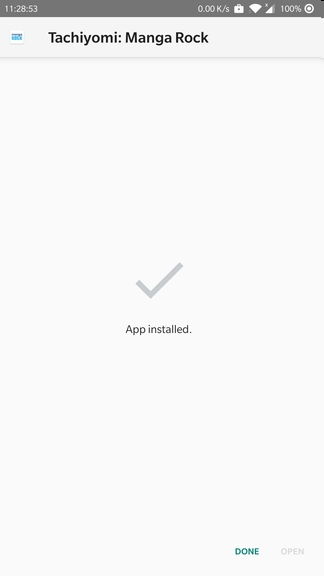
Back to here, it doesn't matter just tap "OK", see if the extension installed (I hope so).
Digi1980s
on 15 Oct 2019
@Digi1980s
How did you use screenshot?
Anyway i have the same situation until i tap the notification, the app came back to the extension list but it didn't install anything
The solution i got was to install the extension in tachiyomi.org
Seiyu12
on 15 Oct 2019
@Seiyu12
Just paste images as the line beneath the text area says.
Perhaps what you have had is another new but worse problem. Downloading separately is indeed a workable method, but it is way too tedious when you have extensions to be updated occasionally. Let's hope someone could fix it soon.
Digi1980s
on 15 Oct 2019
Duplicate of #2107
 arkon
on 9 Apr 2020
arkon
on 9 Apr 2020
Related issues
 Pepsyy
·
4Comments
Pepsyy
·
4Comments
 BlueCat300
·
3Comments
BlueCat300
·
3Comments
 squadz3
·
3Comments
squadz3
·
3Comments
 nataliejean2412
·
4Comments
nataliejean2412
·
4Comments
 ElerTheMagnanimous
·
3Comments
ElerTheMagnanimous
·
3Comments
Most helpful comment
I have managed to figure out a workaround:
When it prompts "There was a problem parsing the package", instead of tapping "OK" here, swipe down notification bar, there is "Download complete" and by tapping it you proceed the normal installation.