Tachiyomi: [Bug] Selecting Help gives "Open with <app>" prompt.
All 9 comments
I think that's the expected behavior. The code uses openInBrowser, and when you selected chrome it used a chrome tab, not a webview.
 inorichi
on 26 May 2019
inorichi
on 26 May 2019
Yes, I did intentionally choose to make it open in the browser instead of the WebView. Do you think it'd be better to have it in the WebView, which has very little functionality?
 arkon
on 26 May 2019
arkon
on 26 May 2019
Opening it in web view would seem more integrated.
 hXtreme
on 26 May 2019
hXtreme
on 26 May 2019
@inorichi if you look at the video, the browser looks nothing like chrome.
hXtreme
on 26 May 2019
It's a custom tab, it's definitely Chrome.
arkon
on 26 May 2019
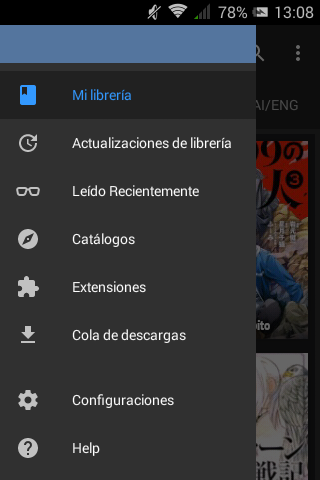
There is a blank space between Settings and Download Queue since Help was added. Maybe this is because of my phone resolution? It is not much of a problem, just reporting.
 MerradOklom
on 26 May 2019
MerradOklom
on 26 May 2019
@MerradOklom That's always been there.
arkon
on 26 May 2019
@arkon I see, sorry. Maybe I didn't pay enough attention before.
MerradOklom
on 26 May 2019
I prefer the browser. The only reason we use webviews is to share cookies and allow to bypass the cloudflare challenge and captcha.
inorichi
on 26 May 2019
Related issues
 TheUnlocked
·
3Comments
TheUnlocked
·
3Comments
 nataliejean2412
·
4Comments
nataliejean2412
·
4Comments
 dinosw
·
3Comments
dinosw
·
3Comments
 basilg3
·
3Comments
basilg3
·
3Comments
 Septolum
·
3Comments
Septolum
·
3Comments
Most helpful comment
I prefer the browser. The only reason we use webviews is to share cookies and allow to bypass the cloudflare challenge and captcha.