Tachiyomi: [Feature Request] Mass Mark Read/Unread/Download
Request for extended menu on main screen, to select multiple mangas and perform action (mark as read/unread, download all)

 folta01
All 19 comments
This is the only feature I am missing from manga rock. Sometimes I have to mark certain chapters as read and I have select 100+ chapters one by one.
 echevarriandre
on 12 Jan 2018
echevarriandre
on 12 Jan 2018
@xadden
In a manga you can mark previous as read so you can easily mark 100 plus chapters without having to select 1 by 1
 CarlosEsco
on 12 Jan 2018
CarlosEsco
on 12 Jan 2018
@CarlosEsco that's good to know but if I want to download the next 50 chapters I have to click all of them one by one.
echevarriandre
on 12 Jan 2018
You can also click download 10, 5 times. But I understand where you're coming from :).
I don't really like mass selection from manga though. Personally I think all manga should be managed individually. I will try to implement #1179 today though
 NoodleMage
on 12 Jan 2018
NoodleMage
on 12 Jan 2018
how about letting us enter a custom number to download?
 shogunreaper
on 19 Jan 2018
shogunreaper
on 19 Jan 2018
See #1185.
NoodleMage
on 19 Jan 2018
Well, it's good to know that's what "Mark Previous Read" means. Should be made clearer, though, had to come here and almost open up my own issue to find out.
 Malkierian
on 2 Dec 2018
Malkierian
on 2 Dec 2018
How would it be made clearer? The action is pretty much self-explainatory.
 metroid112
on 3 Dec 2018
metroid112
on 3 Dec 2018
When I read it, it struck me as mark previous chapter (singular) as read. Granted, I didn't try it out to see what it was, but I was confused, so thought it better not to risk it. It'd be clear enough if it was just changed to "Mark Previous Chapters Read" or "Mark All Previous Read" or something like that.
Malkierian
on 3 Dec 2018
Is there any update for this yet by chance? I just fully migrated my 860 manga and was wondering if this feature would be coming? Definitely be amazing for the many like me who will be migrating especially now that MR is gonna be fully dead and buried
 stardrogen
on 4 Mar 2020
stardrogen
on 4 Mar 2020
You can still go to each one and do a select all > mark read, but yeah, that's going to be rather tedious for 800+ mangas. But if you actually migrated (using Tachiyomi's source migration feature) it should have kept the read status of those chapters.
Malkierian
on 4 Mar 2020
I think the "Mark Previous Chapter as Read" is good enough for Mass mark as read.
(Also about your 860 migrated manga, doesn't a full backup keep track of what you did read ? I think it does ?)
But we really need an option for mass unreading. Sometimes I wanna read something a second time, or I tap on "Mark Previous Chapter as Read" by mistake, and then I need to go through the hundred of chapters one by one to unread them...
 clem193
on 4 Mar 2020
clem193
on 4 Mar 2020
@clem193 stardrogen is talking about 800 or more mangas they now have to go through individually. The process we have now is valid, but it's two or three extra steps per manga than could be needed with operations on the manga list itself.
That being said, there IS a mass "Mark as unread" option. And it's virtually the same as I was talking about in my last comment. Go into the chapter list for a manga, long-press on any chapter, and tap the triple dot in the top right corner of the header. You'll see "Mark as read", "Mark as unread" and "Select all".
Malkierian
on 4 Mar 2020
Another option long press a chapter, long press another chapter it will select between then you can 3 dot at top far as unread
CarlosEsco
on 4 Mar 2020
This would be nice to have I have to Mark 1900 manga now
 inverlock
on 10 Mar 2020
inverlock
on 10 Mar 2020
Would have to agree that these need to be a feature. I saw that some were saying that there is an alternative for it so why should this be a thing. But that alternative is nice for one or two manga but when you're like me and some of the others here we don't have 20 or 30 manga we range in the high hundreds to low thousands. Some said they don't think it's a good idea don't knock it down since there is a large group of us that think it's wonderful. And a few of us would pay to have it as one.
Other note if someone could point me to the line of code in the Json backup file that states that a manga has been "read" I would greatly appreciate it. I personally could not see it but I am not a programmer.
 Fyzhex
on 13 Mar 2020
Fyzhex
on 13 Mar 2020
Unfortunately, there is no one single line that marks it as read, it keeps track of the individual read chapters. If it's in the chapter list, it's been read.
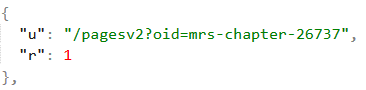
I believe the "r" of 1 is what marks that individual chapter read. And if it hasn't been read, it's just not in the list. Sorry, no easy fix for you there.
Malkierian
on 13 Mar 2020
After looking you're right. If it was already in there we could have maybe done something but it doesn't look like it sadly. It would probably take longer trying to make that happen via the Backup file sadly.
Fyzhex
on 13 Mar 2020
Duplicate of #156
 arkon
on 27 Apr 2020
arkon
on 27 Apr 2020
Related issues
NoodleMage
·
3Comments
 Pepsyy
·
4Comments
Pepsyy
·
4Comments
 dinosw
·
3Comments
dinosw
·
3Comments
 nataliejean2412
·
4Comments
nataliejean2412
·
4Comments
 Septolum
·
3Comments
Septolum
·
3Comments
Most helpful comment
Another option long press a chapter, long press another chapter it will select between then you can 3 dot at top far as unread