Tachiyomi-extensions: [Bug] mangasPROJECT: Could not get read token
Device information
- Tachiyomi extension version: 1.2.5
- Tachiyomi version: 0.8.4
- Android version: Android 8.1.0
Steps to reproduce
- Downloading or reading the chapter
- Having the issue
Expected behavior
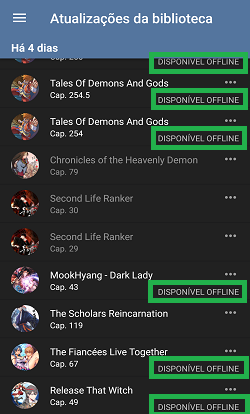
Actual behavior
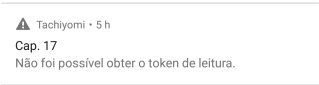
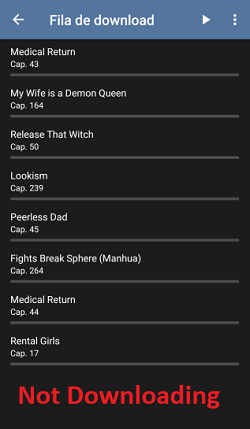
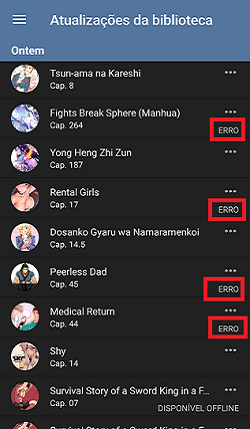
Other details
This maintenance message seems to only appears in webview, in a normal browser the site works normally. So then i came here.
 maz1no
All 10 comments
Guys? please don't ignore me.
maz1no
on 18 Jan 2020
Sorry, can't fix what I can't access.
Error 1020 Access denied
 happywillow0
on 18 Jan 2020
happywillow0
on 18 Jan 2020
The site always been region-restricted, i dont think that's the problem.
there must be a way to fix... also thanks for the feedback
maz1no
on 19 Jan 2020
@maz1no What he's saying is that because the site is region locked, that limits who can work on the problem. We need access to the site to figure out what the issue is: no access means no way to figure out the issue, which means no way to correct it.
 SnakeDoc83
on 19 Jan 2020
SnakeDoc83
on 19 Jan 2020
Understood. I can help with something? I'm not a senior programmer but i need this extension working again. If it serves as proof, when I access the site through the webview, the site returns me with the advice that the site is in maintenance. However, he's not and that has been going for a week.
maz1no
on 19 Jan 2020
This bug only affects mangasproject, and not all mangas, from my testing, at least One Piece still works fine for some reason.
Also, Mangalivre, which comes with the mangasproject extension, seems to have the exact same content as mangasproject and is working without any problems that I could find. In fact, looking at some commits, the extension maintainer even points out the mangalivre site is just a mirror of mangasproject, but with licensed stuff.
So I recommend you to just migrate everything you have to mangalivre, at least temporarily, until mangasproject is fixed.
 0klux
on 20 Jan 2020
0klux
on 20 Jan 2020
I will take a look and see if I can fix it. Meanwhile, you can use temporarily the MangaLivre catalogue as pointed out by @0klux.
 alessandrojean
on 20 Jan 2020
alessandrojean
on 20 Jan 2020
@alessandrojean I took a look at their website by using a proxy. I think it's an issue with val readerSrc = document.select("script[src*=\"reader.min.js\"]") not having the token in all cases. Something for you to check anyway.
SnakeDoc83
on 20 Jan 2020
Probably they have changed how the reader works and how they do the request to get the chapter pages, updating the backend and frontend only in the MangaProject and not yet on MangaLivre. Anyway, I will take a look, thanks @SnakeDoc83.
alessandrojean
on 20 Jan 2020
Okay, apparently they have changed the script to reader.toon.min.js, so Jsoup will not find the element, resulting the error reported. However, the token it's still there. Tomorrow I will submit a PR fixing it.
alessandrojean
on 20 Jan 2020
Related issues
 napplebun
·
4Comments
napplebun
·
4Comments
 alireda22
·
4Comments
alireda22
·
4Comments
 Credits125
·
3Comments
Credits125
·
3Comments
 Kediny
·
4Comments
Kediny
·
4Comments
 Nesaijn
·
3Comments
Nesaijn
·
3Comments