Tabulator: Tabulator 4.6.3 Filter Column Height Restore Issue


All 6 comments
I thought this maybe stack-overflow question so I have created one: https://stackoverflow.com/q/62149666/5124710
 BirukTes
on 2 Jun 2020
BirukTes
on 2 Jun 2020
I am pretty sure it is a bug. If it isn't a bug, then I would definitely say it is a feature enhancement that should be added.
I am not aware of any easy way to workaround it right now. It looks like the height is not re-calculated properly (or at all) when you remove the header filters.
 nrayburn-tech
on 2 Jun 2020
nrayburn-tech
on 2 Jun 2020
I noticed another thing with select filter drop down, that the font-size is not same as tabulator default:
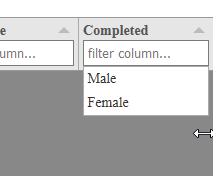
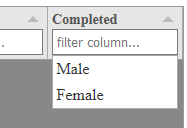
The second image became slightly larger in font (JSFiddle Firefox), however my project (Chromium based) it was larger, then became smaller to match tabulator with this code:
.tabulator-edit-select-list {
        font: inherit;
    }
BirukTes
on 3 Jun 2020
Hey @BirukTes
That is definitely a bug, i will stick it on the fixit list for the next release.
Cheers
Oli :)
 olifolkerd
on 7 Jun 2020
olifolkerd
on 7 Jun 2020
@BirukTes
The second issue is down to your CSS, the select element popup is not contained inside of Tabulator it is appended directly to the page body so it has no way to reference the font size of the table. You will need to tweak your CSS to resolve that.
A list of classes for the select popup can be found in the Styling Documentation
Cheers
Oli :)
olifolkerd
on 20 Jun 2020
Hey @BirukTes
I have just pushed a fix for this to the 4.8 branch which will be released next weekend.
Cheers
Oli :)
olifolkerd
on 30 Aug 2020
Related issues
 iBek23
·
3Comments
iBek23
·
3Comments
 Honiah
·
3Comments
Honiah
·
3Comments
 AndrewHutcheson
·
3Comments
AndrewHutcheson
·
3Comments
 tomvanlier
·
3Comments
tomvanlier
·
3Comments
 Manbec
·
3Comments
Manbec
·
3Comments