Tabulator: Add JSON data to a dropdown menu in every cell of the table
PLEASE WAIT BEFORE CLOSING THIS ISSUE,I'M BEGGING YOU : I know that i'm not supposed to ask questions here.
It's just that on Stack Overflow, people don't generally help with Tabulator.js related questions and I am a very desperate student. I already asked my question over there and no one has answered.
I've tried to contact you by other means of communication bu it seems like I can't reach you. Can you please help me solve this issue,I'm begging you. You are my last hope.
I'm new to tabulator.js but so far, it's great but I have an issue.
I have a JSON file containing some clients.
Here is the data :
{
  "clients": [
    {
      "city": "Brussels",
      "email": "[email protected]",
      "firstName": "Benoit",
      "idClient": 1,
      "lastName": "Dupont",
      "mailBox": "6",
      "phoneNumber": "0465237956",
      "postCode": "1200",
      "street": "Clos Chapelle-aux-Champs",
      "streetNumber": "43"
    }
  ]
}
For the moment, there's only one client but they will be more added to this json data in the future.
So I would like to add a dropdown menu in each row of the "Client" column like in the screenshot below.
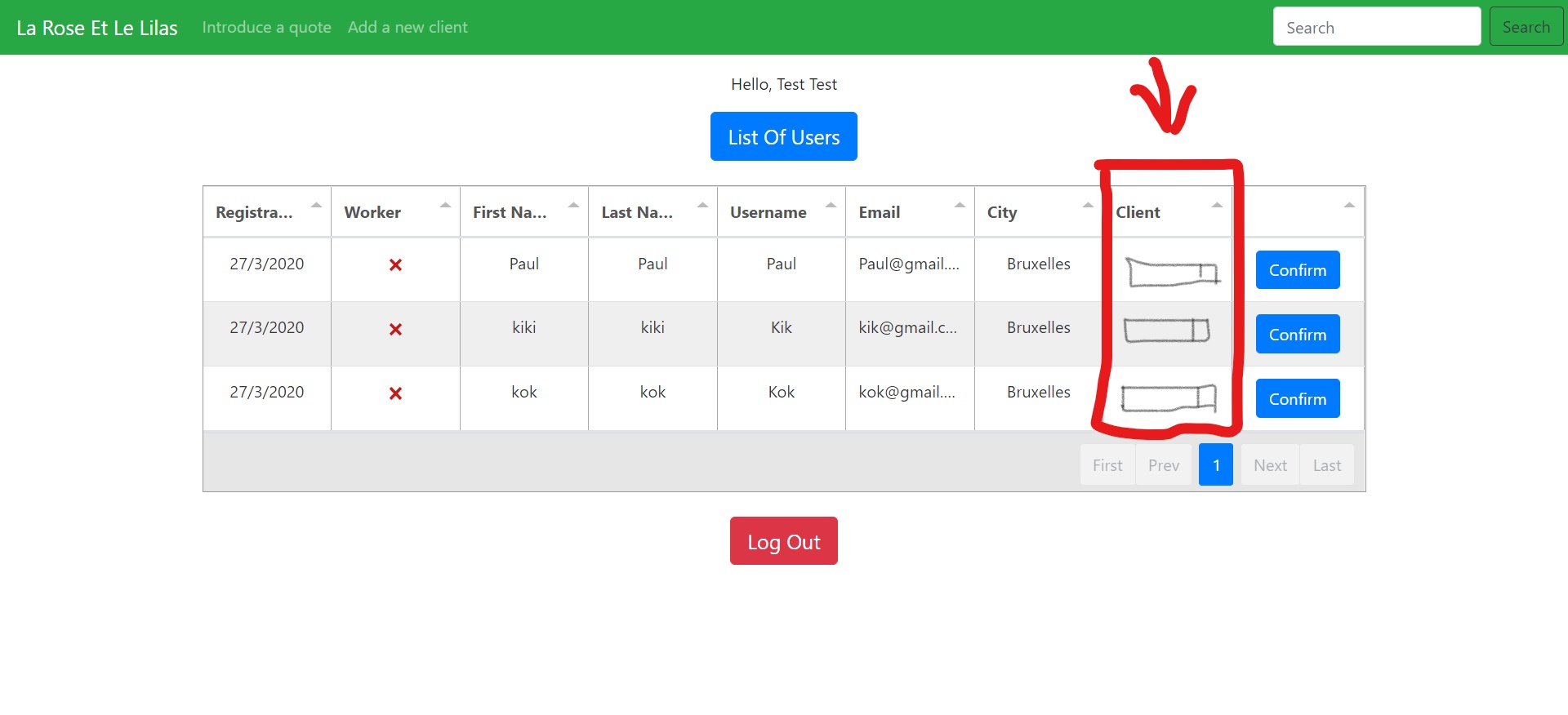
I've tried to follow the documentation of Tabulator.js on the matter but I can't seem to implement it well in my code with the JSON data
` var table = new Tabulator("#test", {
data: response.users,
index: "idUser",
layout: "fitColumns",
responsiveLayout: "hide",
tooltips: true,
addRowPos: "top",
pagination: "local",
paginationSize: 7,
movableColumns: true,
resizableRows: true,
    columns: [
        {title: "Registration Date", field: "registrationDate", formatter: dateFormatter},
        {title: "Worker", field: "worker", formatter: "tickCross", editor: true},
        {title: "First Name", field: "firstName"},
        {title: "Last Name", field: "lastName"},
        {title: "Username", field: "username"},
        {title: "Email", field: "email"},
        {title: "City", field: "city"},
        {
            title: "Client", editor: "select", editorParams: {
                values: {
                    // TODO INSERT THE VALUES OF THE JSON DATA HERE
                }
            }
        },
        {
            title: "", formatter: buttonTest, cellClick: function (e, cell) {
                const data = {
                    user: cell.getRow().getData().idUser,
                    worker: cell.getRow().getData().worker
                };

                updateData("users/" + data.user.idUser, data, token, function (response) {
                    console.log(response);
                }, function (response) {
                    console.log(response.error);
                })
            }

        }
    ],

});
`

Once the option from the dropdown is selected, i'd like to remember the id of the client that was selected.
I've tried almost every thing and nothing is working. Can you please help me?
Please don't hesitate illustrate your solution (I'm a visual learner).
Thank you very much in advance
 BrandonNgoranNtam
All 8 comments
Maybe you should consider to make a live example or so, so it's easier to help you (_codepen.io, or something like that_).
I also found it very hard, to understand the request itself, cause the close is formatted in three different ways. I guess you could improve that part, just a bit 😁
 exetico
on 28 Mar 2020
exetico
on 28 Mar 2020
Thank you so much for your response and your willingness to help me. It's very much appreciated. It's gonna be hard to show this example on codepen.io because the data is directly from a database that I am using and there's a whole back-end code to this. I'm going to try and explain the problem again in a clearer and more precise way.
Basically in the first screenshot of my website, there's a table that was generated thanks to tabulator.js. The data in the table is from a JSON file that was given to me thanks to my back-end code. This JSON file contains an array of what I call "user" objects with attributes (email, first name, etc). I successfully loaded the data to the table, as you can see. Now comes the tricky part.
I'd like to link a "user" object to a "client" object(a customer in other words) . "Client" objects come from another JSON file with almost the same format as the JSON file containing the users.
Now that I've laid the groundwork, here comes the question : How do I put the full name of each client of the "clients" from my second JSON file into a dropdown menu in each row of the Client column? I tried to illustrate that in my first screenshot ( the grey rectangles that I drew in the Client column are supposed to represent the dropdown menus that I want to create). So in the screenshot, if we were to press on a dropdown menu, we would see 1 option, which would be "Benoit Dupont" because that's the full name of sole client in the JSON file containing clients. (find JSON file in my first post). If that JSON file contained more client objects, then those people's full names would also appear in the options. (eg. "Rose Tyler", "Mary Poppins"). And once an option has been selected, I'd like to remember the "idClient" value of the selected object, for it to be sent to the database and linked with the user.
That's what I'm trying to do.
Don't hesitate to ask more questions if you need clarifications.
Again, I thank you.
BrandonNgoranNtam
on 28 Mar 2020
So just to make sure I understand correctly, you want the client column to be a dropdown list that stores the client id, but displays the full name.
You want to get the values from some async api call.
Is that all correct?
 nrayburn-tech
on 29 Mar 2020
nrayburn-tech
on 29 Mar 2020
Yes exactly !
But is it possible to click on a full name in the dropdown list and have the full name be displayed and the client id be saved implicitly, so that the client doesn't see the id? If that's not possible then your version is totally fine by me.
Thank you very much !
BrandonNgoranNtam
on 29 Mar 2020
You need to use the lookup formatter for displaying the id value as a name instead.
You need to use the select editor for creating a dropdown.
Use the related editorParams and formatterParams, so that your list contains what you need.
The most difficult part is how you can link the api call with the params, so here are two examples that should be useful.
Example where the api call is completed before creating Tabulator.
https://jsfiddle.net/69hp5L2y/
Example where the api call may be completed after Tabulator is created.
https://jsfiddle.net/69hp5L2y/1/
nrayburn-tech
on 29 Mar 2020
Wow, the second link is really what I'm looking for ! I've tried it and it almost worked. The data that i get from the database is an array of objects
{ "clients": [ { "city": "Brussels", "email": "[email protected]", "firstName": "Benoit", "idClient": 1, "lastName": "Dupont", "mailBox": "6", "phoneNumber": "0465237956", "postCode": "1200", "street": "Clos Chapelle-aux-Champs", "streetNumber": "43" } ] }
I tried your method but I kept on getting a "Missing display value" error. It's probably because I didn't format the data well into the key value pairs.
I tried to format it like this but it didn't work well. Based on the JSON data above, could you please provide some code that will successfully format it into key value pairs where the key is the "idClient" attribute and the value is a concatenation of the "firstName" and "lastName" attributes?
Thank you so very much, you have helped me a ton!
BrandonNgoranNtam
on 31 Mar 2020
Here is an updated version. I removed the extra data from your clients object to keep it short.
https://jsfiddle.net/0mwL72ga/
You will receive a warning in the console that there is not a display value because the async call may not be completed before the table is drawn. This should not be an issue because the table.redraw() will update the label.
nrayburn-tech
on 31 Mar 2020
OMG YES!!!!! THIS IS PERFECT!! IT WORKS!!!!!!
I am so grateful for your patience, your time and your willingness to help.
I can't thank you enough. I've learned a lot.
Thank you
BrandonNgoranNtam
on 31 Mar 2020
Related issues
 andreivanea
·
3Comments
andreivanea
·
3Comments
 Honiah
·
3Comments
Honiah
·
3Comments
 aballeras01
·
3Comments
aballeras01
·
3Comments
 iBek23
·
3Comments
iBek23
·
3Comments
 soo1025
·
3Comments
soo1025
·
3Comments
Most helpful comment
Here is an updated version. I removed the extra data from your clients object to keep it short.
https://jsfiddle.net/0mwL72ga/
You will receive a warning in the console that there is not a display value because the async call may not be completed before the table is drawn. This should not be an issue because the table.redraw() will update the label.