Tabulator: Data Tree not showing children records on filtered rows
When a table is setup as a dataTree, and any form of filter is applied to the data (header, or setFilter()), the child rows disappear from the parent. Child rows appear when filters are cleared.
Using version 4.3
Reproduced using headerFilter:
https://jsfiddle.net/dylanjnz/nL7458rj/
Expected behaviour
Filtering (as documented) should only affect parent rows, child rows are not filtered, but are available for hide/show on the visible parent rows.
- OS: Mac
- Browser Chrome
- Version 75
Happy to provide more detail, just let me know!
 dylanjnz
All 16 comments
The filter function in tabulator is very misleading or it does not work the way it presented. I had a post on the closed issue but no response.
 supportdesk-si
on 9 Aug 2019
supportdesk-si
on 9 Aug 2019
It affects all rows. When trees were first added, the filter only applied to top level rows and the userbase complained a lot that it should affect all rows so it was changed.
I will look at adding an option to toggle both ways in a future release
 olifolkerd
on 9 Aug 2019
olifolkerd
on 9 Aug 2019
Oli, thank you for prompt reply. Unfortunately filters do not work as described. Applying filter wipes out the entire table.
This is our older internal grid framework with proper filtering

This is Tabulator 4.3 with setFilter() and like option fired on keypress. As you can see it clears everything.
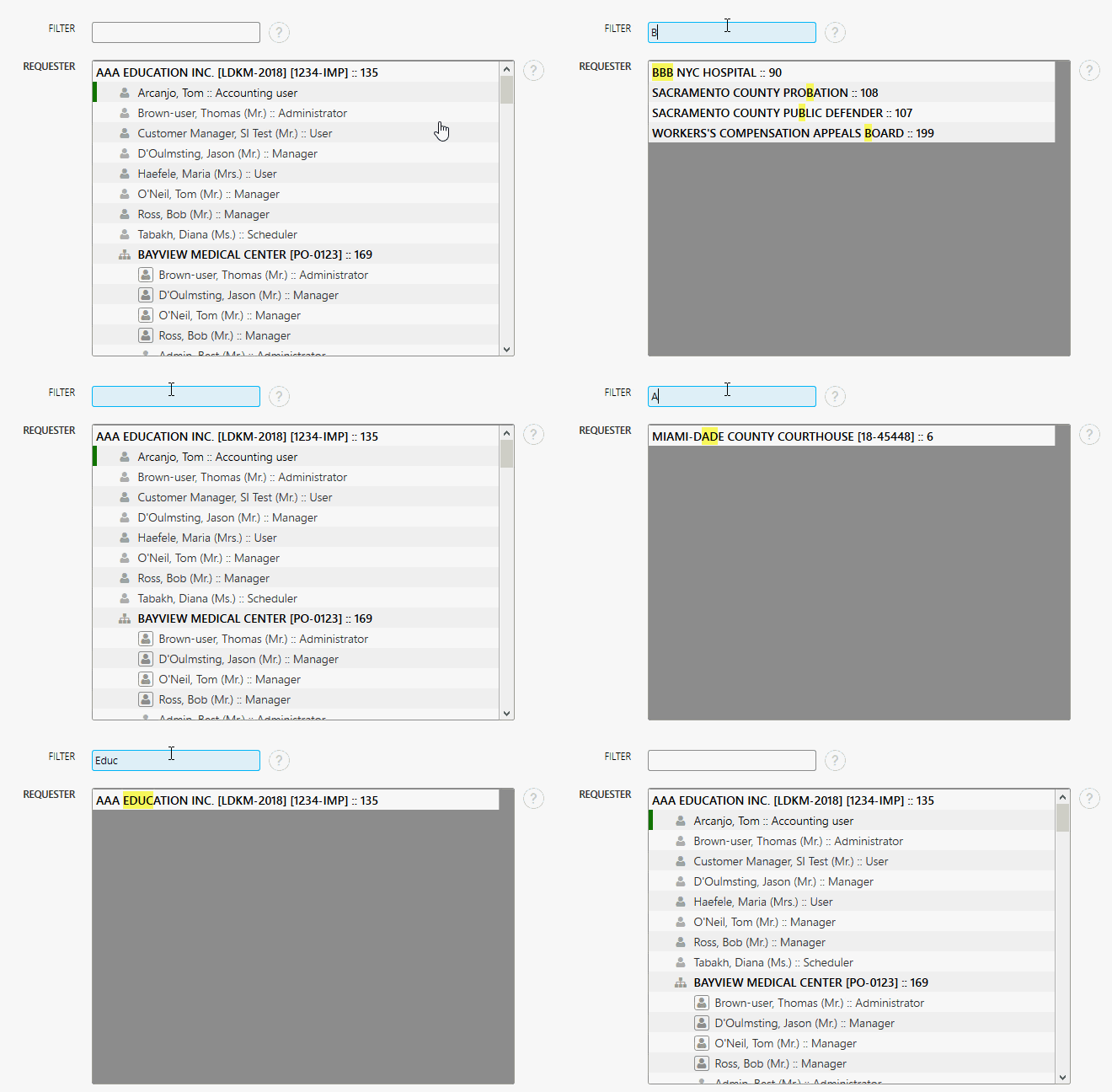
Any suggestion?
supportdesk-si
on 9 Aug 2019
That depends on how your filters are setup
On Fri, 9 Aug 2019, 10:34 supportdesk-si, notifications@github.com wrote:
Oli, thank you for prompt reply. Unfortunately filters do not work as
described. Applying filter wipes out the entire table.This is our older internal grid framework with proper filtering
[image: system]
https://user-images.githubusercontent.com/51302932/62769441-9a4de880-ba5e-11e9-8415-625e05c6d3b3.gifThis is Tabulator 4.3 with setFilter() and like option fired on keypress.
As you can see it clears everything.
[image: tabulator]
https://user-images.githubusercontent.com/51302932/62769608-f284ea80-ba5e-11e9-9aaa-fc32dc5c7ae5.gifAny suggestion?
—
You are receiving this because you commented.
Reply to this email directly, view it on GitHub
https://github.com/olifolkerd/tabulator/issues/2281?email_source=notifications&email_token=ABUGBTCILTNNWDJEGDBHJILQDU22VA5CNFSM4IKE5SLKYY3PNVWWK3TUL52HS4DFVREXG43VMVBW63LNMVXHJKTDN5WW2ZLOORPWSZGOD36FFKA#issuecomment-519852712,
or mute the thread
https://github.com/notifications/unsubscribe-auth/ABUGBTEXH7N4KGJKECWBMOLQDU22VANCNFSM4IKE5SLA
.
olifolkerd
on 9 Aug 2019
Nothing special, literaly following the manual.
js to init
userIdGrid = new Tabulator("#userIdList", {});
js to apply filter
userIdGrid.setFilter( "name", "like", document.getElementById("userFilter").value);
As you can see in the video, the filter works for the "parent" rows and it wipes out everything else. It should be expected to keep all the rows that contain the matching pattern, even if the tree is deeper than 2 tiers.
supportdesk-si
on 9 Aug 2019
@supportdesk-si The filters are woking as i would expect them to when i use them my end.
Could you put togeather a JS fiddle that replicates your issue. it is very hard to diagnose the issue and offer advice without a full understanding of how your table is setup.
Once i can play with that im sure i can point you in the right direction.
Cheers
Oli :)
olifolkerd
on 11 Aug 2019
Oli,
As always, thank you for coming back on this issue. Give me few moments to set this up and I will post here.
supportdesk-si
on 11 Aug 2019
Here it is. Try to filter by using either type of user MANAGER or ADMINISTRATOR or name of the user Bob or Jason.
supportdesk-si
on 11 Aug 2019
Definitely seems like a bug to me. This does filter, but only if the whole tree matches. ie, if you filter for "AAA" you see:
AAA Education Inc. [LDKM-2018] [1234-IMP] :: 135
    BIG AAA sub :: 142
AAA Hospital [PO1234567] :: 54
"Big AAA sub" only shows up because it's parent has "AAA" in it's name as well.
Filtering for "BIG" doesn't return anything, as "BIG AAA sub"'s parent doesn't have "BIG" in it's name.
 takuy
on 11 Aug 2019
takuy
on 11 Aug 2019
@olifolkerd
Any chance you had a minute to look at the fiddle? Or maybe you have a working fiddle for us to learn from?
supportdesk-si
on 14 Aug 2019
@supportdesk-si Sometimes you may want to work around the issue:
    function customHeaderFilter(headerValue, rowValue, rowData, filterParams){
        return JSON.stringify(rowData).toLowerCase().indexOf('"name":"'+headerValue.toLowerCase()) !== -1 || JSON.stringify(rowData).toLowerCase().indexOf('"value":"'+headerValue.toLowerCase()) !== -1;
    }
 ctlkkc
on 16 Sep 2019
ctlkkc
on 16 Sep 2019
@ctlkkc
Sorry, not fully proficient with the tabulator ... where do you call the customHeaderFilter? Fork https://jsfiddle.net/supportdesk_si/rmtpwox2/51/ ?
supportdesk-si
on 18 Sep 2019
@supportdesk-si you may refer to documentation about customHeaderFilter here: http://tabulator.info/docs/4.3/filter#header
but this only partly works around the issue.
As @olifolkerd said, adding an option to toggle both ways in a future release is the resolution.
ctlkkc
on 25 Sep 2019
@supportdesk-si how about the code below?
function customFilter(data, headerValue){
  var a = JSON.stringify(data, ['name','_children']).replace(/"(name|_children)":/g,'');
  return a.toLowerCase().indexOf(headerValue.toLowerCase()) !== -1
}

document.getElementById('userFilter').onkeyup = function(){
    userIdGrid.setFilter(customFilter, document.getElementById("userFilter").value);
};
 tkfkm
on 8 Jan 2020
tkfkm
on 8 Jan 2020
Thank @tkfkm. This is a huge leap forward!!!
There is one more issue left. When I type medical, I need to make sure all users under that account are visible. Any idea on how to make that work?
supportdesk-si
on 8 Jan 2020
Hey all,
I have just pushed an update to the 4.8 brach to help with this. it should be released in a couple of weeks time.
the new dataTreeFilter option will allow you to disable filtering of the child rows:
var table = new Tabulator("#example-table", {
    dataTree:true,
    dataTreeFilter:false, //disabled child row filtering
});
Cheers
Oli :)
olifolkerd
on 23 Aug 2020
Related issues
 Honiah
·
3Comments
Honiah
·
3Comments
 cemmons
·
3Comments
cemmons
·
3Comments
 KES777
·
3Comments
KES777
·
3Comments
 alainpannetier
·
3Comments
KES777
·
3Comments
alainpannetier
·
3Comments
KES777
·
3Comments
Most helpful comment
Definitely seems like a bug to me. This does filter, but only if the whole tree matches. ie, if you filter for "AAA" you see:
"Big AAA sub" only shows up because it's parent has "AAA" in it's name as well.
Filtering for "BIG" doesn't return anything, as "BIG AAA sub"'s parent doesn't have "BIG" in it's name.