Tabulator: Progressbar breaks the height
Describe the bug
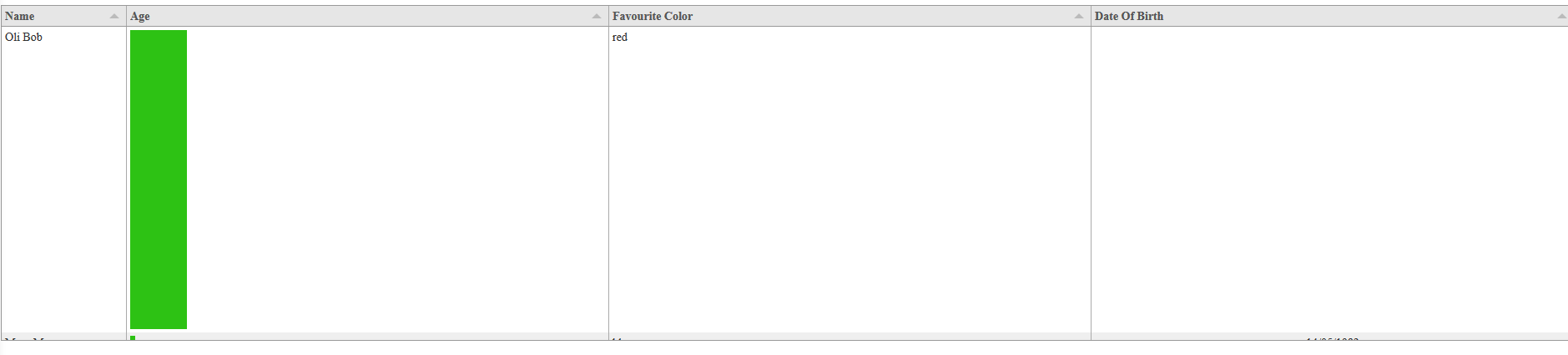
Adding "progress" as a formatter breaks complete the height!
Tabulator Info
4.2
Working Example
I used just the example from your documentation.
<script
  src="https://code.jquery.com/jquery-3.4.1.js"
  integrity="sha256-WpOohJOqMqqyKL9FccASB9O0KwACQJpFTUBLTYOVvVU="
  crossorigin="anonymous"></script>

<link href="https://unpkg.com/[email protected]/dist/css/tabulator.min.css" rel="stylesheet">
<script type="text/javascript" src="https://unpkg.com/[email protected]/dist/js/tabulator.min.js"></script>

<div id="example-table"></div>


<script>
  //define some sample data
 var tabledata = [
    {id:1, name:"Oli Bob", age:"12", col:"red", dob:""},
    {id:2, name:"Mary May", age:"1", col:"blue", dob:"14/05/1982"},
    {id:3, name:"Christine Lobowski", age:"42", col:"green", dob:"22/05/1982"},
    {id:4, name:"Brendon Philips", age:"125", col:"orange", dob:"01/08/1980"},
    {id:5, name:"Margret Marmajuke", age:"16", col:"yellow", dob:"31/01/1999"},
 ];
  //create Tabulator on DOM element with id "example-table"
  var table = new Tabulator("#example-table", {
    height:205, // set height of table (in CSS or here), this enables the Virtual DOM and improves render speed dramatically (can be any valid css height value)
    data:tabledata, //assign data to table
    layout:"fitColumns", //fit columns to width of table (optional)
    columns:[ //Define Table Columns
        {title:"Name", field:"name", width:150},
        {title:"Age", field:"age", align:"left", formatter:"progress"},
        {title:"Favourite Color", field:"col"},
        {title:"Date Of Birth", field:"dob", sorter:"date", align:"center"},
    ],
    rowClick:function(e, row){ //trigger an alert message when the row is clicked
        alert("Row " + row.getData().id + " Clicked!!!!");
    },
  });
</script>
 TheCherry
All 37 comments
I see the same thing. Run the demo from http://tabulator.info/basic/4.2 and it works. When I use the same code on my server with the latest npm downloaded module ([email protected]) it's broken as described above. If remove formatter:"progress" from the age field the row height is correct.
 schatzsv
on 13 May 2019
schatzsv
on 13 May 2019
Ditto.
 abrownsword
on 10 Jun 2019
abrownsword
on 10 Jun 2019
I'm getting this too.
 phallett
on 10 Jun 2019
phallett
on 10 Jun 2019
Thanks for the feedback i will look at resolving this for the next release
Though if anyone fancies submitting a pull request with a fix i would be happy to merge it in
Cheers
Oli :)
 olifolkerd
on 10 Jun 2019
olifolkerd
on 10 Jun 2019
If anyone looks at this issue, please check your tag formatting as that it what caused mine to happen:
https://github.com/olifolkerd/tabulator/issues/2076#issuecomment-500760090
phallett
on 11 Jun 2019
Closing this as it appears @phallett has identified the issue and it is outside of Tabulator.
Cheers
Oli :)
olifolkerd
on 21 Jul 2019
I stripped my HTML down to the bare minimum and my editor doesn't point out any tag issues (it usually does) -- the progress bar height issue remains. Chrome doesn't report any issues except the "consider marking event handler as 'passive'" one.
Is there an error in my html page that anyone can see? Should I try taking anything else out?
<html>
<head>
    <style type="text/css"> body { background-repeat: no-repeat; }</style>
    <script type="text/javascript" src="tabulator/dist/js/tabulator.min.js"></script>
    <script type="text/javascript" src="jQuery/dist/jquery-3.4.1.min.js"></script>
    <link href="tabulator/dist/css/tabulator.min.css" rel="stylesheet">
    <title>MCP Test</title>
</head>


<body onload="JavaScript:load_page();">
    <div id="mcp-table"></div>

    <script>
        var table;

        function load_page()
        {
            table = new Tabulator("#mcp-table",
                {
                    height: "500",
                    ajaxURL: "table.json",
                    ajaxConfig: "GET",
                    layout: "fitDataFill",
                    responsiveLayout:"collapse",
                    responsiveLayoutCollapseStartOpen:false,
                    columns:[
                        {title:"Variable", field:"alias", frozen:true, responsive:0},
                        {title:"Value", field:"value"},
                        {title:"Portion", field:"value", formatterParams:{}, formatter:"progress"},
                        {title:"Min", field:"min", responsive:2},
                        {title:"Max", field:"max", responsive:2},
                        {title:"Tags", field:"tags", responsive:3},
                        {title:"Kinds", field:"kinds", responsive:3},
                        {title:"Index", field:"index", responsive:4},
                        {title:"VarName", field:"name", responsive:4}
                    ]
                });
        }
    </script>
</body>
</html>
Updated to 4.3 and it is still happening. See details in previous comment. @olifolkerd
abrownsword
on 22 Jul 2019
@abrownsword No one has managed to provide me with a functional example where this is happening.
If you can create a working JS fiddle that can demonstrate the issue then i am happy to investigate further.
Cheers
Oli :)
olifolkerd
on 23 Jul 2019
Well above is my html file (including all my js code). I'll have to strip down a table.json for you, unless you can just manufacture one yourself based on the fields mentioned. I'll try to do that in the next few days, when I've got time.
abrownsword
on 23 Jul 2019
Hey @abrownsword
I get a great many people asking me Tabulator questions each day, and im afraid if it is something UI based i dont have the time to setup a function table example for every example, specially when there are so many combinations of setup, browser etc. and when so much of it can be down to the configuration of the site outside of the table (including their copies of the local source files), which is never included in peoples example.
So i prefer to see an exact replicatable example on a standardised site in order to help people out. it just streamlines the process and makes it easier for me to be able to provide meaningful feedback to people.
Cheers
Oli :)
olifolkerd
on 23 Jul 2019
Yeah, understandable. I'm new to the space though, so I don't know what a "standardised site" might be...? Point me at something and I'll see if I can make it happen.
abrownsword
on 23 Jul 2019
Use JS Fiddle or Code Pen. They are both sites that let you build a
functional JavaScrip and HTML example
Just post a link to the fiddle or pen when you are done
Cheers
Oli
On Tue, 23 Jul 2019, 21:10 Andrew Brownsword, notifications@github.com
wrote:
Yeah, understandable. I'm new to the space though, so I don't know what a
"standardised site" might be...? Point me at something and I'll see if I
can make it happen.—
You are receiving this because you were mentioned.
Reply to this email directly, view it on GitHub
https://github.com/olifolkerd/tabulator/issues/2039?email_source=notifications&email_token=ABUGBTDIMUP4Y4TKUF7UWS3QA5QUTA5CNFSM4HKV5BU2YY3PNVWWK3TUL52HS4DFVREXG43VMVBW63LNMVXHJKTDN5WW2ZLOORPWSZGOD2UJOHA#issuecomment-514365212,
or mute the thread
https://github.com/notifications/unsubscribe-auth/ABUGBTHTD4XBPLCBLJS47VLQA5QUTANCNFSM4HKV5BUQ
.
olifolkerd
on 23 Jul 2019
Spent some time "fiddling" but can't get the cross-origin request to work because it always gives an error (apparently from the OPTIONS request?
Access to fetch at 'https://api.myjson.com/bins/1cucn5' from origin 'https://fiddle.jshell.net' has been blocked by CORS policy: Request header field access-control-allow-origin is not allowed by Access-Control-Allow-Headers in preflight response.
Don't know how to get past that, and the bug only seems to happen if using ajax request to retrieve the json table data (preloading it and passing to the table works fine).
abrownsword
on 31 Jul 2019
That is a CORS issue. It means the server is not setup to receive get requests from other domains
olifolkerd
on 31 Jul 2019
Okay, so I switched to jsonblob.com and it started working. The plot thickens, however... when I put my html page on jsfiddle it works perfectly, but when I host it from my own application server it doesn't work. This is whether I have the html page fetch from jsonblob.com or from the local application server, so there is something about how the html page itself is being served that is breaking the progress bar rendering. Any idea of what that might be?
abrownsword
on 4 Aug 2019
Finally have some time to dig into this again. Trying to understand the html being generated and why the rendering is wrong, and what might trigger that happening. Note that the _same html_ served from two different kinds of servers results in different behaviour, so this seems to imply that the source html page isn't the problem or, if it is, then it is a subtle issue.
I put the progress bar in the first column and here is a snippet of the generated html in Chrome:
`
style="min-height: calc(100% - 26px); height: calc(100% - 26px); max-height: calc(100% - 26px);"><div class="tabulator-table" style="padding-top: 0px; padding-bottom: 1.36304e+06px;">
<div class="tabulator-row tabulator-selectable tabulator-row-odd" role="row" style="padding-left: 0px;">
<div class="tabulator-cell" role="gridcell" tabulator-field="value" aria-label="20" title=""
style="width: 154px; min-width: 30px; position: relative; height: 1217px;">
<div style="position:relative; height:100%;" data-max="100" data-min="0">
<div style="position:relative; height:100%; width:calc(20%); background-color:#2DC214; display:inline-block;"></div>
</div>
<div class="tabulator-col-resize-handle"></div>
<div class="tabulator-col-resize-handle prev"></div>
</div>`
The strangest thing (to me, with my limited html experience) is the large and oddly precise padding-bottom value of ~1.36M pixels?!
The core of the problem seems to be that the 3rd div has a height of 1217, and then everything within it is using a height of 100%. I haven't been able to find where in the code that height of 1217 is calculated -- if @olifolkerd could point me at that then I can continue trying to trace backward to root cause.
abrownsword
on 25 Aug 2019
@olifolkerd -- I am trying to trace backward to figure out where the large height value comes from, but need a bit of advice about where to look.
In the debugger I've found that Cell.prototype.getHeight gets null for this.height so it returns this.element.offsetHeight (which is the large value, i.e. the height of the table's frame). Trouble is, I can't find where offsetHeight is set? It looks like it is inherited from the containing element, which ultimately comes from the root document
abrownsword
on 30 Aug 2019
@abrownsword without a JS Fiddle or Code pen that demonstrates the issue it is hard for me to offer advice without seeing the problem in action myself.
It might be that you are trying to load the data into the table while it is hidden which is causing the layout to get corrupted, if this is the case , you can either show the table before you load the data, or you can call the redraw function on the table when it is made visible.
Cheers
Oli :)
olifolkerd
on 29 Sep 2019
Understood, but I haven't been able to reproduce it on either of those services. So I'm trying to trace back to the source of the problem in the code. Hence my question about how / where this.element.offsetHeight is set.
I don't hide/show the table, I just create it and tell it to fetch data via Ajax.
function load_page()
            {
                table = new Tabulator("#mcp-table",
                    {
                        height: "100%",
                        ajaxURL: "table.json",
                        ajaxConfig: "GET",
                        layout: "fitColumns",
                        columns:[
                            {title:"Portion", field:"value", formatter:"progress"},
                            {title:"Name", field:"name"},
                            {title:"Value", field:"value"},
                            {title:"Min", field:"min"},
                            {title:"Max", field:"max"},
                            {title:"Index", field:"index"}
                        ],
                    });

                setTimeout("reload_data()", 10000);
            }
If you haven't been able to reproduce it in a js fiddle it suggests that something in other code on your site is interacting with the table. Rather than an issue with Tabulator itself.
You possibly have some css that is changing the functionality in the table.
olifolkerd
on 30 Sep 2019
Yes, that's what I've been assuming, but I haven't been able to isolate it at all. My page's header is pretty simple _and the page works as-is_ on js fiddle. The only css I'm using is yours.
<!doctype html public "-//w3c//dtd html 4.0 transitional//en">
<html>
    <head>
        <meta http-equiv="Content-Type" content="text/html; charset=iso-8859-1">
        <script type="text/javascript" src="tabulator/dist/js/tabulator.js"></script>
        <script type="text/javascript" src="jQuery/dist/jquery-3.4.1.min.js"></script>
        <script type="text/javascript" src="lodash/dist/lodash.js"></script>
        <script type="text/javascript" src="sparklines/dist/jquery.sparkline.js"></script>
        <link href="tabulator/dist/css/tabulator.css" rel="stylesheet">
        <title>MCP</title>
    </head>
TLDR: Adding element.style.height = "1px"; to function progress helps
progress returns html code which is used to set innerHTML of the cell. That does not update height of the cell itself in my configuration.
star and traffic formatters return objects which are added to the cell using appendChild, which seems to update the cell height. That does not explain, why setting innerHTML to some plain text seems not cause any problems (and as you for sure understand, I will not spend any time to find that out ;-) ).
Using 1px worked for me, as row height seems to be overwritten later anyhow, even if there is just one column with a progress bar in the table. We just need to avoid that maxHeightis set to the much to big value.
I added the setting just after line 16481in tabulator.js
element.style.minWidth = "30px";
element.style.height   = "1px";
element.style.position = "relative";
I installed tabulator 4.4.3 from zip file today. If required I will add the html code I used.
It would be interesting to here if there are other solutions.
 gerangel
on 2 Nov 2019
gerangel
on 2 Nov 2019
Added the 1-line change, and sure enough the problem disappears!
@olifolkerd -- is there any chance we can get this simple fix included in the official build? We don't understand why the original value for the row height is being set wrong in some circumstances, but the reality seems to be that it is. I would rather not have to hand patch the release to deal with this.
Thanks @gerangel!
abrownsword
on 8 Nov 2019
Hey @abrownsword
While the proposed fix does indeed work under certain circumstances it imposes a height on the parent cell which will cause issues in certain circumstances.
The actual issue is that the firefox layout engine cannot calculate percentage height of a child element if the parent had no height set at the point the child was added to the DOM. The correct fix is to use the onRendered callback in the formattter to append the bar element once the row has been drawn and thus has height.
I have pushed a more comprehensive fix to the 4.5 branch which will be released in a few weeks.
Cheers
Oli :)
olifolkerd
on 9 Nov 2019
FYI, I'm seeing the issue in Safari and Chrome. Haven't used Firefox myself.
abrownsword
on 9 Nov 2019
Try it with the code on the 4.5 branch. If you are still seing it I will need to see a JS Fiddle that replicates it to fix it
olifolkerd
on 9 Nov 2019
Unfortunately the HEAD of 4.5 doesn't work. The suggested workaround above still does (new line number is 16813). I've tried to repro this on js fiddle, with no success -- _exactly_ the same html and data works fine when served from there but fails when served from my application's web server to exactly the same client browsers.
All I've been able to track down is that somehow the default inherited height is the height of the whole table, but I don't know where that value comes from. The Chrome debugger just shows the height is "" prior to the above fix executing.
abrownsword
on 9 Nov 2019
@abrownsword
Literally nothing i do causes any issues with the progress bar formatter on v4.5, using your earlier code sample also works fine, i have tested on a wide range of configurations and browsers.
This suggests it is likely something else you have setup on your site that is causing the issue.
Please try and create a code pen or JS fiddle, it will only take a few minutes and it will isolate the table from the rest of your site making it easy to find the cause of the issue. I cannot fix this if i have not seen the issue, and as i stated before i will not add the "height fix", it is a work around at best and will break other functions of the table.
The firefox issue was causing the bar not to show at all, which was because of the issue i mentioned.
Are you sure your table element is visible when you are instantiating it, if not that will cause you render issues. have you made sure you are only pulling in one tabulator CSS file, pulling in multiple CSS files can cause conflicts. have you made sure your browser hasn't cached an old version of the library.
As i am unable to replicate the issue on any of the test build configurations i will consider this matter closed until someone can produce a JS Fiddle or Codepen that demonstrates the issue in practice.
Cheers
Oli :)
olifolkerd
on 9 Nov 2019
Yes, I understand the severe difficulty (often impossibility) in fixing a problem without an isolated repro case. The trouble is that moving the problem case to JS Fiddle isn't trivial because I'm using ajax to retrieve a json file to put in the table. The only way I could get the HTML onto JS Fiddle was to make some changes to not use ajax... and when I did that the problem went away.
AFAIK my table element is visible when instantiating the table, and the only script and css I'm using are the ones from your package. Here is the entire HTML, and a short snippet of the JSON data file... these are as short as I can figure out how to make them, is there anything obviously wrong in what I'm doing??
<html>
    <head>
        <meta http-equiv="Content-Type" content="text/html; charset=iso-8859-1">
        <script type="text/javascript" src="tabulator/dist/js/tabulator.js"></script>
        <link href="tabulator/dist/css/tabulator.css" rel="stylesheet">
        <title>MCP test page</title>
    </head>
    <body onload="JavaScript:load_page();">
        <div id="mcp-table"></div>

        <script>
            var table;

            function reload_data()
            {
                table.setData();
                setTimeout("reload_data()", 10000);
            }

            function load_page()
            {
                table = new Tabulator("#mcp-table",
                    {
                        height: "1000px",
                        ajaxURL: "table.json",
                        ajaxConfig: "GET",
                        layout: "fitColumns",
                        columns:[
                            {title:"Portion", field:"value", formatter:"progress"},
                            {title:"Name", field:"name"},
                            {title:"Value", field:"value"},
                            {title:"Min", field:"min"},
                            {title:"Max", field:"max"},
                            {title:"Index", field:"index"}
                        ],
                    });

                setTimeout("reload_data()", 10000);
            }
        </script>
    </body>
</html>
data file:
[
    {
        "alias": "temperature",
        "history": [
            20,
            20.546875,
            20.546875,
            20.546875,
            20.546875,
            20.546875,
            20.546875
        ],
        "index": 1245,
        "kinds": [
            "dict"
        ],
        "max": 50,
        "min": 0,
        "name": "temperature",
        "tags": [
            "Clamped"
        ],
        "value": 20.546875
    },
    {
        "alias": "humidity",
        "history": [
            50,
            53.08935546875,
            53.176822662353516,
            53.176822662353516,
            53.176822662353516,
            53.176822662353516,
            53.176822662353516
        ],
        "index": 1246,
        "kinds": [
            "dict"
        ],
        "max": 90,
        "min": 20,
        "name": "humidity",
        "tags": [
            "Clamped"
        ],
        "value": 53.176822662353516
    },
    {
        "alias": "temp_upsouth",
        "history": [
            20,
            21.359375,
            21.328125,
            21.328125,
            21.328125,
            21.328125,
            21.328125
        ],
        "index": 1247,
        "kinds": [
            "dict"
        ],
        "max": 50,
        "min": 0,
        "name": "temp_upsouth",
        "tags": [
            "Clamped"
        ],
        "value": 21.328125
    },
    {
        "alias": "templift",
        "history": [
            0,
            0,
            0,
            0,
            0,
            0,
            0
        ],
        "index": 1250,
        "kinds": [
            "dict"
        ],
        "max": 100,
        "min": 0,
        "name": "templift",
        "tags": [
            "Clamped"
        ],
        "value": 0
    }
]
@abrownsword
Perfect! I know exactly what your issue is, Thanks for sending that over!
The problem is you are missing the doctype declaration at the top of your file so the browser isn't interpreting the page contents as HTML5.
You need to add the following as the first line in your file:
<!DOCTYPE html>
As a rule that should always be the first line in any HTML file you produce. This Article explains a bit more about doctype and why it is needed. Essentially if you don't define the doctype, the browser enters quirks mode and tries to interpret it as a bit of HTML from the early 90's which can result in all sorts of random behaviour.
I hope that helps,
Cheers
Oli :)
olifolkerd
on 9 Nov 2019
Oh hallelujah! Thank you! Works like a charm. Super-irritating that this can't be detected and warned about.
abrownsword
on 9 Nov 2019
You can detect the current mode using document.compatMode but if the site is actually from the 90's then it isnt actually an issue the browser should be notifying you of so i guess thats why they dont.
The w3c HTML validation tool would warn you about the lack of doctype :)
olifolkerd
on 9 Nov 2019
Thanks for the tips.
abrownsword
on 9 Nov 2019
You're welcome!
olifolkerd
on 9 Nov 2019
@gerangel please have a look at the above posts as they will fix your issue too
olifolkerd
on 9 Nov 2019
@olifolkerd It solves my problem too. Thank you :-)
btw: My DOCTYPE tag used to be <!DOCTYPE HTML PUBLIC "-//W3C//DTD HTML 4.01 Transitional//EN">
I am using Firefox 60.6.2esr with Debian Linux.
Thanks a lot for the help and the time you spend on this issue and the project at all.
gerangel
on 11 Nov 2019
Related issues
 iBek23
·
3Comments
iBek23
·
3Comments
 cemmons
·
3Comments
cemmons
·
3Comments
 KES777
·
3Comments
KES777
·
3Comments
 Manbec
·
3Comments
Manbec
·
3Comments
 yaxino
·
3Comments
yaxino
·
3Comments
Most helpful comment
@abrownsword
Perfect! I know exactly what your issue is, Thanks for sending that over!
The problem is you are missing the doctype declaration at the top of your file so the browser isn't interpreting the page contents as HTML5.
You need to add the following as the first line in your file:
As a rule that should always be the first line in any HTML file you produce. This Article explains a bit more about doctype and why it is needed. Essentially if you don't define the doctype, the browser enters quirks mode and tries to interpret it as a bit of HTML from the early 90's which can result in all sorts of random behaviour.
I hope that helps,
Cheers
Oli :)