Hi Oli great job with the Tabulator project.
I would like to find out if you will be working on any column toggle widget for tabulator in future?
I have been using w2ui for a while something like this looks pretty good:
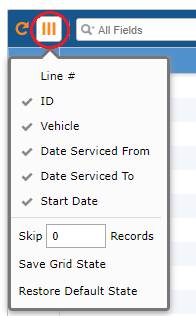
I know we can hide columns in Tabulator but It'll look nice to have it integrated in say the filters

At the moment I'm busy making my own for Tabulator, It'll be nice to have a more authentic looking one though.
 ghost
ghost
All 10 comments
Perhaps you could make a pull request once it is working? That way you can contribute to the project!:)
 Rodbjartson
on 25 Jan 2019
Rodbjartson
on 25 Jan 2019
Hey @1MALKAVIAN
Thanks for getting in touch,
Thanks for your kind words, it is always great to hear that people are enjoying using Tabulator.
Sorry for the delayed response, I have been busy working on the 4.2 release for next week
Tabulator only maintains elements within the table itself, all those inputs and buttons above the table are not part of Tabulator they just call functions on the table.
I have no intention of developing any features that sit outside of the table element itself as that is outside the scope of the project.
That being said i would be happy to update one of the examples to include a column toggle list if you think that would be of use to you.
Cheers
Oli :)
 olifolkerd
on 28 Jan 2019
olifolkerd
on 28 Jan 2019
Hey @1MALKAVIAN
Thanks for getting in touch,
Thanks for your kind words, it is always great to hear that people are enjoying using Tabulator.
Sorry for the delayed response, I have been busy working on the 4.2 release for next week
Tabulator only maintains elements within the table itself, all those inputs and buttons above the table are not part of Tabulator they just call functions on the table.
I have no intention of developing any features that sit outside of the table element itself as that is outside the scope of the project.
That being said i would be happy to update one of the examples to include a column toggle list if you think that would be of use to you.
Cheers
Oli :)
Thanks Oli, that would be quite helpful.
If I come up with anything good in future I'll definitely make a pull request.
ghost
on 29 Jan 2019
Hi again, I managed to put some time into the widget. It's not looking good yet but it does what I want in the simplest form.

I want to improve the code. At the moment each checkbox calls a function which contains table.toggleColumn(""); I would like to automatically read the columns names from the table. I thought about using the table.getColumns() function but I'm not sure how to get the objects into variables so I can use them. This may not be a good method though... I'm open to suggestions .
Perhaps there is a widget plug in which can work with tabulator? I was not able to find any though.
Here's my code:
HTML:
Just a hover dropdown example from w3schools modified a bit. LINK
<div class="dropdown">
  <button onclick="myFunction()" class="dropbtn">
    <span class=""></span>
  </button>

  <div id="myDropdown" class="dropdown-content">
    <ul class="items">
    <li><input  type="checkbox" onclick="myFunction1()">ID Toggle</a></li>
    <li><input  type="checkbox" onclick="myFunction2()">Vehicle Toggle</a></li>
    <li><input  type="checkbox" onclick="myFunction3()">Date Serviced From Toggle</a></li>
    <li><input  type="checkbox" onclick="myFunction4()">Date Serviced To Toggle</a></li>
</ul>
  </div>
</div>
CSS:
Dropdown styling.
.dropbtn {
  background-color: rgb(187, 202, 187);
  color: white;
  padding: 16px;
  font-size: 9px;
  border: none;
  cursor: pointer;
  background: url(http://www.stackoverflow.com/favicon.ico) 50% no-repeat #eee;
}

.dropdown {
  position: relative;
  display: inline-block;
}

.dropdown-content {

  display: none;
  font-size: 11px;
  position: absolute;
  right: 80;
  border: 1px solid black;
  outline-style: outset;
  outline-color: lightblue;
  background-color: #c0b9b9;
  min-width: 160px;
  box-shadow: 0px 8px 16px 0px rgba(0,0,0,0.2);
  z-index: 1;
}

.dropdown-content a {
  color: black;
  padding: 12px 16px;
  text-decoration: none;
  display: block;
}

.dropdown-content a:hover {background-color: #f1f1f1}

.dropdown:hover .dropdown-content {
  display: block;
}

.dropdown:hover .dropbtn {
  background-color: lightblue;
}
JS:
Js functions in my tables script.
//column toggle functions
function myFunction1() {
  table.toggleColumn("id");
}

function myFunction2() {
    table.toggleColumn("Assigned To");
//var cols = table.getColumns() //get array of column components
//console.log(JSON.stringify(cols))
}

function myFunction3() {
  table.toggleColumn("Name");
}
function myFunction4() {
  table.toggleColumn("Surname");
}
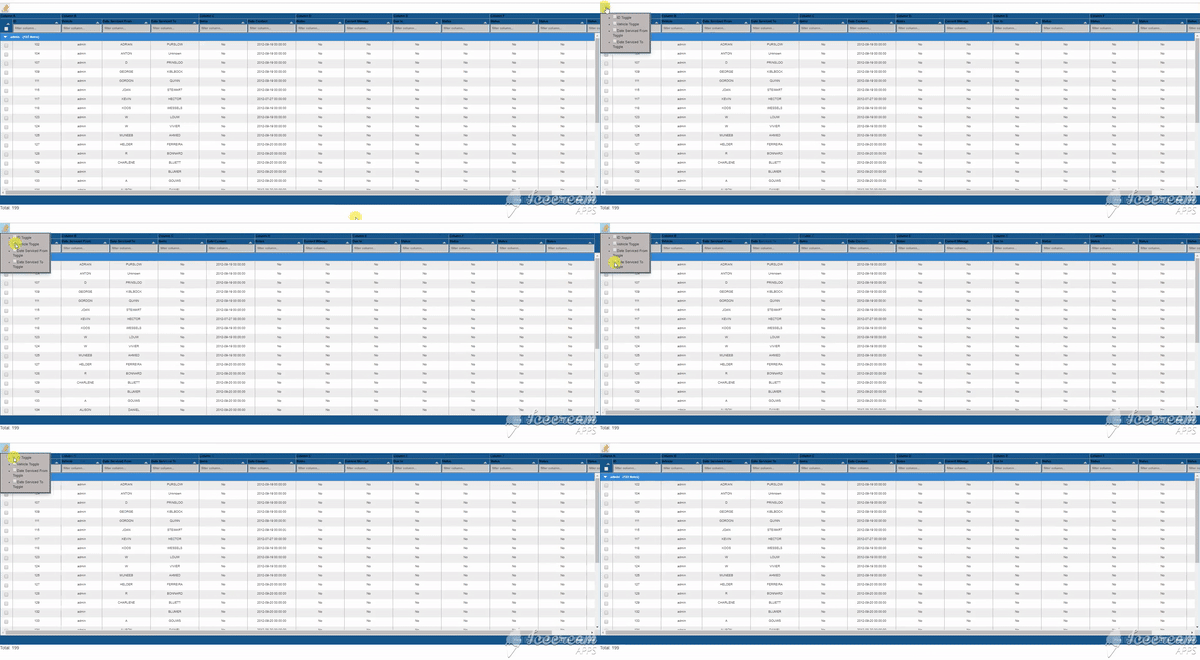
So I want to remove the redundant JS functions and getcolumns() to automatically get the columns. Let me know if you need any more info.
Thanks
ghost
on 6 Feb 2019
Hi again, I managed to put some time into the widget. It's not looking good yet but it does what I want in the simplest form.
I want to improve the code. At the moment each checkbox calls a function which contains table.toggleColumn(""); I would like to automatically read the columns names from the table. I thought about using the table.getColumns() function but I'm not sure how to get the objects into variables so I can use them. This may not be a good method though... I'm open to suggestions .
Perhaps there is a widget plug in which can work with tabulator? I was not able to find any though.
Here's my code:
HTML:
Just a hover dropdown example from w3schools modified a bit. LINK<div class="dropdown"> <button onclick="myFunction()" class="dropbtn"> <span class=""></span> </button> <div id="myDropdown" class="dropdown-content"> <ul class="items"> <li><input type="checkbox" onclick="myFunction1()">ID Toggle</a></li> <li><input type="checkbox" onclick="myFunction2()">Vehicle Toggle</a></li> <li><input type="checkbox" onclick="myFunction3()">Date Serviced From Toggle</a></li> <li><input type="checkbox" onclick="myFunction4()">Date Serviced To Toggle</a></li> </ul> </div> </div>CSS:
Dropdown styling..dropbtn { background-color: rgb(187, 202, 187); color: white; padding: 16px; font-size: 9px; border: none; cursor: pointer; background: url(http://www.stackoverflow.com/favicon.ico) 50% no-repeat #eee; } .dropdown { position: relative; display: inline-block; } .dropdown-content { display: none; font-size: 11px; position: absolute; right: 80; border: 1px solid black; outline-style: outset; outline-color: lightblue; background-color: #c0b9b9; min-width: 160px; box-shadow: 0px 8px 16px 0px rgba(0,0,0,0.2); z-index: 1; } .dropdown-content a { color: black; padding: 12px 16px; text-decoration: none; display: block; } .dropdown-content a:hover {background-color: #f1f1f1} .dropdown:hover .dropdown-content { display: block; } .dropdown:hover .dropbtn { background-color: lightblue; }JS:
Js functions in my tables script.//column toggle functions function myFunction1() { table.toggleColumn("id"); } function myFunction2() { table.toggleColumn("Assigned To"); //var cols = table.getColumns() //get array of column components //console.log(JSON.stringify(cols)) } function myFunction3() { table.toggleColumn("Name"); } function myFunction4() { table.toggleColumn("Surname"); }
So I want to remove the redundant JS functions and getcolumns() to automatically get the columns. Let me know if you need any more info.
Thanks
you can have a common function then pass the Name of the column as parameter .
Like,
"onclick="myFunction('id')"
function myFunction(nameOfColumn) {
table.toggleColumn(nameOfColumn);
}
Cheers,
Naveen Selvaraj
 NaveenSelvaraj
on 18 May 2020
NaveenSelvaraj
on 18 May 2020
Hey @NaveenSelvaraj
There is now Context Menu functionality built into Tabulator as standard as of the 4.6 release in March.
Cheers
Oli :)
olifolkerd
on 23 May 2020
Context Menu is fantastic but is it possible to use it when autocolumns=true ? Would I need to traverse all created columns and add contextmenu one by one afterwards? Is it possible to enable contextmenu on auto created columns?
 pseudozach
on 30 Aug 2020
pseudozach
on 30 Aug 2020
@pseudozach
Checkout the 4.8 release next weekend, it will have some new features to help with your problem.
Cheers
Oli :)
olifolkerd
on 30 Aug 2020
Hi,
I am looking for Column toggle widget with persistence in tabulator. Please provide some examples
We use tabulator 4.8.4
Regards,
Mohan
 MohanrajNataraj
on 3 Dec 2020
MohanrajNataraj
on 3 Dec 2020
Mohan, If.you would like assistance please ask the question on stack overflow, this issue list is now only for.bug reports and feature requests
olifolkerd
on 3 Dec 2020
Related issues
 jiaqianliCn
·
3Comments
jiaqianliCn
·
3Comments
 Manbec
·
3Comments
Manbec
·
3Comments
 alainpannetier
·
3Comments
alainpannetier
·
3Comments
 mindcreations
·
3Comments
mindcreations
·
3Comments
 yaxino
·
3Comments
yaxino
·
3Comments
Most helpful comment
@pseudozach
Checkout the 4.8 release next weekend, it will have some new features to help with your problem.
Cheers
Oli :)